Free
Try it out, casual use
$0
CreditsNever expires
One-time1
- Unlimited vectorizing & preview
- Simplify & merge colors
- Clean, optimized SVG output
- SVG, PNG, JPG, PDF, EPS, DXF export
- Re-download saved files for free
- Studio · up to 50 files per batch
AI-NATIVE VECTORIZATION
VTracer turns JPEG noise into hundreds of near-duplicate colors. PerfectVector keeps a small palette with no settings: on eight JPEGs it wrote 6.4 times fewer fill colors than VTracer at its best of 174 settings. Try it on your own image here.
or try by clicking an image
Vectorize and inspect protected previews for free, with no usage limit.
Credits to unlock a finished result: 1. Repeat downloads are free.
THE SHORT VERSION
On colors and accuracy, no. Even at its best of 174 settings, VTracer wrote 419 fill colors for our eight JPEGs to PerfectVector's 65, and missed 3.8 times as many pixels of the clean artwork. PerfectVector matched the artwork more closely on all eight images, with no settings. On size, tuning closes the gap: tuned VTracer wrote 10,207 anchor points to PerfectVector's 7,751, and its eight files were 2% smaller in total, mostly thanks to the line drawing. Finding that setting took 1,392 test conversions checked against the clean originals.
All eight files added up
Each multiple is against VTracer's better run, VTracer tuned.
All eight files added up
Each multiple is against VTracer's better run, VTracer tuned.
Distinct fill colors in each file, added up
Each multiple is against VTracer's better run, VTracer tuned.
Average share of pixels that miss the clean artwork
Each multiple is against VTracer's better run, VTracer tuned.
VTracer tuned is one setting for all eight images: the best of 174, chosen by checking 1,392 test conversions against the clean artwork. You will not have that clean artwork for your own images. PerfectVector used no settings.
EVERY IMAGE, MEASURED
Pick an image and compare the same JPEG traced by VTracer at its defaults, by VTracer at its best setting, and by PerfectVector. The paths and points view draws each file's outlines in mint with every anchor point on them.

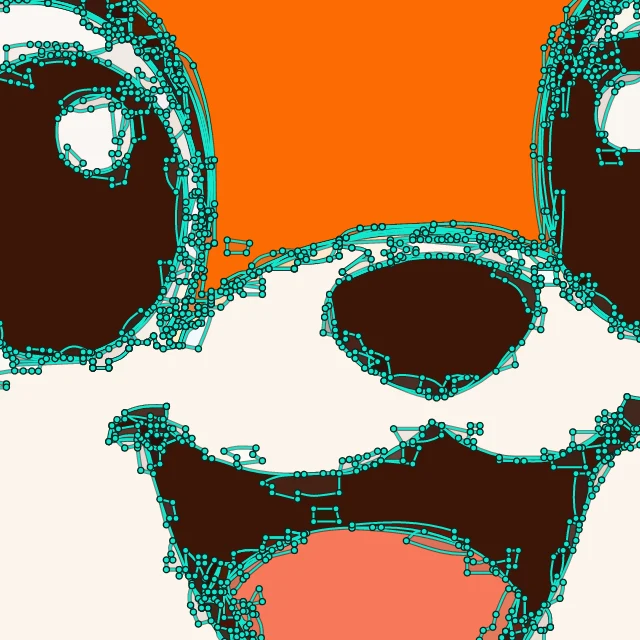


Character
A sticker-style mascot with dark outlines. Turn on paths and points to see the thin stacked slivers tuned VTracer leaves along the eyes.
| Tool | Anchor points | File size | Fill colors | Pixel match |
|---|---|---|---|---|
| VTracer | 21,196 | 562 KB | 2,094 | 96.5% |
| VTracer tuned | 1,247 | 31.8 KB | 48 | 97.1% |
| PerfectVector | 473 | 16.1 KB | 8 | 99.3% |
Fox mascot: Paths and points
One card per test image. Tuning cut VTracer's points and file size on every image. PerfectVector wrote fewer points than tuned VTracer on six of the eight images and a smaller file on seven. Tuned VTracer wrote fewer points on the wordmark and the line art, and the line art's much smaller file makes its eight files 2% smaller in total.
Shorter bar is better. Each card has its own scale; multiples are against VTracer's better run.

Simple icon

Badge with lettering
Logo with text
Icon set

Character
Flat illustration

Detailed illustration
Black-and-white line art
| Image | VTracer1.0.0-alpha.4 | VTracer tuned1.0.0-alpha.4 | PerfectVectorproduction engine, 2026-11-17 |
|---|---|---|---|
| Coffee cup iconSimple icon | 6,236anchor points172 KB831 fill colors98.4% pixel match | 157anchor points4.8 KB9 fill colors98.3% pixel match | 98anchor points3.7 KB4 fill colors99.7% pixel match |
| Honeycrust Bakery badgeBadge with lettering | 24,899anchor points663 KB2,707 fill colors95.6% pixel match | 1,316anchor points34.0 KB87 fill colors96.3% pixel match | 698anchor points20.5 KB4 fill colors99.2% pixel match |
| Northpeak wordmarkLogo with text | 2,198anchor points58.3 KB164 fill colors98.4% pixel match | 159anchor points4.4 KB11 fill colors98.4% pixel match | 165anchor points4.3 KB4 fill colors99.6% pixel match |
| Four weather iconsIcon set | 11,760anchor points313 KB1,131 fill colors96.8% pixel match | 596anchor points14.8 KB28 fill colors98.3% pixel match | 221anchor points6.5 KB4 fill colors99.7% pixel match |
| Fox mascotCharacter | 21,196anchor points562 KB2,094 fill colors96.5% pixel match | 1,247anchor points31.8 KB48 fill colors97.1% pixel match | 473anchor points16.1 KB8 fill colors99.3% pixel match |
| Lighthouse at sunsetFlat illustration | 6,160anchor points161 KB534 fill colors98.3% pixel match | 669anchor points16.7 KB49 fill colors98.4% pixel match | 282anchor points7.6 KB13 fill colors99.6% pixel match |
| Windowsill still lifeDetailed illustration | 41,028anchor points1.04 MB3,320 fill colors95.2% pixel match | 5,170anchor points123 KB186 fill colors94.1% pixel match | 2,662anchor points83.0 KB26 fill colors98.2% pixel match |
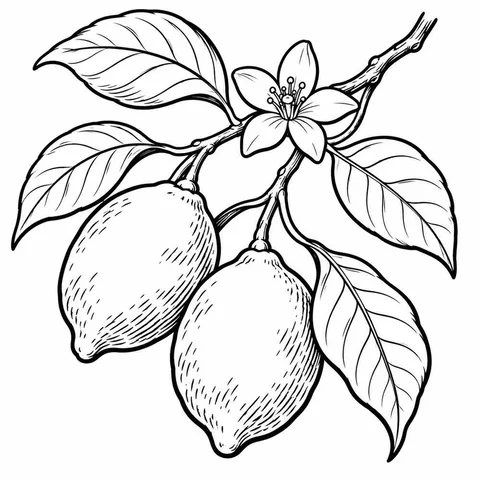
| Lemon branch line artBlack-and-white line art | 3,914anchor points111 KB1 fill colors94.1% pixel match | 893anchor points23.6 KB1 fill colors92.6% pixel match | 3,152anchor points117 KB2 fill colors97.8% pixel match |
| All eight images (pixel match is the average) | 117,391anchor points3.03 MB10,782 fill colors96.7% pixel match | 10,207anchor points253 KB419 fill colors96.7% pixel match | 7,751anchor points258 KB65 fill colors99.1% pixel match |
Pixel match is the share of pixels within 32 of 255 levels, in every channel, of the clean artwork before JPEG compression. It shows how much noise each SVG carried over; it is not a judgement of design quality. The sample images were generated for this test with an AI image model.
AT A GLANCE
VTracer is a free, open-source color tracer for the command line, Python and Rust. PerfectVector is a hosted converter that reconstructs shapes instead of tracing pixels.
| PerfectVector | VTracer | |
|---|---|---|
| Made by | PerfectVector, with its own engine | Vision Cortex |
| Version tested | Production API, Nov 17, 2026 | 1.0.0-alpha.4, released Aug 29, 2026 |
| License and price | Free to convert and preview; credits unlock downloads | Free, MIT |
| Color | Every color in one pass, grouped into a small palette | Every color in one pass, clustered from the pixels |
| Settings to choose | None required | Clustering, speckle size, color precision, layer difference, curve mode, simplify and more |
| Circles and rectangles | Written as circle, ellipse and rectangle elements where the drawing has them | Traced as curved outlines |
| JPEG noise in our test | Smoothed out; highest pixel match on all eight images | Carried into extra colors: 164 to 3,320 per color image at the defaults, 9 to 186 tuned |
| Where it runs | In the browser, with nothing to install | Command line, Python, Rust and a web demo |
| Developer API | Hosted REST API: send an image and get the SVG back, or a status link to check if it takes longer | Rust library and Python package to build into your own code |
| AI assistants (MCP) | MCP server for Claude, ChatGPT, Claude Code and Codex: ask in plain words, get SVG files | No official MCP server |
| Your image | Uploaded to PerfectVector to convert | Stays on your computer |
PerfectVector is not affiliated with, endorsed by, or sponsored by Vision Cortex or the VTracer project. VTracer is named only so readers can compare tracing results.
THE RIGHT TOOL
VTracer is fast, free, open source and runs on your own computer. Tuned well, it writes lean files. PerfectVector is built for a different job: a color file that looks like the original, with a palette you can edit.
Whichever you choose, open the SVG at a large zoom, count its colors and check that small details survived. PerfectVector uploads your image to its servers to convert it; VTracer runs on your computer.
METHOD
One script prepared the inputs and ran VTracer at its defaults on November 17, 2026, and at the tuned setting on November 18. PerfectVector converted the same files through its public Developer API. Nobody edited any output.
Eight original images were generated with an AI image model: flat icons, a badge and a wordmark with lettering, a mascot, two illustrations and one black-and-white line drawing.
Each image was resized to 1000 px (the wordmark to 1200 × 292) and saved as a JPEG at quality 45 with 4:2:0 chroma subsampling. Every run received these exact bytes.
VTracer ran through its official Python binding with Config(), the library defaults, on the seven color images, and with its black-and-white preset on the line drawing. PerfectVector received no settings.
We tried 174 settings: the defaults, the poster and photo presets, and combinations of color limit (none, 8 or 16), speckle filter (4 to 48 px), simplify (off to 9), layer difference (16 to 128) and optimize (1 or 2). The tuned run is the one with the fewest anchor points whose average pixel match was no worse than the defaults.
Anchor points are counted as Illustrator and Figma show them: one per segment end, without handles. A circle or ellipse counts as 4, a rectangle as 4, a rounded rectangle as 8. File size is the SVG as saved.
Each SVG was rendered with resvg at the input size and compared with the artwork before compression. Pixel match is the share of pixels within 32 of 255 levels in every channel.
| Run | Version | How it ran | Settings |
|---|---|---|---|
| VTracer | 1.0.0-alpha.4 | official Python binding (PyPI vtracer 1.0.0a4), vtracer.Config() | library defaults: color clustering, hierarchical stacked, spline mode, filter_speckle 4, color_precision 6, layer_difference 16, corner_threshold 60, length_threshold 4, max_iterations 10, splice_threshold 45, path_precision 2; Config.bw() for the black-and-white sample |
| VTracer tuned | 1.0.0-alpha.4 | official Python binding (PyPI vtracer 1.0.0a4), run on 2026-11-18 with the same inputs | Config() with filter_speckle 16, simplify 2.5, layer_difference 48, optimize 2: the fewest anchor points among 174 tested settings (the defaults, the poster and photo presets, max_colors none, 8 or 16, filter_speckle 4 to 48, simplify off to 9, layer_difference 16 to 128, optimize 1 or 2) whose average pixel match was no worse than the defaults; Config.bw() with the same speckle, simplify and optimize for the black-and-white sample |
| PerfectVector | production engine, 2026-11-17 | Developer API POST https://api.perfectvector.com/v1/vectorizations | defaults; no parameters sent |
Every input JPEG and SVG on this page opens from its card above. The figures file lists every count, file size, SHA-256 hash, version and setting used here. The settings files list every setting we tried and its results, and the clean originals are the artwork that pixel match is scored against.
All figures (JSON)Every VTracer setting we tried (JSON)Clean originals (ZIP, 5.47 MB)
I'd tried everything and been let down every time — I'd given up, figuring today's tech just couldn't do this. And you actually built it. If this is real, it's genuinely incredible.
It converts at even better quality than I expected — it preserves the character of the original better than anything else I've tried.
PerfectVector is impressively fast, and the output quality is already very good. With a bit more refinement it could easily compete with the leading tools.
Way more detailed than I expected. Opening Illustrator to convert every single time was such a chore — bookmarked.
Tried it — it's accurate. Simple images actually expose detail differences more than complex ones do, and this nails them.
SIMPLE, FAIR PRICING
Vectorizing and preview are always free and unlimited — you only spend a credit when you download a finished file.
Try it out, casual use
For regular design work
then $8 per month · Cancel anytime
Per download, first month$0.20
For professional creators and studios
then $20 per month · Cancel anytime
Per download, first month$0.10
Or pay as you go
Buy credits only when you need them. They never expire, and nothing renews.
Per download$0.50






It depends on what you need from the file. For color JPEGs, logos and illustrations, PerfectVector matched the clean artwork more closely than VTracer on all eight of our test images and wrote 6.4 times fewer fill colors than tuned VTracer. If the image must stay on your computer or you script large batches, VTracer tuned for your images is a strong free choice.
On our eight JPEGs, the best single setting in VTracer 1.0.0-alpha.4 was the defaults with filter_speckle 16, simplify 2.5, layer_difference 48 and optimize 2. It cut anchor points by 91%, file size by 92% and fill colors by 96% against the defaults, with the same average pixel match. Pushing speckle or simplify further cut more points but lost pixel match.
You can reuse the setting, but it may not be the best one for your images. We found it by running 174 settings on all eight images and checking every result against the clean artwork before JPEG compression. With your own images you only have the JPEG, so you can judge settings by eye but cannot measure which one comes closest, and each new kind of image may need a new search. PerfectVector takes no settings: the results on this page are its first and only run.
VTracer groups pixels by color, and JPEG compression shifts colors slightly around every edge. Each slightly different group can become its own filled path. At its defaults VTracer wrote between 164 and 3,320 fill colors on our color images. A larger layer_difference and speckle filter cut that sharply.
Raise layer_difference and filter_speckle. On our JPEGs, layer_difference 48 and filter_speckle 16, with simplify 2.5 and optimize 2, cut fill colors from 10,782 to 419 at the same average pixel match. A hard color limit cuts further but costs accuracy: max_colors 16 left 91 to 109 colors and lost 1.8 to 3.7 percentage points of average pixel match, and max_colors 8 left 53 to 57 colors and lost 7.4 to 14.9.
Not on our images. The poster preset wrote more anchor points than the defaults (180,563 in total) at about the same pixel match. The photo preset wrote fewer points (50,341) but missed almost twice as many pixels of the clean artwork as the defaults.
For file size, it can be. On our line drawing, tuned VTracer wrote 893 anchor points in a 24 KB file, against PerfectVector's 3,152 points in 117 KB. It got there by dropping detail: the stamen tips filled in and most hatching lines disappeared, and its pixel match was 92.6% against PerfectVector's 97.8%.
No. PerfectVector uses its own engine. Instead of clustering pixels and following their edges, it estimates the shapes the artwork was drawn with and writes curves, circles and rectangles into the SVG.
Vectorizing and preview are always free and unlimited — you only spend a credit when you download a finished file.
You can check it. Every input JPEG and output SVG opens from this page, and figures.json lists the versions, settings, file hashes and counts. The clean originals that pixel match is scored against, and the results of every setting we tried, including VTracer's presets and its stable 0.6.15 release, can be downloaded from the method section, so you can recount any figure or rerun the same versions on the same JPEGs.
Vectorizing and preview are always free and unlimited — you only spend a credit when you download a finished file.
Unlimited vectorizing & preview