Upload existing coloring-book or activity-page line art, inspect the protected vector preview, and unlock a path-based SVG only when the result fits your production workflow.
or try by clicking an image
No credit card·Unlimited vectorizing & preview·SVG ready in seconds
REPRESENTATIVE BOOK-PRODUCTION SCENARIO, NOT A TESTIMONIAL
THE PAGE SIZE CHANGED
Page 38 is finished. The source file is gone.
The illustration looked fine in the first layout. Then the trim size changed, the artwork had to grow, and the only surviving copy was a flattened raster export. Rebuilding every contour by hand would turn one revision into another drawing session.
SVG solves the artwork problem, not the whole book.
SVG is resolution-independent and can be placed in professional layout software. Print platforms still have their own manuscript, image, trim, bleed, and margin requirements, so the reviewed SVG belongs inside a wider production workflow.
These sources establish format and publishing behavior. They do not test, evaluate, or endorse PerfectVector.
REAL PERFECTVECTOR CONVERSIONS
Inspect the lines before they become a whole book.
These two team-created fixtures were processed through the protected PerfectVector workflow. One tests detailed storybook line art; the other tests the bold geometry of an activity maze.
Evidence set2 reviewed pairs
COLORING-BOOK ILLUSTRATION
Large expressive details stay visible during review.
The fox, open book, tree, leaves, and mushrooms use clean black lines and generous white regions. That makes the result practical to inspect feature by feature instead of judging only a thumbnail.
Original rasterPNG
Team-created 1122 × 1402 raster source
PerfectVector SVGSVG
Visible artwork reconstructed as SVG paths
ACTIVITY-BOOK GEOMETRY
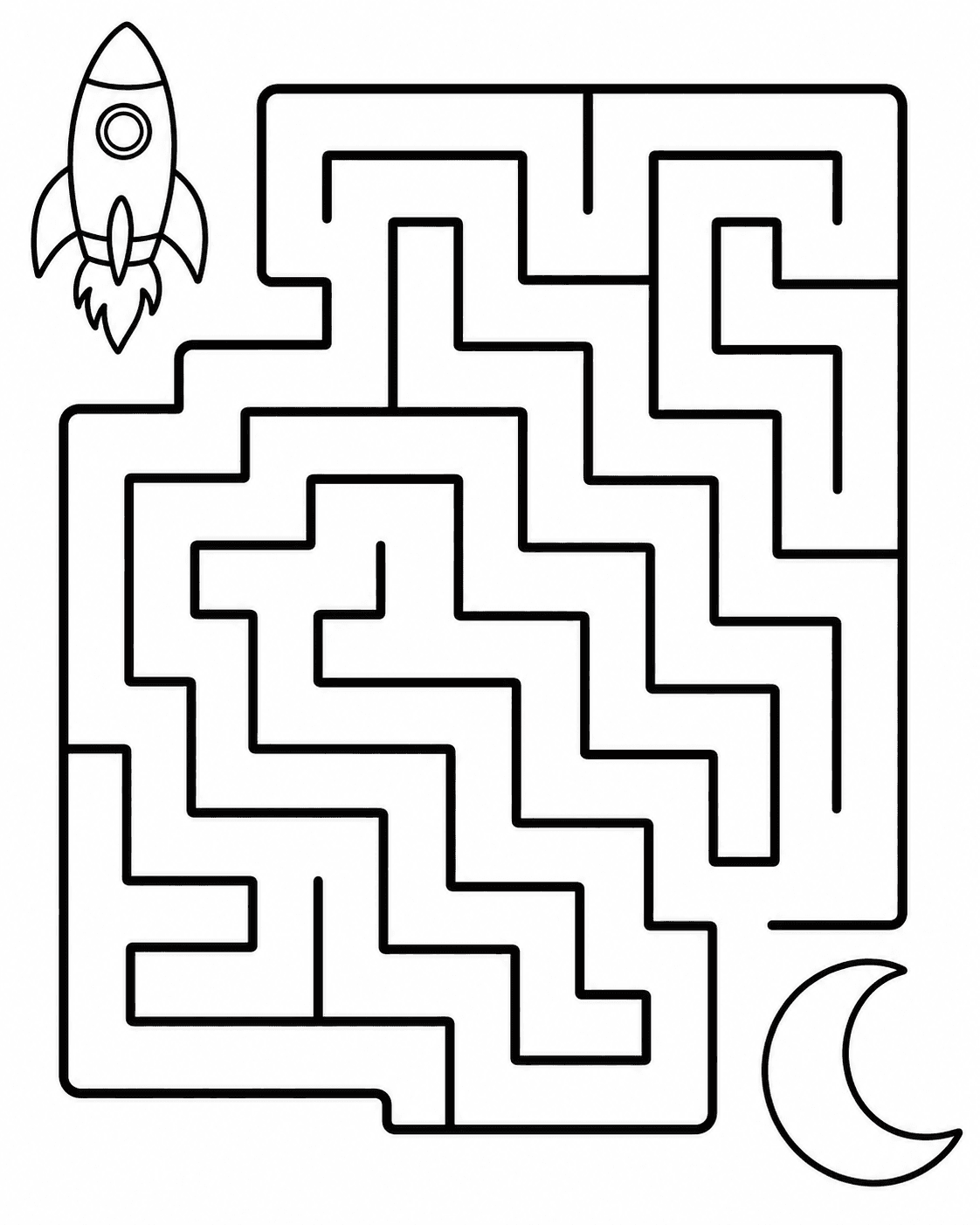
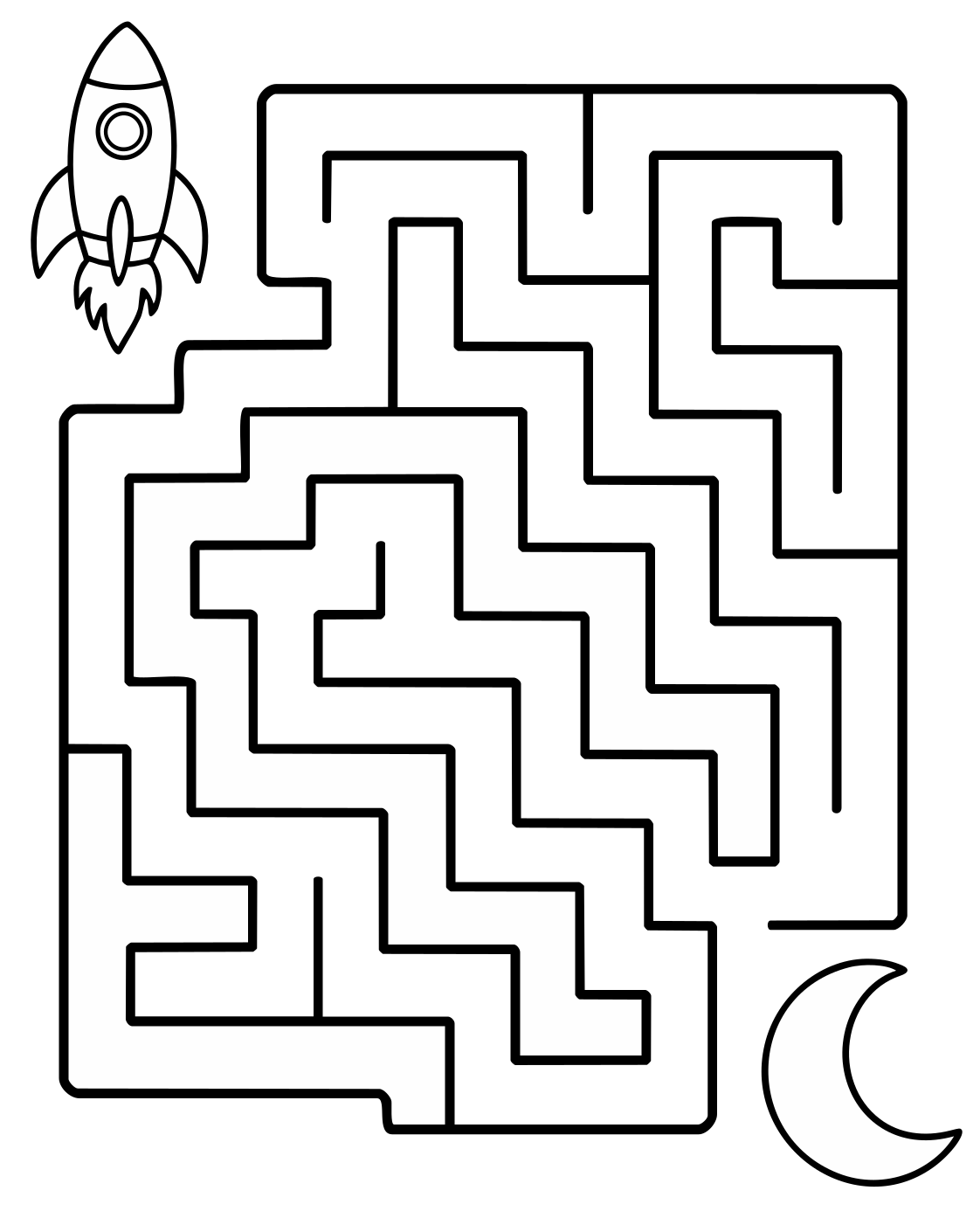
Bold maze walls remain easy to compare.
The rocket-to-moon activity uses thick continuous paths, broad turns, and large endpoint shapes. The source/result pair makes gaps, joins, and unwanted fragments straightforward to check.
Original rasterPNG
Team-created 1122 × 1402 raster source
PerfectVector SVGSVG
Bold maze geometry reconstructed as SVG paths
These examples show visible source/result comparison and path-based SVG output. They do not promise automatic cleanup, print readiness, recovered source layers, or the same result for every image. Source size, line thickness, contrast, noise, compression, and intended use all matter. For display, we removed only the verified full-canvas near-white background path from each downloaded SVG; the path counts describe these review copies.
BUILT BY AI RESEARCHERS
An in-house AI model that turns pixels into editable vectors.
PerfectVector AI Lab
The research team continuously advancing PerfectVector's in-house vectorization engine
PerfectVector is developed in-house by Rastrix Inc. Its researchers bring 10+ years of combined research and industry experience in deep learning and computer vision.
Our researchers hold every vector to a high standard. They design new methods, review results, and continuously improve how PerfectVector reconstructs shapes, edges, colors, and fine detail.
A coloring page has more to check than whether it looks crisp.
Zoom into the protected preview before download. Review the places where a child colors, where a maze path turns, and where a small expression gives the character its personality.
Continuous outlines
Look for unexpected breaks where an outer contour or maze wall should remain connected.
Open coloring regions
Check narrow gaps and enclosed areas at the actual size children will see and color.
Small expressive details
Inspect eyes, paws, leaves, page edges, and other shapes that carry the drawing.
Stray fragments
Scan blank regions for small paths introduced by source noise, shadows, or compression.
A protected preview is evidence for a visual decision, not an automatic production approval. Review the finished book export separately.
400%
THE BOOK-PRODUCTION HANDOFF
Use SVG as the artwork master, then finish the book in its proper tools.
Separating illustration recovery from page layout keeps each production decision visible and reversible.
01
Reviewed SVG artwork
Approve outlines, open regions, small details, and unwanted fragments.
02
Native page layout
Place the art with editable text, page numbers, trim, margins, and bleed.
03
Required final file
Export the PDF or other manuscript format requested by the printer or marketplace.
04
Physical proof
Check line weight, crop, gutter, blank areas, and real paper before publishing.
PerfectVector handles the raster-to-SVG artwork step. It does not replace book-layout software, platform validation, or a physical proof copy.
CHOOSE THE RIGHT ARTWORK ROUTE
Some pages are strong vector candidates. Others need a different tool.
Decide from the source you have and the production change you need. The preview is where you judge the reconstructed artwork.
Strong candidate
Bold digital line art
Large black-and-white shapes, continuous outlines, open regions, and limited texture give you the clearest result to inspect.
Review closely
Scans, faint lines, and compression
Paper shadows, gray pixels, broken strokes, and JPEG artifacts may produce extra paths or gaps that need closer review.
Keep raster
Shaded or painted pages
Continuous-tone artwork, graphite shading, watercolor, and rich textures may be better kept as a sufficiently large raster image.
Different path model
Pen plotters and engraving
A machine that must follow one centerline may need dedicated centerline tracing or toolpath preparation after visual vectorization.
Rights first
Artwork you may publish
Converting an image changes its format. It does not create permission to reproduce, sell, or redistribute someone else's illustration.
If the original SVG, Illustrator, Inkscape, or other editable drawing still exists, return to that source instead of tracing a flattened export.
FROM FLATTENED PAGE TO SVG ARTWORK
Prepare each illustration in three reviewable steps.
1
Upload the clearest line-art source
Use the largest original PNG, JPG, or WebP available. Bold continuous outlines, open white regions, and limited texture are easier to inspect than a compressed screenshot or thumbnail.
2
Review the vector preview at useful zoom levels
Check outer contours, facial features, narrow gaps, maze walls, and stray fragments. A successful conversion still needs a visual decision from the person preparing the book.
3
Unlock the SVG and place it into the book layout
Keep titles, instructions, page numbers, trim, bleed, and margins in your layout application. Export the final PDF or other file requested by your printer, then inspect a proof copy.
Before you pick a plan
You're in good company.
I'd tried everything and been let down every time — I'd given up, figuring today's tech just couldn't do this. And you actually built it. If this is real, it's genuinely incredible.
sam••••·via Threads
It converts at even better quality than I expected — it preserves the character of the original better than anything else I've tried.
imbee••••·via Threads
PerfectVector is impressively fast, and the output quality is already very good. With a bit more refinement it could easily compete with the leading tools.
InPixelSt••••·design studio·via email
Way more detailed than I expected. Opening Illustrator to convert every single time was such a chore — bookmarked.
bazzing••••·Illustrator user·via Threads
Tried it — it's accurate. Simple images actually expose detail differences more than complex ones do, and this nails them.
good9••••·via Threads
I'd tried everything and been let down every time — I'd given up, figuring today's tech just couldn't do this. And you actually built it. If this is real, it's genuinely incredible.
sam••••·via Threads
It converts at even better quality than I expected — it preserves the character of the original better than anything else I've tried.
imbee••••·via Threads
PerfectVector is impressively fast, and the output quality is already very good. With a bit more refinement it could easily compete with the leading tools.
InPixelSt••••·design studio·via email
Way more detailed than I expected. Opening Illustrator to convert every single time was such a chore — bookmarked.
bazzing••••·Illustrator user·via Threads
Tried it — it's accurate. Simple images actually expose detail differences more than complex ones do, and this nails them.
good9••••·via Threads
SIMPLE, FAIR PRICING
Start free. Upgrade when you need more.
Vectorizing and preview are always free and unlimited — you only spend a credit when you download a finished file.
Free
Try it out, casual use
Free
5 credits when you sign up. Expires in 30 days.
5 credits when you sign up(Expires in 30 days)
Unlimited vectorizing & preview
Simplify & merge colors
Clean, optimized SVG output
SVG, PNG, JPG, PDF, EPS, DXF export
No credit card required
Recommended
Light
For regular design work
$12/month
100 credits a month · about $0.12 per download
Everything in Free, plus:
100 download credits every month
Credits refresh monthly
Priority processing
Priority support
Early access to new features
Pro
For power users & studios
$25/month
500 credits a month · about $0.05 per download
Everything in Light, plus:
5x more usage than Light
500 download credits every month
Credits refresh monthly
Highest monthly volume
Built for high-volume professional use
Secure payments, powered by Stripe
Payments via Lemon Squeezy, a Stripe company.
Need just a few more? Buy 10 credits for $5. · one-time · Never expires
1 credit = 1 download. Re-downloading a file you already saved is always free. Cancel anytime.
FREQUENTLY ASKED QUESTIONS
Questions before you convert?
Can I convert a coloring page from PNG to SVG?
Yes. PerfectVector can reconstruct suitable black-and-white line art from PNG, JPG, or WebP as SVG paths. Inspect continuous outlines, open coloring regions, small details, and unwanted fragments before using the result.
What coloring-page artwork usually vectorizes best?
Large images with bold continuous outlines, strong black-and-white contrast, generously sized details, and little texture are the clearest candidates. Start with the largest original file rather than a screenshot or marketplace thumbnail.
Will PerfectVector create a whole coloring book from one upload?
No. PerfectVector converts one raster image into SVG artwork. Book assembly, page order, instructions, trim, bleed, margins, and final export remain in your layout or publishing application.
Can I upload a scanned coloring page?
You can try, but faint lines, paper texture, shadows, skew, and compression may create extra or broken paths. Clean digital line art is a stronger starting point, and every scanned result should be reviewed closely.
Does an SVG make my coloring book ready for Amazon KDP?
Not by itself. SVG can be a useful scalable artwork master, but KDP documents raster-image, trim, bleed, margin, and manuscript requirements. Build and export the final book file in the format KDP currently requests, then review the print preview and a physical proof.
Is SVG always better than a high-resolution PNG for coloring books?
No. A sufficiently large, clean raster image can be appropriate at one fixed print size. SVG becomes useful when artwork must be resized, adjusted in a vector editor, or reused across several layouts without returning to the original pixels.
Can I use this SVG for a pen plotter or engraving path?
Review the result carefully. PerfectVector reconstructs visible filled shapes and outlines; it does not promise a single centerline toolpath. Plotter, embroidery, laser, and engraving workflows may need purpose-built path preparation after conversion.
Can I vectorize coloring pages that I found online?
Only when you created the artwork or have permission to modify and use it for your intended purpose. Converting a file to SVG does not grant copyright, trademark, commercial-use, or redistribution rights.
How much does coloring-page vectorization cost?
Vectorizing and preview are always free and unlimited — you only spend a credit when you download a finished file.
Give the artwork another life beyond one fixed page size.
Upload the clearest line-art source you have, inspect the protected SVG preview, and unlock the file only when the outlines, open regions, and small details are right for your book.
Vectorize and inspect the protected preview for free. Unlock the first SVG download with one credit; unlocked files can be downloaded again without another credit.