Can AI Image Generators Make Real Vector SVGs?
Diffusion models paint pixels, so most AI images can never be SVGs. Here's why that's baked into the technology, and the three real routes to vector output.
On this page
Ask a mainstream raster image generator for an SVG and its documented image endpoint still returns a raster format, no matter how "vector-like" the prompt sounds. For example, OpenAI's image API documents PNG, JPEG, and WebP output, not SVG. That is not the same output structure as vector geometry. This post explains what the three real routes to AI vector output are and how to tell which one you're actually looking at when a tool promises SVGs. If you're choosing between tools right now, the practical guide is AI SVG generators vs. vectorizers; this is the story of what's happening underneath.
The short version
- Image models paint pixels. Diffusion-based generators produce a grid of colors. "Vector style" is a look they can paint, not a file format they can produce.
- A vector is geometry, not a picture. SVGs are instructions (curves, points, fills), so producing one means generating structure, which is a different task entirely.
- Three real routes exist: models that write paths natively, language models that write SVG code, and pipelines that generate pixels and trace them. Each has a distinct failure mode.
- Already have an image? None of this applies to you: vectorizing it is a conversion job, not generation.
Image models paint pixels, and that's the whole problem
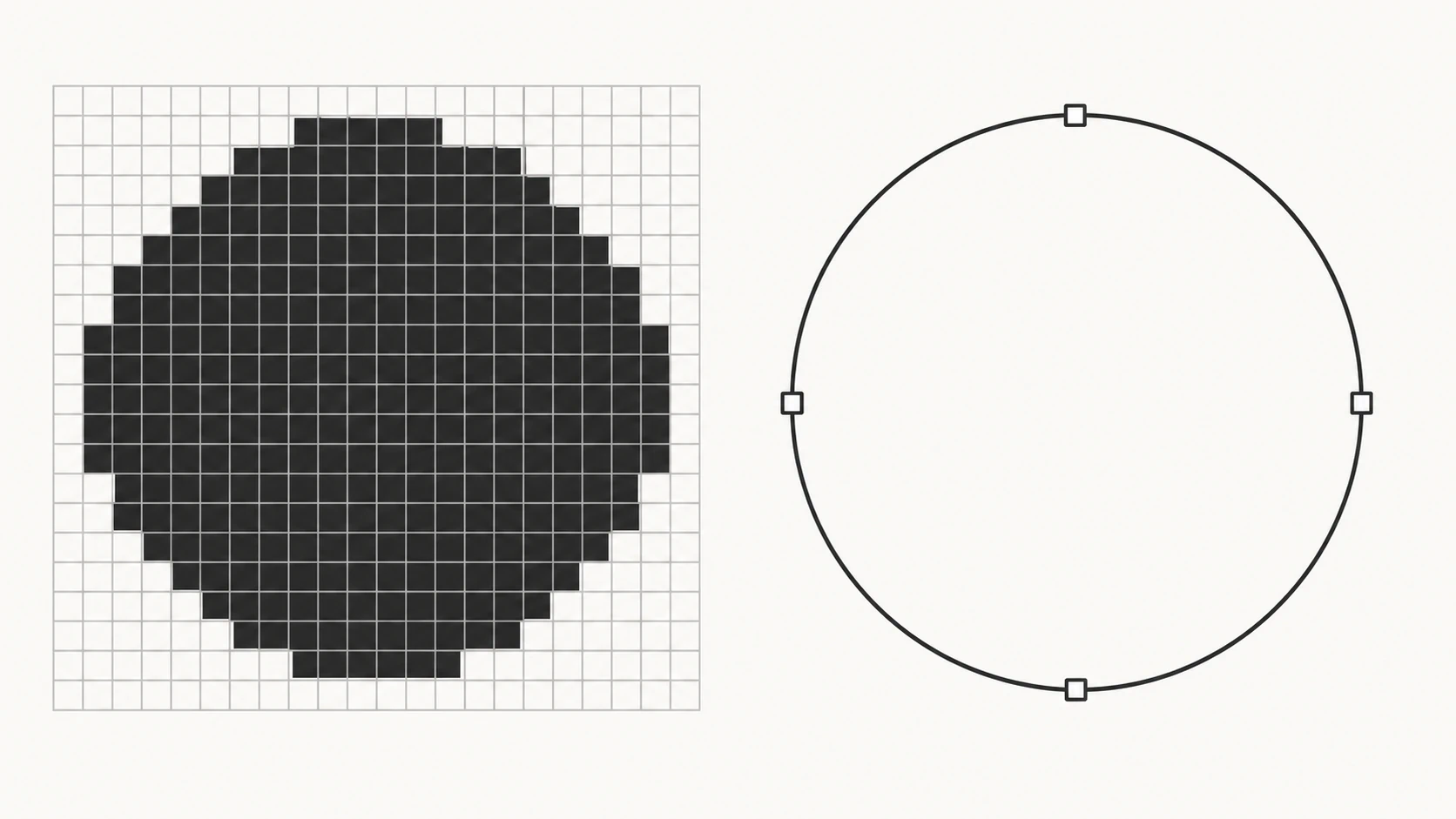
A diffusion model generates a picture by starting from noise and refining it, step by step, into a grid of colored pixels. Everything it knows about "a fox logo" or "flat vector illustration" is knowledge about how those things look, painted onto that grid. Prompt one for vector style and it will happily paint flat colors, sharp edges, and clean silhouettes, because that's what vector art looks like. But the output is still a photograph of the style, so to speak: a raster image, pixel by pixel, exactly like every other image the model makes.
An SVG is a different kind of object altogether. It's not a grid of samples; it's a set of instructions: move here, curve there, fill this shape with that color. To output an SVG directly, a model wouldn't refine pixels; it would have to write geometry, deciding where paths start, how curves bend, and how shapes stack. That's a structured-generation problem, closer to writing code than painting a picture. Pixel models simply don't have that output channel, which is why no amount of prompting installs it.
Route 1: models that genuinely write paths
A small class of models generates vector graphics natively, producing paths, points, and fills as their actual output. Recraft documents vector SVG generation, and Adobe Firefly's Text to Vector module belongs here too. The results are real SVGs from the first moment: scalable, recolorable, made of geometry.
Two honest caveats come with this route. First, structural generation is harder than pixel generation, so output quality is less predictable: designers who use these tools tend to describe them as ideation machines, with results varying enough between generations that consistency across a project, say the same character in ten poses, remains out of reach. Second, "real paths" doesn't automatically mean tidy paths. A generated vector can arrive as elaborate, merged geometry that fights you in an editor, so the same node-count and editability checks apply to generated vectors as to traced ones.
Route 2: language models writing SVG code
An SVG is text, so a language model can write one, and this looks like the loophole. Ask ChatGPT or Gemini for an SVG and you'll genuinely get vector code back. The Claude image-to-SVG alternative comparison applies the same distinction to Claude's current Artifacts and image-upload workflows. For simple, geometric content, icons made of circles and rectangles, basic diagrams, this actually works.
It collapses quickly past that. The model is writing coordinates the way it writes sentences, predicting plausible next tokens, without seeing the picture it's drawing. Organic shapes drift, curves kink, elements overlap in unintended ways, and complexity multiplies the errors. Code-writing also can't reproduce an existing image: a chatbot can't look at your logo and transcribe its exact curves into path data. So route 2 is real but narrow: fine for a hexagon badge, wrong for artwork.
The guide to what Claude can do with an uploaded image explains its SVG code and tracing limits.
Route 3: generate pixels, then trace them
The most common "AI SVG generator" is neither of the above. It's a pipeline: a pixel model generates an image, an auto-tracer converts it, and the tool presents the pair as one step. Several tools describe this architecture openly on their own sites.
There's nothing wrong with the approach, but you should know you're using it, because it inherits tracing's rules. Flat, high-contrast generations trace beautifully; gradient-heavy or painterly generations come out simplified or heavy; and the intermediate raster caps the detail the tracer can recover. When a pipeline tool disappoints, it's usually because the generation step produced something that was never going to trace well, which no tracer downstream can fix.
How to tell which route you're looking at
Tool pages rarely announce their mechanism, but the output tells you:
- Open the SVG in a text editor. Path elements with sane structure suggest native generation or a clean trace. Because SVG can legally contain an embedded or referenced raster
<image>element, finding one means the file may still depend on pixels. - Count the shapes. Native generation tends toward deliberate, layered objects. Tracing tends toward one shape per color region, with node counts reflecting the source's noise.
- Ask for text. Native vector models and tracers both struggle with clean letterforms; language-model SVGs render text as actual
<text>elements or simple shapes. Mangled lettering is a raster-pipeline tell. - Ask the same prompt twice. Wild variation between runs is the signature of generation; a tracer given the same image twice returns the same result.
Where that leaves you
The conclusion is less "AI can't do vectors" than "know which machine you're operating." Need brand-new vector art from a description? Route 1 or 3 through a generator, with the trade-offs above, and the comparison guide covers choosing one. Need a simple geometric icon? Route 2 might be all it takes. But if what you actually have is an existing image, a logo, a drawing, an AI generation you've already fallen in love with, then generation isn't your problem at all. What you need is vectorization: converting the pixels you have into the paths you need.
What this looks like with PerfectVector
PerfectVector is that conversion side, and knowing the mechanics above is exactly why it exists as a separate tool. It doesn't generate anything: it takes the image you already have and rebuilds it as clean, low-node, editable paths, each color its own shape. That's the step every pixel-generating route eventually needs, and the step no prompt can perform. If you've got an AI image, or any image, that needs to become a real SVG, convert it and inspect the paths that come back. The first conversions are free, no credit card required.
FAQ
Why can't a raster image generator give me an SVG directly? Because its image-output interface returns a raster file, while an SVG describes geometry and can contain paths, shapes, and text. Prompting for "vector style" can change how the raster looks, but it does not add SVG to an endpoint's supported output formats.
Is "vector style" AI art actually a vector? No. It's a raster image painted to look like vector art: flat colors and clean edges, still made of pixels. It scales like any PNG and blurs when enlarged. It does tend to trace well, which makes it a good input for real vectorization.
Can any AI actually generate a real SVG? Yes, a few systems generate vector paths natively, and language models can write SVG code for simple geometric graphics. Both are real but come with limits: native generation varies run to run, and code-written SVGs fall apart past basic shapes.
Will image generators eventually output SVGs directly? Native vector generation already exists and keeps improving, so more tools will offer it. The pixel-based generators themselves would need a different output architecture, which is why today they bolt on a tracing step instead. Whatever arrives, the same checks apply: open the file and look at the paths.
Is tracing an AI image as good as native vector generation? They fail differently. Tracing is faithful to the image you feed it, so a flat, clean generation traces into excellent paths, while a painterly one traces poorly. Native generation composes real geometry but improvises the design. For reproducing something that exists, tracing wins; for inventing, generation does.
Why does my AI-generated SVG look messy in Illustrator? Either it's a traced raster whose source was too complex, leaving noisy, heavy paths, or it's a natively generated file whose geometry arrived merged and over-built. In both cases, check the node count and whether shapes select individually; a cleaner source image or a cleaner converter usually fixes the traced case.
Sources
- OpenAI: Image generation guide — Documents raster image output formats for OpenAI's image API.
- Recraft: Recraft V2 model — Documents a model with native vector SVG output.
- Adobe Firefly: Generate vectors using text prompts — Confirms a dedicated prompt-to-vector workflow and SVG export.
- W3C: SVG 2 embedded content — Defines raster images embedded or referenced within SVG documents.
- Adobe Illustrator: Image Trace — Documents the separate raster-to-vector tracing route.
Curious what your own AI art looks like as real geometry? Convert one image and open the result in a text editor. Once you've seen paths instead of pixels, the whole distinction clicks.
More from the blog
Can ChatGPT Vectorize an Image? What Works Instead
Can ChatGPT vectorize an image into a clean, editable SVG? Not really. Here's what it can and can't do, the fake-SVG trap, and how to get a real vector.
Best AI Image Vectorizers in 2026: An Honest Comparison
Compare leading AI vectorizers by editability, node count, color handling, privacy, and price—then test the right option on your own artwork and workflow.