What Is Image Vectorization?
Learn what image vectorization does, how raster pixels become editable SVG paths, when tracing helps, and when a high-resolution raster is the better choice.
On this page
If you've ever tried to enlarge a logo and watched it dissolve into blurry squares, you've already met the problem vectorization solves.
Raster vs. vector
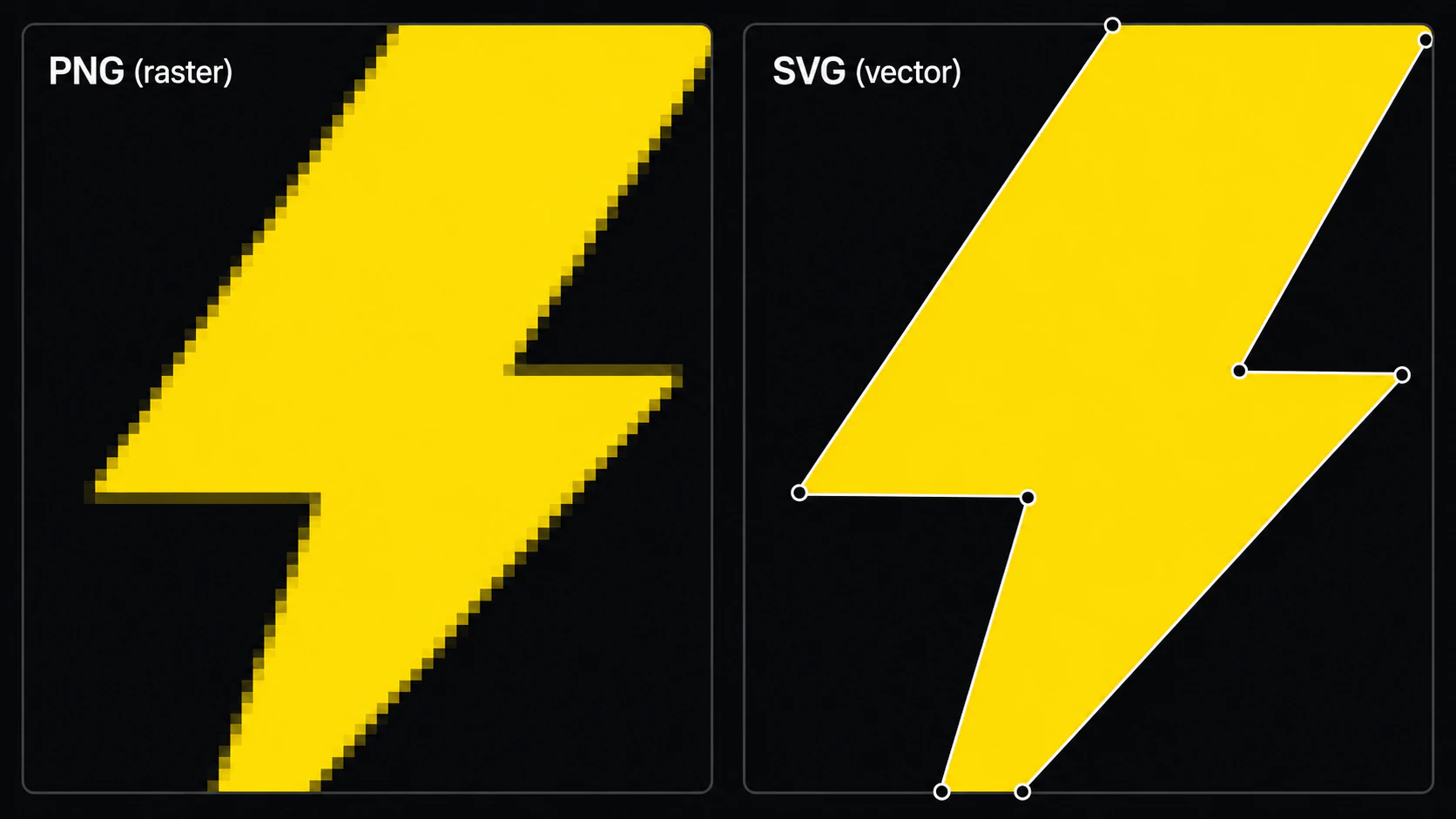
A raster image — PNG, JPG, GIF — stores image samples on a pixel grid. The image has fixed pixel dimensions: enlarge it far enough and you see softness or the grid. The W3C's PNG specification, for example, defines PNG as a raster image format built from scanlines and pixels. See the PNG 3 standard.
An old .bmp file is one raster case with its own cleanup traps. Use the BMP image vectorization workflow to preserve intentional hard edges without turning every legacy-file defect into a path.
For artwork saved as AVIF, start with the AVIF to SVG converter and inspect the resulting paths. The source format changes how you open the file, not whether its artwork is a good tracing candidate.
A vector image can describe geometry with instructions such as "draw a curve from here to there, fill the inside red." Those vector elements can render at different sizes without raster pixelation. Some vector containers can also embed raster images, so an .svg extension alone does not prove that every visible element is vector. (W3C SVG 2; SVG embedded content)
That's the headline difference: raster detail is tied to a pixel grid; vector geometry is resolution-independent.
What "vectorization" means
Vectorization (also called image tracing) is the process of taking a raster image and reconstructing it as vector shapes. The output is a vector file where each region of color in the original becomes one or more filled paths.
Done well, the result is:
- Scalable without raster pixelation for the reconstructed vector elements
- Editable shape-by-shape in tools like Illustrator, Figma, Inkscape, or Affinity Designer
- Potentially smaller than the original raster for simple artwork, depending on path and effect complexity
- Suitable for workflows that specifically require paths or editable shapes, after checking their file requirements
Why designers vectorize
A few of the most common reasons we see:
- Cleaning up generated artwork. Current OpenAI and Stability image APIs document raster outputs such as PNG, JPEG, and WebP. If a downstream workflow requires editable paths, those raster results need tracing or manual redrawing. (OpenAI Images API; Stability AI API; how to vectorize AI art for print)
- Reviving old logos. Many small businesses only have a JPG of their original logo. Vectorizing it produces a clean SVG that scales for every modern use.
- Print and merchandise. Vector source is useful for scalable logos and flat graphics, but many providers also accept high-resolution raster files. Follow the vendor's product-specific specification; Printful, for example, recommends PNG or JPEG for most print products. (Printful file guidance)
- Cutting and fabrication. Cut workflows can use vector shapes as layers or toolpath geometry, while raster engraving and print-then-cut workflows may not require vectorization. Cricut documents SVG and DXF as layered vector uploads and raster formats as single-layer image uploads. (Cricut upload guidance; preparing SVGs for Cricut; converting an image for laser cutting; the 3D-printing version)
The hard part: editability
Producing a vector file is not the same as producing one that is useful for a specific job. (See the AI vectorizers compared.)
Automatic tracers approximate raster features with vector paths. Depending on the source, algorithm, and settings, that can produce:
- Hundreds or thousands of anchor points per shape
- Curves that wiggle to match noise instead of forming smooth arcs
- A single visual shape split into many overlapping fragments
That can still be technically vector, but it may be inconvenient to edit. Adobe's Image Trace controls explicitly trade off path fitting, corners, noise, colors, and complexity, while Potrace documents a polygon-based curve-fitting approach for bitmap outlines. (Adobe Image Trace options; Potrace paper)
The goal of a good vectorizer is to produce paths that match what a designer would have drawn in the first place: fewer nodes, clean curves, one shape per visible region.
Where AI comes in
Classic tracers such as Potrace use documented deterministic stages to derive and optimize paths from bitmap outlines. Modern products may use different algorithms or learned models, and their behavior varies by product and input.
The practical question is not whether a product uses an "AI" label; it is whether its output preserves the intended silhouette and colors with sensible paths and layers. Test the same source, inspect the SVG, and compare node count and editability.
PerfectVector is designed around that goal: reconstructing raster artwork as editable vector shapes. Inspect each result against the source and compare its paths with another method when fidelity or production risk matters.
When to vectorize (and when not to)
Vectorization works best on:
- Logos and wordmarks
- Icons and illustrations
- Stylized graphics with clear color regions
- Hand-drawn line art
It works less well on photographs of complex scenes. A photo of a forest has so many distinct color regions and gradients that a vector trace would either be enormous (millions of paths) or lossy. For photographs, you usually want to stay raster.
Try it
If you have a raster image that needs to become a vector, run a PNG or JPG through the converter and inspect how the preview reconstructs its silhouette, colors, and paths. Vectorizing and previewing are free; one credit unlocks the SVG. For AI-generated art specifically, see how to vectorize AI art for print.
FAQ
Is vectorization the same as image tracing? Yes — "image tracing" is just another name for vectorization: reconstructing a raster image as editable vector shapes.
What image formats can I vectorize? Common raster inputs include PNG and JPG; support for WebP, GIF, TIFF, or other formats depends on the vectorizer. Use the cleanest source available, then verify the traced silhouette, colors, and paths. (How to convert a PNG to SVG without losing quality.)
Can I vectorize a photograph? Usually you shouldn't. Photos have too many gradients and color regions to become clean shapes — you'll get a huge file or a posterized look. Vectorization is built for logos, icons, illustrations, and line art.
What can open the SVG afterward? Many vector-capable tools, including Adobe Illustrator, Figma, Sketch, Inkscape, Affinity Designer, and Canva, support SVG workflows. Feature handling can vary, so test the file in the exact application and version you plan to use.
Is it free? Vectorizing and previewing are free; one credit unlocks the finished SVG. Use the built-in editor before unlocking to check whether the colors and paths fit your workflow.
Sources
- W3C — Portable Network Graphics (PNG) Specification, Third Edition — Current standard for PNG's raster representation and lossless encoding.
- W3C — Scalable Vector Graphics (SVG) 2 — Standard defining SVG geometry, paths, paint, and rendering.
- Adobe Illustrator — Image Trace panel options — Official tracing controls that expose fidelity-versus-complexity trade-offs.
- Selinger — Potrace: a polygon-based tracing algorithm — Primary technical description of a classic bitmap-to-vector algorithm.
- Cricut — How to upload images into Design Space — Official raster-versus-vector upload and layer behavior for a cutting workflow.
- Printful — How should I prepare my print file? — Primary vendor guidance showing that many print workflows accept raster files.
Have flat raster artwork that needs editable paths? Run it through PerfectVector, compare the preview with the source, and unlock the SVG only if its shapes and node layout fit the next tool. Keep photographs raster unless you want a deliberately stylized trace.
More from the blog
AI SVG Generator vs AI Vectorizer: Which Do You Need?
An AI SVG generator makes a new vector from a text prompt. An AI vectorizer converts the image you already have. Here's how to pick, and when you need both.
Can Gemini Vectorize an Image? What It Can Do
Gemini can write SVG code from a text prompt, unlike most AI. But it can't trace your uploaded image into a clean, editable SVG. Here's what it can and can't do.