SVG Gradient Along a Path: Check Color Around a Bend
Compare an SVG coordinate gradient with deliberate color bands around a curved ribbon. Inspect the source, test two sizes, and choose the geometry tradeoff.
On this page
An ordinary SVG linearGradient does not measure progress along a curved path. It paints according to a gradient vector in a coordinate system. If a ribbon doubles back, two points at the same position along that vector can receive the same color even though they are far apart along the ribbon.
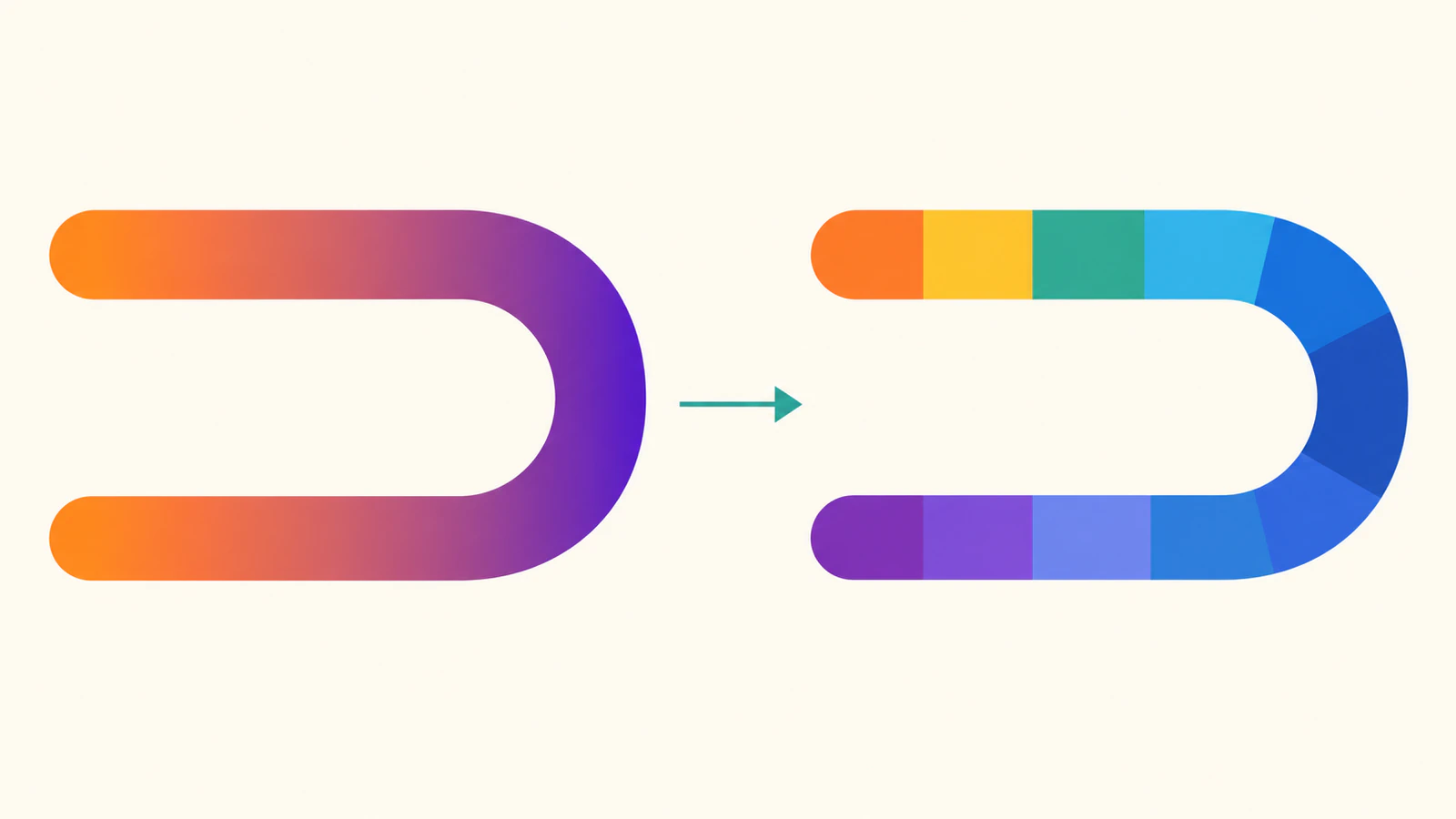
For a static design that needs color to progress around a bend, you can author separate colored sections. That gives you control over the sequence, but it adds geometry and visible color boundaries. Our original example compares a horizontal gradient with eight deliberate bands on the same authored route. Both files contain paths and no embedded image.
Check where the color repeats
The SVG2 paint-server specification defines linear gradients through a vector and its color stops. It describes radial gradients through their own circular geometry. Neither definition turns an arbitrary path into a path-distance color axis.
Our ribbon starts at the upper left, runs right, bends around a semicircle, and returns to the lower left. A horizontal gradient makes both left ends orange and the right bend purple. That is a valid coordinate gradient; it simply answers a different design question from “change color from the start of this route to its end.”
The MDN gradient tutorial explains the endpoint and stop model. Adding more stops changes that coordinate-based color sequence. It does not make the paint follow the curve.
Keep one ordinary gradient as the control
Save this complete file as coordinate.svg. The path uses a 24-unit stroke inside a 200×160 viewBox. Its straight portions and right semicircle form one editable centerline.
<svg xmlns="http://www.w3.org/2000/svg" width="200" height="160" viewBox="0 0 200 160">
<defs><linearGradient id="across" gradientUnits="userSpaceOnUse" x1="30" y1="0" x2="170" y2="0" color-interpolation="sRGB"><stop offset="0" stop-color="#e36b2c"/><stop offset="1" stop-color="#704baa"/></linearGradient></defs>
<path d="M30 30 H120 A50 50 0 0 1 120 130 H30" fill="none" stroke="url(#across)" stroke-width="24" stroke-linecap="butt"/>
</svg>
We use gradientUnits="userSpaceOnUse" to make the gradient endpoints explicit in the source coordinate system. Changing to bounding-box coordinates would change how those endpoints are expressed; it would not introduce path-distance paint. See the gradientUnits reference and our gradient-coordinate guide.
The full route is one path element. Keep this simple version as a geometry master even if you decide to deliver a more elaborate color treatment.
Author a stepped sequence around the bend
Save the following as bands.svg. It divides the upper straight portion into two pieces, the semicircle into four arcs, and the returning straight portion into two pieces. Colors are assigned in route order, from orange at the upper start to purple at the lower end.
<svg xmlns="http://www.w3.org/2000/svg" width="200" height="160" viewBox="0 0 200 160">
<g fill="none" stroke-width="24" stroke-linecap="butt">
  <path d="M30 30 H75" stroke="#e36b2c"/>
  <path d="M75 30 H120" stroke="#d38d31"/>
  <path d="M120 30 A50 50 0 0 1 155.355339 44.644661" stroke="#b4a747"/>
  <path d="M155.355339 44.644661 A50 50 0 0 1 170 80" stroke="#6fab79"/>
  <path d="M170 80 A50 50 0 0 1 155.355339 115.355339" stroke="#3d9dac"/>
  <path d="M155.355339 115.355339 A50 50 0 0 1 120 130" stroke="#4486b9"/>
  <path d="M120 130 H75" stroke="#5265b2"/>
  <path d="M75 130 H30" stroke="#704baa"/>
</g>
</svg>
These are eight manually chosen bands with unequal segment lengths. They are not a calculation of uniform color increments per unit of path length, and they do not create continuous shading. The rounded decimal arc endpoints approximate the original route; this example makes no pixel-identical-outline claim.
The path reference documents the element and its path data. Each section here remains a stroked centerline rather than an outlined closed fill. If a destination requires closed shapes, prepare and inspect that geometry separately instead of treating these stroke pieces as cutting contours.
We use stroke-linecap="butt" so adjacent pieces do not extend beyond their endpoints. Round caps on every internal section would overlap neighboring colors. The straight-to-arc transitions also need matching directions; our smooth-join guide covers the geometric continuity question separately.
Compare two sizes and two positions
We rendered both original files in Chrome at 200×160 and 400×320 CSS pixels. The browser decoded each SVG, then painted it to a canvas whose backing dimensions matched the test dimensions. The browser's device pixel ratio was 2; these recorded samples come from the canvas buffer, not from counting screenshot device pixels.
At source coordinates (60,30) and (60,130), the points lie on different straight portions of the route. They share the same horizontal coordinate, so the horizontal gradient gives them the same sampled color.
| File | Upper sample at x=60 | Lower sample at x=60 | Paths | Embedded images |
|---|---|---|---|---|
| Coordinate gradient | RGB 202,100,71 | RGB 202,100,71 | 1 | 0 |
| Authored bands | RGB 227,107,44 | RGB 112,75,170 | 8 | 0 |
| Flat geometry master | RGB 184,94,57 | RGB 184,94,57 | 1 | 0 |
The sample pairs were the same at both tested sizes, with alpha 255 on the painted interiors. The open area at source (100,80) had alpha zero in all six cases. That checks these authored files in this browser; it does not certify every renderer or all boundary pixels.
The banded rendering visibly keeps discrete color changes at both sizes. Inspect the joins at the delivered size, especially after export or embedding. Separate pieces can expose seams through antialiasing, rounding, or later edits. Increasing the number of sections can reduce the size of each color step, but it also creates more paths and more boundaries to maintain.
Choose the treatment before expanding the artwork
| Design need | Useful starting point | Cost to inspect |
|---|---|---|
| Color follows a page direction | One coordinate gradient | Endpoint positions and source bounds |
| Static progression around this route | Deliberate colored sections | Section colors, tangent joins, and seams |
| Smooth progression along an arbitrary curve | A separately designed approximation or another delivery method | Sampling, intersections, editable geometry, and destination rendering |
Rotating a linear gradient changes its direction. Repeating it changes how its colors extend. Neither operation makes it continuously turn with this returning centerline. A radial gradient may suit a circular composition, but that is its own paint geometry rather than a general route-distance solution.
If you adjust the curve later, revise the sections together. Keep a flat master for comparing the intended route and preserve the color-treatment copy separately. Our relative-path guide can help when reading or moving the underlying path commands.
If your starting artwork is a PNG or JPG and you need editable contours, convert the source with PerfectVector, inspect the recovered shape and open areas, and keep a clean SVG master. Choose or rebuild the color treatment after checking that geometry. Vectorization does not guarantee exact recovery of continuous shading or invent a native gradient-along-path feature. An existing clean SVG needs paint and geometry editing directly; the image-vectorization guide explains when raster conversion helps.
FAQ
Can I make a linearGradient follow any curved stroke? No path-distance setting is provided by the ordinary linearGradient definition. Its coordinate vector controls the paint. The stepped example assigns separate colors to separate route sections.
Will more gradient stops fix the returning colors? More stops can refine color transitions along the gradient vector. Points at the same position along that vector still share the same coordinate-based paint.
Does the banded file contain a raster image? No. Our authored example contains eight path elements and no image element. It also contains visible color steps rather than a continuous path-distance gradient.
Should I replace every gradient with separate paths? Use the simpler coordinate gradient when it matches the design. Separate sections are useful when their progression and editing costs are acceptable; inspect seams and the destination rendering before delivery.
Sources
- W3C — SVG2 paint servers — Gradient vectors, stops, and coordinate-based painting.
- MDN — Gradients in SVG — Linear and radial gradient construction.
- MDN — gradientUnits — User-space and bounding-box coordinate systems.
- MDN — path — Inspectable path elements and path data.
- MDN — stroke-linecap — Butt and round stroke endpoint behavior.
More from the blog

SVG Text Wrapping: Build Measured Lines with tspan
Wrap SVG labels by measuring words with the actual font, then emit tspans. Test narrow labels, reject overflowing words or extra lines, and save the result.

SVG.js: Import Artwork, Edit a Path, and Export SVG
Import trusted SVG markup into SVG.js, recolor a named path, and check full-root versus children-only exports. Keep original geometry and inspect saved files.