
SVG Bézier Curves: Fix a Kink Without Adding Nodes
Repair an SVG cubic Bézier join by aligning its handles. Compare unequal and reflected handles, understand the S command, and preserve deliberate corners.
On this page
To remove an unintended kink where two ordinary cubic Bézier segments meet, keep their shared anchor in place and align the adjacent handles on one straight line, on opposite sides of that anchor. Their lengths can differ while the curves share a tangent direction. Equal reflected handles impose an additional condition; they are not required for every visually smooth join.
Inspect the source shape before making that change. A pointed leaf tip, notch, or lettering corner may be deliberate. The repair below targets one unwanted change of direction, with the start, join, end, and segment count held fixed.
Find the two handles that control the join
A cubic SVG command has two control points and an endpoint:
C firstControlX firstControlY secondControlX secondControlY endX endYThe segment starts at the current point. Its first control point guides the direction leaving that start; its second guides the approach to the endpoint. The MDN paths tutorial illustrates those control points and the cubic syntax.
At a shared anchor, inspect the previous segment's last control point and the next segment's first control point. If those handles point along different lines, the join changes direction. Adding another node nearby does not resolve that relationship by itself.
Repair the original two-segment example
Save this complete SVG as join-example.svg and open it in a browser. It is an original curved mark with a deliberate kink at (150, 100).
<svg xmlns="http://www.w3.org/2000/svg" width="900" height="600"
     viewBox="0 0 300 200">
  <path fill="none" stroke="#137f74" stroke-width="5"
    d="M30 150 C60 150 100 100 150 100
       C170 50 240 50 270 50"/>
</svg>
The incoming control point is (100, 100), directly left of the join. The outgoing control point is (170, 50), above and to its right. The curve arrives horizontally and leaves in a different direction.
Change only the first control point of the second segment to (175, 100):
<path fill="none" stroke="#137f74" stroke-width="5"
  d="M30 150 C60 150 100 100 150 100
     C175 100 240 50 270 50"/>
Both adjacent handles now lie on the horizontal line through the join. The incoming handle is 50 units long, and the outgoing handle is 25. The tangent direction agrees even though those lengths differ.
For a reflected pair, change that control point to (200, 100) instead. Both handles then extend 50 units from the shared anchor. This changes the shape of the second segment more than the unequal-handle edit, so compare both with the contour you intend to preserve.
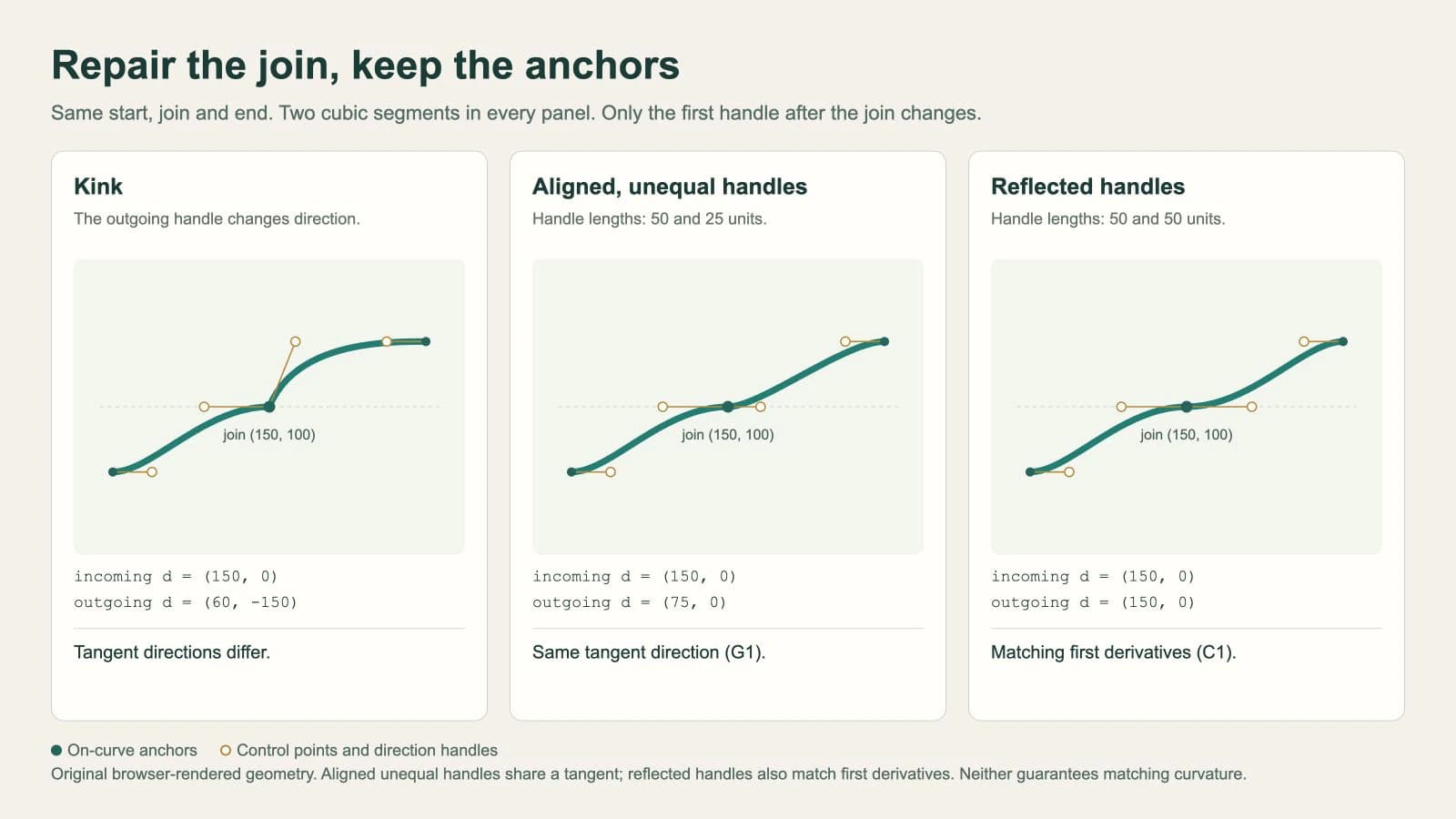
Every version has two cubic segments and three on-curve anchors: start, join, and end. The control points are separate coordinates. The comparison is an original browser rendering, not a traced PerfectVector result or a screenshot of an editor's node tool.
Check direction separately from handle length
For a cubic ending at join J with last control point A, its endpoint derivative is 3 × (J − A). The next cubic, starting at J with first control point B, has initial derivative 3 × (B − J).
In our example, the incoming derivative is (150, 0) in every panel:
| Outgoing control point B | Outgoing derivative | Join condition |
|---|---|---|
(170, 50) | (60, −150) | Different tangent direction |
(175, 100) | (75, 0) | Same direction, different magnitude |
(200, 100) | (150, 0) | Same direction and magnitude |
Matching tangent directions is called G1 continuity. Matching first derivatives is C1 continuity, using the usual zero-to-one parameter interval for each of these two cubics. Michigan Tech's Bézier derivative notes derive these endpoint conditions.
The direction test assumes nonzero endpoint derivatives. A handle collapsed onto its anchor needs a separate check because its first derivative is zero. Also, collinearity alone is insufficient if both handles sit on the same side of the join: the travel direction can reverse.
Neither of the aligned examples promises matching curvature across the join. A curve can have no tangent corner and still need reshaping to match a logo's intended silhouette. Inspect the entire bend, not just the selected node.
Use S only when reflection is the shape you want
The reflected version can be written more compactly:
<path fill="none" stroke="#137f74" stroke-width="5"
  d="M30 150 C60 150 100 100 150 100
     S240 50 270 50"/>
Here, S infers the first control point by reflecting the previous cubic's last control point around the current point:
reflectedX = 2 × 150 − 100 = 200
reflectedY = 2 × 100 − 100 = 100
The remaining pairs in S240 50 270 50 specify the second control point and endpoint. This is the 50/50 reflected-handle version. It cannot stand in for the 50/25 version without changing the curve.
The SVG cubic-command specification limits that reflection rule to a preceding C, c, S, or s command. If the preceding command is a line or a quadratic curve, the implicit first control point is the current point instead.
For example:
M30 150 L150 100 S240 50 270 50After the line, that last segment behaves like C150 100 240 50 270 50. Its first handle has collapsed onto the start. It can still bend because the remaining control geometry is not collinear; S after a line does not force a straight segment.
Our browser check compared the reflected S path with its explicit C equivalent, then checked this line-followed-by-S example against its own explicit expansion. Both comparisons agreed at the sampled positions. That confirms these examples, while the specification defines the general rule.
Make the same repair in a node editor
Work on a copy, select the path, and expose the handles around the suspect join. Confirm that there is one shared anchor. Two separate endpoints that merely overlap may need a topology repair before changing handle directions.
In Inkscape, the node-type guide distinguishes smooth nodes, whose handles share a line, from symmetric nodes, whose handles also remain equal in length. Use the node type that fits the contour instead of forcing every join to be symmetric.
Keep the anchor fixed while adjusting the handle direction. Then shorten or lengthen the handles to recover the intended shape around the join. Compare the result at both high zoom and normal viewing size, and reopen the saved SVG to inspect the exported path.
If the path contains crowded anchors across the whole bend, a local handle edit may not be enough. The SVG node-count guide covers simplification, while the SVG editing workflow covers broader changes. Preserve intentional corners during either operation.
Compare the repaired shape with its source
A smooth join is one quality check. It does not prove that a traced logo matches the original. Compare its silhouette, openings, and deliberate corners using the vector trace quality checklist.
If only a PNG or JPG of the mark is available, PerfectVector's logo vectorizer can prepare an editable SVG candidate. Inspect its contours, then use a local handle repair where an unintended kink remains. Keep the raster reference beside the edited path so smoothing does not erase a feature you meant to retain.
Use an existing vector master when available. Exact brand geometry or a severely damaged source may need manual reconstruction; the logo vectorization guide explains that choice. Retouching one join is useful when the rest of the contour is already suitable.
FAQ
Do both Bézier handles need the same length for a smooth join? No. Nonzero handles can have different lengths while sharing the same tangent direction. At the shared anchor they should lie on one line, on opposite sides. Equal reflected handles add matching first derivatives for the two cubic segments used here.
Why does the SVG S command change my curve? S infers its first control point. After C or S, it reflects the previous cubic's last control point; after other command types, it uses the current point. That inferred point may differ from the explicit control point you intended.
Should I smooth every node in a traced logo? No. Preserve intentional corners, tips, and notches. Repair an unintended kink locally, then compare the whole silhouette with the source. A tangent-continuous join alone does not establish an accurate reconstruction.
Sources
- MDN — SVG paths — Explains cubic control points and path-command syntax.
- Michigan Tech — Bézier derivatives — Derives endpoint tangents and the conditions for joining curves.
- W3C — SVG cubic Bézier commands — Defines the reflection rule and fallback control point for S.
- Inkscape — Node types — Distinguishes cusp, smooth, symmetric, and automatic node behavior.
If your logo starts as a raster image, prepare an SVG candidate with PerfectVector, inspect the joins and silhouette, then repair only the curves that need it while preserving deliberate corners.
More from the blog

SVG Transform Order: Scale and Position Artwork
Compare SVG translate and scale order with a measured logo example. Use nested groups, follow one point, and place artwork without changing its source paths.

SVG Arc Flags: Draw the Right Curve with A Commands
See how SVG large-arc and sweep flags choose one of four curves between the same points. Copy a working A command, then fix radii, rotation, and traced artwork.