Vector Magic Alternatives: Choose the Right Vectorizer
Vector Magic is two products with one name, and the browser edition is missing eight features. Check which one you used before you shop for a replacement.
On this page
Before you replace Vector Magic, one question is worth answering: did you use it in a browser, or did you buy the desktop app?
It matters more than most people expect, because those are two different products sharing a name, and the browser one is deliberately the smaller of the two. Plenty of people conclude the tool cannot do something when the truth is that the online edition cannot do it.
Short on time? The quick version
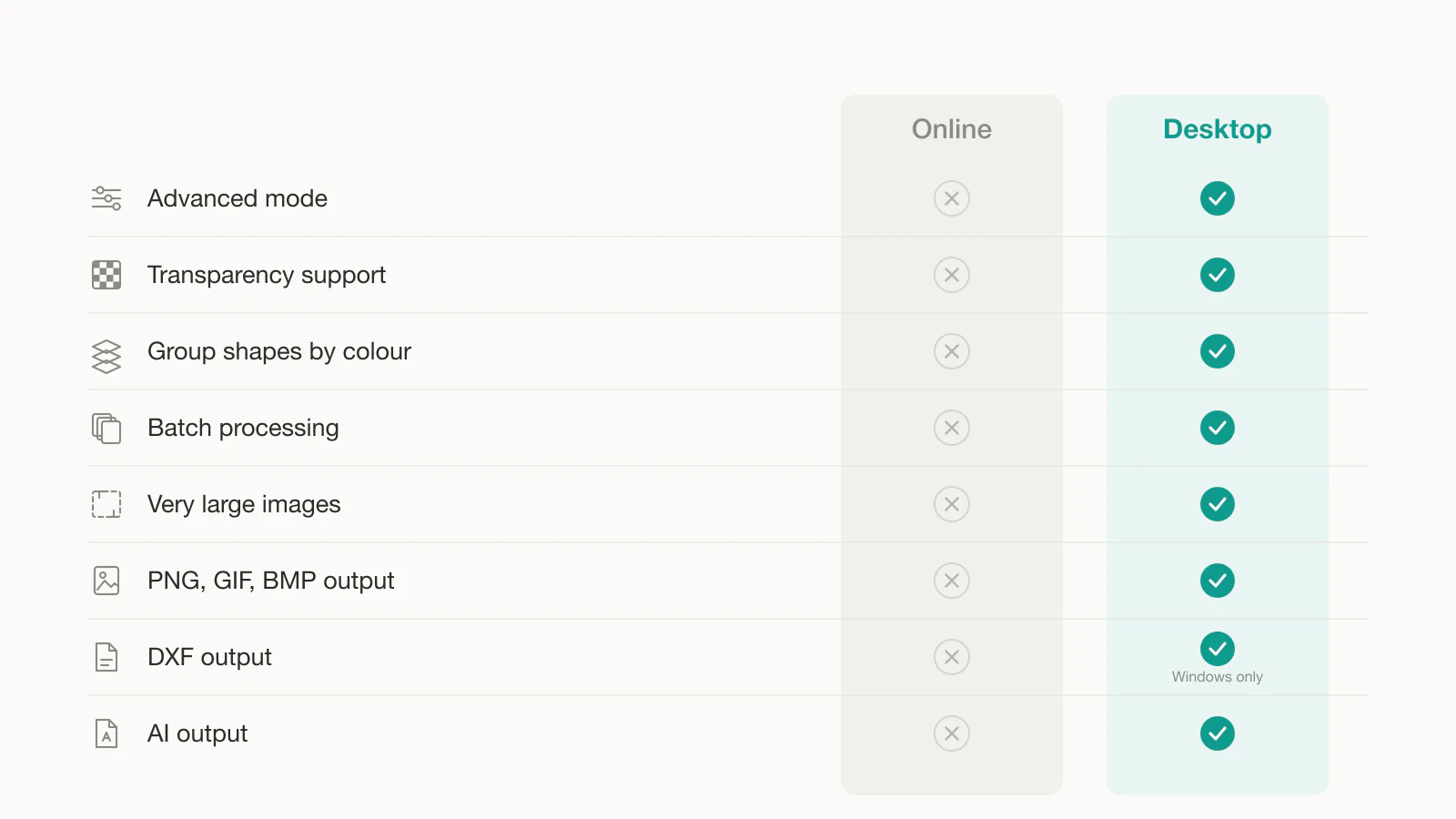
- Online and Desktop are not the same product. By Vector Magic's own feature table, eight capabilities are Desktop-only.
- Missing online: transparency support, group shapes by colour, batch processing, very large images, advanced mode, and raster output.
- Both editions let you preview free and charge you to download, so switching purely to dodge that wall lands you in the same place elsewhere.
- If Vector Magic already performs well on your full-color or photographic files, test before switching. If your work is flat art you need to edit or cut, compare the alternatives on editability and layer separation.
What the browser version leaves out
This comes from Vector Magic's comparison of its online and desktop editions, not from our testing:
| Capability | Online | Desktop |
|---|---|---|
| Advanced mode with fine-grained control | No | Yes |
| Transparency support | No | Yes |
| Group shapes by colour | No | Yes |
| Batch processing | No | Yes |
| Vectorize very large images | No | Yes |
| PNG, GIF, BMP output | No | Yes |
| DXF output | No | Windows only |
| AI output | No | Yes |
Read that list against what you were trying to do. Two rows on it cause most of the frustration.
Transparency. If you traced a logo online and got a white box behind it, that was not a bug. The online edition does not do transparency. Anything you place on a coloured background or cut from vinyl will show it. We cover how to check for and fix that whatever tool you use.
Group shapes by colour. This is layer separation, and it is the difference between a file you can cut and a file you have to take apart by hand. If you are preparing layered SVGs for a cutting machine, the online edition was never going to give you what you needed.
So the first fork in the road is not which alternative to pick. It is whether you judged the full product by its reduced edition.
The pricing shapes, without the numbers
Vector Magic lets visitors upload and preview a result before purchase; downloading your own finished result requires paid access. The online edition is a subscription, while the desktop edition uses a one-time licence. The vendor's pricing page is the current source for both offers.
We are not quoting figures here, because they move and they differ by region. Check the current amounts on the vendor's own pricing page rather than on any comparison article, including this one.
Worth knowing: the same preview-free, pay-to-download pattern is what drives people away from Vectorizer.AI as well. Switching between those two to escape the wall does not escape anything.
What changed since Vector Magic was the obvious answer
Vector Magic earned its reputation. Its own comparison page is a useful window into when that happened: it still measures itself against Adobe Live Trace CS6 and Corel PowerTRACE X6, both of which shipped in 2012. Against that field, "answer two simple questions and get an accurate trace" was a genuinely better idea than the slider-heavy tools of the day.
Two things have moved since.
The first is that accuracy stopped being the only goal. Tracing faithfully means following every wobble in the source, which produces files with a lot of anchor points. That is the right call for a photographic source and the wrong one for a logo you plan to edit, recolour, or cut. Our write-up on what too many nodes costs you covers why.
The second is that the trace is no longer the whole job. People now want the file to arrive ready for a specific downstream use: separated by colour for a cutting machine, transparent for layout work, light enough to open without lag.
Alternatives by what you are actually doing
There is no single replacement, and any page that names one without asking what you are converting is guessing.
Flat art, logos, and anything you will edit or cut. This is where a cleaner, lower-node trace beats a faithful one. It is what we built PerfectVector for, and you can judge it on your own file in a minute: run it through the image to vector converter, open the result, and count the anchor points on a shape you would want to edit. For brand marks specifically, the logo vectorizer is tuned for it.
Free, and you do not mind the work. Inkscape's documented Trace Bitmap workflow is a capable free option, and it is a full editor as well, so cleanup happens in the same place. VTracer offers configurable color and speckle filtering. Both cost you time in settings.
You already pay Adobe. Illustrator's Image Trace is there, and for one-off jobs the money question is already settled.
Offline or one-time licensing matters to you. That constraint narrows the field quickly, and Vector Magic's own desktop edition is a legitimate answer to it rather than something to replace.
Full-colour photographic conversion. Test the alternatives against the same representative source before switching. If Vector Magic already produces the fidelity you need on photographic work, a replacement should beat that real result rather than a feature-table score. We include it in our comparison of AI vectorizers alongside our own tool.
How to judge a replacement in two minutes
Pick one file from your real work, ideally the one that made you start looking. Run it through any candidate, then check four things.
- Anchor point count. Open the result and look at a shape you would want to edit. Tens to low hundreds is workable. Thousands means you will fight the file every time you touch it.
- Transparency. Place it on a coloured background. Is there a white rectangle behind it?
- Colour separation. If you cut or print by layer, can you select one colour and move it on its own?
- What the free tier gives you. Preview or download? Personal use or commercial? These differ more than the trace quality does.
Those four take longer to describe than to run, and they beat any comparison table, this one included.
When to stay
Switching costs you a workflow you already know, so it should buy something specific.
Stay if you own the desktop licence and use the advanced mode, because that is the version most alternatives are actually competing with and few of them win outright. Stay if your work is photographic and fidelity is the point. Stay if a one-time purchase is a hard requirement.
Go if you are on the online edition and kept hitting things it does not do, if your output is flat art you need to edit or cut, or if node counts have been costing you more time than the trace saved.
FAQ
Is there a free version of Vector Magic? Not for finished work. Both editions let you upload, vectorize, and preview as many images as you like at no cost, but downloading a result requires either an online subscription or a desktop licence. The free samples on the site can be downloaded, which is useful for checking format compatibility but not for finishing a project.
Why does my Vector Magic SVG have a white background? Because the online edition does not support transparency. That is listed on the vendor's own feature comparison as a desktop-only capability. You can delete the background shape by hand afterwards in Inkscape or Illustrator, or use a converter that preserves transparency in the first place.
What is the difference between Vector Magic Online and Desktop? By the vendor's own table, the desktop edition adds an advanced mode with fine-grained control, transparency support, grouping shapes by colour, batch processing, very large image support, raster output formats, and drag-and-drop output. A couple of output formats are Windows-only. The online edition covers automatic and basic vectorization with EPS, SVG, and PDF output.
What is the best free alternative to Vector Magic? Inkscape is a capable option if you are willing to learn its Trace Bitmap dialog, because it is a full vector editor as well as a tracer, so cleanup happens in the same window. VTracer exposes configurable color and speckle controls. Both are free and trade money for setup and inspection time.
Is Vector Magic still good in 2026? It remains an actively sold online and desktop vectorizer. Whether it is the right choice depends on the output you need: test fidelity, node count, transparency, and color separation on your own source rather than treating the product's age as a quality verdict.
Sources
- Vector Magic: Pricing — Current source for online subscription and desktop-license terms.
- Vector Magic: Desktop edition — Compares online and desktop capabilities and output formats.
- Vector Magic: FAQ — Explains trials, previews, downloads, and product behavior.
- Inkscape: Tracing tutorial — Documents the free Trace Bitmap workflow.
- VTracer: Official repository — Documents VTracer's open-source status and tracing controls.
- Adobe Illustrator: Image Trace — Documents Illustrator's built-in raster-to-vector alternative.
More from the blog

AI SVG Generator vs AI Vectorizer: Which Do You Need?
An AI SVG generator makes a new vector from a text prompt. An AI vectorizer converts the image you already have. Here's how to pick, and when you need both.
Can Affinity Designer Vectorize With Image Trace?
Affinity has Image Trace in the unified app. See how it works, why Designer 1 and 2 lack it, its documented limits, and when to compare another tracer.