SVG feComposite: Compare in, out and xor Artwork
Compare SVG filter inputs with in, out and xor, test operand order and partial alpha, and preserve source paths when a visual opening is not editable geometry.
On this page
SVG feComposite combines two rendered inputs. For fully opaque inputs, in keeps the first input in the overlap, out keeps it outside the overlap, and xor combines both inputs outside their shared overlap. These operations change paint at render time. They do not rewrite the source paths into an editable intersection or difference.
That distinction matters when an overlap looks like an opening but the deliverable needs actual contours. The example below compares two original asymmetric shapes, reverses the inputs and checks partial transparency. Keep the source artwork beside the filtered result.
Name both inputs before choosing the operator
The MDN feComposite reference describes a pixel-wise operation in image space. in names the first input; in2 names the second. Give intermediate results explicit names so a changed filter chain does not silently change the operands.
For opaque interiors, these three operations are easy to compare:
| Operation | First input A, second input B | What reversing the inputs changes |
|---|---|---|
in | A's paint in the overlap | The overlap carries B's paint instead |
out | A's paint outside B | B's paint outside A is a different region |
xor | Both inputs outside their shared opaque overlap | The same non-overlapping regions remain |
The same operator attribute also appears on other filter primitives with different values. Keep the compositing context explicit; MDN's operator reference distinguishes it from morphology operations.
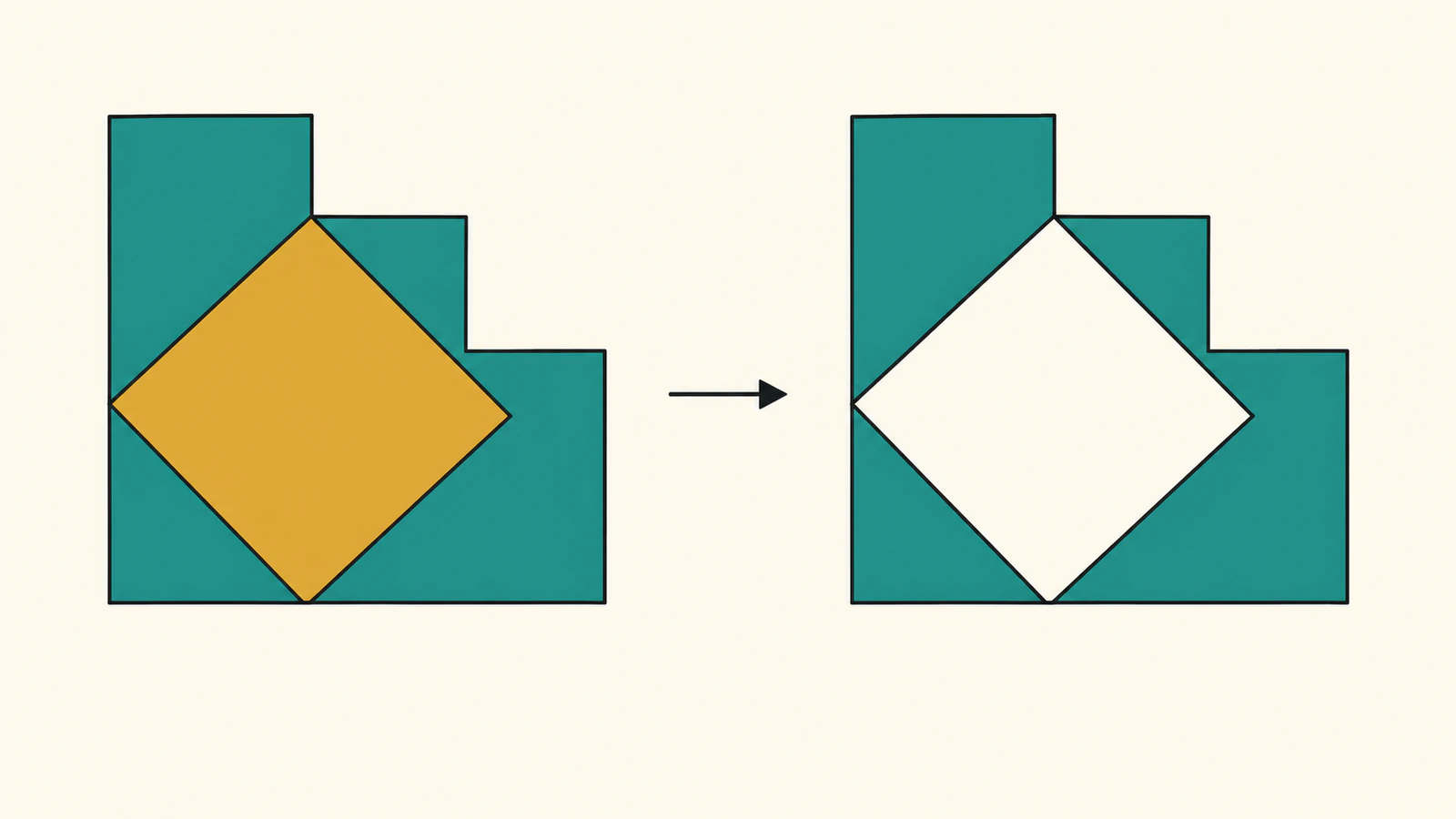
Align the second artwork explicitly
Our first operand A is a teal stepped block. B is an ochre skewed kite. Both use the same 0 0 240 160 viewBox. B extends beyond A's local bounding box, so using A's bounds as the filter region would be a poor starting assumption.
The filter uses filterUnits="userSpaceOnUse" for its explicit x=0, y=0, width=240, height=160 region. MDN's filterUnits reference explains that coordinate choice. We also set primitiveUnits="userSpaceOnUse" and give the second input the same full-frame coordinates.
B is a self-contained SVG data URL passed through feImage, with result name operandB. This brings it into the filter as an image input; it does not insert B's path as a new direct child of the filtered artwork. The MDN feImage reference describes its image input behavior.
The filter explicitly selects sRGB. The default for these filter primitives is linearRGB, as the feComposite reference documents. Neither that default nor the operator name supplies a path-editing operation.
Run the complete original comparison
Save this as starter.html and serve the folder over local HTTP, for example with python3 -m http.server 8766 --bind 127.0.0.1. Open http://127.0.0.1:8766/starter.html; use another free port if needed.
The page builds two originals plus seven filtered cases at each of two explicit sizes. Every filter ID includes its case and width so multiple inline SVGs in the same document have unique references. Each Save SVG link keeps the self-contained filter and its encoded B input.
<!doctype html>
<html lang="en">
<meta charset="utf-8">
<title>Original SVG composite artwork</title>
<style>
  body { margin: 24px; font: 16px system-ui; background: #f6f2e8; }
  main { display: grid; grid-template-columns: repeat(3, 260px); gap: 18px; }
  figure { margin: 0; }
  svg { display: block; background: white; border: 1px solid #bbb; }
  figcaption { margin: 6px 0; }
  pre { white-space: pre-wrap; font-size: 12px; }
</style>
<h1>Original operands and rendered composites</h1>
<main id="cases"></main>
<pre id="report"></pre>
<script>
  const A = 'M24 24 H132 V56 H192 V136 H24 Z';
  const B = 'M92 8 L216 84 L92 152 L60 84 Z';
  const svgNS = 'http://www.w3.org/2000/svg';
  const cases = [
    { id: 'a' }, { id: 'b' },
    { id: 'a-in-b', operator: 'in' },
    { id: 'a-out-b', operator: 'out' },
    { id: 'a-xor-b', operator: 'xor' },
    { id: 'b-in-a', operator: 'in', reverse: true },
    { id: 'b-out-a', operator: 'out', reverse: true },
    { id: 'b-xor-a', operator: 'xor', reverse: true },
    { id: 'a-out-half-b', operator: 'out', opacity: 0.5 },
  ];
  function documentSVG(test, width) {
    const height = width * 2 / 3;
    const id = test.id + '-' + width;
    const second = '<svg xmlns="' + svgNS + '" width="240" height="160" viewBox="0 0 240 160">'
      + '<path d="' + B + '" fill="#d4a53a" opacity="' + (test.opacity ?? 1) + '"/></svg>';
    const href = 'data:image/svg+xml;charset=utf-8,' + encodeURIComponent(second);
    const first = test.reverse ? 'operandB' : 'SourceGraphic';
    const other = test.reverse ? 'SourceGraphic' : 'operandB';
    const defs = test.operator ? '<defs><filter id="' + id + '" filterUnits="userSpaceOnUse" primitiveUnits="userSpaceOnUse" x="0" y="0" width="240" height="160" color-interpolation-filters="sRGB">'
      + '<feImage href="' + href + '" x="0" y="0" width="240" height="160" preserveAspectRatio="none" result="operandB"/>'
      + '<feComposite in="' + first + '" in2="' + other + '" operator="' + test.operator + '"/></filter></defs>' : '';
    return '<svg xmlns="' + svgNS + '" width="' + width + '" height="' + height + '" viewBox="0 0 240 160">'
      + defs + '<path d="' + (test.id === 'b' ? B : A) + '" fill="' + (test.id === 'b' ? '#d4a53a' : '#176b5b')
      + '"' + (test.operator ? ' filter="url(#' + id + ')"' : '') + '/></svg>';
  }
  async function run() {
    const results = [];
    for (const width of [120, 240]) {
      for (const test of cases) {
        const source = documentSVG(test, width);
        const svg = new DOMParser().parseFromString(source, 'image/svg+xml').documentElement;
        const figure = document.createElement('figure');
        const caption = document.createElement('figcaption');
        caption.textContent = test.id + ', ' + width + ' × ' + width * 2 / 3;
        figure.append(document.importNode(svg, true), caption);
        document.getElementById('cases').append(figure);
        const path = figure.querySelector('path');
        const bbox = path.getBBox();
        const image = new Image();
        image.src = 'data:image/svg+xml;charset=utf-8,' + encodeURIComponent(source);
        await image.decode();
        const canvas = document.createElement('canvas');
        canvas.width = width;
        canvas.height = width * 2 / 3;
        const ctx = canvas.getContext('2d');
        ctx.drawImage(image, 0, 0);
        const sample = (x, y) => [...ctx.getImageData(Math.floor(x * width / 240), Math.floor(y * width / 240), 1, 1).data];
        const hash = [...new Uint8Array(await crypto.subtle.digest('SHA-256', new TextEncoder().encode(path.getAttribute('d'))))]
          .map(v => v.toString(16).padStart(2, '0')).join('');
        const download = document.createElement('a');
        download.href = image.src;
        download.download = test.id + '-' + width + '.svg';
        download.textContent = 'Save SVG';
        figure.append(download);
        results.push({ id: test.id, width, height: canvas.height, d: path.getAttribute('d'), dSHA256: hash,
          bbox: { x: bbox.x, y: bbox.y, width: bbox.width, height: bbox.height },
          directPaths: svg.querySelectorAll('path').length, filterImages: svg.querySelectorAll('feImage').length,
          aOnly: sample(40, 40), bOnly: sample(200, 84), overlap: sample(120, 84), outside: sample(230, 150) });
      }
    }
    document.getElementById('report').textContent = JSON.stringify({ A, B, results }, null, 2);
  }
  run();
</script>
</html>
The code retains the same direct A path even when the operator's inputs are reversed. For example, b-in-a changes feComposite to in="operandB" and in2="SourceGraphic"; it does not replace the filtered source element with B. This makes the operand order visible without altering the underlying A geometry.
The pixel inspection here reads a canvas painted from each generated SVG. The downloadable deliverable is still the filtered SVG. It is not a new Boolean path or a PerfectVector conversion.
Compare paint and geometry separately
We executed this exact page in one Chrome environment at 120 × 80 and 240 × 160, saved all 18 SVGs and reopened them as images in the same browser. The displayed sizes are explicit inputs, not a claim about two physical devices.
Three interior sample positions use the original coordinate system: A-only (40,40), B-only (200,84) and overlap (120,84). The following alpha values were observed at both sizes with opaque operands:
| Filter inputs and operator | A-only alpha | B-only alpha | Overlap alpha |
|---|---|---|---|
A in B | 0 | 0 | 255 |
A out B | 255 | 0 | 0 |
A xor B | 255 | 255 | 0 |
B in A | 0 | 0 | 255 |
B out A | 0 | 255 | 0 |
B xor A | 255 | 255 | 0 |
The in rows share an opaque overlap but differ in color: A-first was teal (23,107,91,255); B-first was ochre (212,165,58,255). The outside sample (230,150) remained transparent throughout. These are selected interior pixels, not a complete edge-coverage or compatibility test.
Every filtered file still had A's exact original d string and matching SHA-256. Its local geometric getBBox() remained x=24, y=24, width=168, height=112. That box describes the source path; it is not the visible filter-pixel bounding box. The encoded B path also stayed unchanged. A filter result can therefore look different while both authored contours remain intact.
The saved originals have one direct path and no filter image. Every filtered file has one direct A path plus one feImage carrying B's separate one-path SVG. No ordinary raster image element is introduced. A rendered image-space operation and vector source operands can coexist; the source inventory alone does not mean the result became editable combined geometry.
Partial opacity changes the meaning of an opening
The last case makes B half opaque while leaving A opaque, then applies A out B. The overlap did not become empty. At both sizes, its observed RGBA was (22,106,90,127): partly transparent teal, with rounding from the rendering/readback pipeline.
For out, output alpha is the first alpha multiplied by one minus the second alpha. For in, it is their product. The Filter Effects compositing definition defines these operations using premultiplied colors and alpha. Opaque B can remove A's overlapping paint; partially transparent B leaves some of it.
Inspect the result on the actual backdrop. A pale region over white can be translucent paint rather than a fully transparent hole. Antialiased edge pixels also need visual checking; the interior sample is not a promise that every boundary pixel has alpha zero. For a separate opacity-remapping job, see the SVG alpha-threshold guide.
Deliver a filter effect or author real contours
Keep this filter when the receiving renderer should reproduce the visual composite. Preserve the original A and B files and inspect the reopened filtered SVG in its actual destination. Our successful browser reopening does not certify other renderers or production machines.
If delivery requires selectable combined contours or a cutter-ready opening, perform and inspect a real path-editing or Boolean operation in the intended workflow. The changed visible paint here does not create that geometry. The clipPath-versus-mask guide makes a related visibility distinction; the SVG ungrouping guide helps when displayed artwork is not the editable object you expected.
If your clipart exists only as pixels and you need editable source shapes, prepare a clipart SVG with PerfectVector, inspect the contours and openings, and keep the master. Apply and verify the intended filter or path operation separately. Vectorization does not turn this filter's visual overlap into a verified manufacturing contour.
FAQ
Does feComposite out delete the overlapping path geometry? No. It changes the rendered paint using the second input's alpha. In our filtered files, the original A path data and local geometric bounds remained unchanged even where overlapping paint became transparent.
Why does swapping in and in2 change the result? They identify first and second inputs. In keeps the first input's paint within the second input's opacity; out keeps the first outside it. Our reversed in cases share the opaque overlap but show different colors, while reversed out cases keep different regions.
Does xor always make a completely empty overlap? The fully opaque interior overlap was empty in our xor cases. Partial alpha and antialiased edges require their own inspection; opaque-shape set diagrams do not describe every translucent pixel.
Can I send the filtered opening directly as an editable cut path? A visual filter result is not newly authored Boolean geometry. Keep the original shapes, create and inspect the required contours in the intended path workflow, and verify the receiving application and production requirements separately.
Sources
- MDN: feComposite — Image-space input roles, operator descriptions and default filter color space.
- MDN: operator — Compositing operator values and the separate morphology context.
- MDN: filterUnits — Filter-region coordinate system.
- MDN: feImage — Image input to the filter pipeline.
- W3C: Filter Effects compositing — Premultiplied color and alpha compositing definitions.
Starting with your own raster clipart? Create an editable SVG master, inspect its contours and openings, then preserve it while checking the chosen visual composite or separately authored path result in the destination.
More from the blog

Inkscape Group by Color: Keep Paths or Merge Them?
Select matching fills in Inkscape, choose Group or Union, and check overlapping colors before merging. Keep editable paths or export aligned color files safely.

SVG Grain Texture: Keep Noise Inside Your Artwork
Add SVG grain with feTurbulence, keep monochrome noise inside SourceAlpha, tune it at two sizes, and preserve a clean path master for other destinations.