
SVG Alpha Threshold: Make Transparency a Hard Cutoff
Use feFuncA to turn SVG alpha into a hard cutoff. Compare discrete and table transfer on known PNG pixels, preserve holes, and check why opaque white stays.
On this page
For an alpha cutoff at 0.5, use feComponentTransfer with <feFuncA type="discrete" tableValues="0 1"/>. Input alpha below 0.5 becomes transparent; alpha at or above it becomes opaque. Omit the RGB functions when you want their transfer mappings to remain identity.
That filter changes the rendered alpha, not the underlying artwork structure. It cannot remove an opaque white background, because white pixels with alpha 1 pass the same cutoff as opaque colored pixels. A PNG embedded in the SVG also remains a raster image.
Compare known source pixels before choosing a threshold
We authored a small 8-bit RGBA PNG with a gradual alpha change, a transparent square hole, an opaque white patch and six controlled swatches. Each SVG in this test embeds the same PNG bytes in one image element. The unfiltered, discrete and interpolated-table variants differ only in their filter setup.
The checkerboard below belongs to the surrounding page, outside the SVG. It reveals transparency rather than pretending to be part of the image's alpha channel.
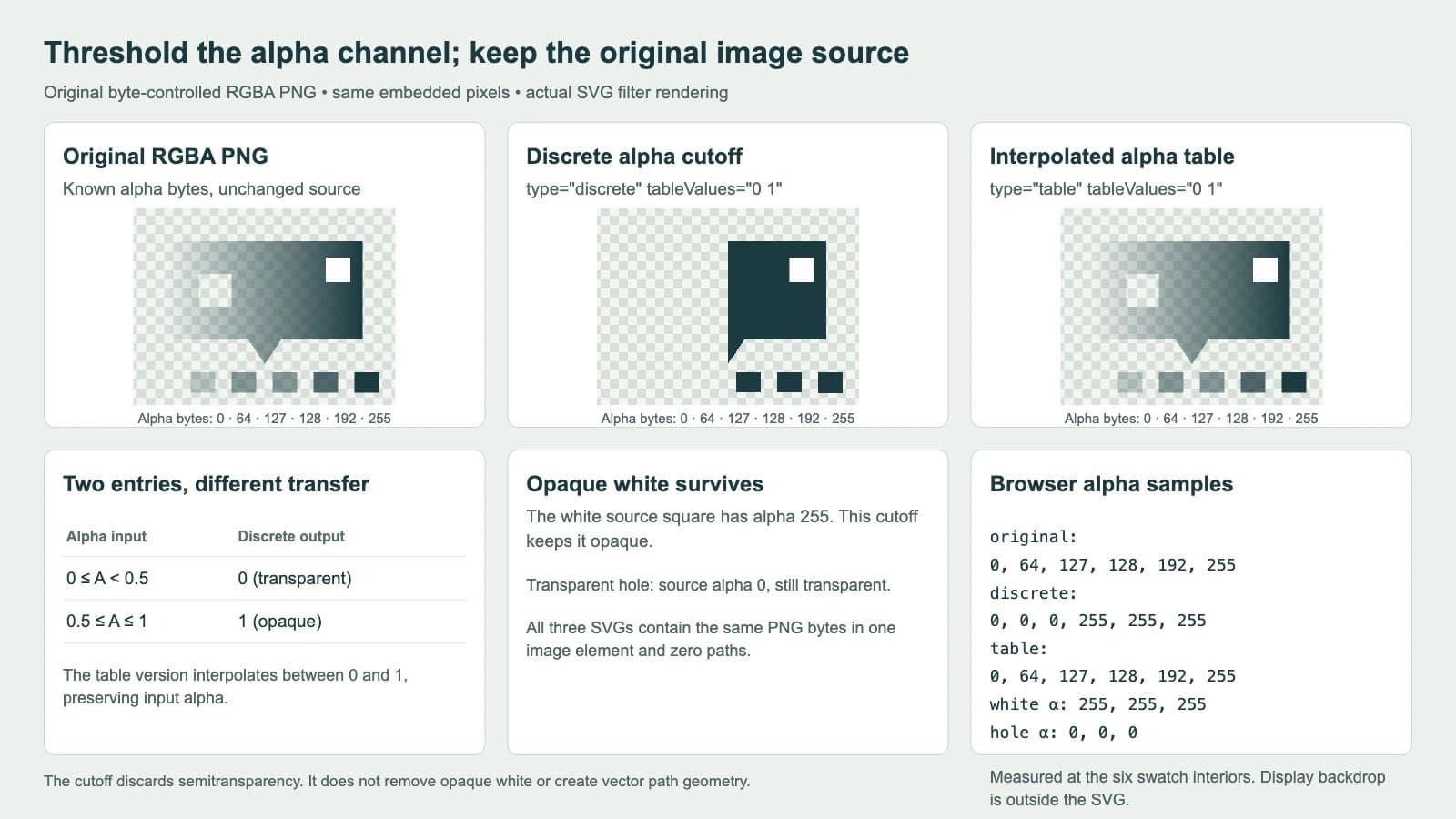
Our page loaded the actual SVG variants, drew them to a browser canvas and sampled the six swatch interiors. The output alpha bytes were:
| Input PNG alpha byte | Unfiltered output | Discrete 0 1 | Table 0 1 |
|---|---|---|---|
| 0 | 0 | 0 | 0 |
| 64 | 64 | 0 | 64 |
| 127 | 127 | 0 | 127 |
| 128 | 128 | 255 | 128 |
| 192 | 192 | 255 | 192 |
| 255 | 255 | 255 | 255 |
The normalized alpha values are these bytes divided by 255. Thus 127/255 is slightly below 0.5, while 128/255 is slightly above. These samples straddle the mathematical cutoff; an 8-bit PNG byte does not represent exactly 0.5.
The source hole measured alpha 0 in every version. The white patch measured 255 in every version. Those are observations from this controlled fixture, not a claim that any arbitrary artwork will keep every desired detail after thresholding.
Apply the transfer to alpha
The essential filter is short:
<filter id="alpha" filterUnits="userSpaceOnUse"
  x="0" y="0" width="320" height="240">
  <feComponentTransfer in="SourceGraphic">
    <feFuncA type="discrete" tableValues="0 1"/>
  </feComponentTransfer>
</filter>
Apply it to the image with filter="url(#alpha)". This sample's filter region covers its complete 320 by 240 source and viewport. Use bounds appropriate to your own artwork rather than copying those dimensions into an unrelated file.
The MDN feFuncA reference identifies it as the alpha transfer function inside feComponentTransfer. The component-transfer reference describes per-channel remapping and calculations on non-premultiplied color values.
The current Filter Effects specification gives unspecified channel functions an identity mapping. Our markup omits feFuncR, feFuncG and feFuncB; it changes only the alpha transfer function. That does not mean the visible colors over a background look identical: changing alpha changes their composited appearance.
Run the complete original PNG fixture
Save the following self-contained SVG as alpha-test.svg and open it in a browser. Its data URL contains our original controlled PNG. To compare the table version, change only type="discrete" to type="table". To compare the unfiltered version, remove the image's filter attribute. A colored or checkerboard page background helps reveal the transparent regions.
<svg xmlns="http://www.w3.org/2000/svg" width="320" height="240" viewBox="0 0 320 240">
<defs><filter id="alpha" filterUnits="userSpaceOnUse"
  x="0" y="0" width="320" height="240">
  <feComponentTransfer in="SourceGraphic">
    <feFuncA type="discrete" tableValues="0 1"/>
  </feComponentTransfer>
</filter></defs>
<image href="data:image/png;base64,iVBORw0KGgoAAAANSUhEUgAAAUAAAADwCAYAAABxLb1rAAAJ6ElEQVR4nO3UVexsZxXG4eLBnRXcIVD3tKey66krENwhuEPQHjTFneAOwR2CM2hw6ql7m3rx4If3kgsCf+ierpk9z5c89+/6Ln4b1bphI4BV1D4AoEv7AIAu7QMAurQPAOjSPgCgS/sAgC7tAwC6tA8A6NI+AKBL+wCALu0DALq0DwDo0j4AoEv7AIAu7QMAurQPAOjSPgCgS/sAgC7tAwC6tA8A6NI+AKBL+wCALu0DALq0DwDo0j4AoEv7AIAu7QMAurQPAOjSPgCgS/sAgC7tAwC6tA8A6NI+AKBL+wCALu0DALq0DwDo0j4AoEv7AIAu7QMAurQPWKOrxdXjGnHNuFZcO64T143rxfXjBnHDuFHcOG4SN42bxc3jFnHLuFVU3DpuE7eN28Xt4w5xx7hT3DnuEneNu8Xd4x5xz7hX3Ds2jk1i09gsNo8tYsvYKraObWLb2C62jx1ix1gXO8XOsUvsGkPsFrvHHrFn7BV7xz6xb+wX+8cBcWAcFAfHIXFoHBaHxxFxn7hv3C/uHw+IB8aD4sHxkHhoPCweHo+IR8aj4tHxmHhsPC4eH0+IJ8aT4snxlHhqPC2eHs+IZ8az4tnxnHhuPC+eHy+IF8aL4shYHy+Ol8RL42Xx8nhFHBWvjFfFq+M18dp4Xbw+3hBvjDfFm+Mt8dZ4W7w93hHvjHfFu+M98d54X7w/PhAfjA/Fh+Mj8dH4WHw8PhGfjE/Fp+Mz8dn4XHw+vhBfjC/Fl+Mr8dX4Wnw9vhHfjG/Ft+M7MYvvxvfi+/GD+GH8KH4cP4mfxs/i5/GL+GX8Ko6OY+LYOC6OjxPixDgpTo5T4tQ4LU6PM+LMOCvOjnPi3Dgvzo8L4sK4KC6OS+LSuCwujyvi1/Gb+G38Ln4ff4g/xp/iz/GX+Gv8Lf4e/4gN1d8OASwBFEABFEABFMASQAEUQAEsARRAARTA7gFrJIACKIACKIAlgAIogAIogAJYAiiAAiiAJYACKIACKIACWAIogAIogCWAAiiAAiiAAlgCKIACKIAlgAIogAIogAJYAiiAAiiAJYACKIACuOAEUAAFUAAFsARQAAVQAAVQAEsABVAABbAEUAAFUAAFUABLAAVQAAWwBFAABVAABVAASwAnEcANTa8EsJ0ACqAACqAAlgAKoAAKoAAKYAmgAAqgAJYACqAACqAACmAJoAAKoACWAAqgAAqgAApgCaAACqAAlgAKoAAKoAAKYAmgAAqgAJYACqAACuCCE0ABFEABFMASQAEUQAEUQAEsARRAARTAEkABFEABFEABLAEUQAEUwBJAARRAARRAASwBFEABFMASQAEUQAEUQAEsARRAARTAuvIB7P6b/0YABVAABVAASwAFUAAFsARQAAVQAAVQAEsABVAAF54ACqAACqAAlgAKoAAKoAAK4BoJoAAKoAAKYAmgAAqgAJYACqAACqAACmAJoAAK4MITQAFc+QDG0XFMHBvHxfFxQpwYJ8XJcUqcGqfF6XFGnBlnxdlxTpwb58X5cUFcGBfFxXFJXBqXxeVxRQlgOwEUQAEUQAEsARRAARRAARTANRJAARRAARTAEkABFEABLAEUQAEUQAEUwBJAARTAhSeAAiiAAiiAJYACKIACKIACuEYCKIACKIACWAIogAIogCWAAiiAAiiAAlgCKIACuPAEUAAFUAAFsARQAAVQAAVQANdIAAVQAAVQAEsABVAABbAEUAAFUAAFUABLAAVQABeeAAqgAAqgAJYACqAACqAACuAaCaAACqAACmAJoAAKoACWAAqgAAqgAApgCaAACuDCE0ABFEABFMASQAEUQAEUQAFcIwEUQAEUQAEsARRAARTAEkABFEABFMBRArhxbBKbxmaxeWwRW8ZWsXVsE9vGdrF97BA7xrrYKXaOXWLXGGK32D32iD1jr9g79ol9Y7/YPw6IA+OgODgOiUPjsDg8jigBFEABFMASQAEUQAEUQAEsARRAARTAEkABFEABXAICKIACKIACWAIogAIogAIogCWAAiiAAlgCKIACKIACKIAlgAIogAJYAiiAAiiAAiiAJYACKIACWAIogAIogAIogCWAAiiAAlgCKIACKIALTgAFUAAFUABLAAVQAAVQAAWwBFAABVAASwAFUAAFUAAFsARQAAVQAEsABVAABVAABbAEUAAFUABLAAVQAAVQAAWwBFAABVAASwAFUAAFcMEJoAAKoAAKYAmgAAqgAAqgAJYACqAACmAJoAAKoAAKoACWAAqgAApgCaAACqAACqAAlgAKoAAKYAmgAAqgAAqgAJYACqAACmAJoAAKoAAuOAEUQAEUQAEsARRAARRAARTAEkABFEABLAEUQAEUQAEUwBJAARRAASwBFEABFMCJBJDFssgB7P4blkj7AJaSADIJ7QNYWosYwO4/Ycm0D2CpLVIAu/+CJdQ+gKUmgCy19gEsvUUIYPcfsKTaBzAJnQHsvp0l1j6ASRBAllL7ACajI4DdN7Pk2gcwKVdlALtvZQLaBzApAshSaR/A5FwVAey+kYloH8AkzTOA3bcxIe0DmCQBZCm0D2Cy5hHA7puYmPYBTNqYAey+hQlqH8CkCSALrX0AkzdGALtvYKLaB7ASrkwAu7czYe0DWAkCyEJqH8DK+H8C2L2ZiWsfwEr5XwLYvZUV0D6AlSKALJT2AayctQSweyMron0AK+k/BbB7GyukfQArSQBZCO0DWFn/LoDdm1gx7QNYaf8awO4trKD2Aaw0AaRV+wBW3voF2MCKah8A0KV9AECX9gEAXdoHAHRpHwDQpX0AQJf2AQBd2gcAdGkfANClfQBAl/YBC2xoMvYdRzYZ+471Tca+Y9Zk7Ds2NBn1jrE/ZUqGJmPfIYACOJvDHQI4cUOTse8QQAGczeEOAZy4ocnYdwigAM7mcIcATtzQZOw7BFAAZ3O4QwAnbmgy9h0CKICzOdwhgBM3NBn7DgEUwNkc7hDAiRuajH2HAArgbA53CODEDU3GvkMABXA2hzsEcOKGJmPfIYACOJvDHQI4cUOTse8QQAGczeEOAZy4ocnYdwigAM7mcIcATtzQZOw7BFAAZ3O4QwAnbmgy9h0CKICzOdwhgBM3NBn7DgEUwNkc7hDAiRuajH2HAArgbA53CODEDU3GvkMABXA2hzsEcOKGJmPfIYACOJvDHQI4cUOTse8QQAGczeEOAZy4ocnYdwigAM7mcIcATtzQZOw7BFAAZ3O4QwAnbmgy9h0CKICzOdwhgBM3NBn7DgEUwNkc7hDAiRuajH2HAArgbA53CODEDU3GvkMABXA2hzsEEGCZtQ8A6NI+AKBL+wCALu0DALq0DwDo0j4AoEv7AIAu7QMAurQPAOjSPgCgS/sAgC7tAwC6tA8A6NI+AKDLPwG8PYVZS9xMPAAAAABJRU5ErkJggg==" width="320" height="240" filter="url(#alpha)"/>
</svg>
The complete fixture retains the PNG bytes. The filter does not recolor the stored source file or replace it with paths. The embedded-raster diagnosis explains why the outer .svg filename does not establish vector geometry.
Distinguish a step from an interpolated table
Both transfer types use tableValues, but interpret the entries differently. The type reference lists the available transfer functions; the tableValues reference describes the lookup list.
For discrete, each entry occupies an equal input interval. With the two entries 0 1, the first interval is 0 ≤ A < 0.5, and the second is 0.5 ≤ A ≤ 1. The output jumps between the two values.
For table, the entries are endpoints of linear interpolation regions. With 0 1, interpolation maps each input alpha back to itself. It is an identity transfer, which is why our sampled table column matches the unfiltered column.
The specification's interval formulas also explain these documented alternatives:
| feFuncA setup | Alpha transfer |
|---|---|
| discrete with 0 1 | Hard cutoff at 0.5 |
| discrete with 0 0 0 1 | Hard cutoff at 0.75 |
| table with 0 1 | Identity interpolation |
| table with 0 0 1 1 | A middle ramp rather than a hard cutoff |
Our screenshot tests the two-entry discrete and table cases. The four-entry rows describe the specification's mappings; they are not additional measured artwork variants. Choose type deliberately instead of assuming that a list containing only zeros and ones must produce a binary threshold.
Keep the input alpha separate from later opacity
Feed the filter actual source alpha. In our fixture, that alpha is stored in the PNG pixels. For a vector test, use a fill's alpha or fill-opacity before applying the filter.
The Filter Effects compositing model applies filters before opacity. An overall opacity on the element or a surrounding group can therefore reduce the rendered result after the filter. If you threshold the source and then composite the result with lower opacity, it can look translucent again. Keep that later opacity out of a controlled threshold test.
A hard cutoff also discards the source's semitransparent transition. Faint pixels vanish, and retained translucent pixels become fully opaque. That may remove a soft glow or a thin edge you intended to keep. Inspect the result at its destination size and against more than one backdrop. Binary output alpha does not guarantee that the final displayed edge is free from sampling or compositing effects.
If translucency is part of the design, keep it or use a gradual transfer rather than forcing a cutoff. For a deliberately monochrome visibility mask, the SVG CSS mask guide covers a different presentation workflow.
Opaque white needs a different diagnosis
The white patch survives because its alpha is fully opaque. This operation selects by alpha, not by whether a pixel looks white. Fully opaque background pixels do not become transparent under this 0 1 discrete mapping.
If the file contains an unwanted white background, first determine whether it is a separate SVG shape or part of a raster image. Delete or edit an unwanted vector background shape directly. For a PNG with white baked into its pixels, clean the raster source before recovery or use a suitable background-removal workflow. The transparent-background SVG guide explains those cases.
Keep genuinely white parts of the subject in mind before removing a background by color. This alpha filter cannot infer which white region is a background and which belongs to the artwork, nor restore color information lost when the source was flattened.
Prepare a transparent raster before vector recovery
PerfectVector can help when the finished design is raster-only and you need SVG geometry. Prepare a PNG with genuine transparency first, then convert the PNG to SVG. Compare the preview over a contrasting background, inspect the silhouette and openings, and check the downloaded file for unwanted background geometry.
Our filter example is a display experiment. It does not submit a filtered SVG for vectorization, and it does not demonstrate a new traced result. If you need to keep a thresholded raster appearance, prepare and verify an actual raster delivery copy in your editor before considering vector recovery. Inspect that copy's alpha rather than relying on the browser preview.
Use an available vector master directly. Preserve semitransparency when it carries useful design information, and redraw a simple symbol when that is easier to maintain. The image-vectorization overview separates raster reconstruction from changing an existing SVG's presentation.
FAQ
What alpha cutoff does discrete tableValues 0 1 use? Input alpha below 0.5 maps to 0; alpha at or above 0.5 maps to 1. In the tested 8-bit PNG swatches, byte 127 becomes transparent and byte 128 becomes opaque.
Why does tableValues 0 1 leave my transparency unchanged? With type table, those entries define linear interpolation from 0 to 1, which is identity. Use type discrete for the two-step mapping shown here.
Will this remove white or turn a PNG into vector paths? No. Fully opaque white passes this alpha cutoff. Our SVG variants still contain the same PNG in one image element and zero paths; background cleanup and vector reconstruction are separate jobs.
Sources
- W3C — Filter Effects Level 1 — Defines identity defaults, non-premultiplied channel transfer and table/discrete interval formulas.
- MDN — feComponentTransfer — Explains the channel remapping performed by the filter primitive.
- MDN — feFuncA — Identifies the alpha-channel transfer function.
- MDN — type — Lists component-transfer function types and their attribute context.
- MDN — tableValues — Describes the lookup entries used by table and discrete transfer.
Need vector geometry from a raster design? Prepare and convert a transparent PNG, then inspect the preview's silhouette and holes and verify the downloaded SVG over a colored background.
More from the blog

Graphviz SVG Images: Keep Node Artwork Portable
Add SVG artwork to a Graphviz node, inspect its image reference, and test a complete asset bundle against a moved diagram and a self-contained delivery copy.

Matplotlib SVG: Keep Plot and Logo Artwork as Paths
Export your Matplotlib plot as SVG, compose separate logo paths with svgutils, and check the delivered file for embedded pixels, placement, and font changes.