Should You Vectorize AI Art? Check Your End Use
Most AI art doesn't need to be vectorized. You need a vector for cutting, screen printing, and big signs. For most prints, a high-res raster is fine. Here's how to tell.
On this page
Usually, no. Vectorize AI art when the job depends on editable paths: a cutting-machine file, a flat spot-color separation, a reusable logo master, or a deliverable whose printer or client specifically requires vector artwork. For DTG apparel, sublimation, posters, and social posts, a high-resolution raster may be the correct file as long as it meets the provider's product-specific requirements. This guide gives you a simple way to decide based on what you're making, and clears up the thing that trips everyone up: vectorizing and upscaling are not the same fix.
The quick version
- Vectorize when you're cutting (Cricut, vinyl, stickers), preparing flat spot-color artwork, making an editable logo master, or following a vendor's vector-file requirement.
- Stay raster when you're printing detailed or photographic art through a workflow that accepts PNG or JPEG. Meet the provider's resolution and size requirements at the final print dimensions.
- Vectorizing and upscaling fix different problems. Upscaling adds pixels. Vectorizing replaces them with paths.
- Flat, bold AI art vectorizes well. Painterly or photoreal art doesn't, and usually doesn't need to.
- When the job does call for one, turn your AI art into a clean SVG.
The short answer: usually no
Most AI art is fine as a high-resolution raster. If your image is big enough and sharp enough for where it's going, converting it to a vector adds work without adding anything you'll actually use. The reason people think otherwise is that "send me a vector" gets repeated as a blanket rule, even by clients and printers who don't strictly need one for the job in front of them.
So the useful question isn't "should I vectorize my AI art?" in general. It's "does this thing I'm making need a vector?" A handful of jobs genuinely do, and for those it matters a lot. Everything else is fine as a raster.
When you do need a vector
Reach for a vector when the output depends on clean, scalable paths rather than pixels:
- Cutting machines. Cricut documents that raster uploads come in as a single layer, while SVG files can preserve separate vector layers. A color-separated SVG gives you explicit cut paths and control over each layer. Here's how to turn AI art into a cut file.
- Flat spot-color screen printing. Each ink color needs its own separation, and screen-printing artwork guidance notes that vectorized images work well for crisp film positives. Some shops also accept high-resolution raster or prepare separations for you, so ask before converting. More on vector art for t-shirts. If your shop needs paths from flat raster art, use the screen-printing artwork converter, then check the palette and smallest details with the printer.
- Large-format logos and graphic signage. A vector is ideal for flat artwork that must scale across unknown dimensions. But large-format doesn't automatically mean vector: current banner-preparation guidance also accepts raster artwork that meets the required resolution at final size.
- Logos and brand marks. Anything you'll reuse at every size, from a favicon to a storefront sign, should be a vector so it stays crisp and editable. If that's your case, vectorize the logo and keep a master file.
- A client or printer explicitly asks for one. Sometimes the answer is just "because they need the editable source." Give them the vector.
If your project is on this list, that's your cue to convert the AI art into a clean SVG.
When you don't (a high-res raster is fine)
For a lot of the most common AI-art uses, a good raster file is the right answer, and forcing a vector can actually make it worse:
- DTG apparel. Detailed artwork and transparency are well suited to raster files. For example, Printful's DTG file guide recommends a transparent PNG and says required DPI varies by product.
- Sublimation and other print-on-demand products. High-resolution raster artwork is commonly accepted, especially for photographic detail. Printify accepts JPEG, PNG, and SVG, and its file requirements say to use JPEG or PNG when most of the design is raster.
- Posters, framed prints, and wall art at their intended size. A raster can print sharply when its pixel dimensions meet the printer's required DPI at the final physical size.
- Social, web, and digital products. Screens are pixels. A sharp PNG or JPG is exactly right.
There's an honest catch worth saying out loud: a lot of AI art is painterly, textured, or photoreal, and that kind of image shouldn't be vectorized. Tracing it flattens all that soft detail into solid shapes and usually looks worse than the original. If your art has gradients and depth and it's going on a mug or a poster, keep it raster.
Vectorize vs. upscale: they fix different problems
Here's the mix-up behind most of the confusion. When AI art looks bad in print, the problem is usually resolution, not format. AI generators often output fairly small images, and blown up past their real size they go blurry. People assume the fix is "make it a vector," when what they actually need is more pixels.
Two different problems, two different fixes:
- Upscaling adds pixels. It keeps the image as a raster and preserves the detail, texture, and gradients. This is what you want for painterly or photoreal art headed to DTG, sublimation, or a poster. You're not changing the format, just making the file big enough.
- Vectorizing replaces pixels with paths. It gives you infinite scaling and an editable file, but it flattens the art into solid shapes. This is what you want for flat, graphic art headed to a cutter, a screen printer, or a big sign.
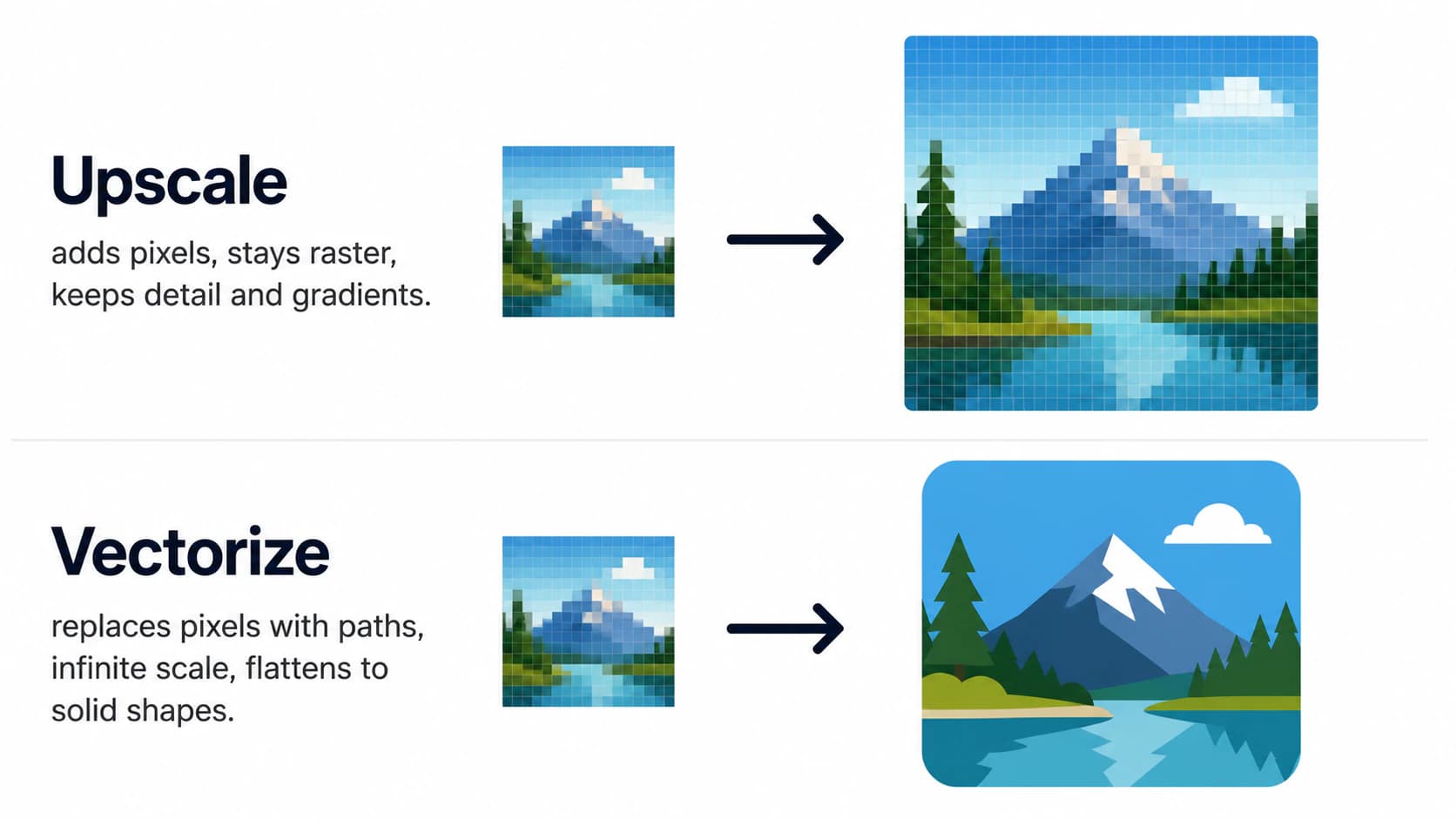
So before you convert anything, ask which problem you have. If the image is just too small, upscale it. If you need paths for cutting or clean scaling, vectorize it.
A quick way to decide
Here's the whole decision at a glance:
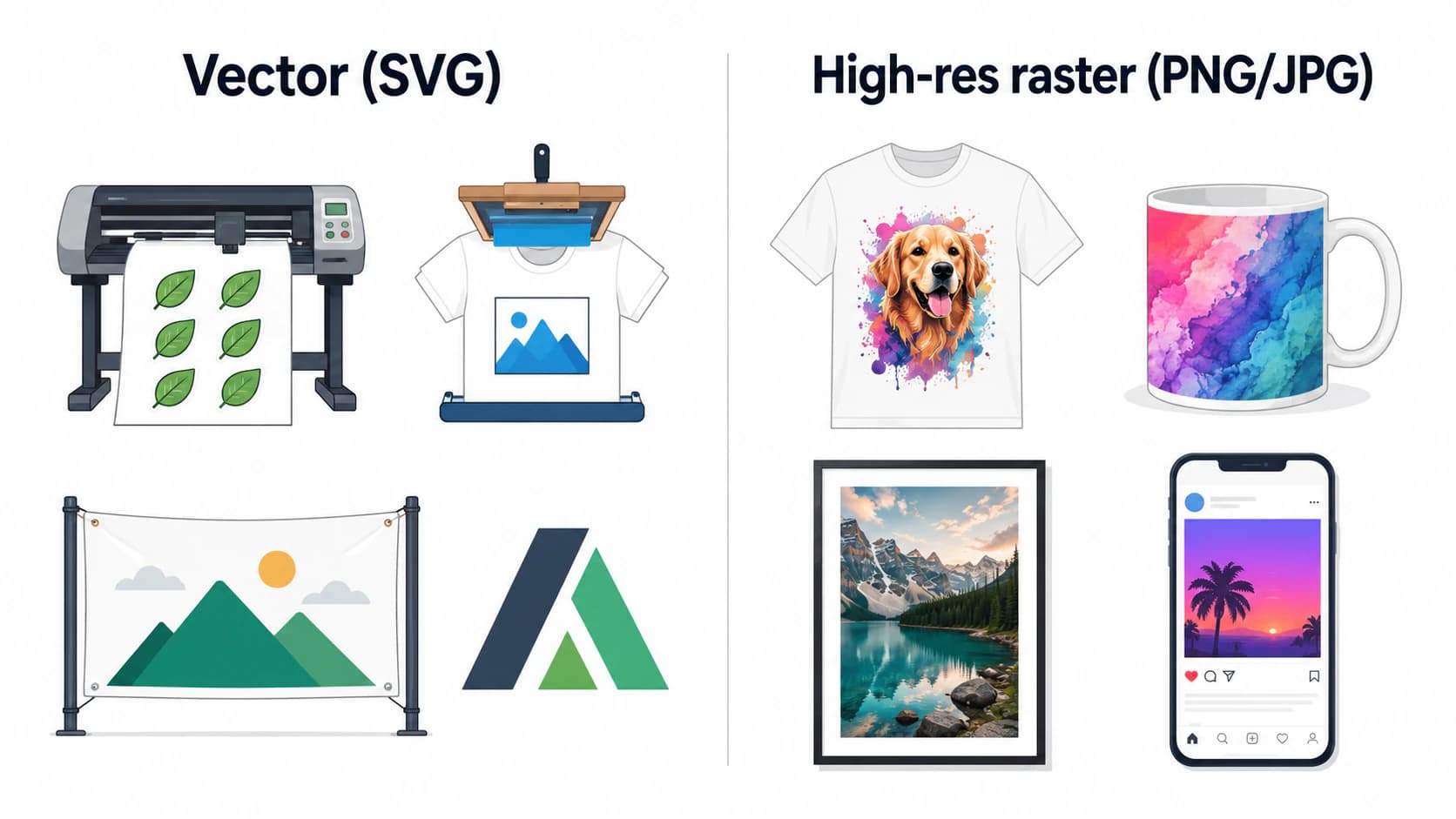
And the same split, broken down by what you're making:
| What you're making | Vector or raster? | Why |
|---|---|---|
| Cricut / vinyl / sticker cut file | Vector (SVG) | The machine cuts paths, not pixels |
| Screen-printed shirt | Vector preferred for flat spot colors | Clean, editable color separations; confirm with the shop |
| DTG-printed shirt | High-res raster commonly accepted | Follow the product's file and DPI requirements |
| Sublimation mug or tumbler | High-res raster commonly accepted | Detailed raster art is supported; check the product template |
| Poster or framed wall art | High-res raster at final size | Use the printer's required pixel dimensions and DPI |
| Banner or sign | Depends on artwork and vendor | Vector for scalable graphics; compliant high-res raster for photos |
| Logo or brand mark | Vector | Reused at every size, stays editable |
| Social, web, digital download | High-res raster | Screens are pixels |
What this looks like with PerfectVector
When your project is one of the vector cases, and your AI art is the flat, graphic kind, PerfectVector traces it into a clean, low-node SVG with each color as its own editable path, ready for a cutter or a screen printer. You can convert your design and check the paths before you use it. Converting and previewing are free; you only spend a credit when you download the finished file.
And when it isn't a vector case, this is us telling you not to bother. If you're printing a detailed, painterly piece on a shirt or a mug, keep it as a high-resolution raster and upscale it if it's too small. Vectorizing it would only throw away the detail that made it good. The whole point is to use the right file for the job, which sometimes means not converting at all. If you want the deeper how-to for the times you are vectorizing, preparing AI art for print covers it, and Midjourney art specifically walks through which of it traces cleanly.
FAQ
Do you need to vectorize AI art? Usually not. You need a vector when the workflow depends on paths, such as a cut file, flat spot-color separation, reusable logo master, or editable file a client requests. DTG, sublimation, posters, and screen output commonly accept high-resolution raster artwork, but the exact vendor requirements still decide.
Should you vectorize or upscale your AI art? It depends on the problem. If the image just looks blurry because it's too small, upscale it to add pixels and keep it as a raster. If you need clean paths for cutting or scaling to any size, vectorize it. Upscaling preserves detail and gradients; vectorizing flattens the art into solid shapes.
Do t-shirt designs need to be vector? It depends on the print method and the shop. Vector artwork is useful for clean spot-color separations in screen printing. DTG providers commonly accept high-resolution raster files; Printful, for example, recommends transparent PNG for its DTG workflow. Check the exact product requirements before converting anything.
Can you vectorize an AI image? Yes, if it's flat and graphic with distinct colors, it traces into a clean vector. If it's painterly, textured, or photoreal, it won't trace cleanly, and it usually doesn't need to, since that kind of art is meant for raster output anyway.
Does AI art print well without vectorizing? Yes, when the raster file meets the printer's specifications at the final output size. DTG, sublimation, and poster workflows commonly accept raster artwork, but required dimensions, DPI, color profile, and transparency vary. Upscaling may help when resolution is the only issue; it doesn't repair every source-image defect.
When is it worth vectorizing AI art for print? When the output needs paths or true scalability: cut files, flat spot-color separations, logos, and editable files a client or vendor requested. For large-format work, use vector for scalable graphic artwork or a raster that meets the printer's final-size requirements.
Sources
Always confirm the specification for the exact product and print provider.
- Adobe — Raster vs. vector — resolution, scaling behavior, and typical uses of both image types.
- Cricut Help Center — How to upload images into Design Space — raster, SVG, and layered-upload behavior for cutting projects.
- ScreenPrinting.com — How to screen print T-shirts — color separation, film positives, and the role of vectorized artwork.
- Printful — Create the perfect DTG file — PNG, transparency, color space, and product-specific DPI guidance.
- Printify — What type of print files does Printify require? — supported raster and vector files and current resolution recommendations.
- Signs.com — How to prepare files for banner printing — large-format resolution guidance and when vector artwork helps.
Not sure which bucket you're in? If the job needs cut paths, editable spot-color separations, or a scalable logo, turn your AI art into a clean SVG. If the provider accepts a raster, keep it and meet the product's final-size requirements.
More from the blog
SVGTrace Alternatives: Compare Craft Vectorizers
Compare SVGTrace, PerfectVector, Inkscape, and Vectorizer.AI by color layers, path cleanup, Cricut testing, licensing, and payment model.
Write AI Prompts for Vector Art That Traces Cleanly
A 'vector style' AI prompt gives you a raster that only looks like a vector. Here's how to prompt for art that actually traces into a clean, editable SVG.