SVG Pattern Transform: Rotate the Fill, Keep the Outline
Rotate or shift repeated SVG paint inside a fixed emblem with patternTransform. Compare a whole-object rotation and verify source, geometry, and browser pixels.
On this page
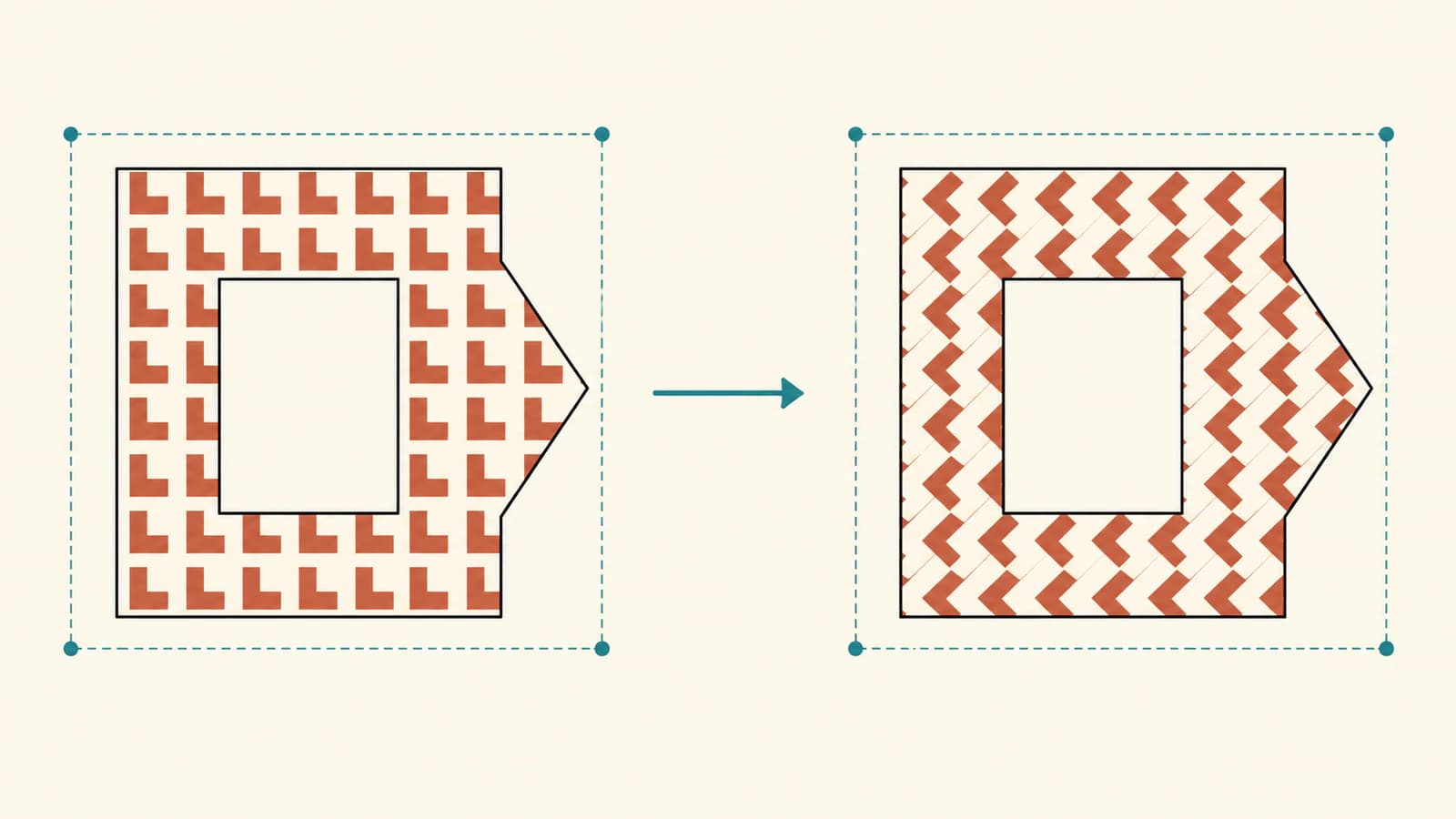
To rotate an SVG pattern inside a fixed shape, put patternTransform="rotate(...)" on the pattern element. Keep the shape's own transform unchanged. To shift where the repeated artwork falls, use a translation on that same pattern instead.
These edits move the paint coordinate system. Rotating a group that contains the shape moves its displayed geometry as well. Our original hollow emblem makes the difference visible: the outline stays upright when the paint turns, while a separate whole-object control tilts the emblem and its opening.
Choose the element that should move
The current patternTransform reference describes a transform list applied to the pattern tile. The SVG2 pattern definition explains the tile's coordinate systems and its paint transformation.
In this example, the motif is a small asymmetric bent mark repeated inside a 24-unit tile. The shape that receives the paint is a different path: an asymmetric badge with a rectangular opening. Keeping those roles separate makes the editing decision clearer.
| Change you want | Attribute location | What to inspect |
|---|---|---|
| Turn the repeated motif field | patternTransform on pattern | Motif direction and tile lattice |
| Shift motif placement within the badge | patternTransform on pattern | Phase at the outline and opening |
| Turn the entire badge | transform on its group | Displayed contour, opening, and bounds |
We use the SVG attribute directly. The MDN note about CSS transform implementation is not a promise that a CSS property called pattern-transform will work in your destination.
Open a complete paint-rotation starter
Save this SVG as pattern-emblem.svg and open it in a browser. It is self-contained, with no external image or library. The pattern's rotation is 30 degrees about source point (100,80); the receiving group has no transform.
<svg xmlns="http://www.w3.org/2000/svg" width="200" height="160" viewBox="0 0 200 160">
  <defs>
    <pattern id="motif" patternUnits="userSpaceOnUse" patternContentUnits="userSpaceOnUse" width="24" height="24" patternTransform="rotate(30 100 80)">
      <rect width="24" height="24" fill="#f4f0e4"/>
      <path d="M3 4 H15 V8 H9 V17 H3 Z" fill="#c15a38"/>
    </pattern>
  </defs>
  <g>
    <path id="emblem" d="M30 25 H130 L170 65 L140 135 H30 Z M65 60 H110 V100 H65 Z" fill="url(#motif)" fill-rule="evenodd"/>
  </g>
</svg>
The evenodd fill rule leaves the inner rectangle open. See the fill-rule reference for the crossing-based rule. The opening belongs to the emblem path, so rotating the repeated paint does not rotate that opening.
Both patternUnits and patternContentUnits are explicit in this source. The patternUnits reference defines the tile coordinate system. Our pattern-units guide covers tile dimensions and motif coordinates in detail. Here, we hold them fixed to isolate the transform; this is not a recipe for designing a seamless repeat.
Compare rotation, translation, and a geometry control
Make three copies of the starter and change only the indicated attribute:
- For the original paint, remove
patternTransformfrom the pattern. - For shifted paint, replace it with
patternTransform="translate(7 5)". - For the whole-object control, remove the pattern transform and add
transform="rotate(20 100 80)"to the receivinggelement.
The translated copy keeps the motif's orientation but changes where it falls inside the badge. A mark at the boundary may enter or leave the painted shape. The rotation copy turns the motif and its repeating lattice together; it is not merely spinning each motif around its own center.
For the object control, the transform attribute reference documents rotation about a chosen point. That transform changes how the group's geometry is displayed. Its ordinary pattern paint travels with it; user-space pattern units do not make this example's paint globally stationary.
Start with one transform while diagnosing the result. If you later combine rotation, translation, and scaling, check their order in the SVG transform-order guide. Combining transforms introduces a separate coordinate question that this controlled comparison avoids.
Verify the geometry and the pixels separately
We rendered the four original variants in Chrome at 200×160 and 400×320 CSS pixels. The browser's device pixel ratio was 2. Each source was also decoded and drawn into a canvas whose backing dimensions matched the stated test size, allowing us to read its pixels independently from the screenshot.
Every file contains the same emblem d string and the same motif path: two path elements and no image element. Their complete file hashes differ because their transforms differ. The emblem's local geometry box is (30,25,140,110) in every case.
That local box alone would miss the whole-object change. For this polygonal emblem, we also transformed its five outer vertices through the actual browser matrix and measured their displayed extent. The table normalizes the larger viewport back to source units:
| Variant | Pattern transform | Group transform | Displayed outer extent x,y,width,height |
|---|---|---|---|
| Original | none | none | 30,25,140,110 |
| Rotate paint | rotate(30 100 80) | none | 30,25,140,110 |
| Shift paint | translate(7 5) | none | 30,25,140,110 |
| Rotate object | none | rotate(20 100 80) | about 15.41,4.38,155.50,140.99 |
The normalized extents agreed at both tested sizes. The object control retains the same d string, yet its displayed geometry changes. Source-data equality is therefore useful evidence of retained path construction, not sufficient evidence that the visible outline stayed put.
For the paint-only variants, full canvas pixel buffers differed from the original at each size. At source point (45,45), the original sample was the tile background (244,240,228) and the rotated-paint sample was the terracotta motif (193,90,56), both with alpha 255. The translation did not change that particular sample, even though its overall buffer differed. A single sampled point can miss a paint shift.
At source (85,80), the opening had alpha zero in all eight cases. Fully opaque pixel bounds were also unchanged for the three upright variants at each size; those thresholded pixel bounds are not the same measurement as exact contour-vertex extents. These observations are limited to our authored source and browser, not a renderer compatibility certificate.
Check the saved destination before delivery
Keep the original emblem as a geometry reference, and retain the paint treatment in a separate copy. A repeating paint server does not turn every visible motif into an independent shape that a downstream cutter or editor can select. If that destination requires expanded geometry, prepare and inspect that expansion separately. The SVG editing guide covers broader source changes.
If the outline turns unexpectedly, inspect its own group and ancestor transforms before adjusting the pattern. If several inline copies unexpectedly share one paint treatment, give their pattern IDs and matching fill references unique names. Our comparison fixture isolates those IDs; separate standalone SVG files do not share that document-level resource namespace.
If your custom motif or emblem exists only as a PNG or JPG and you need editable contours, prepare an SVG with PerfectVector, inspect the outline and opening, and retain a clean master. Then build the repeat and choose its paint transform in your SVG code. Vectorization prepares artwork; it does not design the repeat, select its phase, or guarantee a destination's pattern handling. Existing clean paths can go straight to pattern editing; the vectorization guide explains when raster conversion is useful.
FAQ
Does patternTransform change my emblem's path data? It transforms the pattern paint in this example. The emblem's d string stays unchanged. Inspect the receiving group and ancestor transforms too, since displayed geometry can move without changing d.
Can I shift a pattern without rotating it? Yes. The translate(7 5) variant shifts its paint placement while retaining motif orientation. Keep the tile dimensions and receiving geometry fixed when testing the effect.
Why does the pattern also turn when I rotate the whole group? The group transform changes the displayed receiving geometry and its paint. That is a different operation from placing a transform only on the pattern element.
Are the repeated motifs separate editable paths? Our source has one motif path in a paint server and one receiving emblem path. The visible repeats are not separately authored path elements; expand and inspect them separately if your destination requires that form.
Sources
- MDN — patternTransform — Pattern transform lists and the attribute implementation note.
- W3C — SVG2 patterns — Tile coordinate systems and paint transformation.
- MDN — fill-rule — The even-odd opening in the receiving path.
- MDN — transform — Rotation applied to displayed group geometry.
- MDN — patternUnits — The explicit tile coordinate system held fixed in this comparison.
More from the blog

SVG.js: Import Artwork, Edit a Path, and Export SVG
Import trusted SVG markup into SVG.js, recolor a named path, and check full-root versus children-only exports. Keep original geometry and inspect saved files.

SVG Relative Path Commands: Track the Current Point
Read absolute and relative SVG paths by tracking the current point. Test moveto pairs, closepath resets and cubic coordinates with an original matched example.