SVG Pattern Units: Keep Repeated Motifs the Right Size
Control SVG pattern spacing and motif size with patternUnits, patternContentUnits, and viewBox. Compare resizing a shape with scaling its entire group.
On this page
To keep an SVG pattern's repeat spacing constant while changing a shape's dimensions, use patternUnits="userSpaceOnUse" and a numeric tile width and height. Control the artwork inside that tile separately with patternContentUnits or a pattern viewBox.
That distinction matters when a small motif fills both a narrow badge and a wide banner. You may want more copies in the banner, larger gaps between copies, or a stretched motif. Each is a different coordinate choice. Scaling the whole banner group changes the result again.
If the motif already consists of SVG paths, keep those paths. Vectorization belongs earlier in the workflow, when the only source is a raster image.
Separate the tile from its artwork
A pattern has a repeating rectangular tile and content drawn inside it. patternUnits controls the tile's x, y, width, and height. patternContentUnits controls the content coordinates, unless the pattern has a viewBox.
| Setting | Controls | Default | Useful choice |
|---|---|---|---|
patternUnits | Tile position and dimensions | objectBoundingBox | userSpaceOnUse for numeric spacing in the target's current user coordinates |
patternContentUnits | Coordinates of paths and shapes inside the tile | userSpaceOnUse | objectBoundingBox when motif dimensions should depend on the target's bounds |
Pattern viewBox | A coordinate rectangle fitted into each tile | None | A reusable motif coordinate system, such as 0 0 40 40 |
With objectBoundingBox, a width of .25 means one quarter of the painted object's bounding-box width. It does not mean a quarter of the motif's width. A 120-unit-wide rectangle gets a 30-unit tile; a 240-unit-wide rectangle gets a 60-unit tile.
The content default stays userSpaceOnUse. Changing only patternUnits can therefore change the gaps between motifs while leaving each motif the same size. Set both attributes deliberately instead of assuming they move together.
Compare four versions of one leaf
We drew the leaf paths for this example and rendered the SVG in a browser. Both target rectangles are 80 units tall; their widths are 120 and 240. The screenshot adds labels and backgrounds around those original shapes. It is an SVG demonstration, not a PerfectVector conversion result.
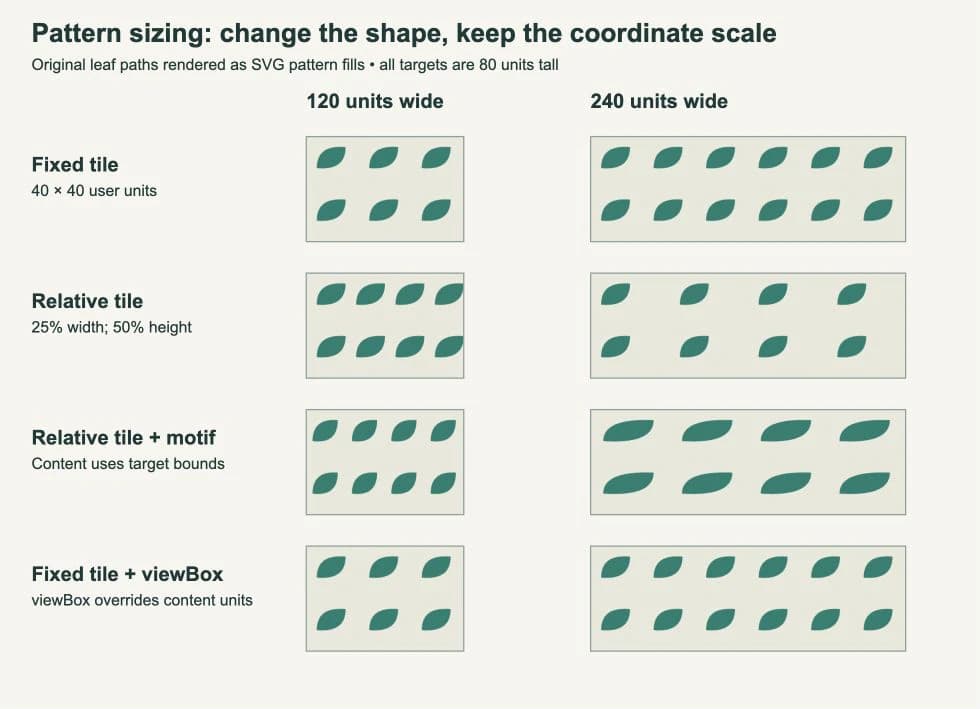
Read the rows from top to bottom:
- A fixed 40 × 40 tile produces three columns in the narrow rectangle and six in the wide one. Leaf dimensions stay unchanged.
- A tile width of
.25keeps four columns in both targets. The wider rectangle has more space between leaves because the leaf coordinates still use user units. - Bounding-box content coordinates stretch the leaf horizontally when the target width doubles. Its vertical size stays the same because the target height is unchanged.
- A fixed 40 × 40 tile with
viewBox="0 0 40 40"returns to the first row's result, even thoughpatternContentUnits="objectBoundingBox"remains in the markup. The patternviewBoxtakes precedence.
Open the complete example
Save this as pattern-units.svg and open it directly in a browser. The four rows use the same definitions as the figure, without its labels and backgrounds. Each pair of rectangles sits in translated groups so their local origins are comparable.
<svg xmlns="http://www.w3.org/2000/svg" width="560" height="420" viewBox="0 0 560 420">
<defs>
  <pattern id="fixed" patternUnits="userSpaceOnUse" width="40" height="40">
    <path d="M8 24 Q8 6 30 8 Q30 26 8 24Z" fill="#127f70"/>
  </pattern>
  <pattern id="tile" patternUnits="objectBoundingBox" width=".25" height=".5">
    <path d="M8 24 Q8 6 30 8 Q30 26 8 24Z" fill="#127f70"/>
  </pattern>
  <pattern id="both" patternUnits="objectBoundingBox" patternContentUnits="objectBoundingBox" width=".25" height=".5">
    <path d="M.04 .30 Q.04 .08 .20 .10 Q.20 .33 .04 .30Z" fill="#127f70"/>
  </pattern>
  <pattern id="box" patternUnits="userSpaceOnUse" patternContentUnits="objectBoundingBox" width="40" height="40" viewBox="0 0 40 40">
    <path d="M8 24 Q8 6 30 8 Q30 26 8 24Z" fill="#127f70"/>
  </pattern>
</defs>
  <g transform="translate(20 20)"><rect width="120" height="80" fill="url(#fixed)"/></g>
  <g transform="translate(220 20)"><rect width="240" height="80" fill="url(#fixed)"/></g>
  <g transform="translate(20 120)"><rect width="120" height="80" fill="url(#tile)"/></g>
  <g transform="translate(220 120)"><rect width="240" height="80" fill="url(#tile)"/></g>
  <g transform="translate(20 220)"><rect width="120" height="80" fill="url(#both)"/></g>
  <g transform="translate(220 220)"><rect width="240" height="80" fill="url(#both)"/></g>
  <g transform="translate(20 320)"><rect width="120" height="80" fill="url(#box)"/></g>
  <g transform="translate(220 320)"><rect width="240" height="80" fill="url(#box)"/></g>
</svg>
Start with the fixed pattern and change only the second rectangle's width. Then inspect tile and both before changing a path. This keeps the coordinate choice separate from the artwork itself. For broader path and color changes, use the guide to editing an SVG.
Use viewBox when the motif has its own coordinates
A pattern viewBox lets the leaf keep a familiar drawing area while the tile has a separate size. The SVG pattern specification fits that drawing area into the tile using viewBox and preserveAspectRatio.
In the last row, both the tile and the viewBox are 40 × 40, so there is no aspect-ratio mismatch. If you later make the tile rectangular, the default preserveAspectRatio="xMidYMid meet" keeps the motif's proportions and centers the fitted drawing area. preserveAspectRatio="none" allows independent horizontal and vertical scaling. Choose that only when distortion is intentional.
Changing patternContentUnits will not fix sizing while a pattern viewBox is present: that attribute has no effect in this case. Change the tile dimensions, the viewBox, or its aspect-ratio rule according to which part should change.
A pattern is useful when one definition should paint a repeated fill. If you need individually placed copies instead, SVG symbols and use instances fit that job more directly.
Resizing the rectangle differs from scaling its group
userSpaceOnUse fixes spacing in user coordinates, not in permanent screen pixels. A transform can scale those coordinates, including the pattern fill.
To turn or shift the paint while retaining the receiving outline, use SVG pattern transforms. Compare a pattern-level edit with a whole-group transform; unchanged path data alone does not prove unchanged displayed geometry.
We also opened two versions with the fixed definition above. The first rectangle had width="240". The second retained width="120" inside a group with transform="translate(20 120) scale(2 1)". Both occupied 240 screen units in that document, but the first showed six leaf columns and the transformed one showed three horizontally stretched columns.
Use this distinction when troubleshooting responsive artwork:
- To reveal more repeats, enlarge the target's geometry while keeping its coordinate scale unchanged.
- To enlarge the whole composition, scale the group and expect its pattern appearance to scale too.
- If a page layout changes the root SVG's displayed size, inspect the root
viewBoxmapping before blaming the pattern attributes.
The SVG coordinate-system specification describes transforms applied to user coordinates. For a mismatch between applications, first check the SVG's document dimensions; pattern units alone cannot establish a physical output size.
Prepare a custom motif before repeating it
If your motif exists only as a PNG or JPG, PerfectVector can recover SVG geometry for the repeat. Convert the motif to vector, open the result in an editor, and inspect the outline, small gaps, and unwanted background shapes before placing it inside a pattern.
Keep a separate SVG master of that motif. Build the tile around a copy, then test both a narrow and a wide target. Existing vector artwork can go straight into this editing step. A simple geometric mark may be quicker to redraw manually, while a photograph may be better kept as an image rather than traced into a complex set of paths.
A browser rendering does not establish that every design application preserves the pattern definition. Reopen the saved file in the actual destination and check repeat spacing and motif shape there. A repeating fill also does not create independent editable copies of every visible leaf. The SVG file guide explains why the document's structure matters alongside its appearance.
Before handing off the file, check that every fill="url(#...)" points to an existing unique pattern ID, that the tile has positive dimensions, and that the motif fits its intended tile. SVG patterns normally clip content at the tile boundary, so a leaf that crosses an edge needs deliberate repeat design rather than an assumption that the overflow will appear. For a supplier-printed roll, check the washi tape repeat seam and template zones before preparing the delivery file.
FAQ
Why did my spacing change but the leaf stayed the same size?
patternUnits controls tile dimensions, while patternContentUnits controls the artwork coordinates. A bounding-box tile with the default user-space content can change its spacing without resizing the leaf.
Why does patternContentUnits seem to do nothing? Check for a viewBox on the pattern. When one is present, it defines the content coordinate mapping and patternContentUnits has no effect.
Does userSpaceOnUse keep the pattern the same size on screen? It keeps numeric tile dimensions in the target's current user coordinate system. Scaling a group or changing the root SVG's coordinate-to-viewport mapping can still change the pattern's displayed size.
Sources
- MDN — patternUnits — Defines tile geometry coordinates and the bounding-box default.
- MDN — patternContentUnits — Defines content coordinates and the viewBox override.
- W3C — SVG patterns — Explains tile fitting, aspect-ratio behavior, and pattern clipping.
- W3C — SVG coordinate systems — Defines the user-coordinate transformations behind group scaling.
Have a raster-only motif to reuse? Turn your image into SVG paths, inspect the recovered outline, and test it in both target sizes before building the finished repeat.
More from the blog

Half-Drop vs Straight Repeat: Place the Same Motif
Compare straight, half-drop and half-brick layouts using one original motif. Check the translations, rectangular repeat cells and matching edge fragments.
Inkscape Command Line Export: Page, Drawing, or Object
Choose page, drawing, or object bounds for Inkscape command-line PNG exports. Compare actual outputs, make two sizes, and keep your original SVG master intact.