Extract the Right PNG From an ICNS Icon on Mac
Extract the PNGs in a Mac ICNS with iconutil, verify pixel dimensions and transparency, and choose the right icon when two files measure the same size.
On this page
On a Mac, run iconutil -c iconset on the ICNS file to extract its PNG versions into a folder. Check the PNGs' actual pixel dimensions, then compare the artwork before you choose one. Two filenames can refer to the same number of pixels and still contain different artwork. Apple's iconutil instructions
How do I extract PNGs from an ICNS file on a Mac?
Use the built-in iconutil command in Terminal. Keep the original ICNS and choose a new output folder ending in .iconset. An iconset is a folder of separately named PNG icon representations.
iconutil -c iconset -o "Ridge Mark Extracted.iconset" "Ridge Mark.icns"Replace the two names with your output folder and input file. The example assumes Terminal is already in the folder containing the ICNS. Use the full file path if the input is elsewhere, and keep the quotes around paths with spaces. Open the output folder to browse the PNGs. Apple documents how -o sets the output path and how the tool derives the folder name when you leave it out. Apple's iconutil instructions
If the command cannot open the input, verify the path and confirm that the file is an actual ICNS. Check the actual file format if someone changed the extension before sharing it. If you have an output folder from an earlier attempt, choose a fresh name so you can compare the results.
What does @2x mean in an iconset filename?
The @2x suffix means twice the pixel density in each dimension for the named display size. For example, icon_16x16@2x.png has 32 × 32 pixels when it follows the naming convention. So does icon_32x32.png at standard density. Keep the full names while inspecting the files. Apple documents the size pairs and shows that large and small versions can be designed with different details. Apple iconset naming reference · Apple's guidance on detail at different sizes
Use sips to read the pixel dimensions and check whether a PNG has an alpha channel. Alpha stores each pixel's opacity. A channel can exist even when every pixel is opaque, so check the visible background as well. Place the icon on a contrasting color and inspect its corners and edges. Apple's image properties reference
sips -g pixelWidth -g pixelHeight -g hasAlpha \
  "Ridge Mark Extracted.iconset/icon_16x16@2x.png" \
  "Ridge Mark Extracted.iconset/icon_32x32.png"
What our ICNS test recovered
We drew an original mountain icon in several sizes, packaged the PNGs as an ICNS with iconutil, then extracted the PNGs on macOS 27.2. The tool returned ten files. All ten matched the decoded pixels of their input PNGs, including transparent corners.
| Extracted PNG | Measured size | Visible detail |
|---|---|---|
icon_16x16@2x.png | 32 × 32 pixels | Mountains without the orange sun |
icon_32x32.png | 32 × 32 pixels | Mountains with the orange sun |
icon_512x512@2x.png | 1024 × 1024 pixels | Sun, ridge highlight, and a line below the mountains |
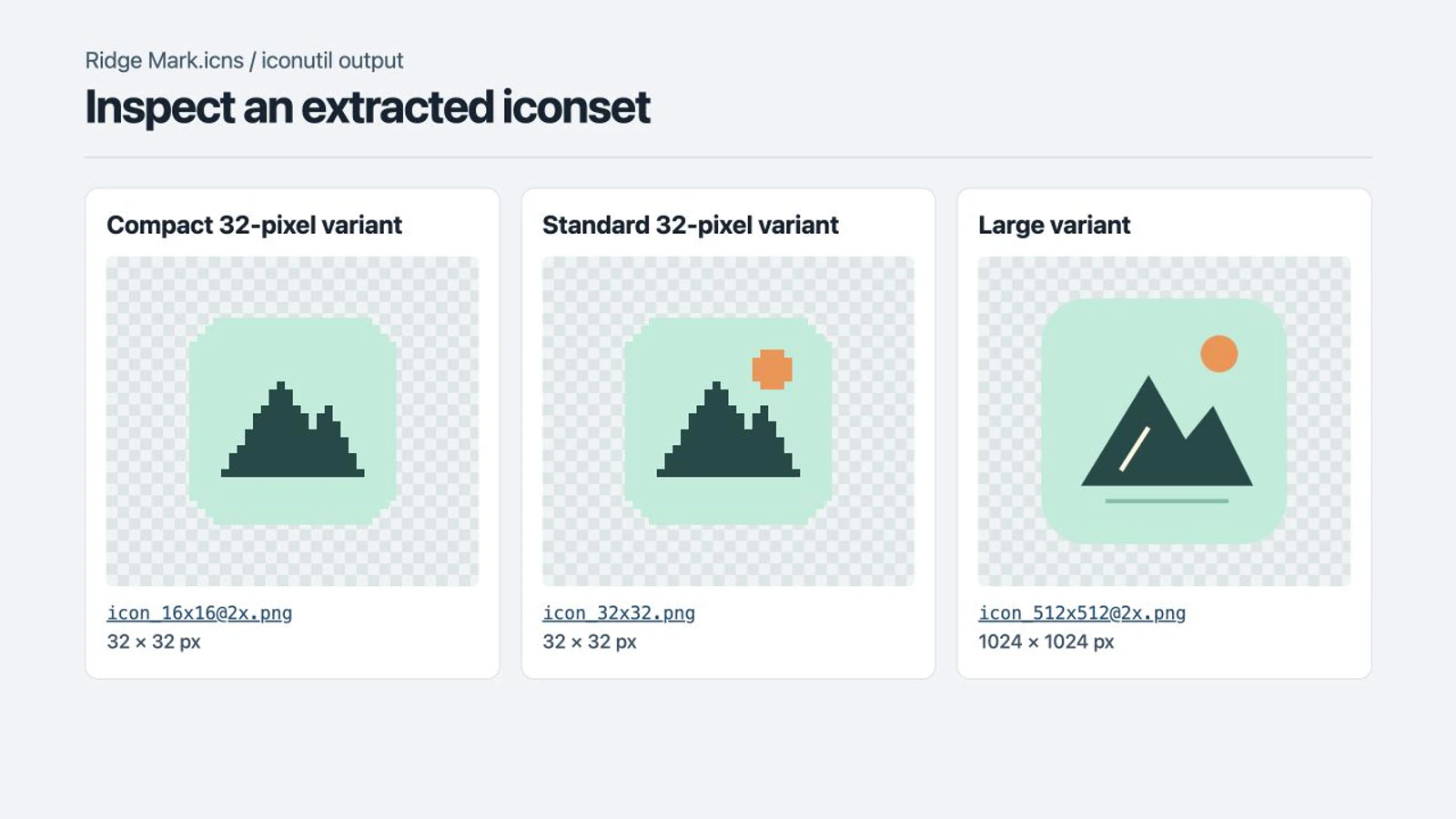
The two 32 × 32 PNGs are both valid choices. For an interface that used the compact icon, choose the matching artwork. For a document illustration that needs the ridge details at a larger size, start with the detailed PNG. Compare the source artwork visually even when the dimensions agree.
When should you keep PNG or rebuild the icon as SVG?
Keep the PNG if the destination needs a bitmap and the extracted file already has the right size and detail. Keep the ICNS if you need the original collection of sizes. An SVG is useful when you need editable outlines or a scaled version of a flat icon. Start with the representation that matches the design you want to carry forward. Fine texture and lighting may be better served by the extracted raster. If the artwork is in a Windows container, use the ICO extraction and tracing checks. Apple's image format guidance
PerfectVector can rebuild the largest supported static PNG from a modern ICNS as editable SVG paths. Automatic selection by pixel area can choose a different design from a compact version you inspected by hand. For that compact design, choose the extracted PNG in a tracing tool that accepts its pixel dimensions. Compare the preview with your chosen image, particularly its small details and transparent edges. PerfectVector's ICNS input guide
FAQ
Can I extract an ICNS without installing an app?
Yes. On macOS, use the built-in iconutil command with -c iconset. The output folder contains PNG representations that you can open individually.
Why do two extracted icon files have the same pixel dimensions?
An @2x representation has twice the pixels per side of its named size. A 16 × 16 icon at @2x and a 32 × 32 icon at standard density can both be 32 × 32 pixels. The artwork in the two PNGs can differ.
Will extraction make a bigger or sharper icon?
Extraction recovers a representation from the ICNS. Check whether the folder contains a larger version with the artwork you need. Enlarging a small PNG keeps the same underlying detail.
Sources
- Apple — Optimizing for High Resolution — Both directions of the iconutil workflow and examples of artwork changing with size.
- Apple — Icon Set Type — The iconset folder and its filename conventions.
- Apple — Image Properties — Pixel width, height, and the presence of an alpha channel.
- Apple — Images — Raster and scalable image formats, including @1x and @2x assets.
- PerfectVector — ICNS to SVG — Supported static PNG selection and the vector preview.
Need editable paths from the detailed version in a supported Mac icon? Upload your ICNS to PerfectVector, then compare the preview's silhouette, detail and transparency with the extracted PNG.
More from the blog

Export a PDF Diagram as SVG With PyMuPDF and Keep Paths
Export one PDF diagram with PyMuPDF, crop the view, and check which parts of the SVG are paths, text, or embedded pixels before editing it.

Convert a QR Code Image to SVG and Verify the Scan
Turn an existing QR code image into SVG, preserve the exact encoded text, and check the four-module margin before you send a label or sign to print.