Convert a QR Code Image to SVG and Verify the Scan
Turn an existing QR code image into SVG, preserve the exact encoded text, and check the four-module margin before you send a label or sign to print.
On this page
Scan your existing QR code, copy the exact encoded text, and generate a new QR code as SVG. Then place it in the layout and scan it again. For an ordinary black-and-white code, rebuilding gives you a regular grid of square modules and a chance to verify that the destination stayed the same.
A module is one square in that grid. The quiet zone is the blank margin around it. Leave at least four modules of quiet zone on every side of a standard QR code. Include the margin when you measure or resize the code. DENSO WAVE QR Code sizing guidance
Decide what needs to stay the same
| What you have | Best next step | What to verify |
|---|---|---|
| A PNG or JPG your scanner can read | Decode the original and generate an SVG from its exact content | Same decoded text, square grid, and quiet zone |
| A code with branded dots, an icon, or a required grid | Request the vector export from the code owner or provider | Approved design and the same decoded content |
| An image that fails to decode | Request a better source or the exact text from its owner | A readable original or an owner-confirmed destination |
Pay special attention to campaign links. Your phone may show the final page after a redirect. The code may contain a short URL with a campaign ID. Copy the string reported by a reader before opening the link. When the code belongs to another team, ask them to confirm the full string and whether a re-export is available.
Rebuild the QR code as an SVG
- Read the original image. Use a reader that displays the decoded text. Save it as your reference, including case, punctuation, query parameters and any trailing slash. If the destination should remain private, use a tool that decodes locally.
- Generate a standard QR code from that content. Pick a generator that can save SVG directly. Use a plain dark code on a solid light background for the first export. A generator can produce a different valid grid for exactly the same data. The Python
qrcodeproject supports SVG path output with a white background. Python QR Code project - Check the exported file. Open it at high zoom. Look for straight edges, square cells and a clear margin. If an editor shows only a single image object, inspect the SVG for an embedded
<image>element. An SVG can contain a raster bitmap. A path or rectangle-based code lets the grid scale as geometry. - Test the placed copy. Put the SVG into your layout at its intended size. Scan the exported layout and the physical proof under real lighting. Compare what the reader displays with the reference string from step 1.
What changed in our test
We used a 264-pixel PNG with a 25-module grid and four blank modules around all four sides. OpenCV decoded it as https://example.org/recipe. We generated a new SVG with the same payload and a different mask pattern. A mask pattern changes which grid cells are dark, subject to the rules of QR encoding. In this example, 196 cells changed and the payload stayed the same.
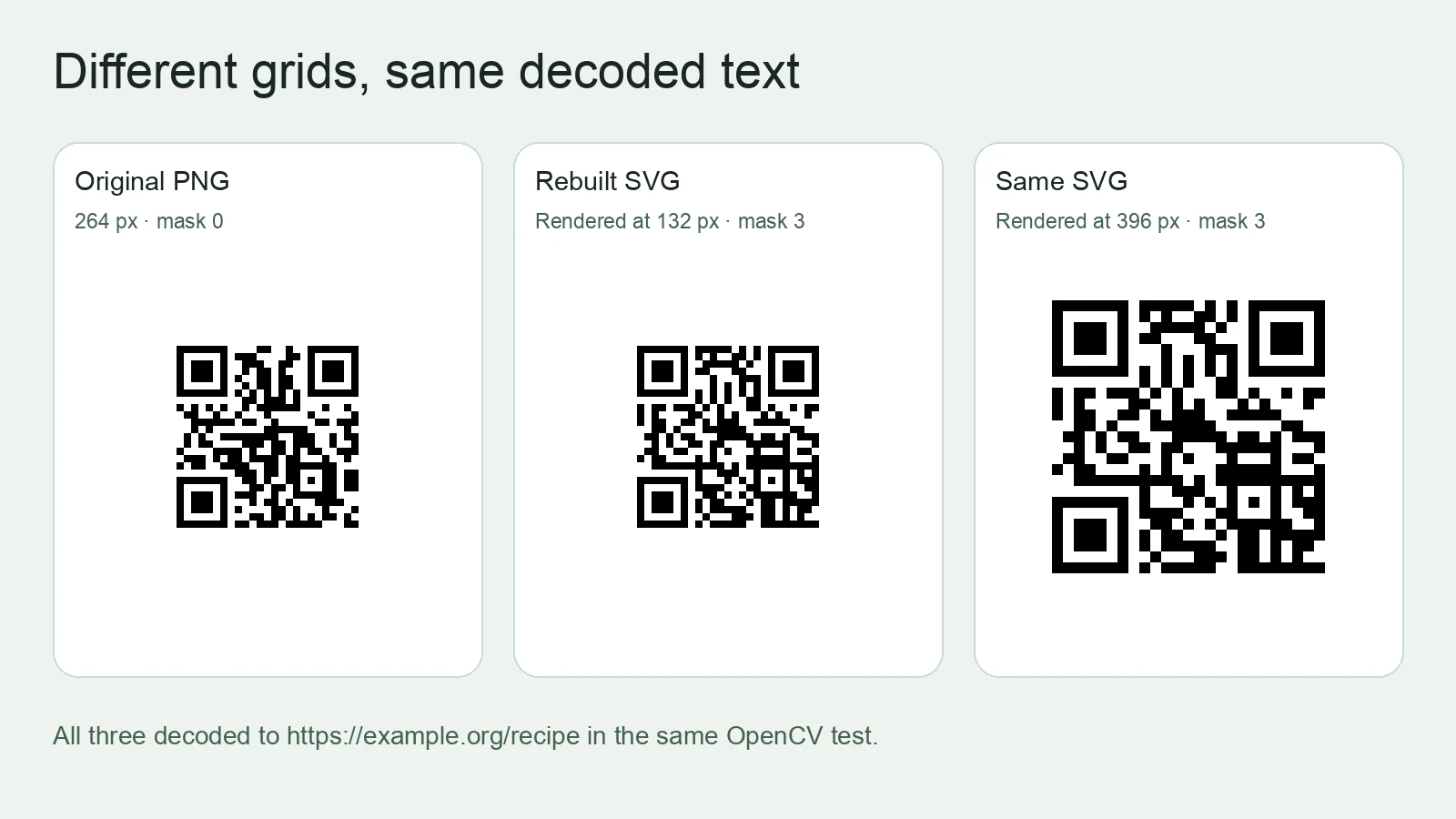
We rendered the SVG at 132, 264 and 396 pixels wide. All three returned the original URL in the same OpenCV decoder. The test covers digital files. Print settings, glare, size, viewing distance and the scanner can change what happens on a physical label. OpenCV QRCodeDetector
Check the quiet zone in the final layout
Measure the blank margin in modules. On a 25-module code with four blank modules per side, the full square is 33 modules wide. If the full artwork is 33 mm wide, a module is 1 mm and the quiet zone is 4 mm per side. Pick the final size by testing the artwork at the distance and contrast the reader will encounter.
Keep the logo, color bands, border rules and type outside the quiet zone. Resize proportionally. If the design sits on a dark background, keep an opaque light square behind the code so the export preserves its blank margin. Scan the final PDF or image as well as the SVG, because either export can crop or obscure the margin.
If the QR code is part of a sign or package, prepare the logo and illustrations with the image vectorizer and place the verified QR SVG separately. Use the original vector art whenever the designer can supply it.
FAQ
Can I convert a QR code from JPG to SVG?
Yes. Decode the JPG, generate an SVG from the exact decoded content, and read the new SVG again. If the original will not decode, ask the owner for the exact encoded text, the original SVG, or a higher-quality image to scan.
Why does the rebuilt QR code look different?
An encoder can use a different mask, error-correction level or symbol version for the same content. Compare the decoded string. Ask for the original vector export if you also need the exact visual grid.
How much white space does a QR code need?
For a standard QR code, leave a clear zone four modules wide on every side. Check the margin on the final export and scan the result at the actual size.
Sources
- DENSO WAVE — Point for determining the code area — module-based sizing and quiet-zone requirements.
- Python QR Code project — SVG images — SVG factories and vector paths.
- OpenCV — QRCodeDetector class — the detector used to read the original and regenerated samples.
For the artwork around the symbol, convert your raster artwork with PerfectVector. Place the verified QR SVG separately and scan the final layout to confirm that its margin and destination survived.
More from the blog

Export a PDF Diagram as SVG With PyMuPDF and Keep Paths
Export one PDF diagram with PyMuPDF, crop the view, and check which parts of the SVG are paths, text, or embedded pixels before editing it.

Actual vs Effective PPI: Check the Placed Image
Understand actual and effective PPI with measured PDF placements. Separate image pixels, source metadata, scaling, and resampling before a print handoff.