Customer Sent a Low-Res Logo? How Shops Triage It
For sign and print shop art desks: check a customer's low-res logo at final size, ask once for the source, vectorize what traces cleanly and redraw only the rest.
On this page
When a customer sends a low-res logo, check its effective resolution at the final size, confirm whether any "vector" file they sent really holds paths, and ask once for the original. If no better file exists, vectorize the logo and send only the parts tracing can't fix (small text, gradients, hairlines, garbled AI lettering) to a human redraw. Whether you need vector at all depends on the job: cut vinyl and contour-cut decals do, while most print work runs from a large enough raster.
This guide is for the art desk at a sign shop or a screen-print/DTF shop: the person who receives the file, not the customer who sends it. If you'd rather send customers something to read, the customer side is covered in what to send a sign shop that asks for vector, turning an image into an AI file for a print shop and why a logo looks pixelated.
The intake check in six lines
- Measure: pixel width ÷ print width in inches = effective PPI at final size.
- Open the "vector": a PDF or EPS can hold a single photo of the logo.
- Sort the job: cut work needs paths; print usually needs enough pixels.
- Ask once for the designer's original file before you trace anything.
- Vectorize the traceable shapes, then set the color count to inks plus background.
- Redraw only small text, gradients, hairlines and AI-made lettering that didn't trace.
Check effective DPI at intake
Effective resolution is the source image's pixel count divided by the size it will print at, and it is the first number to check on any customer logo. A 400-pixel-wide logo printed 4 inches wide on a left-chest transfer has 100 pixels per inch; the same file stretched across a 24-inch banner has about 17. The difference between actual and effective PPI explains why the "300 dpi" in a file's metadata means nothing until you know the output size.
A quick intake check takes four looks:
- Pixel size against final size. Note the image's pixel width and the job's print or cut width, then divide. Compare that number with what your printer or RIP needs for the viewing distance.
- The wrapper. A customer's PDF, EPS or even SVG can contain nothing but one embedded picture of the logo. Switch to outline or wireframe view, or click the artwork: one rectangular object means pixels. Checking whether a PDF is really vector and spotting a fake EPS cover the details.
- Compression damage. Zoom to 400% or more around thin lines and lettering. Gray or colored fringes along the edges are JPEG blur, and a tracer can keep them as extra colors.
- AI-generated tells. Letters that change weight mid-word, text that doesn't spell anything, and decorative detail that melts into texture all suggest a ChatGPT or Midjourney logo. In a March 2026 Signs101 thread, a member who quotes logo vectorizing work wrote that "about 35% of the logos i receive to quote are ai generated", and that half of those were impossible to trace or needed significant simplification. That is one person's count, not a survey.
Then send one message before doing any work: ask whether the customer has the original file from whoever designed the logo (.ai, .eps, .svg, or a PDF exported from a design app). In our own test below, the same logo traced from its full-size original came out with clean, solid lettering that the 400-pixel copy couldn't give.
When does a customer logo need to be vector?
A logo needs to be vector when a machine has to follow its outline (cut vinyl, contour-cut decals, routed or channel letters), while most printed work runs from a raster that is large enough at final size. Vinyl cutters and routers steer along paths, so a raster gives them nothing to follow. Printers place pixels, so they only need enough of them.
Some shops' published artwork pages draw the same line. SpeedPro Nashville South asks for vector files "for all cut vinyl" but takes raster images at 150 DPI at 100% scale for print. Some shops ask for more: V Signs says "Logos must be supplied as vectored elements," and the screen printer Ethix Merch says high-resolution raster files are fine for 4-color print but "will need to be converted to vector for 1, 2 or 3 color designs."
| Job | Does it need vector? | What to check at intake |
|---|---|---|
| Cut vinyl lettering, window graphics | Yes | Closed shapes, one layer per vinyl color, no hairlines |
| Print-and-cut decals | Print part can be raster; cut line must be vector | Enough pixels for the print, a separate vector cut path |
| Routed, channel or dimensional letters | Yes | Clean outer contours, no stray nodes |
| Screen printing, 1–3 spot colors | Usually | Color count equals ink count; solid shapes for separations |
| DTF, DTG, large-format print | Often not | Effective PPI at final size; a vector master is the cleaner way to get a large PNG |
When the effective resolution is high enough for a print-only job, you can stop here and print it. The rest of this guide is for cut jobs, spot-color jobs, and prints the raster can't cover.
How to vectorize a customer's low-res logo
Vectorize the shapes that trace cleanly, set the color count to the job's inks plus the background, and then inspect the letters at high zoom before deciding what still needs a redraw. PerfectVector is an AI image-to-vector converter that turns PNG, JPG and other raster images into clean, editable SVG, PDF, EPS, DXF and AI files. Here is what that looked like on two deliberately bad customer files.
Method note. We made two sample "customer files" with an AI image generator for this post: a two-color plumbing logo with a thin tagline ("Harbor Line Plumbing") and a multicolor school mascot ("Northside Hornets"). Both names are fictional. We shrank each to 400 pixels wide and saved it as a heavily compressed JPEG, the kind of file that arrives as an email screenshot, then converted it on PerfectVector's logo vectorizer on November 2, 2026. Counts below come from the downloaded SVG files.
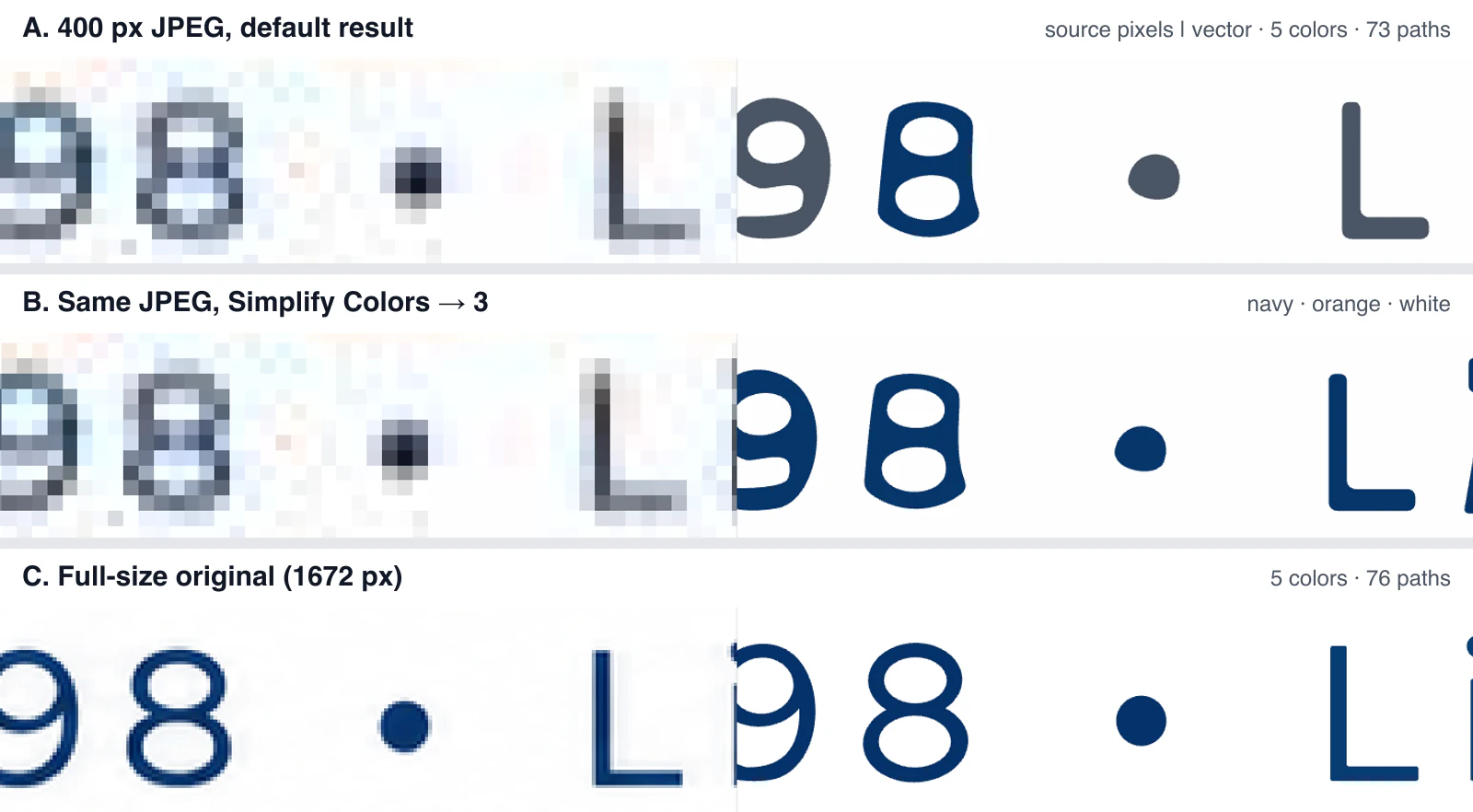
Harbor Line, 400-pixel JPEG. The free preview reported 5 colors. After unlocking, the result had 73 paths using five fills: navy, orange, white and two grays. The grays came from JPEG blur around the thin tagline, and the tracer kept them as colors, so the tagline letters ended up split between navy and gray (row A below).
- Simplify Colors to 3 turned the result into navy, orange and white, and the whole tagline became navy (row B). Three is the right setting here: two inks plus the white background.
- Simplify Colors to 2 kept navy and white and dropped the orange. "PLUMBING" turned navy. Count the background as a color when you pick the number.
- Color merging doesn't redraw letters. The broken "t" in "Est." stayed broken at every color count we tried, because the 400-pixel source never had enough pixels to define it.
Harbor Line, full-size original. Converting the 1,672-pixel original gave 76 paths, and the tagline came out as solid navy letters with a round dot (row C). One email asking for the original would have saved the lettering repair.
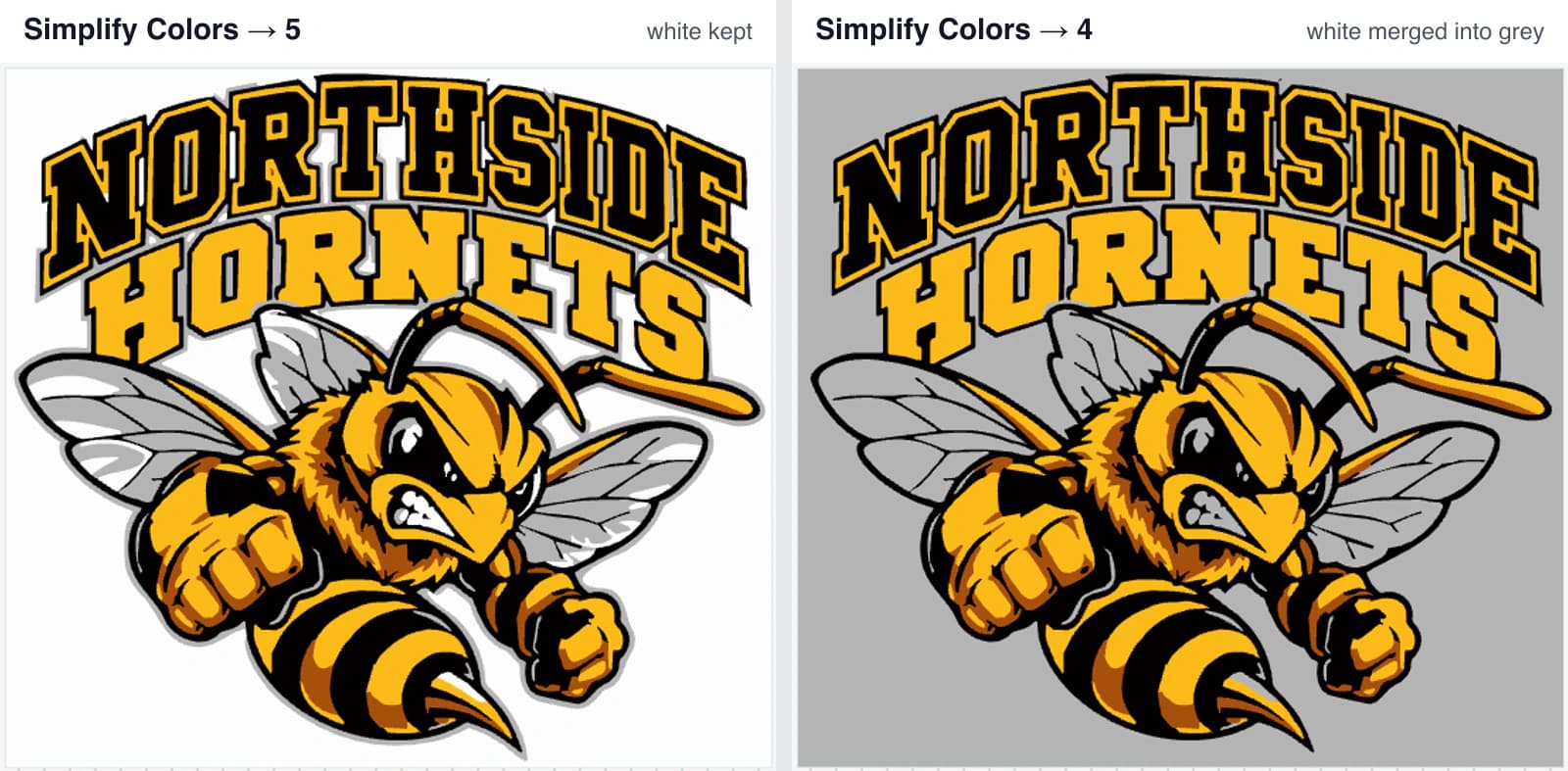
Northside Hornets, 400-pixel JPEG. The preview reported 27 colors; the unlocked result had 490 paths, with the fur and shading turned into hard-edged flat color areas. That is a lot of colors for a screen-printed shirt, so we tried several ink counts:
- 27 → 6 or 5 colors kept white as its own color, including the teeth and eye highlights.
- 27 → 4 colors merged the white into gray. The background, the teeth and the eye highlights turned gray, so a four-ink print would lose every white detail.
A few things about where each step happens. The free preview shows the color count and an edge overlay. The path count, the Colors panel and Simplify Colors appear after a result is unlocked, and applying Simplify Colors does not create a new result. Download the result as SVG, PDF, EPS or Illustrator (.AI) for your separation or cutter software. PerfectVector doesn't make film separations, halftones or named spot colors; those stay in your prepress step, and the screen-printing artwork page lists what it does and doesn't do for screen printers.
Vectorize the customer's logo and zoom into the smallest lettering before you quote the redraw.
What still needs a human redraw
Auto-tracing rebuilds the shapes that exist in the pixels, so anything the low-res file doesn't clearly contain still needs a person. Four cases need one:
- Small text. In a low-res file, taglines, phone numbers and the ® mark can be only a few pixels high, and the tracer can only follow those pixels, as the broken "t" above shows. Identify the font, retype the text and convert it to outlines; that is usually faster and cleaner than repairing traced letters node by node.
- Gradients. A fill tracer turns a smooth blend into stepped bands. For screen print, decide whether the gradient becomes a halftone in your RIP; for cut vinyl, flatten it to solid colors. Vectorizing gradients covers the options.
- Hairlines. Lines thinner than about 1 point at final size can trace as broken dashes from a blurry source, and they are hard to weed in vinyl even when they trace. Thicken them or remove them, and agree the change with the customer.
- AI-made lettering and mush. When the generator never drew real letters, there is nothing to recover. Redraw the wordmark with a real font and trace only the illustration around it; turning an AI-generated logo into SVG goes deeper on that split.
On a file like the Harbor Line logo, that leaves a short list: retype the tagline, check the color count, send the proof. That is the part of the redraw that still needs a designer.
How much does it cost to vectorize a logo?
Shops that publish a logo redraw fee charged from £25 to £75 plus VAT in the UK, A$35 including GST to A$120 plus GST in Australia, or a flat $100 at one Canadian shop when we checked in November 2026; others bill the work as design time. The published examples:
| Shop | Published fee | Source |
|---|---|---|
| UK Sign Shop (UK) | Logo redraw £25.00 ex. VAT | Logo Redraw page |
| V Signs (UK) | £75 + VAT to re-create a logo not supplied as vectors | Terms and conditions |
| Easy Signs (Australia) | Logo re-draw $35 inc. GST | Artwork and design page |
| Melbourne Merch (Australia) | Logo vectorisation from $60 + GST, complex hand rebuilds $120 + GST | Design services page |
| Platinum Signs (Canada) | Flat $100 for graphic recreation | FAQ |
| SpeedPro Nashville South (US) | Minimum $45 per art file that needs converting; designer time $125 an hour | Artwork file guidelines |
Design time is the other way shops bill it. In the Signs of the Times 2026 pricing survey, published in March 2026, half of the responding sign companies charged between $75 and $124 an hour for design time.
On PerfectVector's side, vectorizing and previewing are free, one credit unlocks the download of each new result, and downloading the same result again is free. As of November 2, 2026, the Light plan is US$12 a month for 100 credits, which expire at the end of each billing period. Used in full, that is 12 cents per unlocked result. The redraw fee you quote still covers the judgment, the retyped text and the customer proof; what changes is how much of the work starts from a blank artboard.
Hand the file to your cutter or RIP
Once the paths are clean, the rest happens in your usual production software. Each of these guides compares the software's built-in trace with bringing in an outside vector file, and covers the checks before a cut:
For print-and-cut, PerfectVector's files don't include a CutContour line or any named spot color, so add the cut path in your design software; the Mimaki FineCut guide and the sticker SVG guide show where that step fits.
FAQ
How much does it cost to vectorize a logo? Shops that publish a redraw fee listed £25 to £75 plus VAT in the UK, A$35 including GST to A$120 plus GST in Australia or a flat $100 at one Canadian shop when we checked in November 2026, and others bill design time by the hour. A clean, flat logo that traces well costs far less to prepare than a low-res file with small text or AI-made lettering that needs a redraw.
Can AI vectorize a logo? Yes, for the shapes that exist in the pixels: flat colors, bold lettering and simple marks trace well. AI tracing can't recover text or detail the source never had, so small taglines, gradients, hairlines and garbled AI-generated lettering still need a person to retype or redraw them.
What is the best format to send logos in? A vector file with text converted to outlines: AI, EPS, SVG or a PDF exported from a design app with real paths. For print-only jobs a large PNG with a transparent background also works if it has enough pixels at the final size.
Can low resolution images be printed? They can, but they print blurry or blocky once the effective resolution at final size drops too low. Check pixel width divided by print width first. If it's too low for the job, ask for the original file; without one, an upscaled raster may be enough for a print-only job, while a vectorized logo scales to any size and can also go to a cutter once you've checked the paths.
Sources
- Signs101 — AI Rant — a vectorizing service's count of AI-generated logos among the files it is asked to quote.
- Ethix Merch — Is Your T-Shirt Design Ready For Print? — when a screen printer requires vector artwork.
- Signs of the Times — How Much Are Sign Companies Charging in 2026? — hourly design-time rates from the 2026 survey.
- UK Sign Shop — Logo Redraw — published logo redraw fee.
- V Signs — Terms and Conditions — vector requirement and the charge to re-create non-vector logos.
- Platinum Signs — FAQ — flat fee for graphic recreation.
- SpeedPro Nashville South — Artwork File Guidelines — vector requirement for cut vinyl, raster resolution for print, per-file minimum and hourly designer rate.
- PerfectVector — Pricing — Light plan price, billing period and the per-result unlock rule.
Next time a 400-pixel screenshot arrives with a job due tomorrow, run the intake check, ask once for the original, and vectorize the logo to see which parts trace cleanly and which still need your redraw.
More from the blog
What File Format Should a Logo Be? A Practical Guide
Which logo file format for web, print, embroidery, or a vendor request, in one decision table, plus how to recover a vector master when all you have is a PNG.

Washi Tape Artwork: Check the Repeat Before Printing
Prepare custom washi tape artwork with a supplier template, matching repeat edges, separate bleed and safe zones, and a reopened file check before handoff.