Vector or Raster for Children's Book Illustrations?
Choose raster, vector, or a mix for your picture book. Match painted scenes and reusable characters to the right master files, then check the print handoff.
On this page
Use raster artwork when the painted surface is part of the story: soft washes, pencil grain, textured shadows, and atmospheric scenes. Use vector artwork when you need separate shapes that can be resized, recolored, and reused, such as a flat character, a chapter-opening leaf, or a repeating border. A picture book can use both.
Make that choice per illustration, then check the publisher's required delivery files. The editable file you draw in and the file you submit for printing serve different purposes. You do not need to convert every finished page into SVG just because you want the book to print sharply.
Choose the artwork before the file extension
A raster image records pixels. Its available detail depends on how many pixels it contains and how large you place it. Vector geometry describes shapes and curves, which can be resized without the same fixed pixel grid. Adobe's bitmap image guide explains why raster resolution must be judged at the intended output size.
That distinction does not dictate an art style. You can paint a crisp, flat fox in a raster app, and vector artwork can include gradients and patterns. Those are part of the SVG specification. A smooth-looking PNG is still pixels; a textured SVG may contain a raster image or effects that need separate inspection.
For a book project, ask what you expect to change after the illustration is finished.
| Illustration or future edit | Useful master | What to check |
|---|---|---|
| Painted forest spread with mist and pencil texture | Original layered raster file or high-quality scan | Enough pixels for the full placed size, including bleed |
| Flat fox used on a title page, activity sheet, and poster | Native vector drawing or a reviewed SVG trace | Recognizable face, clean silhouette, selectable color regions |
| Repeatable stars, leaves, borders, or chapter ornaments | Separate vector assets | Consistent shapes, spacing, and stroke weight |
| Painted scene with a reusable flat foreground character | Raster background plus vector character | A coherent style and a supported export from the layout app |
| Finished raster page needing no shape edits | Existing raster master | Print resolution and placement, before considering conversion |
Native vector drawing deserves first consideration when you are starting a flat illustration from scratch. Tracing becomes useful when the artwork already exists as a PNG, JPG, or scan and you need paths from it. Our image vectorization explainer covers that distinction.
Separate full scenes from reusable motifs
Imagine a book about a fox learning to read. Its forest spread relies on mottled bark, pale sky washes, and light falling through leaves. A simplified trace may keep the tree and fox while changing the atmosphere you wanted. Keep the raster master for that scene.
The same project may need a small fox beside the contents, a leaf at each chapter opening, and a star pattern on the endpapers. These are useful candidates for vector assets if their shape and colors matter more than their painted surface. They can share the book's palette without requiring the entire forest to become vector geometry.
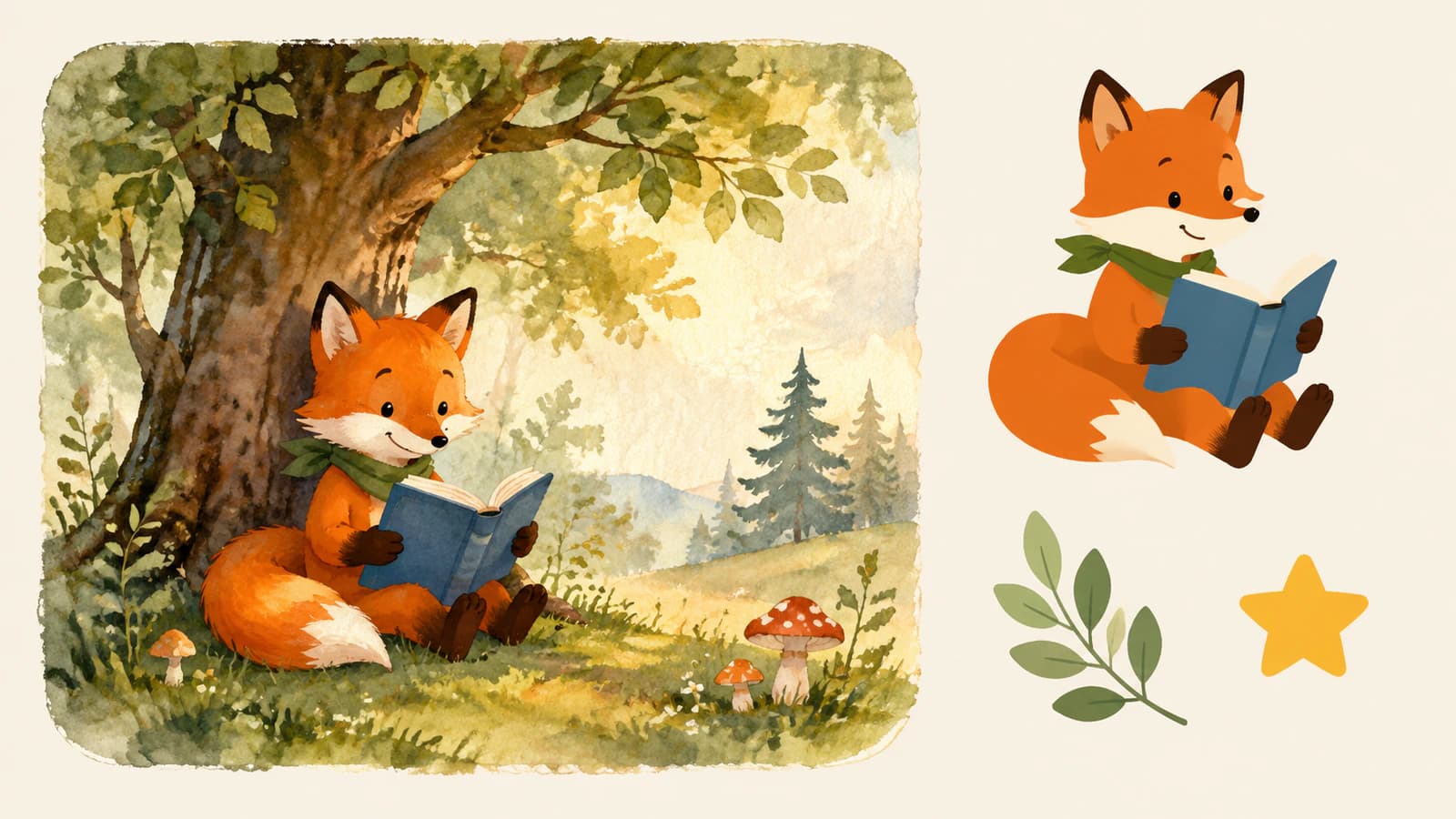
Treat the character's expression as a requirement, not incidental detail. A trace that closes the space between the muzzle and book, shifts an eye, or thickens the mouth may remain technically scalable while making the character feel different. Inspect those features before using the file throughout a book.
For a painted motif that really does need editable shapes, see what watercolor-to-vector conversion changes. Sometimes the right outcome is a deliberately simplified companion asset while the original painting stays in the book.
Keep three kinds of files
One file rarely needs to perform every job in the project. Keep a small, clear set of masters and exports:
- Drawing masters. Save the layered painting, scan, or native vector document. Keep the illustration's original editability here.
- Reusable assets. Save approved characters and motifs individually. Use SVG when vector paths are useful; keep a high-resolution raster when the texture is essential.
- Delivery files. Export the assembled book in the format and page dimensions requested by the publisher or printer. Treat these as derivatives of the masters.
A PDF delivery file does not prove that all the artwork inside it is vector. Likewise, saving a raster inside an SVG does not create editable outlines. The meaningful question is whether the file contains the objects the next person needs to edit.
If a print shop asks for an Illustrator file, clarify whether it needs an editable illustration, a layout, or simply a compatible print document. Our image-to-AI handoff guide explains why changing the extension cannot supply missing paths.
Check print size before converting anything
Start with the publisher's specification: trim size, bleed, color requirements, image resolution, and accepted file formats. This determines the output you must prepare. Vectorization does not fix an incorrectly sized page or put a face back inside the safe area.
For facing-page composition, keep important illustration details clear of the book gutter. A continuous background can cross the binding while the face and story clues stay within the intended safety regions.
For example, KDP's paperback guidelines require a PDF manuscript when artwork bleeds to the page edge, specify single-page files rather than two-page spreads, and require images of at least 300 DPI. These are KDP requirements, not a universal specification for every publisher.
For a simple resolution check, divide a raster's pixel width by its placed width in inches. A 2400-pixel image placed 8 inches wide has 300 pixels per inch. The same image stretched to 12 inches has 200. These examples exclude bleed; calculate against the actual placed dimensions of your artwork.
Changing only the resolution label does not create additional drawn detail. If a painted spread is too small, look for a larger original, rescan the painting, or revise the planned placement. Automatically tracing it changes the representation of the art; it does not recover the artist's missing brushwork.
Before approving the whole book
Build one representative spread and one small spot illustration in the real layout. Check the final-size view, the exported file, and a print proof. Resolve problems with the character, texture, and page edges before repeating the workflow across every illustration.
Test one existing illustration with PerfectVector
PerfectVector fits the part of this workflow where a finished raster motif needs editable SVG paths. Its children's book illustration converter gives you a way to try that handoff before committing a whole set of characters or ornaments to tracing.
Choose one representative flat illustration and test it in the places you actually plan to use it:
- Prepare a separate copy. Export the character or ornament at a useful pixel size. Leave out page text and unrelated scenery when they are not part of the reusable asset. Keep the master untouched.
- Compare the preview with the source. Look first at the face and silhouette. Then check the gaps between arms, clothing, props, and tail. A smooth edge is not enough if the expression has changed.
- Inspect the downloaded SVG in a vector editor. Select and recolor a meaningful region, such as the book cover or the fox's body. Confirm you are selecting paths rather than a single embedded raster. Review grouping and remove an unwanted background only after checking that pale facial features remain.
- Place it at two actual sizes. Use the planned book-page size and the smallest thumbnail or spot size. At the small size, inspect whether the eyes, mouth, and prop remain distinct. At the larger size, inspect curves and accidental fragments.
- Decide whether to keep, edit, or redraw. Keep a usable trace, correct a few local shapes, or return to the original if the changes undermine the character. Save the reviewed result as a separate asset.
This is a method for checking your own artwork, not a claim that every illustration will convert successfully.
If you already draw in Illustrator, its Image Trace workflow is another route from raster artwork to editable paths. Manual redrawing is often the more controllable choice when the character needs carefully organized body parts, consistent expressions, or new poses. An automatic trace does not reconstruct the original drawing layers or invent what is hidden behind a prop.
When keeping raster is the better decision
Keep the raster if texture carries the illustration, the file already meets the delivery requirements, and nobody needs shape-level editing. Also stop if the trace requires more correction than making the few required changes in the original drawing.
You can reuse raster motifs too. Vector is useful for flexible shape editing and resizing, but it is not a prerequisite for repeating an image in a layout. For a mixed workflow, keep the original texture at adequate resolution and check the combined export. A vector outline does not make a raster texture inside it resolution-independent.
Choose the workflow that preserves the book's visual character and gives the next person usable files. The small star might deserve an SVG. The painted forest may already be finished.
FAQ
Do children's book illustrations have to be vector? No. Use the publisher's delivery specification and the illustration's needs to choose. Painted scenes can remain raster when they have enough resolution for their placed size. Vector assets are useful when you need editable shapes or flexible resizing.
Can I use raster and vector illustrations in the same book? Yes. A layout can combine painted raster scenes with vector characters, borders, or ornaments. Keep their styles consistent, retain the source masters, and verify that the layout app's export meets the printer's requirements.
Will converting a PNG character to SVG restore its layers? No. A trace creates shapes from visible image information. It does not recover the original brush layers, hidden body parts, or character rig. Review the resulting paths and organize them for the edits you need.
Should I submit an SVG to my book printer? Only if the printer asks for it. SVG can be a reusable illustration asset while the assembled book is delivered in another format. Confirm the exact file specification before exporting the final manuscript and cover.
Sources
- Adobe Illustrator — Importing bitmap images — raster pixels, image resolution, and how placed size affects output.
- W3C — SVG gradients and patterns — vector artwork can use more than solid-color fills.
- Amazon KDP — Paperback Submission Guidelines — one publisher's requirements for PDF, bleed, single pages, and image resolution.
- Adobe Illustrator — Vectorize images using Image Trace — tracing existing raster artwork into vector paths.
If you have a flat character or ornament that needs editable shapes, try that one illustration in PerfectVector. Compare its expression, silhouette, and selectable colors, then place the result at the book's page and thumbnail sizes before converting the rest.
More from the blog

Reader vs Printer Spreads: Send the Right PDF
Compare single pages, reader spreads and printer spreads with an original eight-page PDF study. Check page order and avoid imposing the same booklet twice.

PDF Page Boxes: TrimBox, BleedBox and MediaBox
Understand PDF page boxes with one measured artwork example. Compare TrimBox, BleedBox, MediaBox and CropBox before exporting a logo or sending it to print.