PDF Page Boxes: TrimBox, BleedBox and MediaBox
Understand PDF page boxes with one measured artwork example. Compare TrimBox, BleedBox, MediaBox and CropBox before exporting a logo or sending it to print.
On this page
The TrimBox describes a PDF's finished page size. The BleedBox describes the production clipping region, including artwork extending beyond that trim. The MediaBox describes the page's physical medium. A fourth boundary, the CropBox, controls the visible or printable region. Those rectangles can differ even when the file contains just one page and one logo. Adobe's page-box definitions distinguish the display boundary from the finished page and bleed.
That explains a confusing handoff: a PDF can look tightly cropped on screen while still containing artwork beyond the displayed edge. Before resizing a logo or tracing a missing border, check which boundary the receiving application used.
What each PDF page box means
A page box is a rectangle stored as page information. It is separate from the shapes, text and images that paint the page. The pypdf page-object reference documents these boundaries and their coordinate units.
| Box | What it describes | Question it helps answer |
|---|---|---|
| MediaBox | The physical medium for the page | How large is the complete page area? |
| CropBox | The region to display or print | Which part appears in the viewer? |
| TrimBox | The intended finished dimensions after trimming | What size should the finished piece be? |
| BleedBox | The clipping region for production output | How far does the production region extend? |
| ArtBox | The meaningful content intended by the page's creator | Which area was identified as the artwork? |
ArtBox is not a universal safe-area setting. A supplier's template may identify its safe area another way. Likewise, drawing a rectangle around a design does not set that PDF page's TrimBox.
The boxes need not all have different values. Cloudprinter's production documentation explains, for example, that an unset TrimBox or BleedBox defaults to the CropBox. A named box in an inspection report therefore does not, by itself, prove that someone deliberately specified a production margin.
One artwork file, four different edges
We made an original one-page Northleaf logo PDF with four explicit rectangles. It contains a pale green background, two orange edge dots and small crop marks. The sample uses an unrotated page with the default coordinate scale: one unit is one point, or 1/72 inch.
| Box | Rectangle: left, bottom, right, top | Width × height |
|---|---|---|
| MediaBox | 0, 0, 360, 240 | 360 × 240 pt |
| CropBox | 24, 24, 336, 216 | 312 × 192 pt |
| BleedBox | 36, 36, 324, 204 | 288 × 168 pt |
| TrimBox | 48, 48, 312, 192 | 264 × 144 pt |
The right coordinate is not the width. For our TrimBox, the width is 312 minus 48, giving 264 points. The bottom-left offset matters as much as the dimensions when you compare two rectangles.
For the figure, we made four viewing copies by setting each copy's CropBox to the named rectangle, then rendered them with Poppler 26.02.0. The page's drawing instructions were byte-identical in all four copies. Only the selected viewing boundary changed; the logo stayed at the same scale.
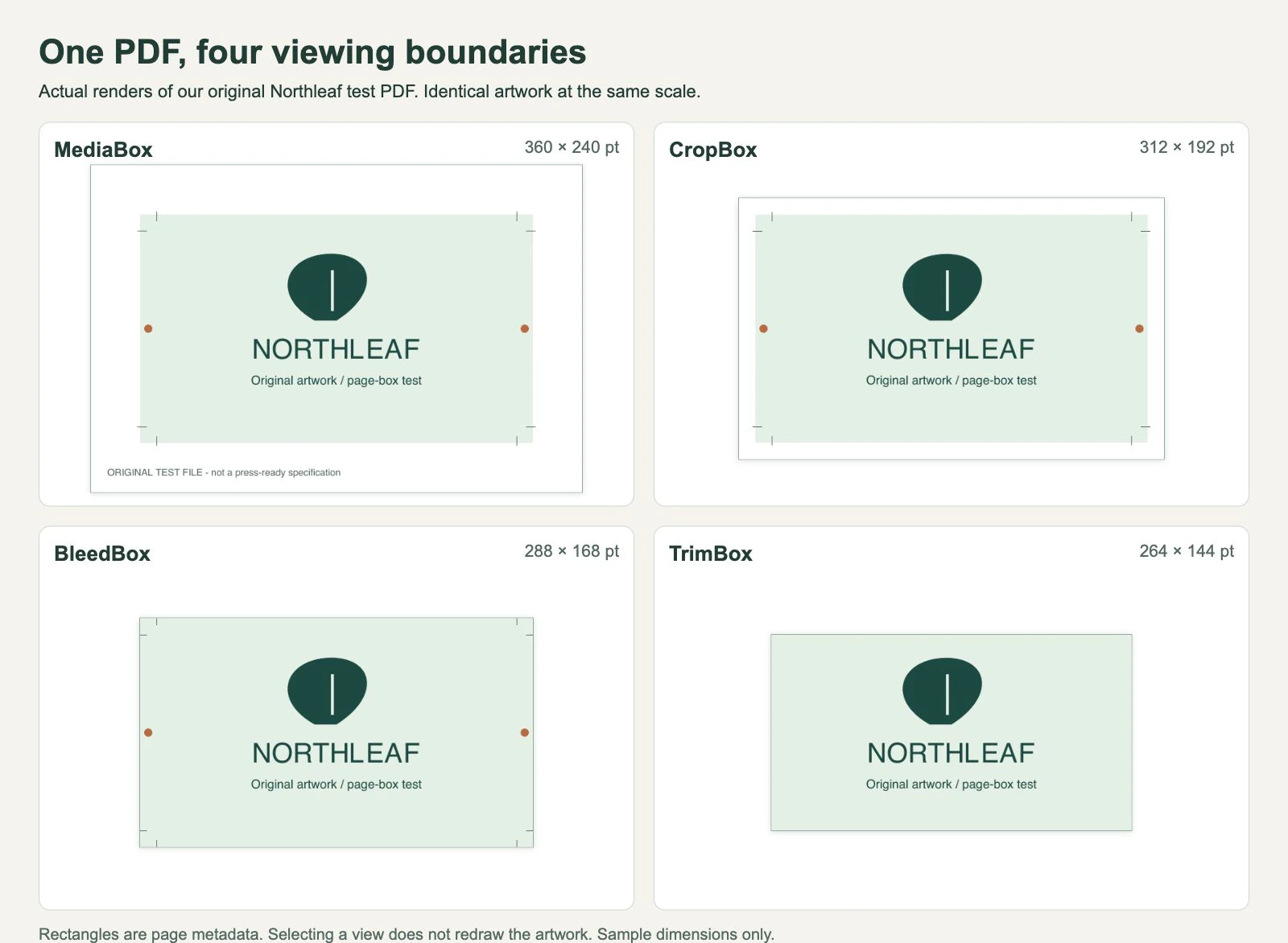
In the MediaBox view, the production note below the design is visible. The CropBox hides that note but retains space around the background. The BleedBox reaches the green background's edge and retains the orange dots. The TrimBox hides the dots and the crop marks while keeping the central logo unchanged.
Our sample has a 12-point gap between each TrimBox edge and the corresponding BleedBox edge. That is a choice for this example, not a recommended bleed allowance. Use the dimensions and export settings supplied for the actual print job.
Why CropBox and TrimBox can disagree
CropBox answers a viewing question. TrimBox answers a finishing question. A proof can show just the finished face while the production PDF retains artwork outside it. Conversely, a viewer can show crop marks and extra paper around the finished design.
Adobe says cropping hides content rather than discarding it. Expanding the view can reveal content that remains in that PDF. It cannot restore artwork that was deleted, clipped elsewhere or omitted before the PDF was written.
The BleedBox also does not paint anything. If a background stops at the TrimBox, changing the BleedBox numbers cannot extend that background. Check both the rectangle and the actual artwork crossing the trim edge. Cloudprinter uses TrimBox for finished size and BleedBox for bleed processing, but the printer's own requirements decide the handoff.
Check the boundary before changing the design
Keep the original PDF and inspect a copy. Record the finished size you expect, the page number and the box coordinates. A multipage document needs the same check for each relevant page.
In a PDF tool that exposes page boxes, compare CropBox, TrimBox and BleedBox rather than relying only on the displayed page size. Adobe documents the Set Page Boxes controls; advanced TrimBox and BleedBox adjustments require Acrobat Pro. That is a documented inspection route, not a test of the Acrobat interface in this article.
If you already use Poppler, its command-line inspection can provide another view:
pdfinfo -box artwork.pdfOn our test PDF, the report returned the four coordinate rows shown in the table. Compare both the offsets and the calculated widths. If the display is wrong but the artwork still exists outside the CropBox, review the viewing boundary before scaling the design. If the background itself ends too soon, return to the source layout and extend the artwork according to the printer's instructions.
Reopen the resulting delivery file and check the finished dimensions, all four edges and the placement of the logo. Matching box numbers alone does not establish print acceptance, color accuracy or sufficient bleed artwork.
What changes when the PDF becomes SVG?
SVG means Scalable Vector Graphics. Its root viewBox defines a user-space rectangle mapped into the viewport; clipping depends on the surrounding SVG and its display context. It does not provide named PDF TrimBox and BleedBox fields. Our SVG bounding-box guide explains how page space and painted artwork bounds differ on that side of the handoff.
We exported the original PDF with Poppler's pdftocairo -svg command. The resulting SVG had width="312pt", height="192pt" and viewBox="0 0 312 192": the dimensions of this PDF's CropBox. It did not use the 264 × 144 pt TrimBox as the delivery size.
We also opened the same fixture with PDF.js 6.2.108, the PDF reader used by our current frontend. Its default page viewport was 312 × 192 points. This checks the library call used for page sizing; it is not a completed upload, vectorization or printer test. Other importers may offer different box choices, so inspect the exported SVG in its destination.
Keep the original PDF as the reference for print boundaries. If the task is extracting existing vector artwork, preserve those paths through a suitable editor and follow our PDF-to-SVG export-or-trace guide. If the job needs an Illustrator handoff, also check the print-shop file decisions.
For a flattened logo or scanned illustration, PerfectVector's PDF-to-SVG converter lets you choose one page and review its prepared image before tracing. Check that the wanted edges are visible in that image first. Vectorization reconstructs visible artwork as paths; it cannot recover a border missing from the rendered input or carry the original PDF's print-box metadata into the new paths. Our vectorization primer explains that reconstruction step.
FAQ
Is TrimBox the same as CropBox? No. TrimBox describes the intended finished page after trimming. CropBox describes the visible or printable region. They can share the same coordinates, but their purposes differ.
Does setting a BleedBox add bleed to my artwork? No. The box describes a production region. The background or image still needs to extend into the required area in the source artwork.
Why is my PDF-to-SVG export a different size from the finished page? The exporter may use a boundary other than TrimBox. In our Poppler test, the SVG used the 312 × 192 pt CropBox, while the intended trim rectangle was 264 × 144 pt. Compare the exported dimensions and viewBox with the source PDF boxes.
Will a larger CropBox recover a missing part of a logo? Only if that content still exists in the PDF outside the current view. A larger viewing rectangle cannot reconstruct content that was removed or never exported.
Sources
- Adobe Acrobat: Crop pages in PDFs — Page-box meanings, current controls and the distinction between hiding and deleting content.
- Cloudprinter: PDF page boxes explained — Finished-size and bleed roles in a production workflow, including fallback box values.
- pypdf: The PageObject class — Page-boundary rectangles, user units and meaningful-content definitions.
Working from a scanned logo PDF? Choose its page and inspect the prepared image. Trace only after the required artwork is visible, then reopen the SVG and compare its edges and dimensions with the intended graphic.
More from the blog

Vector or Raster for Children's Book Illustrations?
Choose raster, vector, or a mix for your picture book. Match painted scenes and reusable characters to the right master files, then check the print handoff.

PDF/X-1a vs PDF/X-4: Choose Your Artwork Handoff
Compare PDF/X-1a and PDF/X-4 for transparent artwork, inspect original PDF feature specimens, and distinguish a printer's preset from verified conformance.