PDF/X-1a vs PDF/X-4: Choose Your Artwork Handoff
Compare PDF/X-1a and PDF/X-4 for transparent artwork, inspect original PDF feature specimens, and distinguish a printer's preset from verified conformance.
On this page
- Compare the requirements that affect your artwork
- Choose from the receiver's requirements
- What live transparency means in an actual PDF
- Flattening does not always rasterize the whole page
- A preset, a feature check, and conformance are different
- Check the actual delivery copy
- Where an Illustrator-compatible handoff fits
- FAQ
- Sources
PDF/X-1a does not permit live transparency. PDF/X-4 permits it within a color-managed print-exchange workflow. That distinction matters when your artwork contains translucent overlaps, soft shadows, or other transparent effects. Use the standard and output setup the print provider requests, and keep an editable master before preparing the delivery copy.
The choice is broader than a transparency switch. Color spaces, output intent, fonts, and other requirements also affect conformance. A filename, PDF version, preset label, or convincing screen preview cannot establish all of them. This guide uses two original ordinary PDFs to show the feature difference, then gives you a decision and verification route. Neither specimen is presented as a conforming PDF/X file.
Compare the requirements that affect your artwork
The PDF Association's technical guide distinguishes the PDF/X family by its exchange requirements, not by a promise that every file will look better on paper.
| Question | PDF/X-1a | PDF/X-4 |
|---|---|---|
| Can live transparency remain? | No | Yes, within the standard's requirements |
| Which color content is allowed? | CMYK, grayscale, and spot colors; no RGB or device-independent color spaces | Supports color-managed content, including appropriately specified RGB, with applicable color-space rules |
| What happens to transparent effects? | They need a representation without live transparency before compliant delivery | They can remain live for an accepting output workflow |
| Do fonts and output condition still matter? | Yes | Yes |
| Does choosing the name finish verification? | No | No |
PDF/X-4 permits transparency; it does not require every page to contain a transparent object. Nor does its RGB support mean that any untagged RGB artwork is ready for any printer. Follow the recipient's color requirements as well as its requested standard. The SVG-to-CMYK handoff guide covers that production-color step.
An output intent describes the intended printing condition. For the complete-exchange PDF/X-4 variant, the output-intent ICC profile is embedded. PDF/X-4p is a separate variant that can reference that profile externally; do not substitute it without the receiver's agreement. The exact variant and revision belong in the job specification.
Choose from the receiver's requirements
If the printer explicitly requests PDF/X-1a, prepare that requested delivery copy and review the flattened effects. Do not send an unverified PDF/X-4 alternative simply because it preserves more live features.
If the printer accepts PDF/X-4 and wants live transparent artwork in its color-managed workflow, keep those features available in the delivery copy. Confirm the output condition and any additional shop requirements. Acceptance of the standard does not waive the job's bleed, detail, ink, or proof checks.
If no standard is specified, ask before exporting:
Which PDF/X variant and revision do you accept for this job? Please supply the required output condition or profile, color restrictions, font requirements, bleed settings, and preflight criteria. Should transparent effects remain live?
Keep the editable source separate from both delivery versions. Returning to that source is usually a clearer way to revise an effect than trying to reconstruct it from an appearance-only copy.
What live transparency means in an actual PDF
For this article, we authored a blue circle beneath an orange triangle. The triangle uses a fill alpha of 0.4, meaning 40% opacity. We saved the new artwork as an ordinary PDF 1.4 file with two vector fill operations and no embedded images.
We then rendered that page with Poppler at 144 dpi and embedded the resulting opaque RGB image into a second ordinary PDF, using the same page dimensions. This deliberately creates a full-page raster appearance copy. It is one explicit way to remove live object transparency from this example, not a model of every PDF/X-1a export.
| Inspected property | Live specimen | Raster appearance copy |
|---|---|---|
| Header | PDF 1.4 | PDF 1.4 |
| Page size | 320 × 220 points | 320 × 220 points |
| Vector fill operations | 2 | 0 |
| Triangle alpha in graphics state | 0.4 | No separate triangle object |
| Embedded images | 0 | One 640 × 440 RGB image |
| Image soft mask | No image | Absent |
| Output intent | Absent | Absent |
| PDF/X conformance validation | Not performed | Not performed |
The live file's extended graphics state, ExtGState, stores the triangle's nonstroking alpha as /ca 0.4. The appearance copy has no live alpha resource: its overlap is already represented by opaque pixels. Its decoded RGB image bytes match the actual first render's pixels exactly.
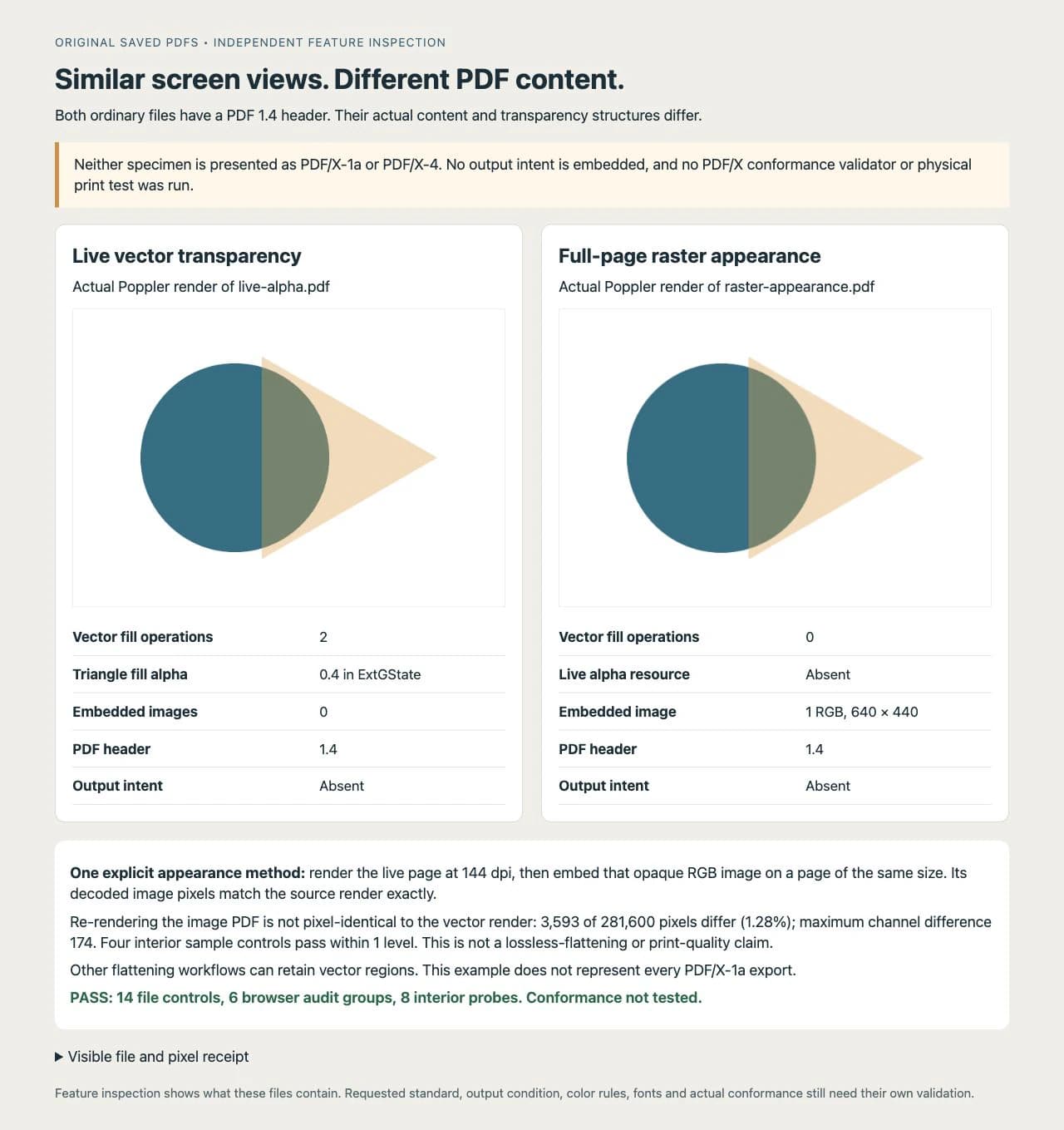
We independently reopened both saved files with pypdf and inspected their page operations, graphics-state resources, images, and output-intent entries. Fourteen file controls passed, including the declared alpha, image structure, decoded-pixel identity, and four interior RGB probes. These are bounded feature checks, not a PDF/X conformance test.
The screen re-renders are not pixel-identical. At 640 × 440 pixels, 3,593 of 281,600 pixels differ, or about 1.28%, with a maximum channel difference of 174. The four selected interior samples agree within the predeclared tolerance of one 8-bit level. Matching those samples does not prove that every edge or later output resolution matches. No print-quality or lossless-flattening claim follows from this comparison.
Most importantly, the two files share a PDF version while storing different content. Neither has an output intent, and neither was run through a PDF/X conformance validator. Finding /ca 0.4 establishes a live transparency feature in the tested file; removing that feature would not, by itself, make the other file PDF/X-1a.
Flattening does not always rasterize the whole page
Adobe's transparency documentation describes flattening as dividing transparent artwork into vector-based and rasterized regions. The outcome depends on the artwork and flattening settings. Some paths can remain vector; text, clipping, and affected regions need review after the operation.
Our appearance copy intentionally takes the full-raster route so its structure is unambiguous. It loses the separate circle and triangle as editable paths. That does not mean every conforming PDF/X-1a file is a page-sized bitmap, or that a PDF/X-4 file is an editable native design document.
Keep an original source with its live objects. If the receiver requires a flattened delivery, compare overlaps, small type, edges, and effects in the exported copy at the intended output size. A photograph can remain raster where appropriate; a flat logo that needs editable outlines has a different source requirement.
A preset, a feature check, and conformance are different
Adobe's PDF options documentation separates the selected standard from compatibility, which specifies a PDF version. It also gives color/output-intent settings and font/transparency settings their own roles. This is documented behavior, not an Illustrator export session we performed for this article.
A preset is a group of export settings. Inspecting /ca, image objects, or fonts checks specific features of a file. Conformance validation evaluates the actual exported PDF against the requested standard's rules. A single feature observation cannot replace that broader test.
For example, a file without transparency can still have the wrong colors or missing required font resources. An output intent needs to describe the intended process; adding an unrelated profile is not a substitute for the printer's requested setup. A visually correct file can also carry the wrong production settings.
Check the actual delivery copy
Use the following route with the printer or a suitable prepress tool. It is a verification plan for your job, not a completed application test of our specimens.
- Record the exact PDF/X variant and revision, output condition, accepted colors, bleed, and proof requirements.
- Export a delivery copy from the editable source using the provider's requested settings. Review any warning rather than assuming the preset name guarantees the result.
- Check font embedding for fonts used in page content, intended process and spot colors, page geometry, image detail, and transparent or flattened areas.
- Validate that exported file against the requested PDF/X criteria. Adobe documents standards conformance verification, including a distinction between standards information and a verified result. Have prepress run an appropriate validator if you cannot.
- Resolve relevant failures in the source or agreed production workflow, export again, and validate the replacement. An earlier report does not cover changed bytes.
- Obtain the receiver's required proof and approval for the actual job. Conformance does not establish that the artwork's spelling, chosen colors, image detail, or intended layout is correct.
The file is ready for the receiver's proof when the current export passes the requested validation and its job-specific checks. If the printer rejects an effect or output setting, return to the editable master and agree on the change before creating another delivery copy.
Where an Illustrator-compatible handoff fits
If suitable flat artwork survives only as a raster image and the receiver needs editable paths, PerfectVector's image-to-Illustrator workflow can provide geometry for the production document. Compare the reconstructed curves, lettering, and openings with the source first.
The current handoff is a single-page PDF 1.4 vector profile saved with an .ai filename, carrying supported RGB paths and gradients. It is not an automatic PDF/X-1a or PDF/X-4 export and does not recover the original brand's CMYK or spot-color setup. The print-shop AI handoff guide explains that distinction from a native Illustrator document.
Use an existing vector master directly when available. Keep photos and soft texture as raster when that is appropriate for the design. After any geometry recovery, finish the printer's production settings and validate the actual PDF/X delivery file in the agreed workflow. Our original specimens are independently authored examples, not PerfectVector conversion results.
FAQ
Which is better for transparency, PDF/X-1a or PDF/X-4? PDF/X-4 permits live transparency; PDF/X-1a does not. Use PDF/X-4 when the receiving workflow accepts it and requests live features. If the printer requires PDF/X-1a, prepare and inspect a compliant flattened delivery copy while preserving the editable master.
Does flattening make the whole PDF a raster image? Not necessarily. Flattening can divide affected artwork into vector and rasterized regions. The full-page raster appearance in this article is an explicit example, not a description of every PDF/X-1a export.
Is a PDF 1.4 file automatically PDF/X-4? No. PDF version and PDF/X conformance describe different things. A version, filename, metadata label, or isolated transparency check does not establish compliance with the requested standard.
Can PerfectVector export a verified PDF/X file? The Illustrator-compatible export provides a PDF 1.4 geometry handoff under an .ai filename. It is not an automatic verified PDF/X export. Finish the required output settings and validate the actual production file in the receiver's agreed workflow.
Sources
- PDF Association — Technical side and requirements of PDF/X — Distinguishes PDF/X-1a and PDF/X-4 transparency, color, resource, and output-intent requirements.
- Adobe — Adobe PDF options in Illustrator — Separates standard, version compatibility, output intent, fonts, and transparency-related export settings.
- Adobe — Print and save transparent artwork — Explains flattening into vector and rasterized regions and the need to retain editable source artwork.
- Adobe — PDF/X-, PDF/A-, and PDF/E-compliant files — Documents validation against standards and verification of actual conformance.
If your production source is missing editable geometry, rebuild suitable artwork as an Illustrator-compatible handoff, inspect the paths, and prepare the printer's requested PDF/X copy separately before validating and approving it.
More from the blog

PDF Page Boxes: TrimBox, BleedBox and MediaBox
Understand PDF page boxes with one measured artwork example. Compare TrimBox, BleedBox, MediaBox and CropBox before exporting a logo or sending it to print.

Overprint vs Knockout: Check How Your Logo Prints
Compare overprint and knockout with separate ink-mask diagrams, understand disappearing process-white artwork, and check the actual print delivery file.