Children’s Book Gutters: Keep Key Artwork Visible
Keep faces, lettering and story clues clear of a picture book’s binding. Check an original spread, measured safety guides and its separate-page PDF layout.
On this page
Keep faces, words and essential story clues away from the binding area of a children's book. A sky, meadow or other expendable background can continue across the middle, but the reader should not need to flatten the book to understand a character's expression. Start with the actual printer's template and binding requirements; there is no universal gutter-safe distance for every picture book.
The composition problem is different from choosing raster or vector artwork. Moving a face out of the gutter can help either kind of illustration. Converting it to SVG does not change where the book bends or make hidden details visible.
Separate the binding, safety guides and bleed
A spread is a pair of facing pages. The gutter is the area where those pages meet at the binding; a layout specification may also use “gutter” to name the inside margin. Read the provider's definition before entering a value into your layout.
BookBaby's safety-zone guidance says text outside its safe area can be trimmed off or disappear into the inside binding. It allows images beyond the safe area while warning that those parts of the image face the same loss. That distinction lets a background continue without treating every pixel as essential.
| Part of the layout | What it controls | Artwork decision |
|---|---|---|
| Binding and inside safety zone | Placement near the meeting edges | Keep eyes, mouths, key props, lettering and important clues away |
| Trim edge | The intended finished page boundary | Check the whole subject against the finished page, not just the larger file |
| Outside bleed | Extra artwork beyond the edges that will be trimmed | Extend suitable background; do not move essential details into it |
| Outside safety guide | A protected region inside the finished edges | Keep important outer details comfortably within the required region |
Bleed is not extra space for a face at the center. KDP's trim, bleed and margins guide distinguishes outside bleed from inside margins and varies the inside minimum with page count. For example, its paperback table lists 0.375 inch for 24–150 pages and 0.5 inch for 151–300 pages. These are KDP minimums for those products, not composition rules for every binding or supplier.
Decide which parts of the scene may cross
Before moving objects, name what the child must be able to see. In a character scene, that may be the whole expression and the object the character is holding. In a search-and-find spread, a tiny clue may matter more than a large tree.
Broad color, hills, clouds or a pattern can often tolerate interruption at the binding. A face split between the pages, a word spanning the seam or two small interacting objects placed against it are harder to judge from a flat screen. Revise the composition so the important relationship remains understandable on the facing pages.
This does not require a blank white strip down the center. Keep the scene continuous where appropriate and move its important content. A decorative leaf may cross; the leaf that solves the story's puzzle deserves a protected position.
Move the focal face inside an unchanged spread
We authored a simple meadow scene with a round, smiling character and two facing square pages. Each finished page is 215.9 × 215.9 mm, corresponding to an 8.5-inch square. The binding is at spread coordinate x=215.9 mm.
For this demonstration, we chose a 12 mm inside safety region on each page and an 8 mm outside safety inset. Those safety dimensions are illustrative, not a supplier template or a statement about how much artwork a bound book will hide.
The face has a 12 mm radius. Its original center is at x=212 mm, so its right edge reaches 224 mm. That is 8.1 mm beyond the binding line. The expression straddles the page pair even though the meadow looks continuous.
We moved only the face and its features 30 mm left, putting its center at 182 mm. Its right edge is now 194 mm, leaving 21.9 mm to the binding. The face clears our illustrative 12 mm guide. The page sizes, background, text and face size stay unchanged.
Before: 215.9 - (212 + 12) = -8.1 mm clearance
After:  215.9 - (182 + 12) = 21.9 mm clearance
Measure the nearest important edge, not only the object's center. An oversized face can have its center outside a safety region while an eye or part of the expression still crosses it. For a complex character, inspect the actual silhouette and meaningful features rather than applying a circle calculation blindly.
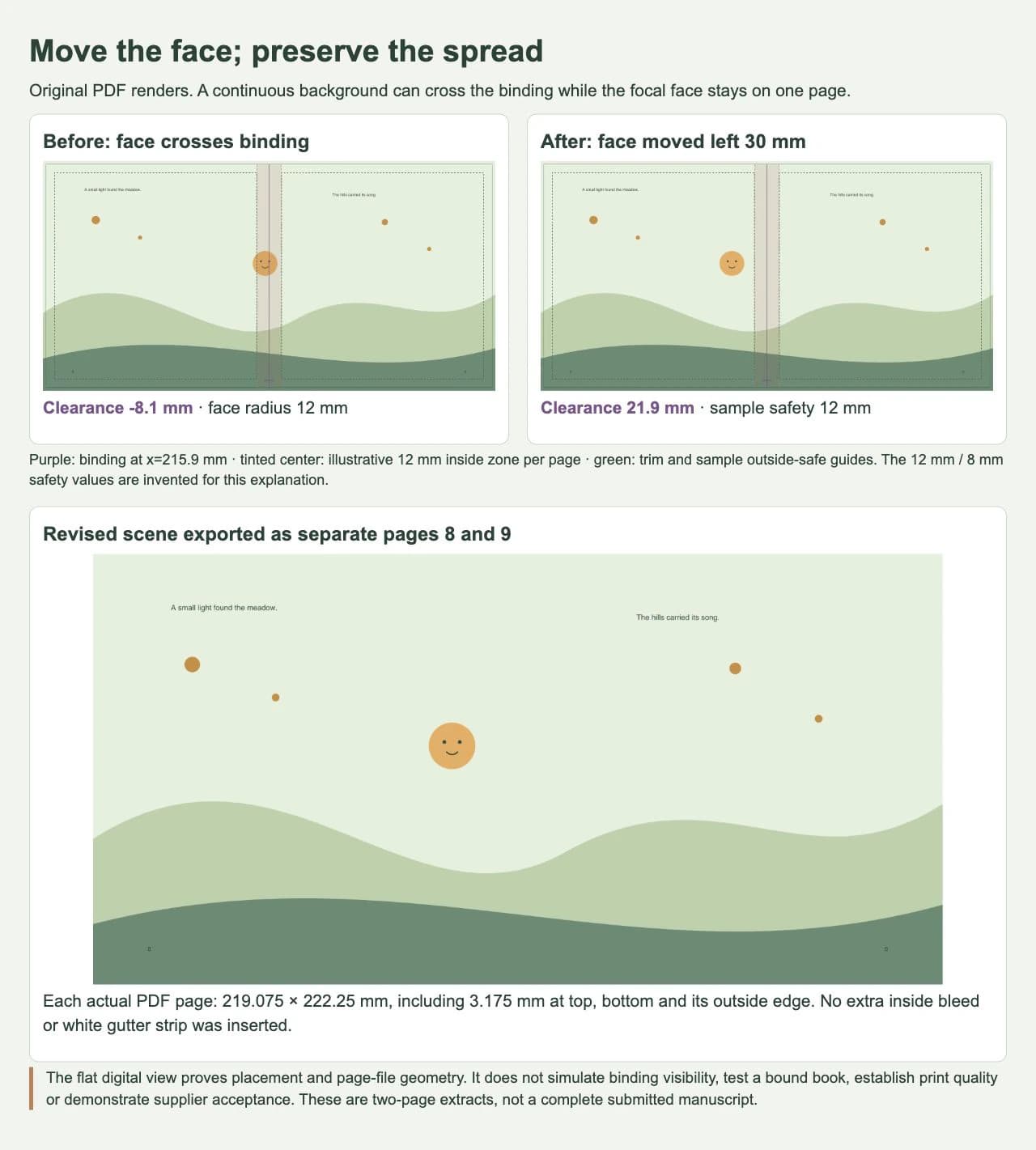
The guides identify a placement problem; they do not predict an exact hidden strip in a finished book. Binding, paper, page count and how the book opens still need the actual provider's guidance and a suitable physical proof.
Check the same composition as separate PDF pages
A useful spread preview is not necessarily the delivery arrangement. KDP's paperback submission guidelines require single pages rather than spreads or two-up files. For a full-bleed interior, it specifies extra artwork at the top, bottom and outside edge. Follow a different provider's instructions when its arrangement differs.
We generated a two-page PDF from the same scene geometry, exporting each facing page separately. It represents pages 8 and 9 in a left-to-right book. We translated the scene into each page's coordinates; we did not mirror the character or insert a white strip at the binding.
Using KDP's 0.125-inch bleed arrangement, our exact added amount is 3.175 mm at the top, bottom and the relevant outside edge. Each PDF page measures 219.075 × 222.25 mm. The left page has its outside bleed on the left; the right page has it on the right. There is no extra inside bleed in this example.
We inspected the actual PDF content streams and rendered both pages. The revised face's center is 185.175 mm from the left edge of the left PDF page: its 182 mm spread position plus the 3.175 mm outside bleed. Relative to the left page's binding edge at 219.075 mm, its 12 mm radius still leaves 21.9 mm of clearance. The page export preserved the intended placement.
The two-page output is a geometry-check extract, not a complete book submission or a passed provider preflight. Our labeled spread-proof file contains demonstration guides; the separate-page output omits those guides. Keep production guides and proof annotations out of a delivery file when the provider requires that.
In your own export, check the page order, inside and outside edges, text, important details and background continuity. If a face moves or the composition suddenly acquires a center gap, inspect the export mapping and layout settings before redrawing the illustration. Do not compensate for an unexplained export problem by shrinking the entire spread.
Preserve the illustration while correcting placement
Keep painted washes, pencil grain and textured scenes in the appropriate raster master when they already meet the intended print requirements. You can reposition or recompose raster artwork without tracing it. A native vector character can also stay in its original editable file. Our raster-or-vector guide for children's books explains that upstream choice.
If a flat character or ornament exists only as a bitmap and you need separate shapes to edit or reuse, PerfectVector's children's book illustration workflow can create an SVG candidate. Compare its expression, silhouette and small gaps with the source before placing it in the spread. Vectorization creates paths from pixels; it does not recover the original layers, choose a safe gutter position or verify the bound book. Our sample face was authored directly and was not traced.
Moving an object can create another problem elsewhere. Recheck the outside safe area, the character's relationship to nearby props and its balance against the text. A larger clearance number is useful only if the revised scene still tells the story.
Finish the digital check, then inspect a physical proof
- Get the current specification for the actual trim size, binding, page count and delivery arrangement.
- Mark the inside and outside safety regions, keeping them distinct from bleed.
- Identify essential faces, words, gestures and story clues; revise their placement within the scene.
- Export in the requested page arrangement and inspect the actual files, including both sides of each spread.
- Review a suitable printed and bound proof before approving the finished book.
The digital placement check is complete when the important details remain within the intended safety regions in the exported pages and the page dimensions and ordering are correct. We reproduced that bounded task here. We did not print, bind or submit this example to a supplier.
If the physical proof obscures a required detail, revise that composition using the observed problem and the provider's advice. A flat preview and a minimum margin cannot establish how every child will see a particular bound spread.
FAQ
Can a children's book illustration cross the gutter? A continuous background can cross the middle when the composition tolerates interruption there. Keep essential faces, words and clues away from the binding using the actual product's guidance, then inspect a physical proof.
Is the gutter the same as bleed? The gutter refers to the binding area or inside margin. Bleed is artwork extending beyond edges that will be trimmed. Read the provider's terminology and template rather than adding outside bleed as extra space for important center details.
Is 12 mm a safe gutter for every picture book? No. It is an illustrative guide in our original example. Use the actual supplier's requirements for the binding, product and page count, and assess the composition in a suitable proof.
Should I submit a two-page spread PDF? Use the requested delivery arrangement. KDP's paperback guidance requires single-page files, even when the artwork was composed across facing pages. Other providers may specify a different handoff.
Sources
- BookBaby: Content in the safety zone — Important text and image details can be trimmed or disappear into the inside binding.
- Amazon KDP: Trim size, bleed and margins — Definitions, page-count-dependent inside margins and provider-specific bleed setup.
- Amazon KDP: Paperback submission guidelines — Single-page delivery, outside bleed arrangement and production-file restrictions.
Need editable shapes from a bitmap-only character? Try one illustration as an SVG candidate, inspect its expression, and place the reviewed result within the real book layout before checking the exported pages and physical proof.
More from the blog
Convert Watercolor Art to Vector and Keep Its Feel
Learn when watercolor art should stay raster, when vectorizing helps, and how a real SVG trace changes soft washes into editable color shapes you can reuse.

Double-Sided Game Tokens: Match Front and Back
Match the fronts and backs of game tokens with a numbered sheet example. Check long-edge and short-edge layouts, readable symbols, and a separate paper proof.