Reader vs Printer Spreads: Send the Right PDF
Compare single pages, reader spreads and printer spreads with an original eight-page PDF study. Check page order and avoid imposing the same booklet twice.
On this page
A reader spread shows facing pages in reading order, such as 2–3. A printer spread pairs pages for a particular printing and folding arrangement, such as 8–1 in an eight-page saddle-stitched booklet. A single-page PDF keeps each finished page separate. Send the arrangement your print provider requests; a layout that looks like an open book is not automatically the production file it wants.
“Single pages” can still mean one multipage PDF. It usually describes the size and arrangement of each PDF page, not eight separate attachments. Keep the complete reading-order master before making any imposed copy.
Recognize the three arrangements
Imposition is arranging publication pages on printing sheets for the intended folding and binding. It changes which pages share a sheet face. It does not mean flipping every illustration or reversing the letters within the artwork.
Smartpress explains reader and printer spreads and requests single pages for its normal print-ready handoff. Its guidance also distinguishes one PDF containing separate pages from one file per page. Use that as a provider-specific example rather than a requirement for every print service.
| Arrangement | Eight-page example | Useful for |
|---|---|---|
| Single pages | 1, 2, 3, 4, 5, 6, 7, 8 | A sequential master and a provider that requests separate finished pages |
| Reader spreads | 1, then 2–3, 4–5, 6–7, then 8 | Reviewing the relationships between facing pages |
| Printer spreads | 8–1, 2–7, 6–3, 4–5 | A specific two-sheet, saddle-stitch imposition study |
In this article, numbers identify all eight publication pages, including the front and back covers. Actual books may use different printed folios or omit printed numbers on covers. Distinguish a page’s position in the PDF from the numeral visible on that page.
Reader spreads also need a convention for the first and last pages. We keep those covers separate in our proof. Do not join 1–2 simply to make every PDF page equally wide; those pages are not an ordinary facing pair in this left-to-right example.
Follow one original eight-page booklet
We authored eight 100 × 140 mm pages with an asymmetric F-shaped motif, a right-pointing arrow and a distinct page identifier. Each motif is native vector artwork. The asymmetry makes a reflection easier to notice than it would be with a circle or centered star.
From that master, we made two additional digital arrangements. The reader proof contains five PDF pages: front cover, three facing-page spreads and back cover. Its middle pages measure 200 × 140 mm; its two cover pages remain 100 × 140 mm.
The printer-spread study contains four 200 × 140 mm PDF pages, representing the two faces of two hypothetical sheets. It uses this declared pairing:
| Sheet | Face in our study | Left page | Right page |
|---|---|---|---|
| Outer sheet | A | 8 | 1 |
| Outer sheet | B | 2 | 7 |
| Inner sheet | A | 6 | 3 |
| Inner sheet | B | 4 | 5 |
The study assumes a left-to-right, side-bound, two-sheet saddle-stitched booklet. It omits bleed, creep, crop marks and stock thickness to isolate page arrangement. “Face A” and “Face B” identify our files; they do not specify how a real printer feeds, turns or reloads paper.
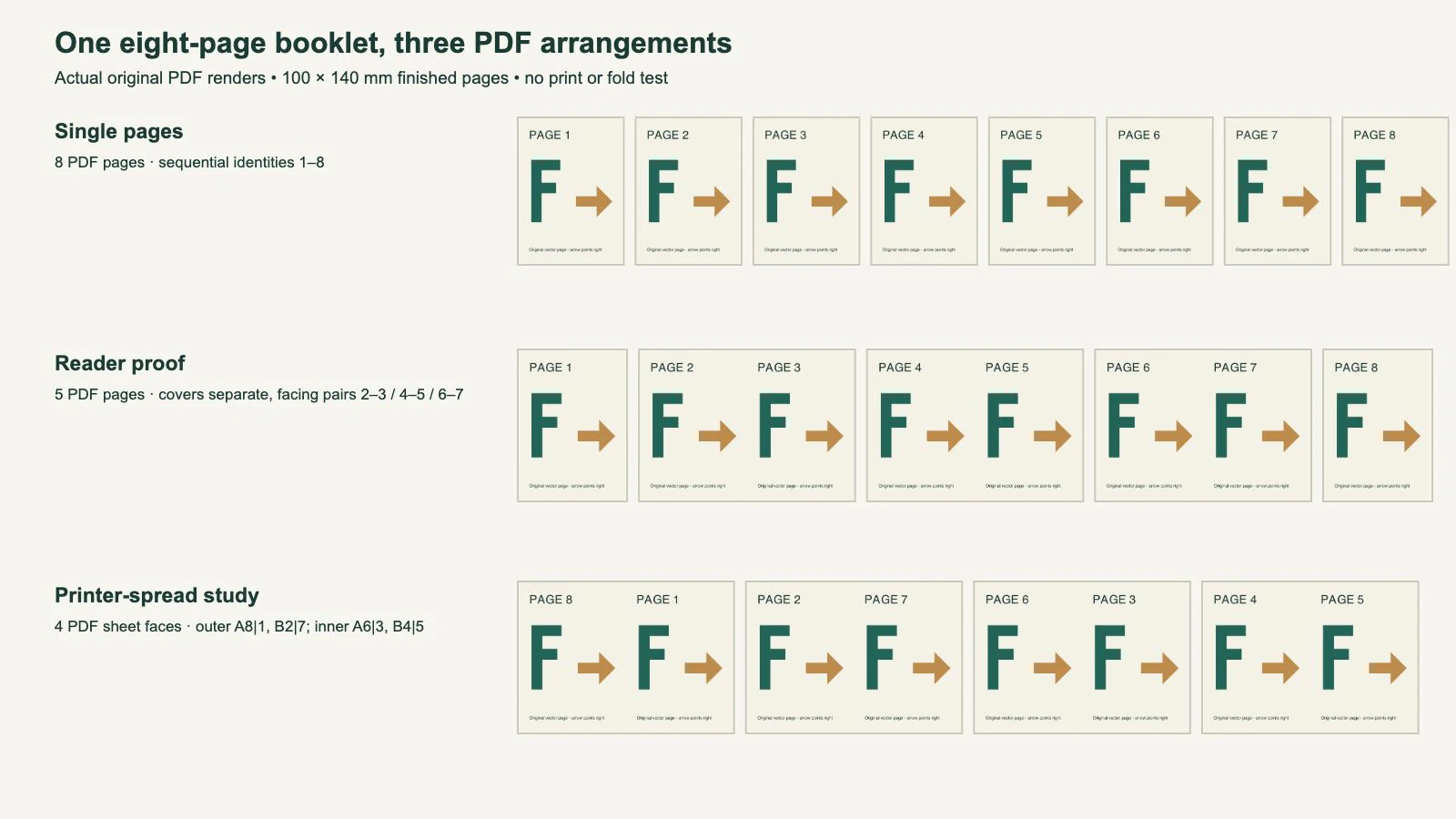
We reopened the three PDFs, checked their page counts and dimensions, and extracted their page identifiers. We also inspected the drawing transformations used to place the original page content. The placements translate the artwork without negative horizontal scaling, so the F and arrow are not mirrored. Rendered pages were inspected separately for visible layout errors.
That is a bounded digital result. It establishes the files’ identities, sizes, pairing and orientation. It does not establish physical front-to-back registration, the correct duplex flip setting or acceptance by a print provider.
Check identities as well as the pair-sum shortcut
In this eight-page study, each printer pair adds to nine: 8+1, 2+7, 6+3 and 4+5. UW–Madison’s spreads handout illustrates that relationship and the difference from consecutive reader pairs.
The sum is a useful check within the stated simple arrangement. It is not a complete imposition test. Repeating 8–1 on every face would pass the sum check while omitting six pages. Swapping the left and right members could preserve the sum while changing the layout.
Check that all eight intended page identities appear exactly once across the four faces, that each left/right pair matches the chosen map, and that the artwork retains its intended orientation. Keep deliberate blank pages in the count and identify their positions. A page with no printed folio can still be essential to the sequence.
For a different page count, binding, reading direction or signature arrangement, obtain the correct map. A formula copied from an eight-page example cannot choose those production assumptions for you.
Avoid imposing an already imposed file
An imposed PDF page is already a wider sheet face containing two publication pages. If another booklet function treats each of those wide faces as a new single publication page, it can rearrange or scale the existing pairs. This is the risk of double imposition: arranging pages for booklet production more than once.
For example, our single-page master has eight narrow pages. Our imposed copy has four wide pages. A downstream service cannot safely assume those four wide pages are the original four-page publication. Give the operator a clear description of the arrangement and follow its requested input.
Adobe documents that InDesign can impose pages in the print stream while the document remains in reading order. That separation is useful: preserve the normal master and create production output deliberately. We did not run InDesign or a printer driver in this study.
PrintingCenterUSA explicitly asks for booklet single pages and says its prepress department arranges them on sheet fronts and backs. If that is your provider, its instruction answers who performs imposition. A local printer or a home-print workflow may ask for something different.
Preserve the illustration while changing the arrangement
Arrange complete page contents; do not mirror characters or reverse captions to make the page numbers seem correct. In our printer-spread file, moving page 8 to the left half changes its location on the sheet, not its internal drawing direction.
A picture that crosses a reader spread may be split across separate production pages. Inspect the correct reader pair after exporting, and preserve its composition in the source master. Our gutter-artwork guide covers important details near the binding; the PDF page-box guide explains why displayed dimensions and intended finished boundaries can differ.
If a flat character or ornament is available only as a bitmap and needs shape editing before layout, PerfectVector’s children’s book illustration workflow can create an SVG candidate. Compare its expression, silhouette and small gaps against the source, then place the reviewed result in the reading-order master. Vectorization does not reorder pages, impose sheets or choose duplex settings. Our example uses directly authored vector motifs, without a tracing step.
Keep suitable raster illustrations when their texture or painting style should remain intact. The children’s book raster-or-vector guide addresses that artwork decision separately from PDF arrangement.
Describe the file before handing it off
Tell the provider the finished page dimensions, total page count, binding and whether the file contains single pages, reader spreads or imposed sheet faces. Include any deliberate blanks and clarify whether covers share the same file or follow a separate template.
Open the exact exported PDF rather than relying on a layout application’s facing-pages view. Check the first and last pages, center spread, page dimensions and complete sequence. If you are responsible for home printing, test the actual device’s feed and duplex behavior with a small proof before committing the finished artwork. Our study supplies no device-specific flip rule.
The right handoff is the arrangement the receiving workflow expects, verified against the complete publication. Preserve the reading-order master so a different production arrangement does not require rebuilding the book.
FAQ
What is the difference between reader spreads and printer spreads? Reader spreads show facing pages in reading order. Printer spreads pair pages for a particular printing and folding arrangement. In our eight-page saddle-stitch study, 2–3 is a reader pair, while 8–1 is one printer pair.
Does single-page PDF mean a separate PDF for every page? Not necessarily. A provider can request one multipage PDF in which each PDF page contains one finished publication page. Confirm its upload instructions and include the full requested sequence.
Should I select booklet printing for a PDF already in printer spreads? Do not apply another booklet arrangement automatically. Confirm whether the receiving workflow expects sequential pages or already imposed sheet faces, then use the settings specified for that input.
Sources
- Smartpress: Reader’s spread versus printer’s spread — Arrangement definitions, eight-page pairs and single-page file guidance.
- UW–Madison: Readers spreads versus printers spreads — A visual eight-page map and pair-sum check.
- Adobe InDesign: Impose documents for booklet printing — Imposition output separated from reading-order document pages.
- PrintingCenterUSA: Page-count overview — Its requirement for single-page booklet files and prepress arrangement.
Editing a flat bitmap character before building the book? Create and compare an SVG candidate, place the reviewed shapes in the reading-order master, and inspect the final PDF in the arrangement your printer requests.
More from the blog

Saddle-Stitch Creep: Protect the Outer Margin
Keep important artwork clear of a saddle-stitched booklet’s outer trim. Separate creep, bleed and safe margins with a measured example and printer checks.

PDF Layers: Check Whether Cut Lines Will Print
Check PDF layer visibility and print settings separately, diagnose baked-in guides, and verify the saved artwork handoff before sending cut lines to a printer.