SVG Paint Order: Keep Thick Outlines Behind Lettering
Use SVG paint-order to put a thick stroke behind the fill. Compare real text and path renders, check small sizes, and keep an editable master for delivery.
On this page
Set paint-order="stroke fill" on an SVG text or shape element to draw its outline before its fill. With an opaque fill, the fill covers the inward-facing portion of the stroke, so a thick outline does not eat into the colored face of the lettering. You can also write paint-order: stroke fill; in CSS.
The path, font size, and stroke width stay the same. This is an appearance setting, useful when an outlined wordmark becomes heavy or hard to read after you increase its stroke width. It does not create an outside-aligned stroke or a new cutting contour.
Why the default outline crowds the letters
SVG normally paints an element's fill, then its stroke, then its markers. A centered stroke extends across the boundary of the filled shape. Painting that stroke last covers some of the fill. On narrow letter stems, a large stroke can hide most of the face color.
Reversing the first two operations lets the fill cover that overlap. The SVG painting specification defines the ordering, and MDN's SVG attribute reference documents both the attribute and its CSS counterpart. The shorter value stroke has the same order as stroke fill markers: omitted operations follow afterward in their normal relative order.
The effect needs a visible fill. A path with fill="none" has nothing to paint over the inner stroke. A partially transparent fill can let that stroke show through, so use an opaque fill for the result demonstrated here.
Compare the same artwork at two sizes
We made a short BOLD wordmark with live text and a small triangular path emblem. The browser comparison below changes only the paint order within each pair. It uses stroke widths of 4 and 8 SVG user units, then displays the same 400 × 110 viewBox at widths of 400 and 200 CSS pixels.
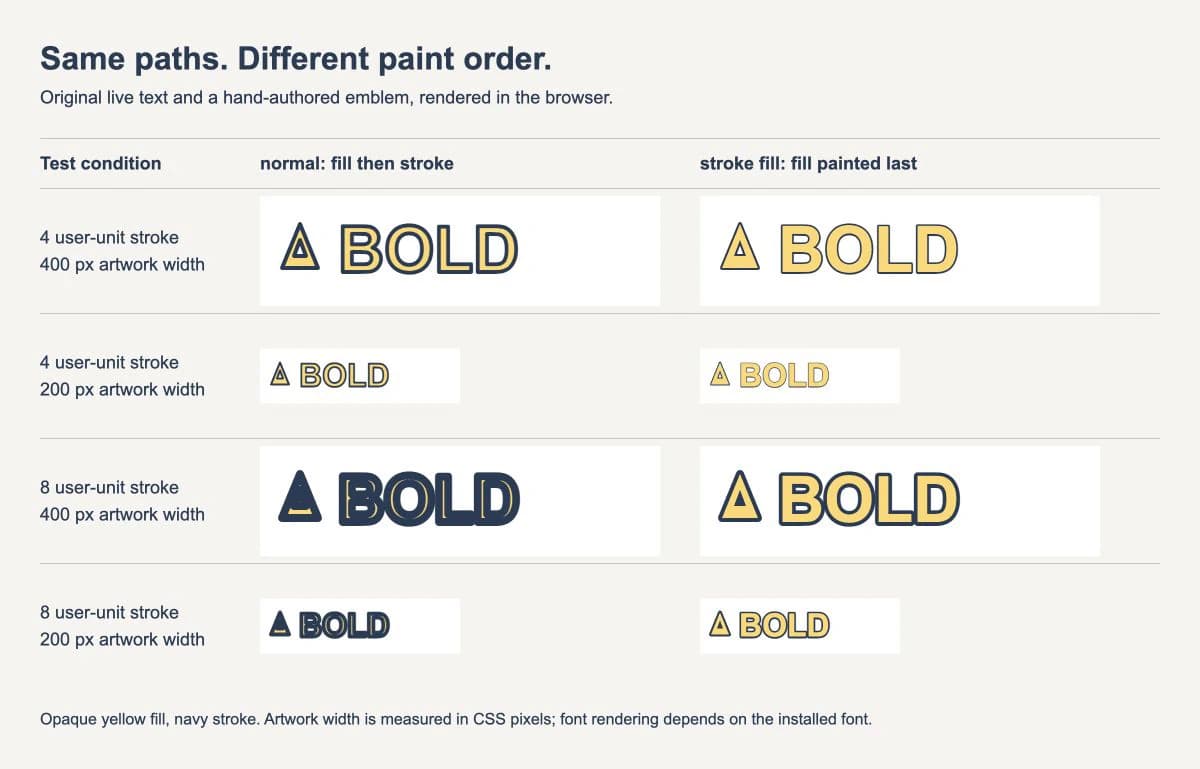
At the 8-unit setting, the normal-order wordmark loses much of its yellow face. Painting the fill last keeps the yellow stems visible. The effect is still apparent in the 200-pixel version, but small openings remain tight. The emblem's tiny inner opening also becomes difficult to distinguish with the heavier stroke.
That last detail matters: paint order can preserve a letter's face without making every hole or gap readable. Strokes still extend into unfilled spaces. If an opening closes at the intended display size, reduce the stroke or simplify the artwork. Enlarging the browser preview is not a substitute for checking the size the reader will actually see.
These are original drawing examples, not PerfectVector conversion results. The wordmark uses the installed Arial font with a sans-serif fallback; a different font changes the letter shapes and spacing.
Try a complete SVG
Save this as wordmark.svg and open it directly in a browser. The example keeps enough room around the shapes for the visible stroke. Change paint-order to normal for the comparison, then try stroke-width="4".
<svg xmlns="http://www.w3.org/2000/svg" viewBox="0 0 400 110" width="400" height="110">
  <g fill="#ffd76a" stroke="#263b55" stroke-width="8"
     stroke-linejoin="round" paint-order="stroke fill">
    <path d="M22 72 L40 28 L58 72 Z M34 60 H46 L40 44 Z" fill-rule="evenodd"/>
    <text x="78" y="76" font-family="Arial, sans-serif"
          font-size="64" font-weight="700">BOLD</text>
  </g>
</svg>
The group passes its paint properties to the path and text. Each child uses the requested order for its own rendering. fill-rule="evenodd" gives the emblem its inner opening; it is independent of paint order.
To reproduce the small examples, change width and height to 200 and 55, leaving the viewBox alone. Because this file has no non-scaling stroke, the artwork and its stroke scale together. An 8-unit stroke becomes 4 CSS pixels wide at that half-size mapping, before accounting for the portion hidden by the fill.
For a stylesheet-based version, assign the target a class and set:
.outlined-wordmark {
  paint-order: stroke fill;
}
When both a presentation attribute and a CSS declaration specify the property, CSS takes priority. If changing the attribute appears to do nothing, inspect the applied rules. MDN's CSS reference also explains inheritance and the allowed keyword combinations.
What this setting does not change
Stroke alignment. The stroke still follows the same center path. Painting the fill over part of it creates an outside-looking border around filled regions, but it has not moved the stroke geometry outward. On the edge of a hole, the remaining visible stroke can intrude into the hole.
The stacking of separate objects. Setting paint order on one element does not send that element behind a neighboring shape. A later overlapping object can still cover it. Reorder the objects when that is the problem. For an example, see why SVG z-index does not reorder logo paths.
Cut paths or offsets. A cutter or geometry tool needs the appropriate contours. It cannot be assumed to interpret an attractive browser outline as one joined border. Create and inspect the required geometry separately if the delivery job calls for it.
Font portability. The sample contains live text. Changing its paint order does not package the font or freeze the glyph shapes. Use the SVG font-change checks if a wordmark changes when reopened elsewhere.
Keep those distinctions separate while editing. A paint-order change is easy to reverse; expanding strokes or converting type to paths changes the document's editable structure.
Check the delivery copy in its destination
Start with the browser result, then open the saved file in the application or renderer that will consume it. A browser preview alone does not establish that an editor, PDF converter, or production pipeline preserves the appearance.
- Compare the face color and outer border at the final size. Look inside B, O, and any narrow emblem openings.
- Confirm that the expected font loaded. Check spacing as well as letter shapes.
- Check the page edges. A wider stroke may need more room in the viewport or clip.
- Reopen the exported delivery file. An export can change styles or object construction even when the working document looked right.
If the destination changes the outline, reduce the file to one filled, stroked shape and compare it with the browser. Follow the disappearing SVG stroke diagnosis when the issue is clipping, scaling, or missing paint. For a color-rule conflict, the SVG recoloring guide covers where fills and strokes can be defined.
If live appearance cannot survive the handoff, preserve the editable master and prepare a separate delivery copy with the necessary appearance represented as shapes. Verify that copy visually and geometrically; simply expanding a centered stroke does not by itself reproduce every intended overlap or create one outer contour.
When the source is a raster logo
Use the original vector emblem and live lettering when you have them. There is no benefit to taking a screenshot of working text and tracing it just to add an outline.
If a PNG or JPG is the only surviving emblem, PerfectVector's logo vectorization workflow can help you prepare an SVG candidate upstream. Inspect the converted silhouette and small openings before applying this styling. Conversion does not set the paint order, identify your original font, or decide which shapes should share an outline.
Where the lettering can be recreated with the correct font, keep it as a separate text object while designing. The broader logo vectorization guide explains how to choose between recovering raster artwork and using an existing vector master.
FAQ
What is the default SVG paint order?
The default is fill, then stroke, then markers. The value normal requests that order.
Is paint-order="stroke" different from "stroke fill"? They produce the same order here: stroke, fill, then markers. Unlisted operations follow the listed operations in their normal relative order.
Does paint-order create an outside stroke? It does not move or offset the stroke. An opaque fill hides the inward-facing portion of a centered stroke. The remaining stroke can still crowd holes and gaps.
Why does my SVG outline still look too heavy? The stroke may be too wide for the display size, the fill may be transparent, or another CSS rule may override the paint order. Check those conditions and inspect small openings at the final size.
Sources
- W3C — SVG 2 Painting — Defines painting order and the relationship between fills and strokes.
- MDN — SVG paint-order attribute — Documents keyword ordering, supported element types, and CSS priority over the presentation attribute.
- MDN — CSS paint-order property — Explains inheritance and abbreviated keyword sequences.
Have only a raster emblem? Prepare an editable logo SVG, inspect its openings, and test the outline at the intended size before making the delivery copy.
More from the blog

SVG Miter Spikes: Fix Sharp Corners Without Clipping
An SVG miter join can make a narrow corner spike or clip at the page edge. Compare miter limits, bevels, round joins, and viewport space before editing paths.

SVG Stroke Alignment: Place Outlines Inside or Outside
SVG strokes sit on a path by default. Use a clip for an inner outline or a mask for an outer one, then check the visible bounds and importer before delivery.