Steel vs Glass Gobos: Choose for Your Artwork
Choose steel or glass gobos by checking bridges, enclosed shapes, tone, color, and fixture fit. Use the same letter O to decide what your artwork needs.
On this page
- Compare the artwork before comparing the quote
- One letter O explains the bridge decision
- Reversing light and dark changes what must stay attached
- Run the same artwork through a material audit
- Separate a colored pattern from a multicolor image
- Check the fixture and holder as a separate decision
- Where PerfectVector fits
- FAQ
- Sources
Choose steel when the artwork can work as a connected stencil and you accept any bridges needed to hold it together. Choose glass when those interruptions would change the design, or when the image needs grayscale or multiple colors. Confirm that the chosen gobo and holder suit the exact fixture before ordering. GoboSource's material guide explains the artwork distinction; Rosco's glass specifications describe the fixture-specific constraints.
For a logo or wedding monogram, start with the shapes you are unwilling to change. An SVG can make those shapes easier to edit, but converting the file does not decide how to support them physically.
If the flat master is correct but the projection looks trapezoidal, check gobo keystone distortion before changing the logo proportions.
Compare the artwork before comparing the quote
A gobo controls where light passes through a lighting fixture. The image you want on the wall or floor determines which regions must transmit light and which must block it. TEK Productions' gobo reference describes this light-through-pattern arrangement.
Use this table to identify the constraint that should lead the material discussion:
| What the artwork needs | Start by considering | What to resolve |
|---|---|---|
| A bold, connected pattern with acceptable stencil breaks | Steel | Where the supplier needs bridges and whether you accept their effect |
| A monogram whose enclosed shapes must remain uninterrupted | Glass | Whether the supplier can reproduce the required detail at the gobo's image size |
| A single light color across the whole pattern | Either, if compatible | The light source or filter; one color alone does not require glass |
| Shading, a photograph, or several colors within the image | A suitable glass process | Required source quality, tonal treatment, and color proof |
| A fixture that restricts material, coating, thickness, or carrier | The documented compatible option | The exact fixture and holder specifications |
The construction and color distinctions come from GoboSource. Treat these as starting questions, not a promise that every design is manufacturable in either material.
One letter O explains the bridge decision
Imagine a bright letter O on a dark background. To make it in steel, the ring of the letter is an opening that lets light through. The dark center is a small disk of metal surrounded by that opening. Cut the entire ring away and the center has nothing holding it to the outer sheet.
A bridge is a narrow strip of metal that connects that center to the surrounding material. It crosses the opening, so it also blocks light along that strip. Gobo suppliers call this tabbing or bridging. StageSpot's steel-gobo explanation uses the center of an O to show why its art lab adds tabs.
With glass, the clear substrate supports the opaque center. The light-transmitting ring can remain continuous because the supplier does not need to cut that substrate away. This is the structural reason glass can preserve the enclosed detail without a metal bridge, as described in GoboSource's comparison.
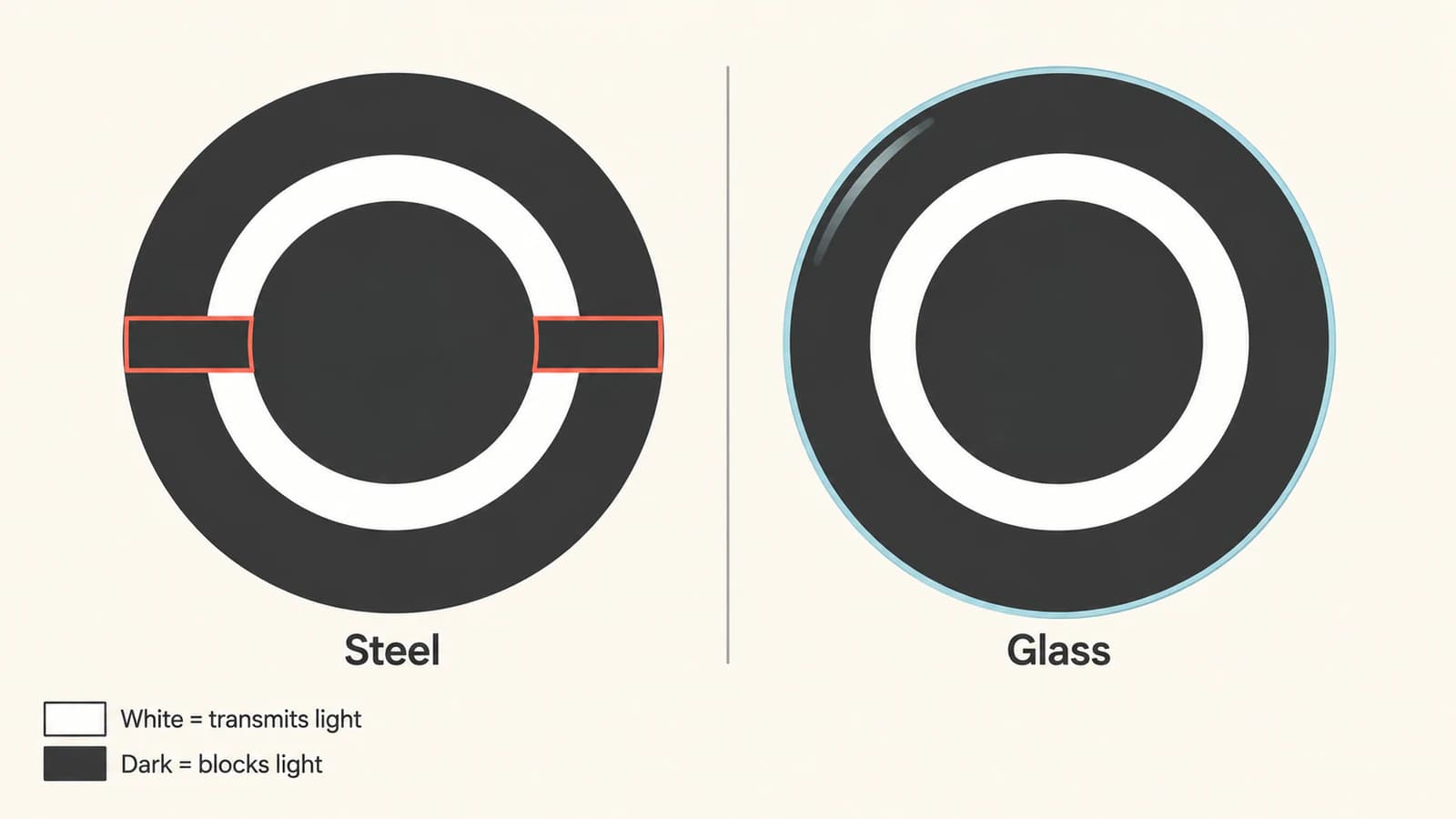
The supplier must confirm bridge widths, minimum features, and how the proposed bridges affect the image. Rosco's steel artwork guidance warns that small gobos with detailed artwork may require changes. Ask for the proposed changes before accepting the design.
Reversing light and dark changes what must stay attached
Now reverse the intended image: a dark O surrounded by light. The opaque ring itself becomes the isolated piece. Supporting the old center would solve the wrong problem.
This gives you a useful check for your own artwork: identify the opaque pieces after choosing the projected light and dark regions. Do not decide bridge placement from a black logo on a white computer canvas alone. Send a preview of the intended projection, with its light and dark regions labeled, so the supplier can confirm the interpretation.
A transparent hole in an SVG and an unsupported piece of steel are different problems. If an opening disappears when you export or import the file, use the SVG hole-repair guide. If the opening survives on screen but leaves an isolated physical piece, the material construction still needs attention.
For an adhesive glass mask, label which stencil regions remain protected and which are exposed. Its transferred islands and product-specific process restrictions follow a different construction from a projection gobo.
Run the same artwork through a material audit
Work on a duplicate of the approved mark.
- Label the areas that should transmit light and those that should remain dark.
- Circle each opaque region that has no connection to the outer material. Check letters, flower centers, small emblems, and decorative dots individually.
- Mark which features may change. A stencil break may be acceptable in a decorative initial but unacceptable in an approved company mark.
- Ask the supplier to propose a steel version with its required bridges and a glass version preserving the intended shape.
- Compare the two proofs at the same artwork size. Record each accepted change instead of approving from the material name alone.
For our bright O, the decision is straightforward. If the breaks are acceptable, keep steel in the comparison. If the ring must stay continuous, ask for glass. A more elaborate monogram needs the same decision for every enclosed region, not just its largest letter.
Separate a colored pattern from a multicolor image
A steel gobo can project colored light. The steel pattern passes the light supplied by the fixture or an appropriate filter; it does not have to appear white. That differs from preserving several colors in different parts of a logo. TEK Productions makes this distinction between supplied light color and custom glass color.
Tone is a separate requirement too. A photograph or shaded illustration may need a grayscale or color glass process and a suitable raster source. Rosco lists separate artwork requirements for line art, grayscale, photographic, and multicolor jobs in its custom glass guidance.
Do not flatten a shaded crest into solid shapes merely because you heard that gobos need vectors. Decide whether the shading is part of the image you want. The gradient-vectorization guide explains why tracing tone can change the artwork, and why keeping the raster may be the better choice.
Check the fixture and holder as a separate decision
Send the supplier the fixture's make and model, required outer diameter, usable image area, and holder or carrier details. Include the permitted material and thickness from the fixture documentation. Rosco's fixture guidance asks for this information because some glass jobs need particular coatings or custom carriers. It also identifies fixtures for which it cannot guarantee gobo lifespan or durability.
The holder name alone is not enough. For example, Rosco's B-size glass holder for ETC Source Four explicitly lists compatible fixtures, image area, supported gobo materials, and maximum thickness. Check the equivalent details for your own equipment.
A material recommendation cannot guarantee a readable projection in every room. Approve the supplier's artwork proof, then check the actual fixture setup and intended projection surface. GoboSource specifically notes that fixture and surface differences prevent it from guaranteeing an exact projected color match in its artwork guidelines.
Where PerfectVector fits
PerfectVector helps when the approved mark exists only as a flat PNG or JPG and you need editable paths for the artwork review. Use the gobo artwork-to-SVG workflow, then compare the converted letter counters, gaps, and outer edges with the original before changing the design for steel or glass.
Keep the original vector if you already have it. If the source is blurred or the lettering needs exact reconstruction, a manual redraw may be more useful; the logo-vectorization guide explains that choice. For the underlying file distinction, see how image vectorization works.
The supplier approves bridge layouts, minimum features, and physical construction. Confirm the delivery format with them too. GoboSource's artwork requirements distinguish vector line art from high-resolution raster pictures; an SVG is useful for the first branch, not a requirement for every image.
Before accepting either quote
Compare the same artwork, quantity, physical size, proof process, required edits, holder or carrier, shipping, and deadline. Ask what happens if the proof needs revision. StageSpot, for example, lists proof, revision, and rush conditions separately on its custom steel page. A material-only price comparison can miss those parts of the order.
FAQ
Does a simple monogram always work in steel? No. Even one letter can contain an enclosed region that needs support. Check the intended light and dark areas, then review the supplier's proposed bridges. Whether the altered letter is acceptable is a design decision.
Can I get a colored projection from a steel gobo? Yes. A steel pattern can pass colored light from the fixture or an appropriate filter. Reproducing different colors in separate parts of the artwork requires a different color treatment, such as a suitable glass gobo process.
Will glass make every detail in my file project clearly? No material label guarantees that result. Have the supplier review the artwork at the required image size and confirm fixture compatibility. Check the actual projection setup before relying on small details or an exact color match.
Should I convert a photograph to SVG before ordering a glass gobo? Only if you deliberately want a simplified shape-based version. If photographic tone is essential, keep the original high-resolution raster and ask the supplier about its grayscale or color artwork requirements.
Sources
- GoboSource — When to use a glass gobo rather than a metal one — Explains tabbing, the enclosed O example, and the distinction between single-color light and glass color designs.
- Rosco — Custom Steel Gobos — Describes artwork changes that steel tabbing and smaller gobo sizes may require.
- Rosco — Custom Glass Gobos — Documents tonal artwork categories and fixture-specific coating, carrier, and durability constraints.
- TEK Productions — Gobo — Explains how light passes through a gobo and how the supplied light color affects steel patterns.
- Rosco — Standard B-Size Glass Gobo Holder for ETC Source Four — Provides an example of holder specifications that go beyond gobo diameter.
- GoboSource — Artwork Guidelines — Separates vector and raster artwork needs and qualifies projected color matching.
- StageSpot — Custom Steel Gobo — Explains supplier-added tabs and separately listed proof, revision, and rush conditions.
If your approved logo or monogram needs paths, convert your gobo artwork with PerfectVector. Inspect every counter and gap against the original, then take the material audit to your supplier so the proof shows the changes you actually accept.
More from the blog
Convert a Photo to SVG: What Works and What Doesn't
You can run a photo through an SVG converter, but a detailed photo won't become a crisp vector. Here's what you really get, and which photos are worth converting.
Best SVG Converter for Cricut: Our Picks by Project
Our pick for cut-ready Cricut SVGs is PerfectVector. See when Design Space, Inkscape, Adobe Express, Canva or a free web converter fits your project better.