Gobo Keystone Distortion: Check the Projection Geometry
Separate trapezoidal gobo projection from a damaged logo. Check a projective example, keep the master, and prepare the measurements your supplier needs.
On this page
A rectangular logo can look trapezoidal when a gobo projects onto a surface at an angle. This is keystone distortion. Sharpening or vectorizing the source does not correct that projection geometry. Keep the approved flat artwork, check the installation, and ask the gobo supplier which measurements or projected test-grid photograph it needs.
A gobo is the patterned element used to form an image in a lighting fixture. Choosing steel or glass for the artwork addresses a different question from correcting the shape that appears on the wall or floor.
Separate the flat artwork from the projected footprint
Check the original logo before changing its proportions. If the flat master is correct but the projection is trapezoidal, establish the projection conditions and the supplier's correction process. Keep any compensated production version separate from the approved master.
Check whether the source or the projection changed
Open the flat source and look at a rectangular boundary, circular element and asymmetric letter or arrow. Then compare those features with the projected image. If the source itself already contains a stretched mark, that is an artwork problem to resolve before preparing the gobo.
If the master is correct and the projected boundary becomes trapezoidal, check the projection setup. Goboservice's distortion explanation describes the keystone effect from an inclined projection. It asks for installation information when preparing compensated artwork, including distances, optical-system information and projection direction.
A venue photograph adds another viewpoint. A picture taken from an arbitrary side position can make a correct surface image look distorted too. Follow the supplier's capture instructions rather than tracing whatever shape happens to appear in a phone photograph.
Keep these observations separate:
| Observation | What to inspect next |
|---|---|
| The flat master already has the wrong proportions | Approved artwork and its editing history |
| The projected boundary is trapezoidal | Fixture-to-surface arrangement and supplier correction workflow |
| The photograph differs from the intended surface view | Camera position and the supplier's requested capture method |
| Edges are soft or brightness varies | The actual optical and installation checks; a corrected outline alone does not verify them |
This article demonstrates one declared two-dimensional mapping. It does not diagnose a particular fixture or replace an installation test.
Follow one original projective example
We authored an F-shaped mark and a right-pointing arrow inside a 100 × 100-unit boundary. The source extends from x = −50 to 50 and y = 0 to 100. These are model coordinates, not measured projector or venue dimensions.
For this study, we chose the mapping:
X = x / (1 + 0.0025y)
Y = y / (1 + 0.0025y)
The coefficient is an illustrative input. It does not represent a measured tilt angle, lens specification or throw distance. The denominator changes with height, so different horizontal rows change by different amounts.
At y = 0, the denominator is 1. The top edge stays 100 units wide. At y = 100, the denominator is 1.25: the bottom corners move from x = ±50 to X = ±40, and their vertical coordinate becomes Y = 80. The mapped bottom edge is therefore 80 units wide.
| Boundary | Top width | Bottom width | Height |
|---|---|---|---|
| Original master | 100 | 100 | 100 |
| After the declared mapping | 100 | 80 | 80 |
The letter and arrow change along with the boundary. Merely making the outer rectangle straight while leaving the interior mark untouched would not compensate the complete artwork.
Why compensation changes the production artwork
A compensated source can look wrong when viewed flat. Its purpose is to counter a known projection, not to replace the approved identity master.
For our chosen mapping, the inverse is:
x = X / (1 − 0.0025Y)
y = Y / (1 − 0.0025Y)
Applying that inverse to the intended 100 × 100-unit rectangle expands its lower edge to about 133.333 units and its height to about 133.333 units. Passing the prewarped result through the original mapping returns it to the intended square. We performed the same calculation on every vertex of the original letter and arrow.
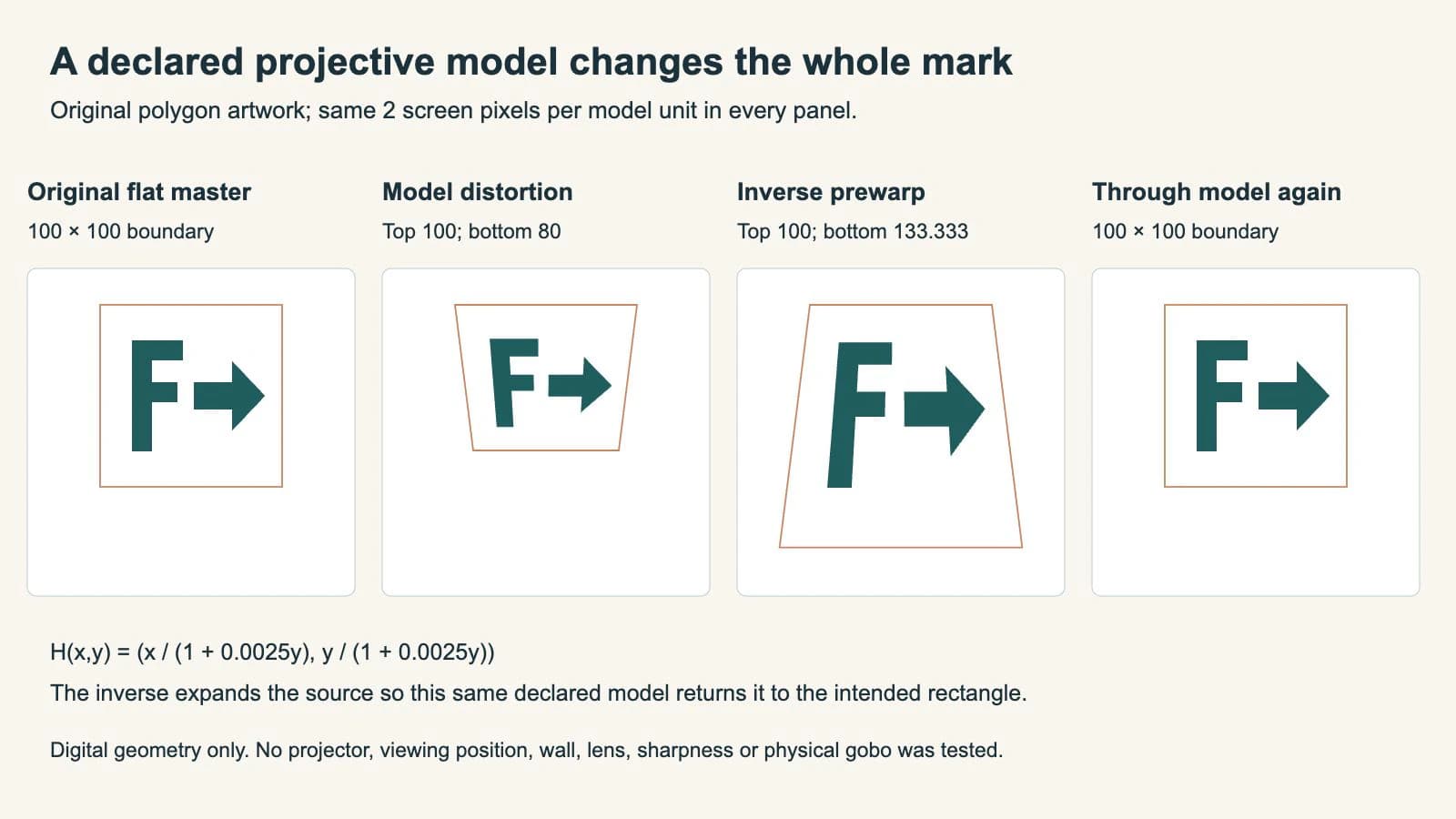
We reopened the saved SVG polygons, checked their coordinates and compared the inverse composition with the source. The measured widths agree with the table. The browser capture shows the actual saved comparison; it does not establish compensation for an unknown installation.
The inverse also has a limit: its denominator must not be zero. In this example it remains positive over the intended artwork. Copying the formula or coefficient into another job without establishing its geometry would be an unsupported correction.
Give the supplier the installation evidence it requests
Suppliers can use a projected reference pattern rather than asking you to guess a flat deformation. Derksen's keystone-correction page describes providing a measurement gobo and using an on-site photograph to manufacture the corrected version.
Rosco's correction workflow similarly describes aiming a Lineup Grid gobo with the intended fixture and lens, photographing the projection and supplying that image with the artwork. These are provider processes, not evidence that our illustrative coefficient fits their equipment.
Before requesting a corrected production file, prepare:
- the unchanged approved flat mark;
- the fixture, lens and target-surface information requested by the supplier;
- installation measurements or a test-grid photograph made using its instructions;
- the intended reading direction and final placement;
- a clear statement of whether anyone has already compensated the artwork.
Recheck the result in the intended installation. A different fixture position, lens or target surface can invalidate the assumptions used for the correction. Treat geometry, focus, brightness and manufacturing suitability as separate checks.
Where PerfectVector fits
If the approved flat mark exists only as a PNG or JPG and your supplier needs editable paths, prepare an SVG candidate with PerfectVector's gobo artwork workflow. Compare its letter shapes, openings and proportions with the flat original before sending it for supplier-specific preparation. Use a usable vector master directly when you already have one.
Do not use a photograph of the distorted wall image as a substitute for that master. Vectorization rebuilds visible artwork; it does not recover the installation geometry or calculate keystone compensation. Our example began as native SVG polygons and was not a PerfectVector conversion. The logo vectorization guide covers the earlier raster-recovery decision.
FAQ
Why does my rectangular gobo logo look trapezoidal? An inclined projection can produce keystone distortion. Check the flat master, the actual projection arrangement and the photograph's viewpoint before changing the logo proportions.
Will converting the logo to SVG fix keystone distortion? No. An SVG can provide editable source artwork, but it does not establish the fixture, lens, surface or compensation needed for the installation.
Why does compensated gobo artwork look stretched when opened flat? It may be deliberately prewarped to counter a particular projection. Keep it separate from the approved identity master and confirm which production version the supplier expects.
Can I use the example formula for my venue? The coefficient and coordinates are illustrative. Ask your supplier for its measurement or test-grid process and validate the result in the intended installation.
Sources
- Goboservice — Deformation of the image — Inclined projection, keystone distortion and installation inputs for preparing compensation.
- Derksen — Keystone Correction — A supplier workflow using a measurement gobo and an on-site photograph.
- Rosco — How We Can Keystone-Correct Your Gobos — Using an installed Lineup Grid projection and photograph with the artwork request.
Need paths from an approved raster mark? Prepare an SVG candidate with PerfectVector, compare it with the flat original, then let your supplier prepare and verify the production correction for the actual installation.
More from the blog

Soft vs Hard Enamel Pins: Read the Artwork Map
Compare raised soft-enamel outlines and flush hard-enamel surfaces using one artwork map. Label metal, color and finish before reviewing the factory proof.

Logo Clear Space: Calculate and Preserve the Margin
Choose a clear-space unit for your logo, calculate the full exclusion zone, and preserve it in an SVG without confusing artwork size with the padded canvas.