
SVG Text Vertical Alignment: Center a Rebuilt Label
Align SVG labels with dominant-baseline, compare middle and central in two fonts, and distinguish text-box centering from the visible shape of the letters.
On this page
For a horizontal SVG label, y positions the selected baseline. It does not place the top of the letters at that coordinate. Start with dominant-baseline="middle" when placing a short Latin label around a horizontal guide, and inspect the result in the actual font. Use text-anchor="middle" to center the text horizontally around its x coordinate.
A label can still look high or low beside an emblem. middle and central use different font baselines, while visual centering depends on the shapes in the word. Decide whether the layout needs a shared baseline, a centered text box, or an optical adjustment before adding an offset.
Choose the alignment target
The same y="100" can produce different letter positions:
| Value on the text element | What the baseline represents | Useful starting point |
|---|---|---|
dominant-baseline="alphabetic" | The alphabetic baseline | Words that should share a reading baseline |
dominant-baseline="middle" | A baseline related to half the font's x-height above the alphabetic baseline | A short label placed around a horizontal guide |
dominant-baseline="central" | The central baseline associated with the em box | Comparing font-box centering with the middle baseline |
The W3C baseline definitions distinguish middle from central. Neither definition promises to center the painted contours of every word. Font baseline tables and renderer heuristics also matter, as the MDN dominant-baseline reference explains.
For ordinary horizontal text, text-anchor="middle" addresses the other axis. It aligns the text chunk around the supplied horizontal position; it does not provide vertical centering. See the text-anchor reference for its relationship to text chunks.
Compare an emblem and a live label
Save this complete example as baseline-example.svg and open it in a browser. The ring is original geometry; Agyp is a test string with an ascender and descenders. The red line marks y=100.
<svg xmlns="http://www.w3.org/2000/svg" width="840" height="400"
     viewBox="0 0 420 200">
  <path fill="#137f74" fill-rule="evenodd"
    d="M55 75A25 25 0 1 1 55 125A25 25 0 1 1 55 75
       M55 86A14 14 0 1 0 55 114A14 14 0 1 0 55 86"/>
  <path d="M20 100H400" fill="none" stroke="#c3594d"/>
  <text id="label" x="250" y="100" font-family="Arial, sans-serif"
        font-size="64" text-anchor="middle" dominant-baseline="middle"
        fill="#193e3a">Agyp</text>
</svg>
Change only dominant-baseline to alphabetic, then central. Keep the coordinates, font size, and wording fixed. Next, compare a second available font. Changing several settings together makes it harder to identify which one moved the label.
We rendered all three values with loaded copies of Arial and Times New Roman. Each panel uses the same SVG coordinates and original ring. The green rectangles show the browser's getBBox() result for the live text.
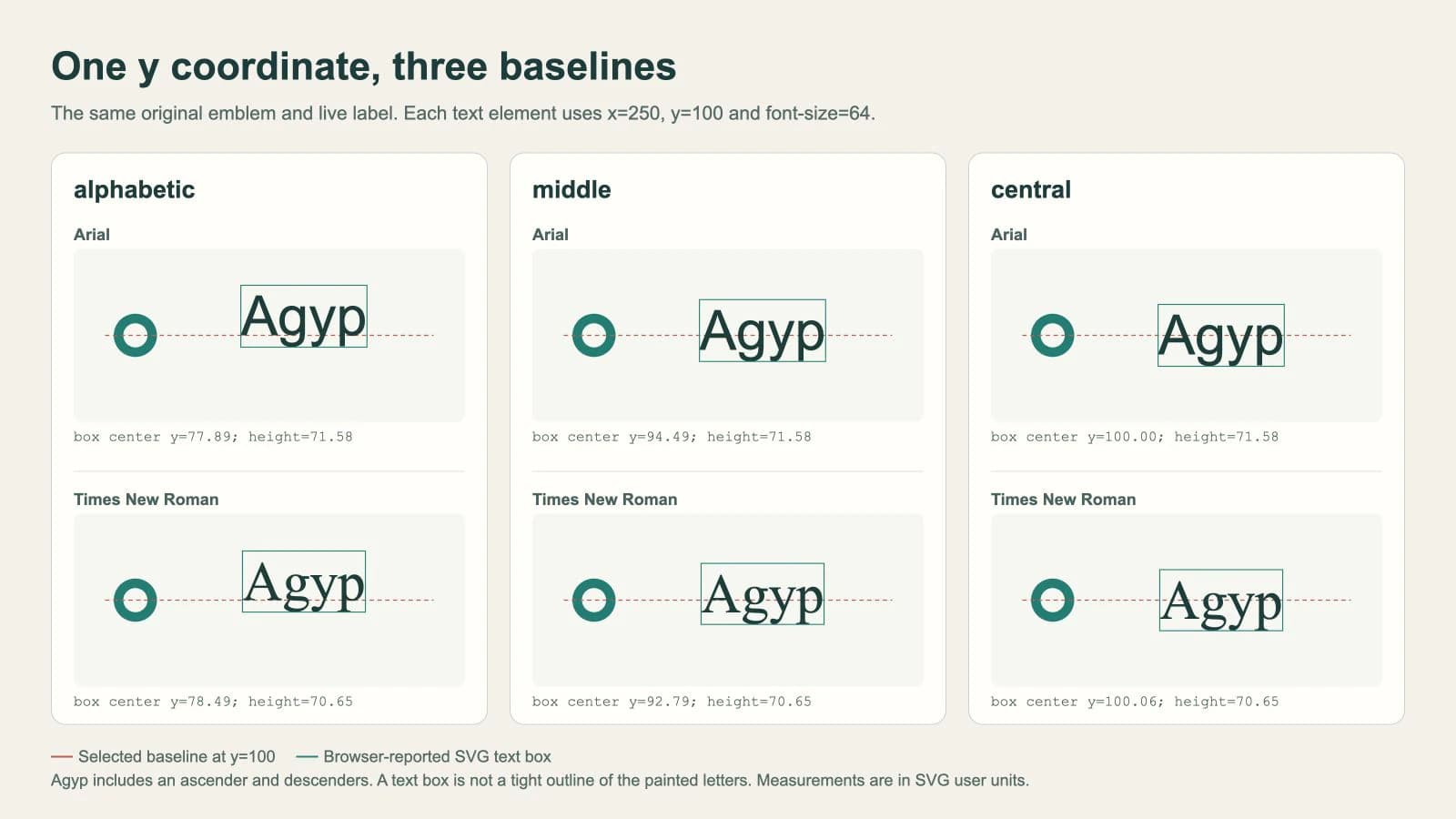
The alphabetic examples sit higher relative to the ring's center line. The middle examples move down, while central places the reported boxes close to the guide. The measurements printed below each specimen belong to these font files and this browser render. They are not offsets to copy into another design.
Our font files loaded before measurement. Your exported SVG can choose a fallback when its requested font is unavailable; resolve that dependency before judging the alignment. The SVG font-change guide covers how to check the actual face and preserve a delivery copy.
A centered text box can still look uneven
SVG text bounds are not necessarily the smallest rectangle around the visible ink. The SVG bounding-box rules use glyph cells and font ascent/descent for text calculations. A rectangle around those cells can include space that no letter paints.
That distinction matters with labels such as Agyp: the g, y, and p descend below the alphabetic baseline. An all-capital label has a different visual distribution. The intended font and actual wording should be present during the alignment pass.
For a row of labels that should read on one line, preserve a shared alphabetic baseline. Individually shifting each word until its visible shape looks centered can make the row uneven.
For a single emblem lockup, compare the label at its final size and adjust it visually after choosing a baseline. If the layout specifically requires alignment by letter contours, use an outlined duplicate in your editor to inspect that geometry, while retaining live text in the editable master. Treat the outline bounds and an optical adjustment as separate decisions.
Center the measured SVG text box when that is the goal
For a simple, untransformed, single-line <text> element, calculate the offset from the reported box center to the target. Run this in the document containing the example, after its font is ready:
await document.fonts.ready;

const label = document.querySelector('#label');
const targetY = 100;
const originalY = label.y.baseVal.getItem(0).value;
const box = label.getBBox();
const shift = targetY - (box.y + box.height / 2);

label.setAttribute('y', String(originalY + shift));
The calculation aligns the reported text box with targetY. It does not calculate visual balance or strip the font's unused glyph-cell space. Re-measure after changing the text, font, weight, or size.
document.fonts.ready waits for font loading and the associated layout work. It does not prove that the font you intended was supplied successfully; check the font resource or the browser's rendered-font information as well.
This snippet assumes one y value, no per-character positions, no dy offsets, and no transformed text group. getBBox() returns a local SVG box. A target in another coordinate system requires a mapping; use the SVG bounds workflow before mixing screen pixels with SVG units.
Resolve conflicting settings before adding more offsets
Inspect the text and its parent groups. A leftover dy, a nested <tspan>, or a transform can alter the placement you are trying to diagnose. Remove one suspected adjustment at a time in a copy and compare the result.
Check page styles too. CSS can override the dominant-baseline presentation attribute. If changing the attribute has no visible effect, inspect the computed value before adding a second correction.
alignment-baseline addresses how an element's baseline aligns with its parent's corresponding baseline. It is not a general synonym for “center this label in the SVG.” The MDN alignment-baseline reference also identifies browser support limits. For this standalone label, keep the test focused on dominant-baseline, then verify the actual export destination.
This example covers horizontal Latin text in one browser. Curved labels need a different placement check; the SVG text-on-path walkthrough separates the lettering from its guide curve. Other scripts and vertical writing need their own baseline decisions.
Keep the mark separate from the lettering
If you already have a clean vector emblem, retain it and rebuild the label as live text. Moving the label or choosing a font does not require vectorization.
When the emblem exists only in a PNG or JPG, PerfectVector's logo vectorizer can prepare candidate geometry for that part of the design. Check its outline and openings, then place it beside newly typed text using the chosen baseline. Vectorization does not identify the original font or restore editable typography from a raster image.
For exact brand lettering, use the original font and vector assets when available, or reconstruct the lettering deliberately. The logo vectorization guide helps choose between preserving, tracing, and redrawing the source.
Before delivery, check the actual wording and font, inspect the lockup at its final size, and reopen the exported SVG in its destination. Keep the editable master if the delivery copy uses outlined text.
FAQ
Is dominant-baseline="middle" the same as central? No. Middle uses an x-height-related baseline, while central uses the central font baseline associated with the em box. Their positions can differ, and neither guarantees optical centering of every word.
Does text-anchor="middle" center SVG text vertically? For ordinary horizontal text, text-anchor controls horizontal placement around the x coordinate. Choose the vertical baseline separately with dominant-baseline, then inspect the result in the intended font.
Can getBBox center the visible letters exactly? It can center the SVG text box reported by the browser. Text bounds can include glyph-cell space beyond the painted letters, so this calculation does not guarantee optical centering or tight contour alignment.
Sources
- W3C — SVG baseline alignment — Defines the alphabetic, middle, and central baselines.
- MDN — dominant-baseline — Explains baseline tables, font heuristics, and CSS precedence.
- MDN — text-anchor — Documents text-chunk anchoring around a supplied position.
- W3C — SVG bounding boxes — Describes the glyph-cell model used for text bounds.
- MDN — FontFaceSet.ready — Defines when font loading and layout have completed.
- MDN — getBBox — Documents local SVG bounds and transform exclusions.
- MDN — alignment-baseline — Explains parent-baseline alignment and browser support limits.
If your rebuilt logo still needs an editable emblem, prepare an SVG candidate with PerfectVector, inspect the recovered outline, then pair it with live lettering and check the alignment in the final destination.
More from the blog
SVG textLength: Fit a Label Without Distorting the Letters
Compare SVG textLength spacing and spacingAndGlyphs with real label examples. Preserve letter shapes, handle a maximum width, and keep your wording editable.

SVG Transform Order: Scale and Position Artwork
Compare SVG translate and scale order with a measured logo example. Use nested groups, follow one point, and place artwork without changing its source paths.