Foil vs Ink Printed Napkins: Choose Your Artwork
Choose foil, spot ink, or full-color napkin printing for your wedding artwork. Compare metallic effects, file needs, and the proof to request before ordering.
On this page
- Foil, metallic ink, and full color are different choices
- Try one motif in three artwork treatments
- For one-color ink, keep the recognizable shapes
- For metallic foil, separate the shape from the shine
- For full color, preserve what makes the painting work
- Where PerfectVector fits in the decision
- Compare quotes and proofs for the same job
- FAQ
- Sources
Choose foil-stamped napkins when you want a defined imprint with a foil finish, such as a metallic monogram. Choose spot ink for artwork built from a few solid colors, and consider full-color printing when the painting, photograph, or shaded illustration matters more than a metallic effect. Confirm which processes your supplier offers on your chosen napkin before preparing the file.
The useful question is what you want to preserve: the motif's shape, its shine, or its painted color. A simple olive branch can work in all three directions, but it needs a different artwork treatment for each. Vectorization helps recover editable shapes from a flat image; a watercolor that should keep its soft washes may be better left as a high-resolution raster.
Foil, metallic ink, and full color are different choices
Foil stamping transfers a thin foil layer with heat and pressure. Ink printing applies ink to the paper. For Your Party explains this distinction for its own products and offers shiny, satin, and matte foils, so foil does not necessarily mean shiny. For Your Party's process comparison is a useful starting point when a product's finish name is unclear.
Metallic ink is still an ink choice. A gold ink selection and a gold foil selection can produce different appearances on the same napkin color. Napkins-Only's metallic ink comparison shows examples where tissue color and absorbency affect the ink's appearance. Treat the sample for your chosen combination as the reference, rather than the gold swatch on your monitor.
| What you want to keep | Route to investigate | Artwork to prepare | What to confirm |
|---|---|---|---|
| A simple mark with a reflective metallic finish | Metallic foil | A clear map of the areas receiving foil | Foil finish, napkin stock, small gaps, and allowed coverage |
| A botanical silhouette or lettering in one flat color | Spot ink, or matte foil if offered | Solid-color artwork with deliberate openings | Ink or foil choice, contrast, and the supplier's accepted file |
| Two distinct flat colors | A supported two-color ink or foil process | Separately identifiable color regions | Whether that exact product supports two colors and how to supply them |
| Watercolor washes, shading, or a photo | Full-color printing | A sufficiently detailed raster or other accepted full-color file | Image resolution, background treatment, color appearance, and print area |
Availability is product-specific. For example, VistaPrint's custom foil napkin FAQ specifies single-color foil printing. For Your Party's custom-art FAQ describes two-color foil artwork supplied as separate files and full-color digital printing on select products. Do not assume an option offered by one supplier is available in another supplier's configurator.
Try one motif in three artwork treatments
Imagine an olive branch chosen for wedding invitations: green leaves, a thin stem, and a soft painted wash. Before converting anything, save that original and make a separate napkin version. These are design options to discuss with the printer, not results from a physical print test.
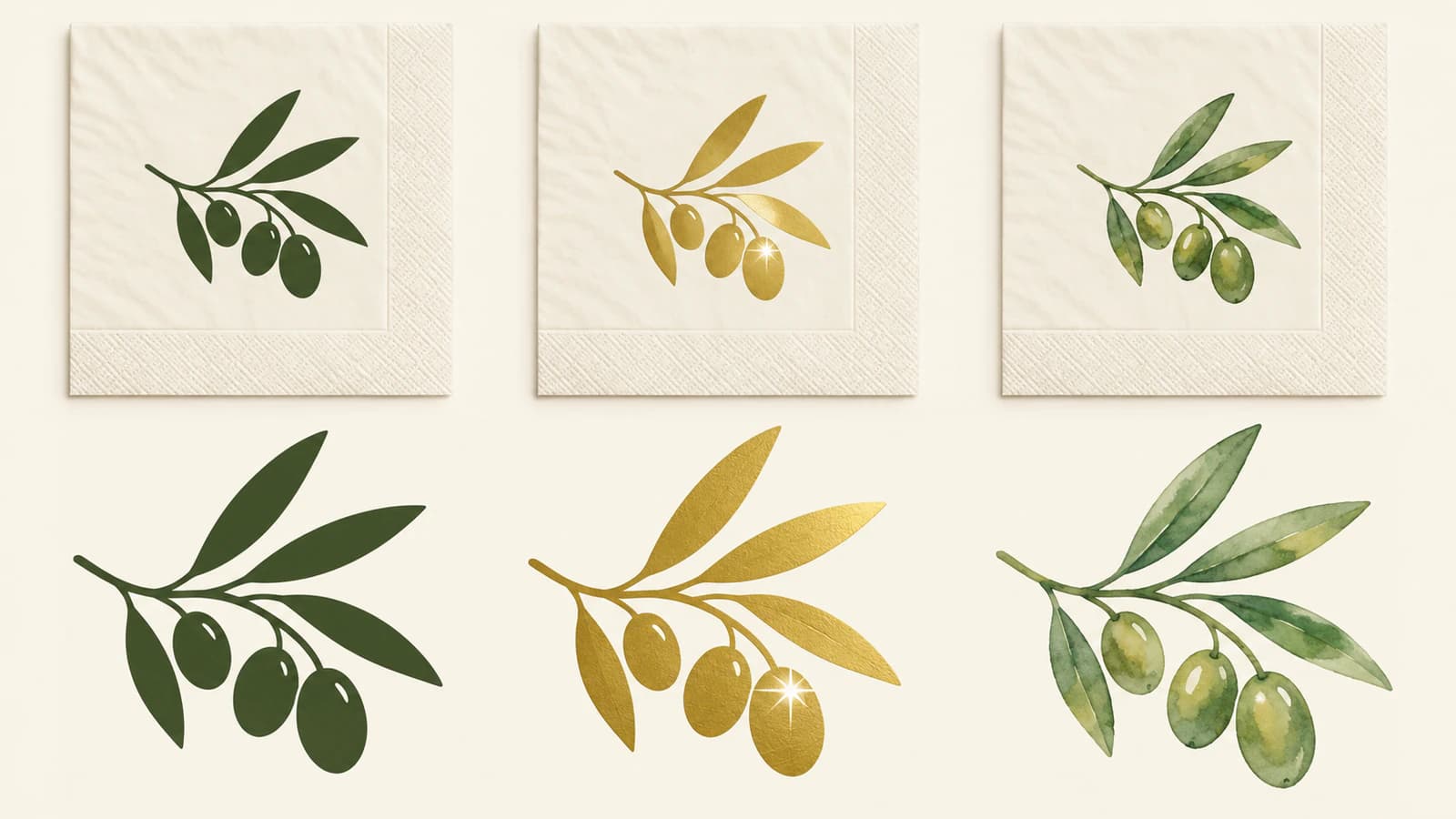
For one-color ink, keep the recognizable shapes
Turn the leaves and stem into a deliberate solid-color motif. Decide whether a leaf needs an interior opening or whether a simpler silhouette carries the idea. You do not need to preserve every vein from the invitation just because it is present in the source.
Place the motif at the supplier's actual imprint size before judging it. Inspect the narrow space between adjacent leaves and the smallest detail you want guests to recognize. Ask whether these features suit the selected ink and napkin; switching to ink is not a universal fix for artwork that is too fine.
For metallic foil, separate the shape from the shine
Use the same branch shape as the starting point, then identify the areas that should receive foil. Keep a gold mockup for discussing appearance and a separate production version that follows the supplier's instructions. A gold gradient does not tell the printer where to stamp.
VistaPrint recommends bold designs, clear fonts, and limited detail for its foil napkins; it also cautions against large foil areas and photos. Its stated minimums are 8-point text and 0.25-point lines. Those figures belong to that product's guidance, not a general napkin-printing standard. Have the supplier assess reversed details and gaps as well as the lines themselves.
Once you have chosen foil, the foil-stamping artwork checklist covers the separate mask, spot-color instructions, and export checks in more detail.
For full color, preserve what makes the painting work
If the pale edges and overlapping washes are the reason you chose the branch, send the supplier a suitable full-color image for assessment before tracing it. Full-color printing is a separate product option, not something a one-color order gains when you upload a colorful file.
For Your Party accepts full-color artwork and high-resolution JPG images for its selected digital products, and notes that images on napkins may look lighter than they do on screen. Follow its current file requirements for that order. Other printers may specify different formats or resolution.
A trace can simplify painted tones into editable regions. That may be a useful redesign, but it changes the artwork. The watercolor-to-vector guide explains that tradeoff before you commit to it.
Where PerfectVector fits in the decision
If you have selected a solid-color route and only have a PNG or JPG of the motif, PerfectVector can turn the flat illustration into SVG paths for editing. Use the wedding napkin artwork converter, compare the preview with your original, and inspect leaf tips, stems, and open spaces before using the result in your layout.
Use the original vector if the illustrator can supply it. For names and dates, add text in your design application so you can correct spelling and spacing before outlining it as requested. Tracing lettering does not recover its font.
A converted SVG still needs preparation for the selected process. Check for unwanted background shapes and multiple fills that only look like one color. If two colors need separate files, the SVG color separation guide explains how to keep the artwork aligned while separating it. Let the supplier specify the final color setup and export format; SVG acceptance is not universal.
For a full-color painting that the printer accepts as raster, keep the original image. Our image vectorization explainer can help if you are unsure whether you need editable paths at all.
Compare quotes and proofs for the same job
Get quotes for the same quantity, napkin size and material, artwork, number of imprint colors, and delivery date. Ask about custom-art setup and proofing as well as the napkin price. A lower starting price for a different product does not settle which route costs less for your order.
The physical napkin also matters. Napkins-Only's comparison describes limits with its paper-linen foil work and recommends checking samples. That is a supplier-specific material warning; it does not establish that all foil napkins flake or that every linen-like product must use ink.
Use the digital proof to check placement and content. Ask for a relevant physical sample when shine, texture, or color contrast will decide the order. A sample from the supplier's range shows a process and material combination; confirm separately whether a custom printed proof of your own design is available.
Before approving, check:
- Product and process: the napkin material, napkin color, ink or foil finish, and number of imprint colors match the order.
- Final-size artwork: the motif fits the printable area, small openings remain clear, and the layout has room for the supplier's placement tolerance.
- Lettering: every name, date, accent, and line break is correct.
- File and proof route: the supplier has the requested file and you know whether another approval is required before production.
For Your Party distinguishes its website-preview approval from an emailed PDF proof and explains when artwork adjustments trigger further approval. Read the proofing choice for your order before selecting it; a screen mockup and a physical sample answer different questions.
FAQ
Is metallic ink the same as metallic foil? No. Metallic ink is applied as ink, while foil stamping transfers a thin foil layer. Ask to see the selected finish on the napkin color you intend to order, because a screen swatch does not show the complete result.
Can watercolor artwork be printed on napkins? Yes, when the supplier offers an appropriate full-color product and accepts the file. Preserve a high-resolution original for that route. Turning the painting into a one-color motif is a separate design decision that removes its tonal washes.
Do I need SVG for foil or ink napkins? Not necessarily. Use the format required for the exact product. SVG can be an editable working file, but the printer may request AI, EPS, PDF, or an accepted raster image. Vectorization alone does not set the print size, color separation, or production tolerances.
Which is cheaper, foil or ink printing? Compare current quotes for the same order specifications. Quantity, material, imprint colors, setup, proofing, and delivery can change the total. A general foil-versus-ink price claim is not a substitute for that comparison.
Sources
- For Your Party — Foil or Ink, Which Should I Choose? — Explains the supplier's foil and ink processes and its shiny, satin, and matte foil finishes.
- Napkins-Only — Metallic Inks vs Foil Embossing — Provides metallic ink and foil examples and describes material-dependent limits in its own napkin workflow.
- VistaPrint — Custom Foil Napkins — Specifies single-color foil availability and the product's artwork recommendations.
- For Your Party — Frequently Asked Questions — Documents custom-art formats, full-color options, color separations, and proofing choices.
If your chosen process needs editable shapes, try your flat motif in PerfectVector. Compare the SVG with the original, inspect the smallest leaf and gap at final size, then prepare the supplier's requested file for proofing.
More from the blog

Double-Sided Game Tokens: Match Front and Back
Match the fronts and backs of game tokens with a numbered sheet example. Check long-edge and short-edge layouts, readable symbols, and a separate paper proof.
Pinback Button Artwork: Face, Wrap and Safe Area
Prepare pinback button artwork with a measured radial example. Keep the logo on the face, preserve the template size, and follow the maker's bleed instructions.