Board Game Art: Vector or Raster for Print?
Choose vector or raster for board game art, test symbols across components, preserve painted detail, and prepare the files your game manufacturer needs.
On this page
Use vectors for board game symbols, frames, and diagrams that you need to resize or revise. Keep painted characters, scenery, and textured backgrounds as raster artwork. Build the component layout from both, with editable text, then export the format your manufacturer requests.
A card can contain a raster illustration, vector resource icons, and live rules text. You do not have to choose one format for the whole game. The useful question is which parts must remain editable when a resource changes, a card shrinks, or the rulebook needs another language.
Choose a working format for each component
| Artwork | Practical working format | What to check before delivery |
|---|---|---|
| Resource and action symbols | Vector paths | Distinct silhouettes, clear gaps, consistent visual weight |
| Card frames and player-board tracks | Vector shapes with separate text | Alignment, spacing, and readability in the actual layout |
| Painted character or location art | High-resolution raster master | Pixel dimensions at the final placed size and intentional texture |
| A board with painted terrain and route markers | Raster painting plus vector overlays | Markers remain legible over the busiest terrain |
| Rulebook diagrams | Reusable vector symbols and editable labels | The same symbol means the same thing throughout the game |
| Box illustration | Raster or vector, according to the art style | Enough detail for the largest placement and the supplier's template |
This is a working-file decision. A manufacturer may still want a flattened export. Keeping editable masters makes that export repeatable when the design changes.
For the underlying format distinction, see PNG versus SVG. An SVG can contain an embedded bitmap, so an .svg extension alone does not prove that a symbol is made of paths.
Start with one symbol that appears in several places
Suppose a trade action appears on a token, in a card's cost row, and beside a rulebook explanation. Those placements give it different neighbors and different amounts of space. A symbol that looks clear alone may become crowded next to three costs and a line of text.
Our example uses an original, team-directed synthetic bitmap: a gold cube surrounded by teal and coral arrows. PerfectVector converted it to SVG on September 4, 2026. For this article, we inspected the existing result again and rendered it at several digital sizes. The SVG contains eight paths, four fill colors, and no embedded bitmap. Its full-canvas near-white background path was removed after conversion; the artwork paths were not redrawn or reorganized.
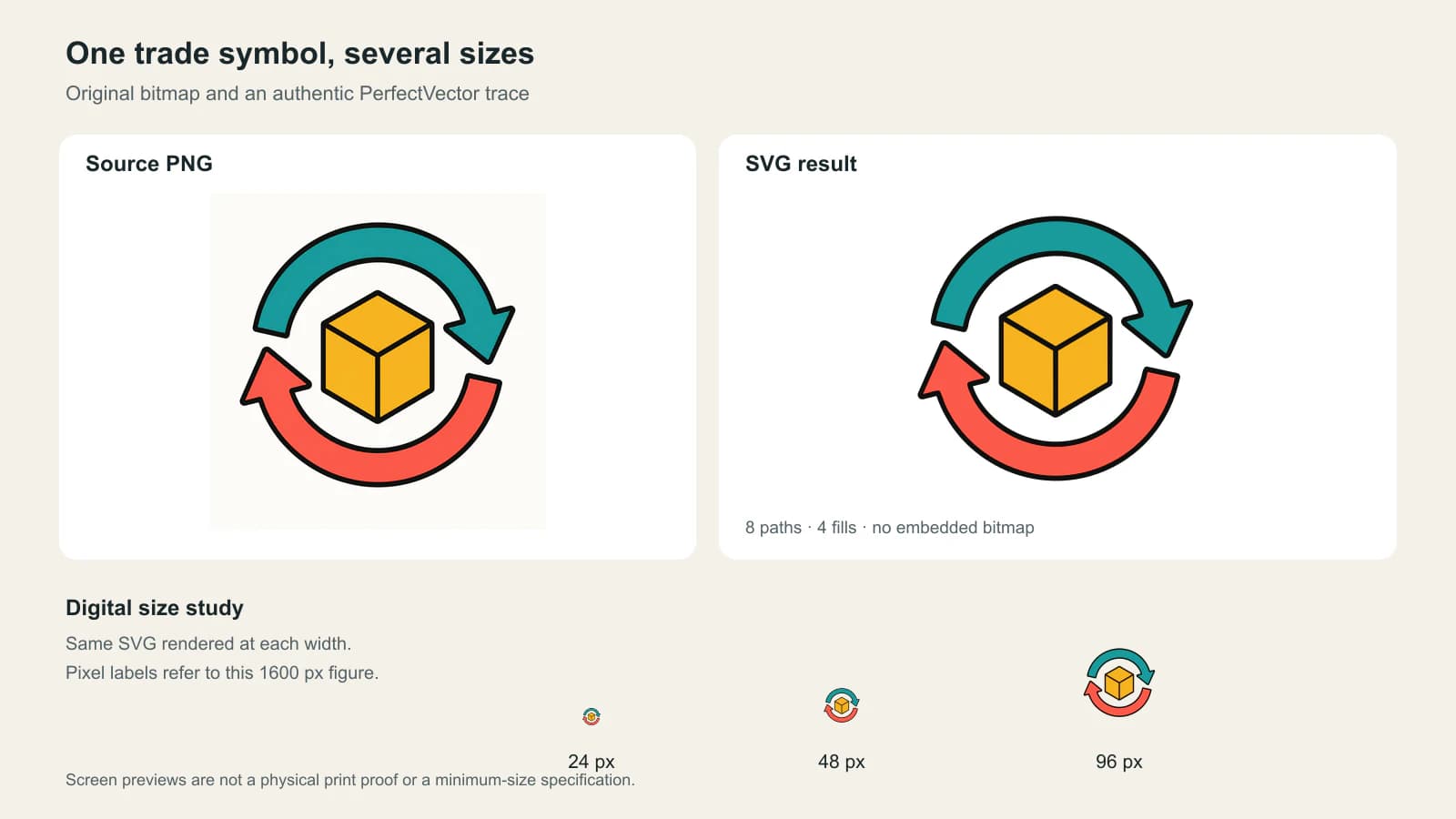
At the largest preview, the cube's internal edges and the arrowheads are easier to distinguish. At the smallest, the overall circular gesture is more apparent than the cube's detail. That is a reason to inspect a small placement, even when its source is vector. Smooth scaling cannot give a tiny symbol more room.
The path count confirms inspectable geometry; it does not establish print quality or recover named “cube” and “arrow” layers. If you need to recolor one part, open the result and check what selecting that part actually selects.
For your own game, place one candidate symbol into the real token, card, and rulebook layouts before tracing an entire set. Ask a playtester to identify it among neighboring symbols without a verbal hint. If its meaning depends on a detail that disappears, simplify that detail or allocate more space. A larger source file cannot solve a crowded layout.
Keep related symbols distinct without relying on color
A red resource and a green resource should not be identical shapes whose only distinction is their fill. Give resources different silhouettes or pair the colors with labels or symbols that also appear in the rules. Then check the set together: a beautifully drawn individual icon can still resemble its neighbor too closely.
Mattel describes using icons or tactile clues, explained in each game's instructions, to help players identify colors in its accessible games. That is a useful published example of giving color another identifier; it is not a certification for a new design. Mattel's accessibility FAQ
For the trade example, color alone should not carry “give” versus “receive” if the direction of each arrow matters. Check the arrowheads and the surrounding rule labels. A grayscale preview can reveal some problems, but playtesting with people who have different visual needs is more informative than treating one filter as a pass.
If you are building a reusable library, the PNG-to-SVG icon workflow covers checking paths and consistent icon sizing. For a physical game, continue that check in the component layout and printed prototype.
Trace selected art, and keep the painting
An automatic trace is useful when only a bitmap of a reusable flat symbol remains. It produces new shapes from the visible image. It does not recover the illustrator's original layers, brushwork, or text.
Keep a textured forest painting as a raster if the texture is part of its appeal. Put the resource symbols and location labels above it as separate objects. Tracing the entire board would turn the painting into color regions and combine a straightforward icon-reuse job with a much larger stylistic change.
Keep rules, numbers, and translated labels as live text in the working document. When a supplier asks for outlined type, make a delivery copy and retain the editable master. Otherwise, a late change from “Gain 2” to “Gain 3” becomes a shape-editing job.
If a flat resource or action symbol exists only as a PNG, use PerfectVector's board game artwork converter to create an SVG candidate. Open it in your layout editor, inspect the shapes and background, and try it at the smallest intended placement. Keep the trace only if it preserves the symbol's meaning and supports the edits you need. Simple geometric symbols may be quicker to redraw; painted artwork may be better left as pixels.
The manufacturer decides the delivery format
Ask for the current template for each component before preparing final files. Your editable SVG symbol is one ingredient in that layout, not a universal print submission.
For a sheet of punch tokens, check bleed against neighboring token gaps as well as the outside sheet edge, while preserving the manufacturer's approved die contours.
Two manufacturers illustrate why you should confirm the handoff:
- The Game Crafter asks designers to export template artwork as PNG or JPG and accepts RGB uploads, rejecting CMYK images. Its templates show trim, bleed, and safe areas. The Game Crafter's template guide
- Hero Time prefers Illustrator files and also accepts editable PDF or PSD files. Its setup guide asks for separate background, image/icon, text, and cutting-template layers. Hero Time's artwork setup guide
Neither workflow means you should discard your vector master. Export the requested file from a layout containing the appropriate vectors, raster artwork, and type. A PDF can contain both paths and pixels; saving as PDF does not trace the painting or repair a low-resolution image.
When a supplier specifically requests Illustrator files, follow the AI-file print-shop handoff and confirm whether it needs native editability or a production PDF. Do not rename an SVG to .ai.
Check the export as a game component
Review the exported file, not just the design document. Use this sequence for the first token and card before repeating the process across the set:
- Compare it with the current template. Check the intended dimensions, bleed, safe area, and which guide layers belong in the final file. The Game Crafter specifically warns that leaving its cut-line layer visible will print those lines.
- Inspect the smallest symbol in context. Look at the actual cost row, board track, or token face, including its background and neighboring marks. Do not judge every symbol at a comfortable editor zoom.
- Check the painting at its placed size. Confirm that its pixel dimensions meet the supplier's requirement. A vector frame does not increase the resolution of the image inside it.
- Make and review a physical prototype. Use the intended component size and check it at the distance players will use it. A home proof can expose layout problems; it does not establish the production printer's color or cutting accuracy. For double-sided tokens, first match the front and back sheet positions so each face belongs to the intended piece.
- Keep the master and delivery copy together. Record the template revision and export settings so later cards use the same setup.
If a symbol fails this review, fix the shape, spacing, or layout that causes the problem. Changing the file extension is rarely the useful next move.
FAQ
Should all board game art be vector? No. Use vectors for reusable symbols, frames, and diagrams when editable shapes help. Keep paintings and textured illustrations as raster artwork with enough pixels for their final placement. Combine them in the component layout.
Can I send SVG files directly to a board game manufacturer? Only if that manufacturer accepts them for your job. Some workflows require PNG or JPG exports; others prefer Illustrator, editable PDF, or PSD files. Confirm the current component template and submission specification first.
Does vector artwork stay readable at any size? No. Vector paths can scale without depending on a fixed source pixel grid, but small gaps, thin features, and crowded layouts can still become hard to read. Check symbols at their intended placement size and in a physical prototype.
Should I vectorize the text in my card image? Retype editable rules and labels in the layout instead of tracing their pixels. Keep live text in your master, then outline a delivery copy only when the supplier requests it. An automatic trace does not restore the original font or editable wording.
Sources
- The Game Crafter: Templates — Component guides, RGB raster uploads, and removal of template cut lines before export.
- Hero Time: Artwork Setup Guide — Its preferred editable delivery formats and separation of artwork, text, and template layers.
- Mattel: Colorblind Accessible Games FAQs — A publisher's use of additional icons or tactile clues to identify colors.
Start with the symbol you repeat most. If only a bitmap remains, convert that board game symbol to SVG, inspect its paths, and place it in your smallest component layout before committing the rest of the set.
More from the blog

PDF Page Boxes: TrimBox, BleedBox and MediaBox
Understand PDF page boxes with one measured artwork example. Compare TrimBox, BleedBox, MediaBox and CropBox before exporting a logo or sending it to print.

Actual vs Effective PPI: Check the Placed Image
Understand actual and effective PPI with measured PDF placements. Separate image pixels, source metadata, scaling, and resampling before a print handoff.