Punchboard Bleed: Check the Neighboring Token Gap
Check how neighboring punchboard bleeds compete for space. Inspect original SVG and PDF geometry, preserve the die contours, and confirm your supplier's rules.
On this page
On a punchboard, check the space between neighboring cut contours as well as the bleed around each token. Two individually adequate bleed extensions can collide when the tokens sit too close together. Use your manufacturer's current spacing rules and approved die geometry before fitting more pieces onto the sheet.
For a simple pair, compare the nearest cut-to-cut gap with the two bleed amounts facing that gap. Keep important artwork inside each token's separate safe margin. A sheet-edge bleed setting alone does not check every token's neighbors.
Each token needs room outside its cut
Measure from the actual neighboring die contours. Extending a background is an artwork edit; moving a token or changing its cut outline changes the die layout and needs the manufacturer's agreement.
Name the three boundaries
A dieline specifies the intended cut contour. Bleed extends background artwork outside that contour. A safe margin keeps important text, symbols and borders inside it. These boundaries perform different jobs.
Adobe's bleed explanation describes extending artwork beyond a finished edge before trimming. A punchboard adds an important layout question: another token may need its own background extension in that same surrounding space.
A decorative frame inside a token is not its dieline. Nor does increasing the sheet's PDF bleed automatically create correctly extended artwork around each internal piece. The crop-marks and bleed guide explains the broader print distinction.
Use a named supplier's rules, not a universal number
LongPack's punchboard guidance specifies at least 6 mm between dielines, including token-to-token and token-to-board spacing, and 3 mm of bleed around each token. It also gives an inner margin for important artwork. We use a chosen 3 mm inner inset in our study.
Those are this supplier's published requirements, checked on October 23, 2026. Confirm the actual job's template, material and instructions before using them. The example below is an original layout study, not a LongPack-approved die or manufacturing file.
Boda Games' punchboard article also separates neighboring-dieline spacing from each token's bleed and margin. It treats shared dielines as a special case requiring consultation. That exception is a reason to ask about the layout, not permission to close every gap.
Calculate the clearance between two backgrounds
Let g be the nearest cut-to-cut gap. Let b1 and b2 be the bleed extensions facing each other. For the aligned locations in our example:
bleed clearance = g − b1 − b2With 3 mm on both sides, a 4 mm cut gap gives 4 − 3 − 3 = −2 mm: the backgrounds overlap by 2 mm along their closest horizontal direction. At 6 mm, their extents meet. At 8 mm, they leave 2 mm between them.
This is a local geometry calculation. It does not replace the supplier's minimum spacing, tooling or tolerance rules. For unlike curves or angled shapes, inspect the actual extended regions rather than assuming that the distance between their centers describes the gap.
| Original study | Nearest cut gap | Two facing bleeds | Resulting clearance |
|---|---|---|---|
| Deliberately crowded pair | 4 mm | 3 mm + 3 mm | −2 mm: overlap |
| Pair after moving the square | 8 mm | 3 mm + 3 mm | 2 mm: separate |
We chose 8 mm to make the corrected separation visible. It is an illustrative layout choice, not a newly recommended minimum. At the supplier's stated 6 mm minimum, these ideal bleed extents meet; that arithmetic does not establish extra manufacturing tolerance.
Inspect the original circle-and-square sheet
Our 100 × 70 mm source sheet contains an illustrative board contour inset 5 mm from its page edges. A circular token has a 10 mm cut radius. A square token measures 20 × 20 mm. The circle stays fixed while the square moves 4 mm to the right between the two versions.
The circular background extends to a 13 mm radius. The square background extends 3 mm past each of its four cut edges, making it 26 × 26 mm. The backgrounds use different solid colors so the occupied regions are easy to compare.
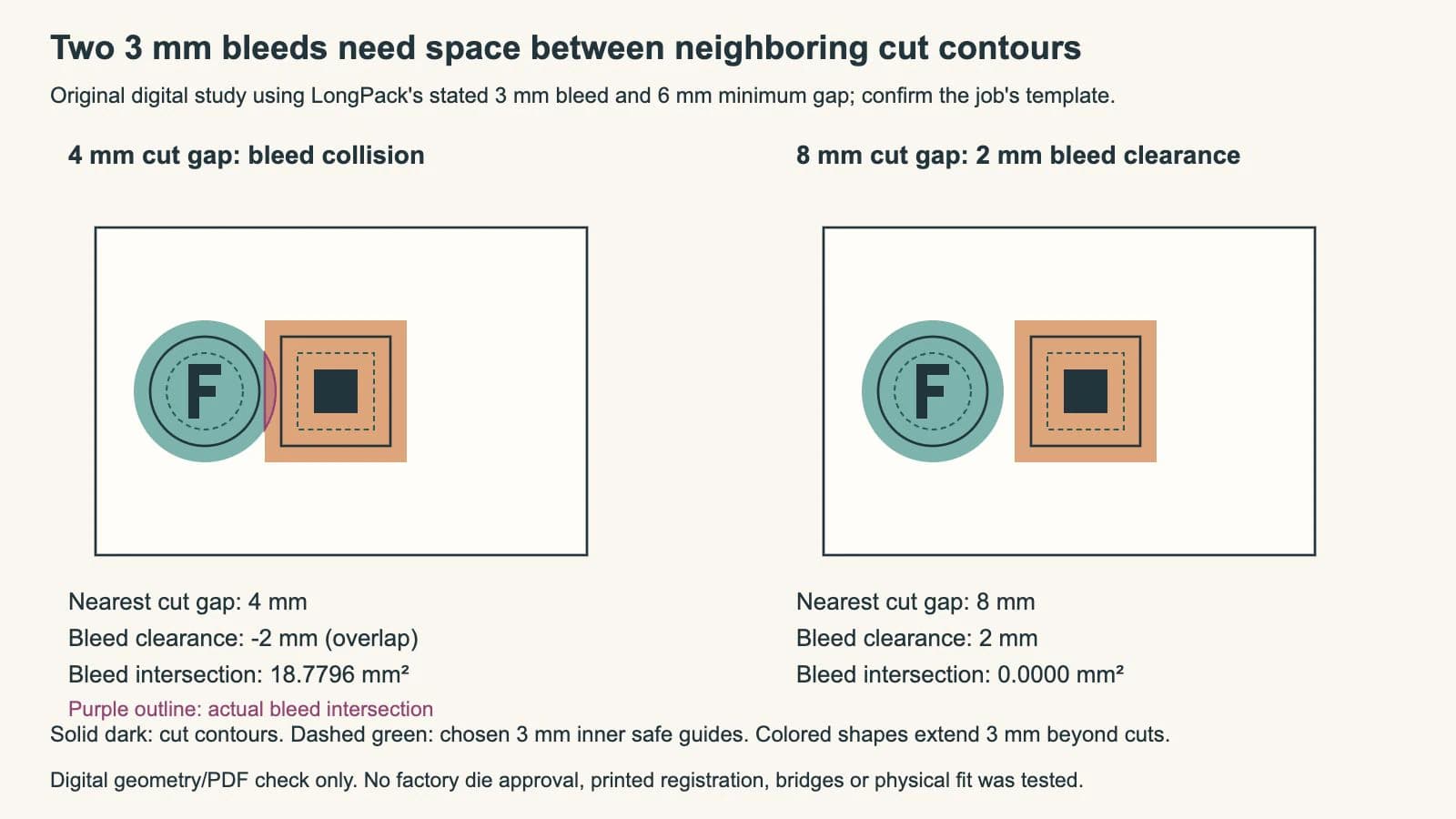
In the crowded version, the overlapping bleed region has an area of approximately 18.7796 mm². The square's fill covers that part of the circle's background where it is drawn later. Changing the stacking order merely changes which color covers the other; it does not make both backgrounds independently available there.
In the separated version, the original bleed regions have no positive-area intersection and leave the declared 2 mm nearest clearance. We verified the geometry by reopening the SVGs, calculating the circle-and-rectangle intersection, and independently checking it by numerical integration. The check concerns these two saved shapes only.
Keep the die geometry separate in the actual export
We also authored separate two-page PDF files for the original artwork and the corresponding die contours. Each page measures 100 × 70 mm. Reopening their PDF content streams confirmed the declared circle and rectangle bounds and kept the die paths separate from the colored artwork. All four PDF pages were rendered and visually inspected. The PDF circle uses cubic curves; the intersection calculation above uses the exact SVG circle, so matching bounds does not imply identical curve geometry.
That check demonstrates our original digital files. It does not establish the supplier's requested color space, spot-color convention, PDF preset, registration or die construction. The inspection figure includes guides for teaching; it is not the artwork-only submission.
LongPack asks for a separate dieline PDF or a separate dieline layer. Keep the actual supplier contour unchanged in your working file and follow its export instructions. If its approved layout has a gap problem, send it back for review instead of silently scaling or moving the die shapes to fit the art.
A larger sheet or a different token arrangement may solve the space conflict, but that choice affects more than the illustration. The manufacturer still decides usable sheet bounds, attachment points, die feasibility and how neighboring pieces are supported. Boda specifically asks designers to consult about shared-dieline suitability; our separated example does not test that construction.
For two-sided pieces, first verify the front-to-back token layout. Correct neighbor clearance on one side does not prove that the opposite faces belong to the right tokens.
Where PerfectVector fits
If a reusable flat token symbol exists only as PNG or JPG and you need editable artwork paths, prepare an SVG candidate with PerfectVector's board-game artwork workflow. Compare its silhouette, openings and proportions with the source, then place the checked symbol inside the approved token layout. Keep native vector artwork when available and leave painterly backgrounds as suitable raster masters.
Vectorization does not create the manufacturing dieline, determine token spacing or approve a punchboard export. Keep text, values, background extensions and supplier guides editable separately. The vector-or-raster board-game guide covers that earlier artwork-format decision.
FAQ
Is punchboard bleed only around the outside of the sheet? No. Individual tokens can need background extensions outside their own cut contours. Check those extensions against neighboring pieces and the board's contour using the actual supplier's rules.
Can I fix overlapping bleeds by changing which token is on top? A stacking change chooses which artwork covers the overlap. It does not provide independent background coverage for both tokens in that same region.
Does a 6 mm gap always make a punchboard valid? No. It is the published minimum in the LongPack guidance used here, with 3 mm per-token bleed. The real die, material, geometry, attachment and export still require the manufacturer's checks.
Can PerfectVector generate the approved token die? No. It can recover candidate artwork paths from suitable raster art. Preserve the manufacturer's approved die geometry and handle bleed, spacing and final export in the component layout.
Sources
- LongPack — Punchboard guidance — Its token spacing, bleed, inner margin and separate-dieline requirements.
- Boda Games — Great punchboards — Neighboring-piece preparation and supplier review for shared-dieline exceptions.
- Adobe — Set a print bleed — Extending background artwork beyond a finished edge and checking the exported file.
Need editable paths for a flat token symbol? Prepare an SVG candidate with PerfectVector, inspect it against the source, then keep the checked artwork inside the approved layout with its required bleed and neighbor spacing.
More from the blog

Poster Tile Overlap vs Bleed: Keep Them Separate
Separate repeated image strips between poster tiles from bleed around the finished edge. Follow four original PDF tiles with checked coordinates and coverage.

Saddle-Stitch Creep: Protect the Outer Margin
Keep important artwork clear of a saddle-stitched booklet’s outer trim. Separate creep, bleed and safe margins with a measured example and printer checks.