Poster Tile Overlap vs Bleed: Keep Them Separate
Separate repeated image strips between poster tiles from bleed around the finished edge. Follow four original PDF tiles with checked coordinates and coverage.
On this page
Poster-tile overlap repeats part of the same image on neighboring sheets so you can align and assemble them. Outer bleed extends artwork beyond the intended finished perimeter for trimming. They protect different boundaries: an internal join and the outside cut. Adding bleed around the whole poster does not automatically give each tile a repeated assembly strip.
Check what your software means by “bleed.” Some sign tools use “tile bleed” to mean overlap between panels. Read the preview and the actual geometry rather than deciding from the label alone.
Find the boundary each allowance serves
A tile is one printed section of a larger image. Overlap is source artwork repeated across neighboring sections. When correctly aligned, the repeated strip belongs in one place in the assembled picture; it is not an extra band that should enlarge the finished design.
Outer bleed is artwork beyond the final trimmed outline. Bristol Print Services describes bleed outside crop marks, separately from protected content inside the page. Our crop marks versus bleed guide explains why marks alone cannot supply that picture content.
| Region | Its job | What to inspect |
|---|---|---|
| Shared tile strip | Repeats image content for a join | Neighboring tiles contain the same source coordinates |
| Outer bleed | Continues artwork beyond the finished perimeter | Background actually reaches the required outside region |
| Paper’s unprintable margin | An area the device may not image | The tile layout stays within the actual printable area |
| Protected content inset | Keeps essential details away from vulnerable edges | Important words and motifs remain inside the agreed finished boundary |
These regions need not have equal widths. A printer’s unprintable margin also does not become useful repeated image content merely because it is blank space beside the picture.
Read the tiling controls in context
Adobe’s Acrobat poster documentation separates Tile Scale, Overlap, Cut marks and Labels. Overlap controls neighboring tiles; scale controls the size of the artwork. Cut marks help identify trimming positions, while labels help organize the sheets.
Terminology differs across tools. SignMaster calls one feature “Tile Bleed (Overlap)” for artwork wider or longer than the loaded media. That product label concerns a tiling operation. It is a reason to ask which boundary a setting affects, not evidence that outside bleed and repeated tile strips always mean the same thing.
Before changing a number, identify the intended finished size, paper size, usable print area and assembly method. If a print shop is producing a single large sheet, it may want a normal full-size PDF with perimeter bleed and no tiles. Ask which file it expects.
Follow four original PDF tiles
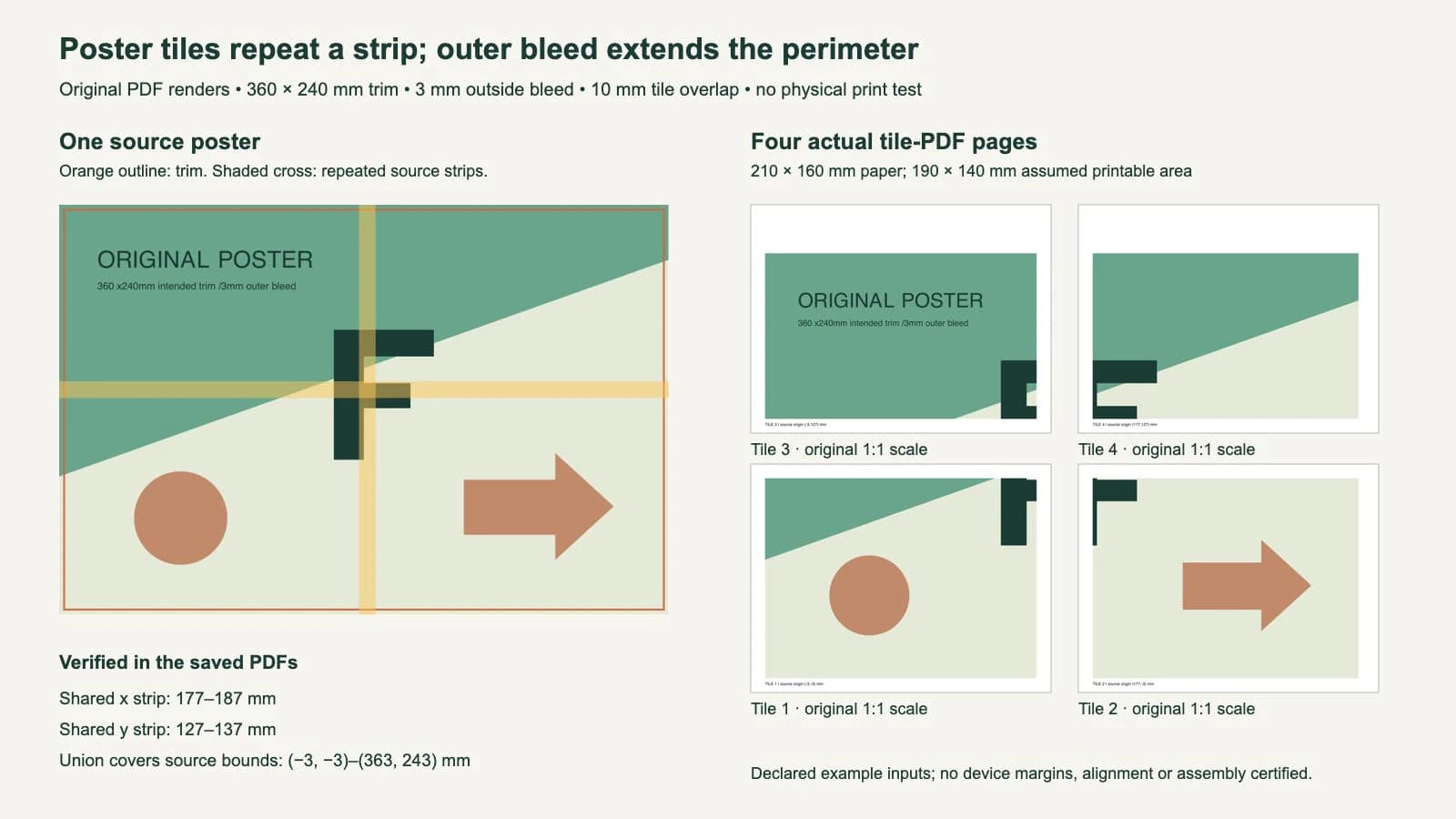
We authored a simple asymmetric poster with an F-shaped mark, a circle and a right-pointing arrow. Its intended trim is 360 × 240 mm. A chosen 3 mm outer bleed extends its source bounds from (-3, -3) to (363, 243) mm, giving a 366 × 246 mm master PDF.
For the tile study, we chose custom 210 × 160 mm paper and assumed 10 mm margins on all sides. That leaves a 190 × 140 mm printable rectangle. These are declared educational inputs, not a supported paper size or measured margin for a particular device.
With 10 mm overlap, the next source window starts 180 mm across or 130 mm up: printable width or height minus the repeated strip. The four PDF pages preserve the original artwork scale and use these actual source regions:
| Tile | Source x interval | Source y interval |
|---|---|---|
| 1, bottom left | -3 to 187 mm | -3 to 137 mm |
| 2, bottom right | 177 to 363 mm | -3 to 137 mm |
| 3, top left | -3 to 187 mm | 127 to 243 mm |
| 4, top right | 177 to 363 mm | 127 to 243 mm |
The right and top edge pages contain unused paper beyond the poster’s source bounds. We kept the same paper dimensions for every tile instead of stretching a smaller remaining region to fill its sheet.
The horizontal neighbors share x = 177–187 mm, a 10 mm strip. Vertical neighbors share y = 127–137 mm, also 10 mm. These internal repeated regions are far from most of the final outside edge. The 3 mm perimeter bleed is still a separate part of the master.
Check repeated coordinates and complete coverage
We reopened the saved PDFs, checked page dimensions and read the actual clipping rectangles and translations. Those instructions map each printable window back to the source poster. We then divided the source at the tile boundaries and verified that every resulting region was covered by at least one tile. The combined coverage includes the complete 366 × 246 mm source, including its outer bleed.
We also rendered the four actual tile pages with Poppler and inspected corresponding overlap patches. That was a consistency check of digital output, not a physical registration or color test. Small edge-pixel differences in two comparisons mean we do not describe the rasterized patches as byte-identical; the saved coordinate mapping establishes which source strip each tile contains.
The result does not establish the printer’s feed accuracy, real printable margins, output scaling or cutting precision. We did not operate Acrobat’s Poster dialog or assemble printed sheets. Our files are an original geometry study, not a tested device preset.
In your own export, check an asymmetric feature near the join. A repeated straight edge in an otherwise blank area can conceal an ordering mistake. Page labels, direction markers and a recognizable landmark help identify whether you are comparing the correct neighbors.
Align the repeated image before removing paper
Keep an untouched full-size master. Preview all tiles together and confirm their row, column and orientation. Follow the chosen workflow’s cut or alignment marks and trimming instructions; do not assume every white paper border belongs underneath its neighbor.
If the same 10 mm strip appears twice side by side in the finished composition, the picture has gained a band. If both copies of the strip are removed, the picture can lose a band. Correct alignment places corresponding image features over the same intended source position. The overlap value describes repeated content, not a new gap between pieces.
Test a small section with the actual printer, paper and settings before using the finished artwork. Measure a known distance in the output when physical scale matters. A displayed 100% setting and a correct digital PDF do not by themselves establish the dimensions on paper.
If the SVG disappears before tiling or print export, use the browser print-layout diagnosis. If a sign shop is handling the work, our sign-artwork handoff guide covers the upstream file and production conversation.
Recover artwork before creating the tile layout
A native vector master can remain native. Suitable existing raster artwork can also be tiled when it meets the intended output requirements. Splitting a picture into pages does not require tracing it first.
If a flat logo or motif exists only as a bitmap and needs shape editing before enlargement, PerfectVector’s image-to-vector workflow can produce an SVG candidate. Compare its silhouette, lettering and small gaps against the source, then place the reviewed asset in the full poster layout. Vectorization does not choose tile overlap, extend missing photographic edges or certify physical alignment. Our poster was authored directly as vector artwork.
FAQ
Is poster overlap the same as bleed? Overlap repeats artwork between neighboring tiles for assembly. Outer bleed extends artwork beyond the final outside trim. Some tools call overlap “tile bleed,” so inspect which boundary the control affects.
Does adding bleed around the poster create overlap on every tile? Not automatically. The tiling operation must include repeated source regions between neighboring sheets. The outside bleed and the internal overlap need separate checks.
How much overlap should I use? Use a value suited to the actual printer, usable page area and assembly method. The 10 mm in this original study is a declared input, not a universal recommendation or tested device setting.
Sources
- Adobe Acrobat: Print large-sized documents — Separate scale, overlap, cut-mark and labeling controls for poster tiling.
- University of Bristol: Crops and bleed — Outside trim, bleed artwork and protected content.
- SignMaster: Tile Bleed, Overlap — A named tool’s tiling terminology for artwork larger than loaded media.
Need editable shapes from a raster-only motif? Create and inspect an SVG candidate, keep the accepted artwork in the full-size master, and verify tile geometry before testing the physical join.
More from the blog

Punchboard Bleed: Check the Neighboring Token Gap
Check how neighboring punchboard bleeds compete for space. Inspect original SVG and PDF geometry, preserve the die contours, and confirm your supplier's rules.

Saddle-Stitch Creep: Protect the Outer Margin
Keep important artwork clear of a saddle-stitched booklet’s outer trim. Separate creep, bleed and safe margins with a measured example and printer checks.