Fabric.js SVG Import: Keep Artwork Editable on Canvas
Import SVG into Fabric.js as editable objects, recolor one part, and export a checked SVG copy. Follow a tested example and separate source issues from API bugs.
On this page
To import editable SVG into Fabric.js, await loadSVGFromString() or loadSVGFromURL(), then add the returned objects to a canvas. Keep a reference to the part you want to edit, change its fill, and export with canvas.toSVG(). Loading artwork as an image gives you a different editing model: selecting that image does not expose each colored region as a separate shape.
The distinction matters for a product configurator, badge editor, or recolorable icon. You need objects that correspond to the pieces your user can change. A file ending in .svg does not guarantee that structure.
This walkthrough uses Fabric.js 7.4.0 and a small, hand-authored lamp. It tests three shapes through import, recoloring, and export. It is an original code fixture, not a PerfectVector conversion or a claim that every SVG feature survives the same trip.
Choose the object model before the loader
Fabric.js parses SVG into its own canvas objects. You edit those objects through Fabric's API; they are not live SVG DOM elements inside the canvas. The current loadSVGFromString reference documents a promise resolving to the parsing result and a reviver that receives each source element and its created object.
If your editor needs a live SVG tree instead, import and edit a named path with SVG.js, then check the selected full root versus a children-only fragment before saving. That workflow uses a different editing representation from Fabric's canvas objects.
| Your task | Useful starting point | Check before continuing |
|---|---|---|
| Change separate shapes | Parse SVG into Fabric objects | The target region exists as its own object |
| Move the artwork as one unit | Group the parsed objects deliberately | Child edits and selection work as intended |
| Place an illustration without editing its parts | Use an image workflow | A single selectable image is sufficient |
| Recolor artwork available only as PNG or JPG | Prepare vector geometry first | Traced regions match the edits you need |
Do not infer object structure from appearance. Two colors can belong to separate paths, while several disconnected islands can belong to one path. The SVG ungrouping guide explains that source-file diagnosis.
Run a small import, recolor, and export example
Start in an empty folder. Install the pinned dependency:
npm install --save-exact fabric@7.4.0Save this as index.html:
<!doctype html>
<html lang="en">
<meta charset="utf-8">
<title>Fabric SVG import test</title>
<canvas id="editor" width="320" height="240"></canvas>
<button id="recolor">Recolor shade</button>
<button id="export">Export SVG</button>
<div id="output"></div>
<pre id="report"></pre>
<script type="module" src="main.js"></script>
</html>
Save this as main.js. The relative module path lets this small example run without a bundler. In a bundled application, import the same names from fabric.
import { Canvas, loadSVGFromString } from './node_modules/fabric/dist/index.min.mjs';
const svg = `<svg xmlns="http://www.w3.org/2000/svg" width="320" height="240" viewBox="0 0 320 240">
  <path id="shade" fill="#e6a23c" d="M115 40 H205 L230 135 H90 Z"/>
  <rect id="stem" x="151" y="135" width="18" height="57" fill="#214c54"/>
  <path id="base" fill="#214c54" d="M110 192 H210 L220 210 H100 Z"/>
</svg>`;
const canvas = new Canvas('editor', { width: 320, height: 240 });
const parts = new Map();
const parsed = await loadSVGFromString(svg, (element, object) => {
  const id = element.getAttribute('id');
  if (id) parts.set(id, object);
});
canvas.add(...parsed.objects.filter(Boolean));
canvas.requestRenderAll();
function report(exported) {
  const xml = new DOMParser().parseFromString(exported, 'image/svg+xml');
  const data = {
    version: '7.4.0',
    importedObjects: canvas.getObjects().length,
    types: canvas.getObjects().map(object => object.type),
    shadeFill: parts.get('shade').fill,
    exportedPaths: xml.querySelectorAll('path').length,
    exportedRects: xml.querySelectorAll('rect').length,
    exportedImages: xml.querySelectorAll('image').length,
  };
  document.querySelector('#report').textContent = JSON.stringify(data, null, 2);
  document.querySelector('#output').innerHTML = exported;
}
document.querySelector('#recolor').onclick = () => {
  parts.get('shade').set('fill', '#397e86');
  canvas.requestRenderAll();
  document.querySelector('#report').textContent = 'Shade recolored. Export to check delivery SVG.';
};
document.querySelector('#export').onclick = () => report(canvas.toSVG());
report(canvas.toSVG());
Serve the folder over HTTP rather than opening the HTML file directly. For example, if Python is installed, run python3 -m http.server 8000 and open http://localhost:8000. Click Recolor shade, then Export SVG. The button renders the exported string below the canvas; it does not download a file.
This demo inserts only its own fixed fixture's export into the preview. Do not reuse that innerHTML preview as a general upload handler for untrusted SVG. The example also omits application-level error handling and file validation.
The map captures the source IDs during parsing. Recoloring addresses the shade by that explicit reference, rather than assuming the first returned object is always the desired part. In a production editor, decide how those identifiers and references are stored when saving and reopening a document.
What the test showed
Our fixture imported as three objects: path, rect, and path. After the shade changed from #e6a23c to #397e86, the exported preview showed the new shade while the stem and base kept their original dark fill. The export contained two paths, one rectangle, and no image elements.
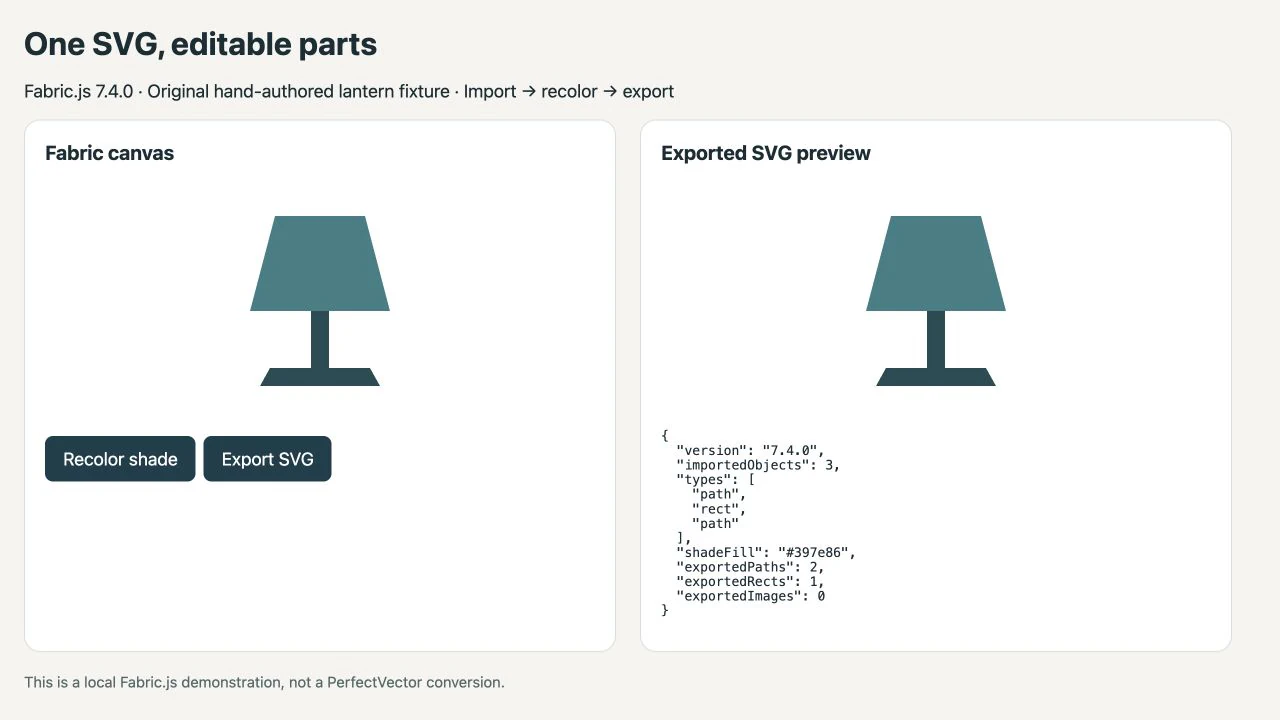
Those checks establish that this example remains vector geometry after export. They do not establish preservation of the original XML, grouping, CSS rules, or every feature used by another file. Keep the original master and compare a delivery copy in the application that will receive it.
Avoid mixing callback tutorials with the promise API
Older examples often call fabric.loadSVGFromString(svg, callback) and expect that callback to receive the whole object array. That is not the role of the second argument in the current API: it is a per-object reviver. Await the parsing result for the complete collection.
Fabric's 6.0 migration guide explains the change to named imports and promise-based APIs. Check the installed package version before adapting an old snippet; replacing only the import statement leaves the loading logic wrong.
For a same-origin SVG file, the equivalent starting point is:
import { loadSVGFromURL } from 'fabric';
const parsed = await loadSVGFromURL('/artwork.svg');
canvas.add(...parsed.objects.filter(Boolean));
canvas.requestRenderAll();
The loadSVGFromURL documentation notes that it fetches the SVG and must obey same-origin policy. If the remote host does not allow your origin, changing the grouping code will not fix the network failure. First test a file served by your own application, then inspect the failed request and the remote server's CORS configuration.
Check editability separately from appearance
A successful render answers one question: did something appear? An editor needs more checks.
- Select the region that should change. Confirm that another part does not change with it.
- Recolor through the object's
setmethod and request a render, as the example does. - Export and open the result independently. Fabric's
Canvas.toSVGAPI generates SVG markup from the canvas state. - Inspect anything your actual artwork depends on, such as strokes, clipping, gradients, text, or nested transforms. The simple fixture above does not test those features.
- Save, reopen, and repeat the intended edit in your own editor before treating the workflow as complete.
If the import produces an image object, examine the source for an embedded raster. The guide to raster content inside SVG shows why an SVG wrapper does not give pixels editable paths. If the source already has usable vector shapes, work on the import and object organization rather than tracing it again.
When raster artwork needs an upstream conversion
If your only source is a flat PNG or JPG and users need to edit its colored regions, PerfectVector's image-to-SVG workflow can help prepare an SVG candidate. Compare the result with the original, inspect the paths, and check whether the regions you need are independently editable before importing it into Fabric.js.
Tracing does not assign application-specific meaning such as shade, stem, or base. Our fixture's names were authored deliberately. Add your own part mapping and editing rules after inspecting converted geometry. For a reusable icon set, the PNG-to-SVG UI kit workflow covers source preparation and consistency checks.
Keep photographs raster when they are meant to remain photographs. Keep a suitable original SVG when it already contains the shapes you need. The vectorization overview can help decide whether tracing belongs in the workflow at all.
FAQ
Does Fabric.js import SVG as editable paths? It can parse supported SVG content into Fabric objects. Editability depends on the source structure: a path, a group of shapes, and an embedded raster do not provide the same editing options. Inspect the returned objects and test the specific change you need.
Why does an older loadSVGFromString example fail? Older tutorials may expect a completion callback as the second argument. The current API returns a promise and uses that argument as a per-object reviver. Match your code to the installed version and await the parsing result.
Does toSVG preserve the original file exactly? Do not expect an identical source document. It generates SVG from the Fabric canvas state. Preserve the original master and verify the exported appearance and the structures your receiving workflow needs.
Can importing a PNG make its individual regions editable? Placing a PNG does not trace it into separate vector regions. If those edits are necessary, prepare suitable vector geometry first, inspect the resulting parts, and define their roles in your application.
Sources
- Fabric.js — loadSVGFromString — Promise return value and the source-element/object reviver contract.
- Fabric.js — Upgrading to Fabric.js 6.0 — Named imports and the migration from callbacks to promises.
- Fabric.js — loadSVGFromURL — URL parsing and same-origin fetch constraints.
- Fabric.js — Canvas API — Exporting canvas state to SVG markup.
If the missing piece is editable geometry from raster artwork, prepare an SVG candidate with PerfectVector. Check the shapes first, then prove that your Fabric.js editor can recolor the intended part and export the result correctly.
More from the blog

SVG in WPF: Choose a Renderer or a XAML Drawing
Use SVG artwork in WPF with a renderer, a native DrawingImage, or a PNG export. Follow an original icon example and check bounds, colors, and dependencies.

Custom SVG Shapes in draw.io: Images or Stencils?
Choose an embedded SVG image or a native XML stencil in draw.io. Check editable colours and connection points, then save the right object in a reusable library.