Book Cover Spine Width vs Bleed: Set Up the Wrap
Build a paperback cover from separate trim, spine and bleed measurements. Check an original SVG example and preserve the artwork when the spine width changes.
On this page
Spine width is part of the finished book cover. Bleed is extra artwork outside its trim boundary. For a simple paperback wrap, add the back cover, spine and front cover first, then add the required outer bleed. Changing the bleed does not correct an inaccurate spine measurement.
Get the print provider's current template for the chosen binding, trim size, paper and final page count before placing artwork. The example here explains the geometry of a plain paperback wrap. Hardcover hinges, turn-ins, flaps and other construction details need the provider's own template.
Keep these measurements separate
Record each trim panel's width and height, the provider's spine width, the outside bleed and the content-safe zones. If the page count or paper changes, obtain a new spine value and review the layout again.
Start with the finished panels and spine
A trim panel is the front or back cover at its finished dimensions. The spine is the narrow cover area between those panels in this paperback example. Bleed extends edge artwork beyond the outside trim boundary. A safe area keeps important content inside the provider's specified limits.
KDP's paperback cover guidance separates these regions and uses paper choice and page count to determine the spine. Its cover calculator creates a template from the selected specifications. Use the actual provider's value; a measurement from another edition or another paper stock is not a substitute.
Interior-page guidance addresses a different layout. The picture-book gutter guide explains keeping story details clear of the interior binding. It does not supply a wrap-cover spine measurement.
Calculate one simple wrap
For the explicitly defined paperback example, let:
| Symbol | Measurement |
|---|---|
| T | Width of one finished front or back panel |
| H | Height of either finished panel |
| S | Spine width supplied for the selected book specification |
| B | Equal bleed added at the left, right, top and bottom outer edges |
The complete canvas is:
Cover width  = 2T + S + 2B
Cover height = H + 2B
This arrangement agrees with the width-and-height equations in KDP's paperback cover instructions. The formulas describe this simple panel arrangement. They do not include additional construction zones from a different binding template.
We chose illustrative trim panels of 148 × 210 mm, an 8 mm spine and 3 mm bleed. Those inputs produce a 310 × 216 mm canvas:
Width  = 148 + 8 + 148 + 3 + 3 = 310 mm
Height = 210 + 3 + 3 = 216 mm
The example's 3 mm bleed is a chosen number for the calculation, not a specification for every printer. Mixam's bleed guidance distinguishes its usual print bleed from the larger wrap allowance on its casebound covers. That difference is a reason to use the selected product's template instead of carrying one number between bindings.
Locate the panels before placing artwork
Our example starts its canvas at x = 0, with the back cover on the left. Read the horizontal coordinates in order:
| Region | Starts at x | Ends at x |
|---|---|---|
| Left outer bleed | 0 mm | 3 mm |
| Back trim panel | 3 mm | 151 mm |
| Spine | 151 mm | 159 mm |
| Front trim panel | 159 mm | 307 mm |
| Right outer bleed | 307 mm | 310 mm |
Top bleed occupies y = 0–3 mm, and the trim panels run from y = 3 to y = 213 mm. Bottom bleed ends at y = 216 mm.
We authored an original tree-like motif and placed its horizontal center at x = 233 mm, the center of the front panel. The SVG master declares width="310mm", height="216mm" and viewBox="0 0 310 216". In that file, its user-space dimensions map to the declared millimeter viewport. The SVG coordinate specification defines that mapping; a receiving application still needs its own dimension check.
Keep the supplier's structural template separate from the illustration and live text. Extend a background that reaches an outside edge into the required bleed. Place important content within the relevant panel and spine safe zones rather than treating the entire canvas as one unrestricted drawing area.
Change the spine without stretching the illustration
Our second saved example changes only the spine input from 8 to 12 mm. Both trim panels remain 148 × 210 mm, and the bleed remains 3 mm. The new canvas is 314 × 216 mm.
The back panel still ends at x = 151 mm. The front now starts at x = 163 mm, and its center moves to x = 237 mm. We translated the motif by 4 mm with its front panel. Its saved path geometry stayed identical.
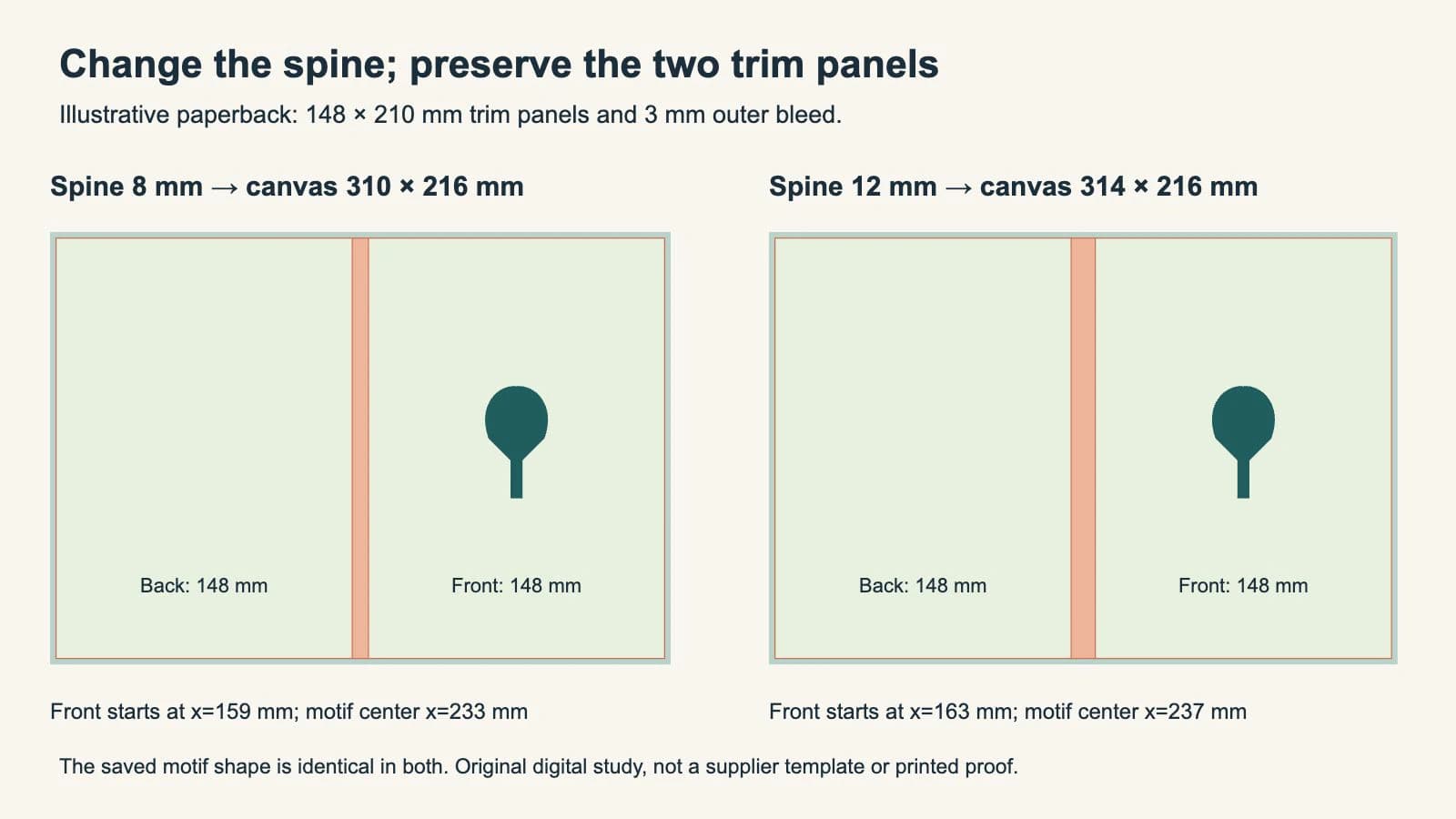
Our file inspection checked the canvas dimensions, panel boundaries, motif coordinates and unchanged motif markup. We also opened the comparison in a browser. These checks establish the arrangement in the saved SVGs. They do not establish a printed spine position, color setup or a provider's acceptance.
If the provider revises your spine width, rebuild the layout from the new specification. Review artwork crossing the spine and any spine text separately. Resizing the complete cover to a new overall width can also stretch the front and back panels, which would change more than the intended spine region.
Inspect the actual delivery copy
Follow the provider's export and submission instructions after the layout is complete. KDP, for example, requests a single cover PDF containing the back, spine and front. An SVG master is useful for construction; it is not automatically the required delivery format.
Reopen the exported file and check:
- Overall dimensions: the canvas includes the required construction zones and outside bleed.
- Panel placement: front, spine and back match the template's order and boundaries.
- Essential content: words, faces and logos stay within the provider's specified safe areas.
- Edge artwork: backgrounds continue to the outer bleed boundary where required.
- Guide handling: template labels and proof annotations appear only where the provider requests them.
A line drawn around a page is not additional artwork beyond that page. The crop-marks-versus-bleed guide explains that distinction. If the exported dimensions or panel locations disagree with the master, inspect the export setup before moving the illustration to compensate.
Use the provider's preview and obtain an appropriate proof. A flat digital diagram cannot show binding shifts or how a spine will appear on the finished book.
Where PerfectVector fits
If a reusable flat character or ornament exists only as a PNG or JPG and you need separate shapes to edit, PerfectVector's children's-book artwork workflow can help recover an SVG candidate. Compare its silhouette, expression and small openings with the source, then place it inside the correct cover panel. Keep a usable vector original when one already exists.
Painted scenes and textured cover art can reasonably remain raster; the children's-book illustration format guide explains that choice. Vectorization does not calculate the spine, restore original typography or complete a printer's cover preflight. The tree motif in our study was authored directly as SVG.
FAQ
Is spine width part of the bleed? No. In the paperback example, the spine sits between the finished back and front panels. Outside bleed is added around that combined cover.
Can I use the same spine width after changing the paper or page count? Obtain an updated spine value or template from the provider for the revised book specification, then review the cover layout again.
Should I add bleed between the spine and front cover? The simple wrap in this article is continuous across those boundaries. Its bleed is outside the combined trim area. Follow a different provider template when its construction requires other zones.
Does the example's 3 mm bleed work for my book? It is an illustrative input, not a universal print requirement. Use the bleed, wrap and safe-area values for your chosen provider and binding.
Sources
- KDP — Create a Paperback Cover — The relationship among cover panels, spine inputs, outside bleed and the cover PDF.
- Mixam — Full Bleed Printing Explained — Bleed, trim and quiet-area definitions, including different requirements for casebound covers.
- W3C — SVG coordinate systems, transformations and units — The viewport and viewBox mapping used by the original millimeter-based SVG examples.
Only have a raster motif to reuse? Prepare an SVG candidate with PerfectVector, compare it with the source, then place the checked shapes within your provider's current cover template.
More from the blog

Saddle-Stitch Creep: Protect the Outer Margin
Keep important artwork clear of a saddle-stitched booklet’s outer trim. Separate creep, bleed and safe margins with a measured example and printer checks.

Punchboard Bleed: Check the Neighboring Token Gap
Check how neighboring punchboard bleeds compete for space. Inspect original SVG and PDF geometry, preserve the die contours, and confirm your supplier's rules.