V-Carve Depth: Why Wider Logo Strokes Cut Deeper
Learn how artwork width and V-bit angle determine carving depth, calculate a logo example, and distinguish flat depth, pass depth, and traced outline geometry.
On this page
In a full-depth V-carve, wider parts of the artwork need a deeper cut with the same V-bit. The cutter moves down until its angled sides reach the boundaries of the selected region. A thin stroke and a thick stroke can therefore finish at different depths, even within one letter.
For an ideal pointed bit, a straight channel of width w, and an included bit angle a, the geometric depth is d = w / (2 × tan(a / 2)). This is a cross-section calculation. Your CAM preview still has to account for the actual cutter, the whole shape, and any depth limit.
The width-to-depth relationship
With a pointed 90° bit, the ideal depth is half the channel width. With a pointed 60° bit, it is about 0.866 times the width. These are geometric ratios, not recommended cutting depths or machine settings.
Why the same logo can have several carving depths
A V-bit becomes wider farther from its tip. To remove material across a wider region while reaching both side boundaries, the tip has to sit lower. Where the artwork narrows, the tool rises.
Vectric's V-Carve Toolpath documentation describes this as a variable-depth operation calculated from the cutter angle and the width and shape of the vectors. The artwork supplies boundaries; it does not store a depth for each part of a letter.
Consider a badge with a thin decorative line beside a bold initial. The initial can demand much more depth than the line. Scaling the entire badge up also increases the widths of its regions, so the ideal full-depth cuts become deeper with an unchanged bit angle. Enlarging artwork is consequently a machining decision as well as a layout decision.
This explanation concerns an enclosed region being V-carved. A toolpath that simply follows a line at a specified depth is a different case.
Calculate a simple cross-section
Imagine slicing straight across a channel made by a sharp, symmetrical V-bit. The cross-section is a triangle. Its top edge is the channel width; its vertical centerline is the depth. Splitting the triangle in half gives a right triangle with half the width and half the included angle.
That gives these two useful forms:
depth = width / (2 × tan(included angle / 2))width = 2 × depth × tan(included angle / 2)
Use the same unit for width and depth. A 60° bit means a 60° included angle across the tip, so the tangent uses 30°. Entering 60° into the tangent without dividing the angle by two gives the wrong result.
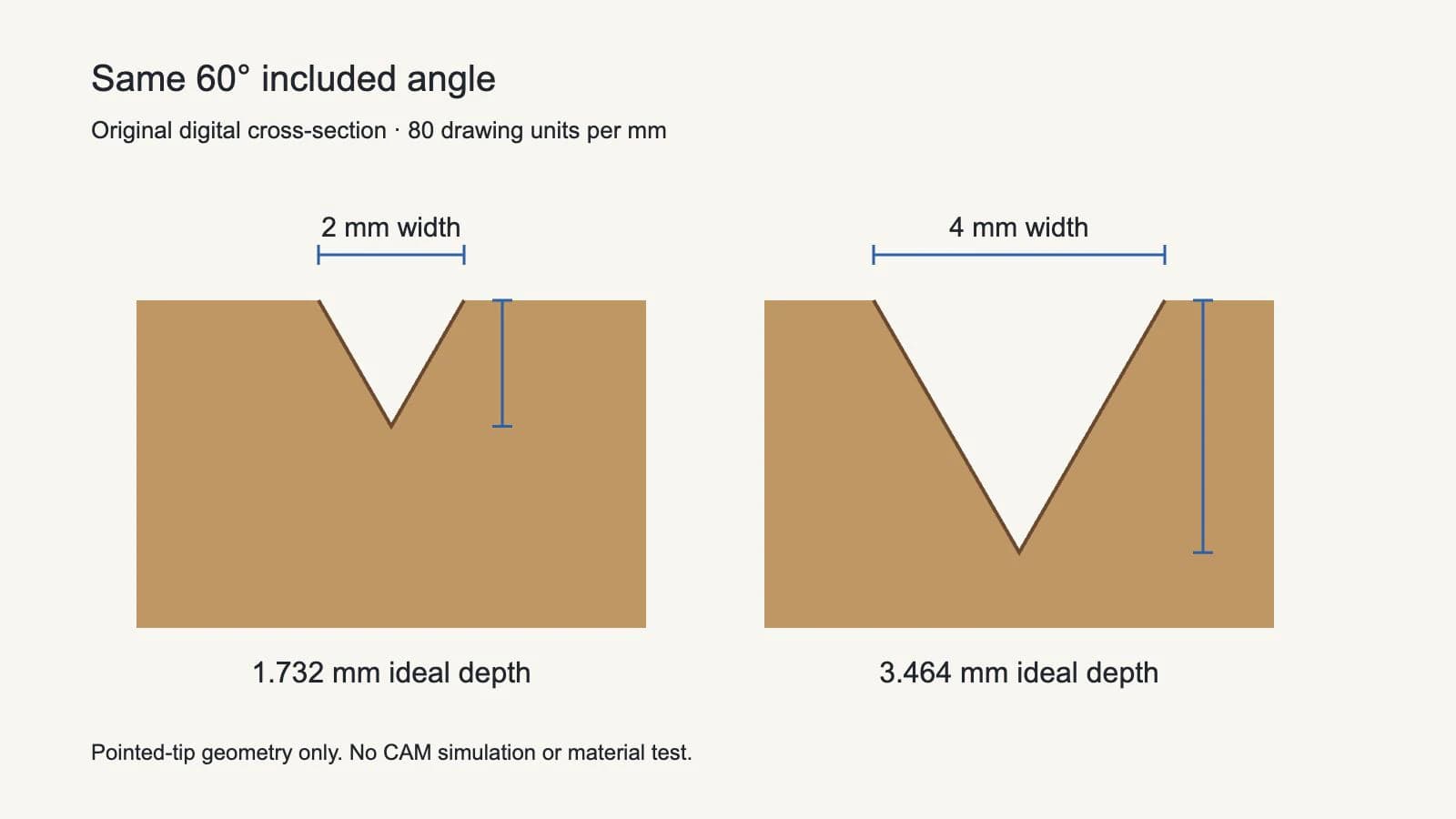
We calculated the following examples for ideal pointed 60° and 90° bits. The fixture uses straight 2 mm and 4 mm wide regions in a native SVG; the 1 mm row provides another reference. Values are rounded to three decimal places.
| Region width | Depth with a 90° bit | Depth with a 60° bit |
|---|---|---|
| 1 mm | 0.500 mm | 0.866 mm |
| 2 mm | 1.000 mm | 1.732 mm |
| 4 mm | 2.000 mm | 3.464 mm |
At 60°, the 2 mm region needs 2 / (2 × tan(30°)), or approximately 1.732 mm. Doubling that region to 4 mm doubles the ideal depth to approximately 3.464 mm.
Our check reproduced these numbers with a local calculation and verified the reverse calculation back to the input widths. It did not run a CAM toolpath or cut material. The numbers describe the ideal cross-section, including the assumption of a pointed tip; they do not establish a usable pass depth, a feed rate, or the strength of a small remaining island.
Full depth, flat depth, and pass depth are separate
These settings answer different questions. Mixing them up can make a perfectly reasonable preview look like a failed depth change.
| Term | Question it answers | What to check |
|---|---|---|
| Geometric full depth | How deep would the pointed bit need to go to reach the region boundaries? | Region width, included angle, actual tip geometry |
| Flat depth | Where should the operation stop descending and clear a flat bottom? | Your CAM application's depth convention and preview |
| Pass depth | How much depth is taken in an individual machining pass? | Tool and material settings, separate from the final shape |
| Start depth | Which surface is the operation calculated from? | Whether the carving starts at the stock surface or a previously machined region |
Vectric documents Flat Depth as a limit for flat-bottomed carving. It also describes multiple Z-level passes where the required cut exceeds the tool database's Pass Depth. Its Start Depth setting lets the operation begin within an existing pocket or stepped region. Read those controls in the official toolpath reference rather than treating every depth field as an instruction to cut a narrow letter deeper.
A flat-depth strategy changes the shape of a wide region from a complete V to a recess with a flat floor and angled edges. Depending on the CAM workflow, another tool can clear that floor. It is not simply the original pointed cross-section moved upward.
Filled regions and centerlines behave differently
A bitmap trace usually follows the boundaries of visible artwork. A thick black line can become an enclosed strip with two sides. V-carving that strip asks the CAM application to work between those sides.
A centerline describes one route through the stroke instead. Following that route at a chosen depth makes the cutter angle and depth determine the visible groove width. You are no longer asking the bit to fit an arbitrary filled region in the same way.
Easel's official V-Carve Projects guide makes this distinction between filled shapes, where the bit respects design boundaries, and outline operations, where the chosen depth affects the resulting width.
Before changing the cutter or offsetting the artwork, decide which result you want: a filled logo region, a line engraving, or a flat-bottomed recess. The single-line SVG guide explains why tracing the outside of a raster stroke does not recover its original centerline. For the tracing stage itself, use the VCarve Trace Bitmap guide.
What changes the estimate
The simple formula assumes a straight local channel and a sharp, symmetrical point. Real cutter tips can have a flat or a radius. Corners, neighboring boundaries, islands, and the tool's usable cutting geometry also need the full CAM calculation. Do not extend the straight-channel example into an assertion about every point in an ornate letter.
If a thin detail appears only as a scratch in the preview, first inspect the actual width at final scale and the tool definition. Increasing a maximum-depth value cannot make a boundary-constrained pointed bit descend farther while preserving the same narrow opening. Choosing a more acute included angle changes the geometry, but the actual operation still needs a valid tool and material setup.
If a wide region demands excessive depth, review the artwork scale and the CAM application's flat-depth options. If changing artwork width would damage the mark, keep the approved logo geometry and reconsider the operation. Do not distort the logo merely to make a depth field look convenient.
Where PerfectVector fits
If the logo survives only as a PNG or JPEG, PerfectVector can reconstruct candidate vector contours before you measure and prepare them. The CNC vector workflow provides SVG or DXF artwork for the next CAD/CAM stage. Inspect narrow regions, letter openings, and the imported physical dimensions against the intended design.
Vectorization does not choose a V-bit or calculate its toolpath. If you already have usable vector artwork, continue with that file. Repeatedly tracing it will not solve a depth question. The broader image-to-CNC guide covers the handoff from contours to operations.
FAQ
Does a wider logo stroke make a deeper V-carve? For an unrestricted full-depth V-carve with the same pointed bit angle, a wider straight region requires a deeper cross-section. Depth limits, tool geometry, and the complete shape can change the calculated operation.
Does a 60° V-bit cut deeper than a 90° V-bit? For the same straight channel width and ideal pointed tips, yes. A 2 mm channel gives approximately 1.732 mm of depth at 60° and 1.000 mm at 90°. These are geometric examples, not cutting recommendations.
Why does increasing maximum depth leave a thin letter unchanged? The bit may already reach both sides of the narrow region at a shallower depth. A larger maximum is a higher limit, not necessarily a command to descend farther. Confirm the operation and its behavior in your CAM documentation and preview.
Sources
- Vectric — V-Carve Toolpath — Variable depth from vector geometry, Start Depth, Flat Depth, Pass Depth, and clearance tools.
- Easel — V-Carve Projects — The distinction between filled regions, outline operations, cutter angles, and flat-bottomed pockets.
- PerfectVector — SVG and DXF for CNC — The raster-to-vector handoff and the boundary between artwork export and CAM toolpath generation.
If you need contours from a raster logo, prepare a CNC vector from your image, inspect its narrow regions and openings, then measure it at the imported size before calculating and checking the V-carve in CAM.
More from the blog

Why DXF Files Have Too Many Segments for CNC Work
A DXF gets dense when source traces, exported curves, duplicate paths, or fragments become too many entities. Diagnose the cause, then clean it before CAM.

Dogbone vs T-Bone Fillets: Check CNC Inside Corners
Compare diagonal dogbone and side T-bone relief, inspect the extra material each removes, and separate ideal corner clearance from a verified CNC fit.