SVG to Canvas: Load the Artwork Before Exporting PNG
Load a whole SVG through Image.decode, draw it at a chosen bitmap size, test CORS and PNG readback, and keep the editable source separate from exported pixels.
On this page
To draw a whole SVG on canvas, load it as an image, await image.decode(), and pass that image to drawImage(). Then check PNG export separately: an image can appear on canvas while the browser blocks reading or saving its pixels.
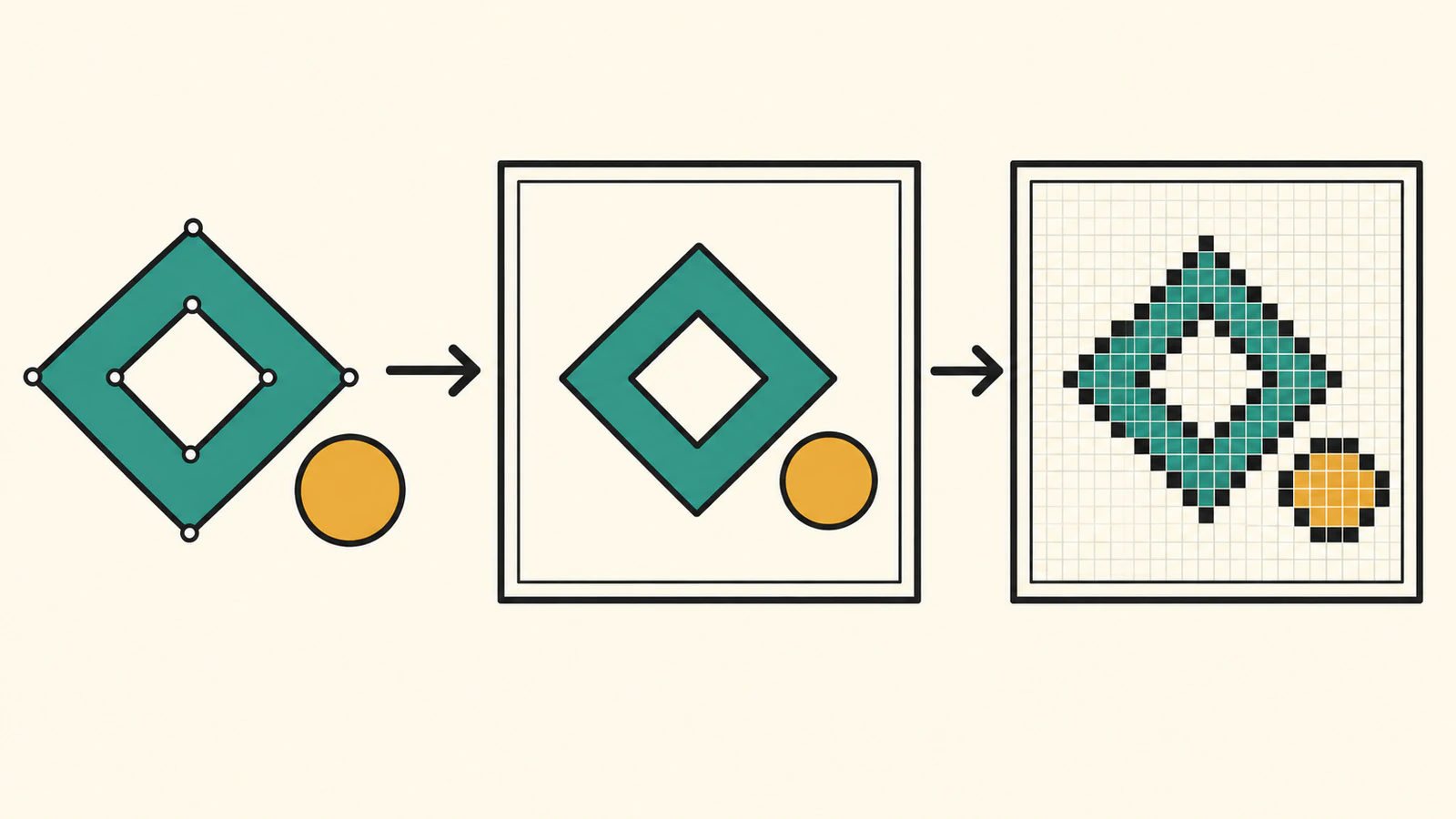
This route paints the SVG document as an image. It does not give the canvas editable SVG paths. If you want to reconstruct selected contours instead, use the Path2D SVG guide. Keep the original SVG whichever display route you choose.
Separate decoding, painting and exporting
An HTMLImageElement is an accepted input to canvas drawImage(). Its destination width and height control the painted size. Image.decode() returns a promise that resolves when the image is decoded; a failed request or decoding problem can reject it.
Successful decoding is only the first check. A cross-origin image loaded without CORS permission can still be drawn, but it taints the canvas. Pixel readback and export then fail. MDN's CORS-enabled image guide explains this distinction.
Build a self-contained original SVG
Save this as master.svg. It contains one path and one circle, with no embedded image, font or external dependency. The inner diamond and the surrounding canvas are transparent in the source.
<svg xmlns="http://www.w3.org/2000/svg" width="240" height="160" viewBox="0 0 240 160">
  <path d="M96 24 L152 80 L96 136 L40 80 Z M96 58 L118 80 L96 102 L74 80 Z" fill="#176b5b" fill-rule="evenodd"/>
  <circle cx="200" cy="80" r="24" fill="#d4a53a"/>
</svg>
We use the complete file as an image, including both shapes and its viewBox. Unlike extracting just a path's d value, this asks the browser's SVG image renderer to paint the document.
The example is intentionally self-contained. SVG used as an image has restrictions, including on external resources and scripting; see MDN's SVG-as-image guide. Do not treat a successful decode of this small file as proof that an arbitrary SVG will load external fonts, styles or linked artwork. For delivery choices, compare inline SVG with an image element.
Run two local origins with different CORS responses
An origin includes its port. The following local-only server exposes the same SVG bytes through two origins. On the second origin, /cors/master.svg includes Access-Control-Allow-Origin: *; /plain/master.svg does not. That isolates the response permission from the artwork.
Save this as serve-proof.py beside the SVG and the HTML below. Run python3 serve-proof.py, then open http://127.0.0.1:8770/starter.html. Both ports must be free; if you change them, update the server and the HTML together. Press Enter in the terminal to stop both servers.
from http.server import ThreadingHTTPServer, SimpleHTTPRequestHandler
from pathlib import Path
from threading import Thread

root = Path(__file__).parent
class Handler(SimpleHTTPRequestHandler):
    def __init__(self, *args, **kwargs):
        super().__init__(*args, directory=str(root), **kwargs)
    def do_GET(self):
        if self.path in ['/cors/master.svg', '/plain/master.svg']:
            payload = (root / 'master.svg').read_bytes()
            self.send_response(200)
            self.send_header('Content-Type', 'image/svg+xml')
            self.send_header('Cache-Control', 'no-store')
            if self.path.startswith('/cors/'):
                self.send_header('Access-Control-Allow-Origin', '*')
            self.end_headers()
            self.wfile.write(payload)
        else:
            super().do_GET()

servers = [ThreadingHTTPServer(('127.0.0.1', port), Handler) for port in (8770, 8783)]
for server in servers:
    Thread(target=server.serve_forever, daemon=True).start()
try:
    input('Original SVG proof on 127.0.0.1:8770 and :8783. Enter to stop.\n')
finally:
    for server in servers:
        server.shutdown()
        server.server_close()
This permissive header belongs to a local fixture serving our own artwork. For a production image host, configure the appropriate allowed origin on a server you control. Setting an image attribute does not grant access to another server's content.
Decode the image before drawing it
Save this complete page as starter.html. Each case gets its own canvas, so the tainted case cannot contaminate the successful cases. Set crossOrigin before src for requests that need CORS, as described by MDN's crossOrigin reference.
The canvas bitmap is explicitly 480 × 320; its CSS display size is 240 × 160. The original image's intrinsic dimensions are 240 × 160, and drawImage() scales it into the selected bitmap dimensions. These are chosen dimensions, not a device-pixel-ratio measurement.
<!doctype html>
<html lang="en">
<meta charset="utf-8">
<title>Original SVG to canvas export</title>
<style>
  body { margin: 24px; font: 16px system-ui; background: #f6f2e8; }
  main { display: grid; grid-template-columns: repeat(2, 280px); gap: 20px; }
  figure { margin: 0; }
  canvas { display: block; width: 240px; height: 160px; background: white; }
  figcaption { margin: 6px 0; }
  pre { white-space: pre-wrap; font-size: 12px; }
</style>
<h1>Decode, paint, then check PNG access</h1>
<main id="cases"></main>
<pre id="report"></pre>
<script>
  function pngBlob(canvas) {
    return new Promise((resolve, reject) => {
      try { canvas.toBlob(blob => blob ? resolve(blob) : reject(new Error('Empty PNG')), 'image/png'); }
      catch (error) { reject(error); }
    });
  }
  function dataURL(blob) {
    return new Promise((resolve, reject) => {
      const reader = new FileReader();
      reader.onload = () => resolve(reader.result);
      reader.onerror = () => reject(reader.error);
      reader.readAsDataURL(blob);
    });
  }
  async function render(test) {
    const figure = document.createElement('figure');
    const canvas = document.createElement('canvas');
    canvas.width = 480;
    canvas.height = 320;
    const caption = document.createElement('figcaption');
    figure.append(canvas, caption);
    document.getElementById('cases').append(figure);
    const result = { id: test.id, url: new URL(test.src, location.href).href,
      crossOrigin: test.crossOrigin ?? null, canvasWidth: canvas.width, canvasHeight: canvas.height };
    const image = new Image();
    if (test.crossOrigin) image.crossOrigin = test.crossOrigin;
    image.src = result.url;
    try { await image.decode(); }
    catch (error) {
      result.stage = 'decode';
      result.error = error.name;
      caption.textContent = test.id + ': decode ' + error.name;
      return result;
    }
    result.naturalWidth = image.naturalWidth;
    result.naturalHeight = image.naturalHeight;
    const context = canvas.getContext('2d');
    context.drawImage(image, 0, 0, canvas.width, canvas.height);
    result.stage = 'painted';
    try {
      result.opening = [...context.getImageData(192, 160, 1, 1).data];
      result.fill = [...context.getImageData(192, 80, 1, 1).data];
      result.corner = [...context.getImageData(0, 0, 1, 1).data];
    } catch (error) { result.readbackError = error.name; }
    try {
      const blob = await pngBlob(canvas);
      result.pngType = blob.type;
      result.pngBytes = blob.size;
      result.pngDataURL = await dataURL(blob);
      result.export = 'ok';
      const download = document.createElement('a');
      download.href = result.pngDataURL;
      download.download = test.id + '.png';
      download.textContent = 'Save PNG';
      figure.append(download);
    } catch (error) { result.export = 'failed'; result.exportError = error.name; }
    caption.textContent = test.id + ': ' + result.stage + ', PNG ' + result.export;
    return result;
  }
  async function run() {
    const tests = [
      { id: 'same-origin', src: 'master.svg' },
      { id: 'cors-allowed', src: 'http://127.0.0.1:8783/cors/master.svg', crossOrigin: 'anonymous' },
      { id: 'no-cors-image', src: 'http://127.0.0.1:8783/plain/master.svg' },
      { id: 'cors-denied', src: 'http://127.0.0.1:8783/plain/master.svg', crossOrigin: 'anonymous' },
      { id: 'missing-file', src: 'missing.svg' },
    ];
    const results = [];
    for (const test of tests) results.push(await render(test));
    document.getElementById('report').textContent = JSON.stringify({ pageOrigin: location.origin, results }, (key, value) => key === 'pngDataURL' ? undefined : value, 2);
  }
  run();
</script>
</html>
The export function handles both a thrown exception and a null blob result. Canvas.toBlob() supports PNG output and can throw SecurityError when the canvas is not origin-clean. The two successful cases add a Save PNG link; the visible report omits the base64 payload.
Read the failure stage before changing the SVG
We executed this exact starter in one Chrome browser environment, then reopened both saved PNGs. These observations concern the original self-contained file and these two local origins.
| Case | Image request | Observed draw/readback/export |
|---|---|---|
| Same origin | Local SVG, no CORS attribute | Decoded at 240 × 160; painted; readback and PNG succeeded |
| Cross origin, permission allowed | anonymous plus response header | Decoded; painted; readback and PNG succeeded |
| Cross origin, no CORS request | No attribute, no response header | Decoded and painted; readback and export threw SecurityError |
| Cross origin, permission denied | anonymous, no response header | Decode rejected with EncodingError; no draw was attempted |
| Missing file | Same-origin 404 | Decode rejected with EncodingError; no draw was attempted |
The no-CORS case visibly showed the artwork. That appearance did not establish permission to read or export it. The denied-CORS case and the missing-file case failed earlier, so rewriting geometry would not address either request failure.
Both exported PNGs reopened at 480 × 320. In this run they were byte-identical, each 10,509 bytes. At bitmap coordinate (192,160), the opening was RGBA (0,0,0,0); the corner also had alpha zero. The teal sample at (192,80) was (23,107,91,255). These samples check this file's opening and fill, not every edge pixel or every SVG feature.
The white rectangles in the browser page are CSS backgrounds behind the canvases. They are not white paint added to the PNG. If your result needs an opaque background, paint that background explicitly before drawing the image and verify the exported file again.
Keep the editable master separate from the PNG
The saved PNG contains pixels. It does not carry the original path, circle or editable inner contour. Keep master.svg as the vector source, and choose the canvas bitmap dimensions for the destination that actually needs a PNG. Enlarging an existing PNG later does not restore its source geometry.
An SVG filename alone also does not prove that all artwork inside is vector geometry; use the embedded-raster inspection guide when a file contains linked or embedded images.
If your source artwork exists only as a raster image and you need editable contours, PerfectVector's image-to-vector workflow can prepare an SVG master. Inspect its outline, colors and openings before using it in this loading routine. Vectorization does not fix CORS headers or grant canvas readback permission.
FAQ
Can I pass SVG markup directly to drawImage()? No. This example loads an SVG file into an HTMLImageElement and passes the decoded image to drawImage(). A markup string is not that image object. Keep document loading distinct from Path2D path-data construction.
Why does the picture appear but PNG export fail? A cross-origin image loaded without CORS permission can taint the canvas after it is drawn. In our no-CORS case, painting succeeded but both pixel readback and export threw SecurityError. Check the request mode and server response rather than assuming the SVG geometry is broken.
Does crossOrigin anonymous fix every image URL? No. Set it before src, and the image server must provide a compatible CORS response. Our same artwork failed decode when anonymous was requested from the endpoint without the permission header.
Does exporting canvas as PNG preserve editable SVG paths? No. PNG is raster output. Retain the original SVG separately if you need to edit paths, shapes or openings, and inspect the PNG at its intended delivery size.
Sources
- MDN: CanvasRenderingContext2D.drawImage() — Accepted image objects, destination sizing and intrinsic dimensions.
- MDN: HTMLImageElement.decode() — Image readiness promise and request/decoding rejection.
- MDN: CORS-enabled images — Origin-clean restrictions on reading and exporting drawn images.
- MDN: HTMLImageElement.crossOrigin — CORS request mode for image loading.
- MDN: HTMLCanvasElement.toBlob() — PNG blob generation, null output and SecurityError.
- MDN: SVG as an image — SVG image contexts and external-resource restrictions.
Working from a raster original that needs editable artwork? Create an SVG master with PerfectVector, inspect its outline and openings, then retain that master while checking the canvas rendering and exported PNG separately.
More from the blog
MapLibre SVG Icons: Check Pixels and Symbol Size
Decode custom SVG artwork for a MapLibre symbol layer, control image density and icon size, and keep an editable master. Verify the displayed shape and opening.
p5.js SVG Images: Load, Scale, and Keep Your Source
Load an SVG in p5.js 2.3.4 with async setup, check its transparent opening at three Canvas sizes, and keep editable paths separate from the displayed image.