Shared Laser Edges: Preserve the Internal Cut Line
Compare adjacent closed shapes, a graph with one shared cut edge, and a union outline. Inspect original SVG lengths before preparing a common-line laser job.
On this page
When two laser-cut parts share a boundary, keep that separating edge once in the intended cut geometry. Keeping both closed contours can duplicate it; replacing the pair with their union's exterior removes it altogether. Those are three different representations of the same arrangement.
Preserve the original closed part shapes as your design master. Prepare and inspect the job's cutting representation separately, with the destination's kerf, ordering and support requirements. A shorter geometric line total does not by itself prove faster cutting or correct finished dimensions.
Keep the separator, and count it once
For each neighboring pair, decide whether the touching line must separate two parts or disappear inside one assembled piece. That manufacturing intent cannot be read reliably from the filled picture alone.
Distinguish closed regions from a cut graph
A closed region describes a part's interior and boundary. A cut graph, as used here, is a collection of intended line segments and their meeting points. One segment can separate two neighboring regions without being stored twice in that graph.
Suppose two rectangles touch. The first rectangle owns its right side; the second owns its left side. Their editable closed contours legitimately include the same location. That differs from accidentally stacking a complete duplicate shape or outlining both sides of a thick drawn stroke. The double-cut SVG guide covers those other causes.
The graph describes geometry, not an executable machine program. It does not specify cut order, lead-ins, power, speed or how the remaining sheet holds the parts. Even a correct single separator still needs a suitable production workflow.
Count the full shared edge
Our first original SVG contains a 30 × 20 mm rectangle beside a 20 × 20 mm rectangle. Their 20 mm vertical sides coincide. These are deliberately ideal, zero-kerf coordinates, not finished-part nesting dimensions.
The separate perimeters total:
2 × (30 + 20) + 2 × (20 + 20) = 180 mmThat total counts the shared 20 mm twice. Keeping one copy gives a 160 mm graph. Keeping only the combined exterior gives 140 mm and leaves no separator between the two regions.
| Full-edge representation | Stored geometric length | Internal separator |
|---|---|---|
| Both closed source contours | 180 mm | Two coincident copies |
| One copy of each intended graph segment | 160 mm | One copy |
| Union exterior | 140 mm | Absent |
The 140 mm representation would suit an intention to retain one outer silhouette. It does not describe the same separation task as the 160 mm graph. “Remove duplicates” and “remove interior boundaries” are different decisions.
Split a partially shared side before deduplicating
A whole-element comparison can miss a partial overlap. In our second original specimen, a 30 × 30 mm rectangle meets a 20 × 10 mm rectangle along the middle 10 mm of its right side.
One source side runs from (30, 0) to (30, 30). The other part's coincident side runs from (30, 10) to (30, 20). The long side needs breakpoints at those two endpoints before the shared interval can be counted separately from the exposed intervals.
An atomic segment in this study is a straight edge split at every relevant source endpoint. We retain those breakpoints when counting; merging neighboring collinear segments would change the element count without changing the geometric length.
| Partial-edge representation | Atomic edge entries | Geometric length |
|---|---|---|
| Source contours split at relevant endpoints | 10 | 180 mm |
| Unique intended graph segments | 9 | 170 mm |
| Union exterior | 8 | 160 mm |
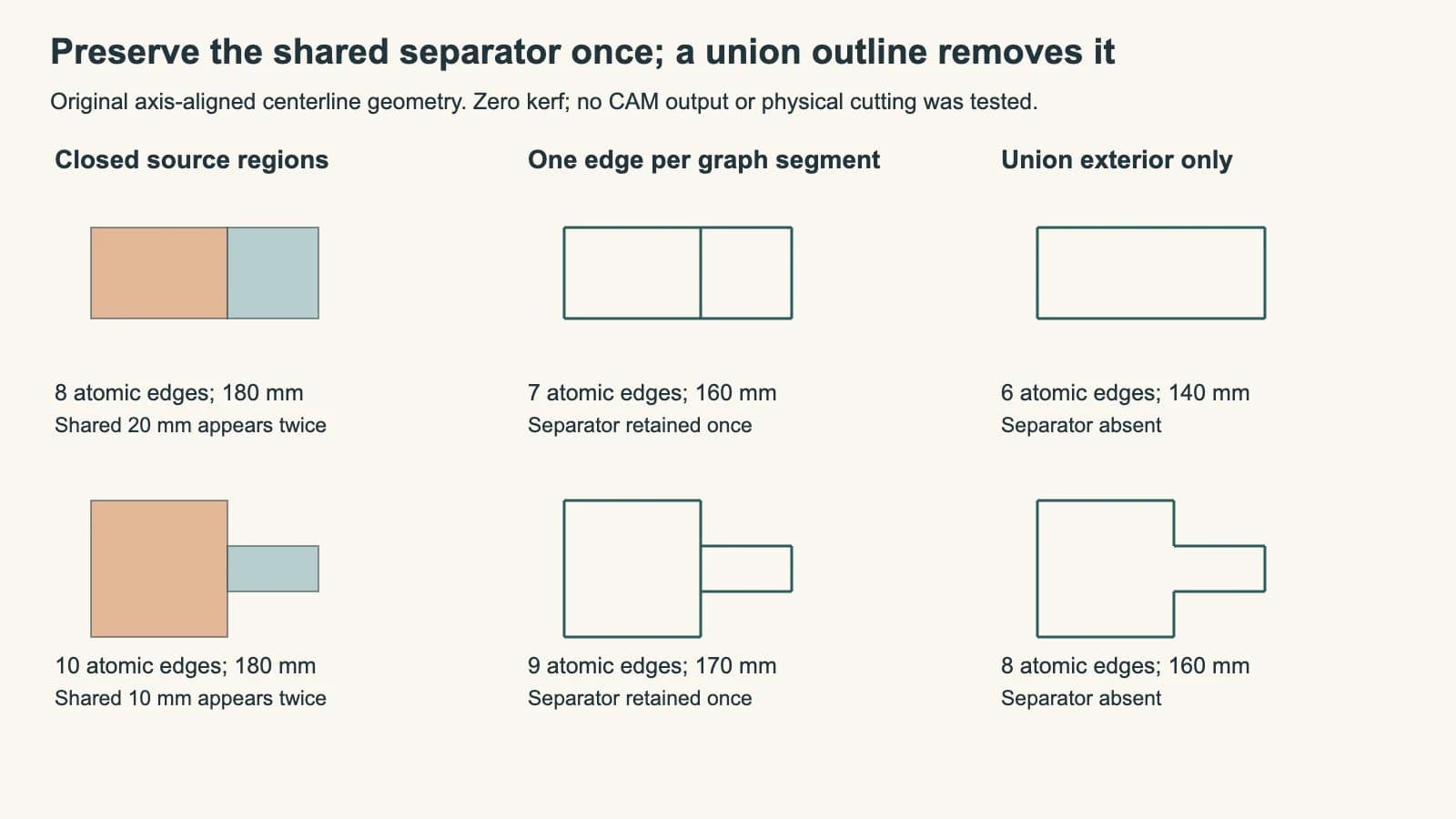
We reopened the saved SVGs and independently compared their straight-edge coverage in one-millimeter intervals. Each graph retains every intended interval once; each union exterior omits the shared interval. The check verifies these axis-aligned specimens, not a general curve-intersection or machine-planning algorithm.
A visible outline may answer a different question
An operation that extracts only the outside of combined filled shapes can be appropriate for a single silhouette. An operation that extracts visible color boundaries can preserve a seam between different colors while discarding a same-color seam or a hidden contour.
Neither visual rule establishes which boundaries must separate manufactured parts. Two parts can use identical artwork colors and still need an internal cut. Conversely, two visible colors may belong to one piece and need engraving rather than a separating cut.
PerfectVector's SVG Cut Line Generator follows visible filled-region boundaries: its current contract retains visible shared color boundaries once and removes same-color seams and hidden contours. That is useful for its stated task, but it is not a guarantee that every intended per-part separator survives. Our native graph specimens were authored directly; they are not output from that utility.
Keep a separate part master and inspect the output against the intended part count. If the internal separator is necessary, confirm it exists as cutting geometry rather than assuming that an attractive filled preview proves it.
Documented common-line features still need a job check
LightBurn's optimization reference describes removing overlapping lines during cut planning, with a distance setting for recognizing overlaps. This is a documented planner function, not a result we executed on these files.
Nest&Cut's common-cut explanation distinguishes output representations: its standard DXF retains part contours, while its NC output merges shared contours; a separate CAM DXF option supplies merged geometry. Its spacing also accounts for the kerf. A file can therefore preserve closed source parts even when the planned machine output handles a shared cut once.
Kinetic's SmartCluster reference likewise makes kerf data part of its common-line calculation and discusses process-dependent quality limits. Do not copy its plasma-specific settings into a laser job. The relevant lesson is that intentional common-line cutting involves more than touching two screen outlines.
Our examples contain no beam width. They do not establish the correct offset for two finished parts, the stability of a released part or any runtime saving. Read the kerf-compensation guide for that separate dimension problem and the inner-shape cut-order guide for operation-order considerations.
Where PerfectVector fits
If a suitable flat silhouette exists only as PNG or JPG and you need editable contours, prepare an SVG candidate through PerfectVector's laser artwork workflow. Compare the recovered outline and openings with the source, then preserve the actual part definitions before job-specific editing and CAM planning. Keep a usable native vector when one already exists.
The Laser SVG download serves a different intent: its Cut out mode omits internal color borders when forming the design's cut outline and openings. It is not a promise to reconstruct a set of separate parts or their common-line cutting graph. Choose the representation that retains the geometry your job needs, and inspect the actual destination preview before a material test.
FAQ
Why can two valid closed shapes repeat one cut edge? Each closed shape stores its own boundary. If their sides coincide, the same interval can appear in both contours even though the intended separating graph needs it only once.
Does taking the union solve a shared-edge cut? A union exterior removes the internal separator. That is appropriate for one combined silhouette but changes a task that requires two neighboring parts to separate.
Why does a partial shared side need extra breakpoints? The shared interval can be shorter than one source edge. Splitting at the other part's endpoints separates that interval from the exposed portions before counting unique segments.
Does less path length prove a faster or dimensionally correct job? No. These examples measure ideal geometric length. Kerf, travel, starts, sequence, material behavior and the destination's actual output remain separate checks.
Sources
- LightBurn — Optimization Settings — Documented overlap removal and its distance setting during cut planning.
- Nest&Cut — Common cut — Kerf-aware spacing and the distinction between intact contours and merged CAM output.
- Kinetic — SmartCluster common-line cutting — Kerf-dependent preparation and process-specific limitations.
Need contours from a flat raster design? Prepare an SVG candidate with PerfectVector, inspect the source shapes, then verify that the job's cutting representation keeps each necessary separator once.
More from the blog

Can LightBurn Vectorize an Image? Yes, With Trace Image
LightBurn can turn a bitmap into vectors with Trace Image. Learn its key controls, when to keep raster engraving, and what to check before a test cut.
Dogbone vs T-Bone Fillets: Check CNC Inside Corners
Compare diagonal dogbone and side T-bone relief, inspect the extra material each removes, and separate ideal corner clearance from a verified CNC fit.