Measure SVG Path Length Without Confusing Scale
Measure SVG paths in browser user units, account for transforms and nominal size, and distinguish contour totals from pathLength calibration or machine travel.
On this page
- Measure a known segment before measuring artwork
- Keep local and transformed lengths separate
- Convert to millimeters only after fixing the mapping
- pathLength calibrates distances without resizing geometry
- Add contours without turning the total into machine travel
- Record the measurement with its assumptions
- FAQ
- Sources
To measure an SVG path, call getTotalLength() on the geometry element, then identify the coordinate system behind the number. The browser returns a length in user units. That number is not automatically the displayed length, a millimeter measurement or a machine's travel distance.
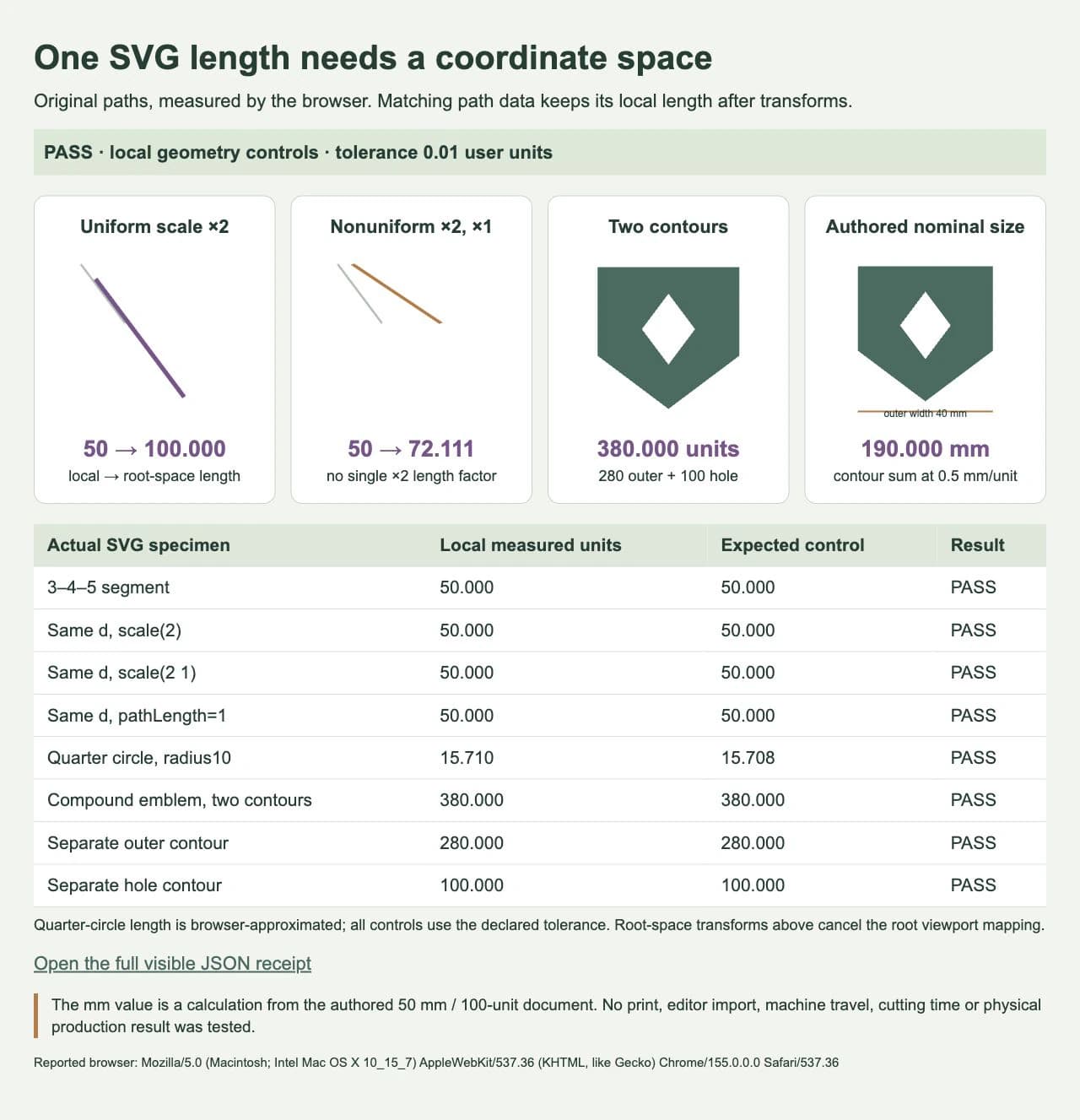
For example, our original diagonal is 50 user units long. A uniform scale doubles its root-space length to 100, while scaling only its horizontal direction makes that length about 72.111. The local API result stays 50 in both cases. Those numbers answer different measurement questions.
Measure a known segment before measuring artwork
You need an SVG with accessible geometry and a browser that runs inline SVG and JavaScript. Work on a copy of the artwork. Decide whether you need local geometry, transformed geometry or a length at a specified physical size before recording a result.
A path stores a route using commands such as move, line, curve and close. A user unit belongs to that SVG coordinate system; do not rename it a pixel or millimeter without checking the mapping. MDN's getTotalLength() reference defines the result as the browser-computed path length in user units.
This complete HTML example measures a straight segment. Save it as an HTML file and open it in a browser:
<!doctype html>
<html lang="en">
<meta charset="utf-8">
<title>SVG length control</title>
<svg width="240" height="240" viewBox="0 0 120 120">
  <path id="route" d="M10 10 L40 50"
        fill="none" stroke="black" />
</svg>
<pre id="result"></pre>
<script>
  const route = document.querySelector("#route");
  document.querySelector("#result").textContent =
    route.getTotalLength() + " local user units";
</script>
</html>
The horizontal change is 30 and the vertical change is 40, so the expected length is sqrt(30² + 40²) = 50. The displayed result gives you a known control before you trust a complex curve or imported emblem. The 240-pixel viewport does not turn that local result into 100 user units.
In our browser fixture, we declared a tolerance of 0.01 user units. A quarter-circle control with radius 10 has an analytical length of 5π, approximately 15.708. The test browser reported Chrome 155 and returned approximately 15.7102, within that tolerance. A browser computes curve length numerically, so retain useful precision and compare against an appropriate tolerance rather than demanding identical final decimals from every implementation.
Keep local and transformed lengths separate
Our next two specimens keep the same d="M10 10 L40 50" and add transforms:
| Original segment | Local API length | Length after the stated transform, in root SVG user units |
|---|---|---|
| No transform | 50 | 50 |
scale(2) | 50 | 100 |
scale(2 1) | 50 | About 72.111 |
Uniform scaling multiplies every direction by the same magnitude, so multiplying the local length by 2 works for the second row. Nonuniform scaling treats directions differently. In the third row, the changed segment is 60 units across and 40 units down: sqrt(60² + 40²), not 50 × 2.
The SVG coordinate-system specification explains how transforms and the viewBox mapping establish coordinate systems. Name your target space. A length in root SVG user units still differs from CSS pixels in the viewport.
For this known straight segment, we mapped its endpoints into the root SVG's user space:
const root = route.ownerSVGElement;
const relative = root.getCTM().inverse().multiply(route.getCTM());
const a = new DOMPoint(10, 10).matrixTransform(relative);
const b = new DOMPoint(40, 50).matrixTransform(relative);
const transformedLength = Math.hypot(b.x - a.x, b.y - a.y);
The inverse root matrix removes the root's viewport mapping; the relative matrix retains the path's transformation into root user space. This snippet assumes an attached SVG with invertible matrices and the specific straight segment above. Its endpoints are known from that path's source.
For a curve, the distance between its endpoints is only a chord. To measure a generally transformed curve, transform the geometry into the target coordinate system and measure that geometry, or use a controlled numerical approximation that preserves separate contours. Do not apply this endpoint formula to a curved route or multiply a nonuniformly transformed shape by one guessed scale factor.
Convert to millimeters only after fixing the mapping
Our original emblem document declares width="50mm", height="50mm" and viewBox="0 0 100 100". With the intended uniform mapping, that is 0.5 mm per user unit. The emblem's outer width spans 80 units, so its nominal width is 40 mm.
Its two contour lengths total 380 user units. At that declared scale:
50 mm / 100 user units = 0.5 mm per user unit
380 user units × 0.5 mm per user unit = 190 mm of contours
This is a calculation from authored dimensions. We did not measure a printed object, verify a monitor with a ruler or test an editor's import sizing. CSS can override the SVG viewport, and a destination can rescale artwork. Confirm the delivered dimensions in that destination before treating a nominal calculation as a production measurement.
The whole document width is also different from the artwork's width inside it. If you instead set only the emblem's outer width to 50 mm, its 80-unit width gives a different factor: 50 / 80 = 0.625 mm per unit. The same 380 units would then represent 237.5 mm of contours. Record which width you set; use the SVG bounding-box guide when you need to inspect the extents first.
pathLength calibrates distances without resizing geometry
We also made a copy of the original 50-unit segment with pathLength="1". Its getTotalLength() result remained 50. The attribute did not change its endpoints or make its geometric length one unit.
The SVG geometry API specification explicitly excludes pathLength from the computed result. MDN's pathLength reference describes its calibration of distance-along-path behavior, including stroke dashes. That is useful when authoring an effect with normalized distances; it is not a substitute for measuring the underlying route.
For a drawing reveal, follow the SVG stroke-animation guide. Keep its calibrated dash values separate from the geometric length you record for an artwork inspection.
Add contours without turning the total into machine travel
Our emblem has an outside boundary and a diamond-shaped hole. The original compound path stores both closed contours:
<path fill-rule="evenodd"
      d="M10 10 H90 V60 L50 90 L10 60 Z
         M50 25 L65 45 L50 65 L35 45 Z" />
The outer contour measures 280 units and the inner one measures 100. The compound path returned 380; measuring the two contours as separate path elements and adding them also returned 380. The SVG path specification distinguishes new subpaths from line and closing segments. Moving to the hole does not add a drawn connecting segment between the contours.
That sum describes the selected stored geometry. A traced thick line may have two boundary routes; a duplicate path may add geometry again; an emblem may include small interior contours you did not intend to process. Measure the objects and contours you actually mean, and inspect them before interpreting a total.
Machine travel is a separate result. A job can include movement between contours, ordering choices, repeated passes or destination-specific path changes. Our browser total establishes none of those. It also gives no cutting time, material consumption or successful machine result. If you need one center route from a scanned drawing, the single-line SVG guide addresses that different reconstruction task.
Record the measurement with its assumptions
- Identify the selected geometry and check whether it contains multiple contours or duplicates.
- Measure a known control and the selected paths in local user units.
- Record the transforms and the coordinate space needed for your result.
- Establish the intended document or artwork dimensions before converting units.
- Keep calibration values, contour totals and destination measurements separately labeled.
If the known straight control does not return 50 within your declared tolerance, check which element you selected and whether its source data changed. If local results agree but the nominal size differs, inspect the viewport, transforms and destination scale before altering the paths. More decimal places will not resolve a wrong coordinate mapping.
The file-geometry check is complete when another person can reproduce the selected contour total and understand its units, mapping, tolerance and included objects. Our retained browser fixture passed those numeric controls. No editor import, machine travel or physical-size test was performed.
If the only source is a bitmap, PerfectVector's image-to-vector workflow can reconstruct editable SVG geometry first. Inspect the recovered contours and holes, then measure that selected geometry with an explicit scale. Vectorization creates paths from pixels; it does not recover a lost physical size, infer a centerline or supply a machine-travel estimate. Preserve an existing vector original when it is available. The emblem in this article was authored directly and was not traced.
FAQ
Does getTotalLength() return pixels or millimeters?
It returns the browser-computed length in SVG user units. Establish the coordinate and size mapping before expressing that result in viewport pixels or nominal physical units.
Why does scaling my path leave the local API result unchanged? The stored local route and its transformed representation occupy different coordinate spaces. Our same-data segment returned 50 locally after both uniform and nonuniform scaling. Its transformed lengths were 100 and about 72.111 root SVG units.
Does pathLength="1" mean the path is one unit long?
It supplies a calibration value for supported distance-along-path behavior. The geometry API's computed length ignores that attribute; our 50-unit control still returned 50.
Can I estimate cutting time from a contour total? The total alone is insufficient. It does not establish the destination's generated routes, travel between contours, repeated passes, speed changes or material behavior. Use the actual destination's job checks and a suitable production test.
Sources
- MDN: SVGGeometryElement.getTotalLength() — Browser-computed path length in user units.
- W3C SVG geometry API — Computed length and its independence from
pathLengthcalibration. - W3C SVG coordinate systems — Viewport,
viewBoxand transform mappings. - MDN: pathLength — Calibration of distance-along-path behavior.
- W3C SVG paths — Subpaths, drawn segments and closing commands.
Need editable geometry from a bitmap before measuring? Create an SVG candidate, inspect which contours it contains, and establish the intended scale before recording a length.
More from the blog

SVG Dotted Outlines: Control Dash Spacing and Round Caps
Make dotted SVG borders with round caps, calculate visible gaps, and fix a closed outline's uneven seam using an original badge and editable stroke examples.

Leaflet SVG Markers: Align the Tip with iconAnchor
Position custom SVG markers in Leaflet by mapping the visible tip to iconAnchor. Account for viewBox padding, aspect-ratio fitting, and changes in icon size.