Wrap a Logo Around a Cylinder: Arc vs Front Width
Compare surface arc length and front width when placing a logo on a cylinder. Inspect original geometry and keep the SVG master before choosing a CAD operation.
On this page
For a logo on a cylinder, decide whether its width should be measured along the curved surface or straight across the front view. Those dimensions differ. An arc-preserving wrap can look narrower from the front, while a parallel projection that preserves frontal width can cover a longer surface arc. Adding extrusion depth is another decision.
Keep the flat SVG master unchanged while comparing the placement. A clear vector outline gives you editable artwork; it does not decide which dimension a CAD or slicer operation should preserve.
Say what the logo width means
Record the cylinder radius, the intended artwork width and whether that width follows the surface or the frontal span. Inspect the actual destination's result before using its operation name as a dimensional guarantee.
Define the arc and the frontal span
An arc length follows the circle. A chord connects two points on that circle with a straight segment. In our symmetric, straight-on example, the chord also equals the endpoint width seen in an orthographic front view, which has no camera perspective.
OpenStax's treatment of circular arc length gives arc length = radius × angle when the angle is in radians. That is the relationship behind the original calculations below.
We chose a cylinder with a 40 mm radius and authored a flat, F-shaped SVG 60 mm wide and 30 mm high. The radius and dimensions are illustrative. The study contains no physical cylinder or printed object.
Both surface mappings keep height unchanged. They differ in how they interpret the horizontal source coordinate. The surface patches have zero thickness; they are not printable solids.
Preserve 60 mm along the surface
Let s be the source's horizontal distance from its center, ranging from −30 to 30 mm. An ideal arc-length-preserving wrap uses:
angle = s / 40
X = 40 × sin(angle)
Y = 40 × cos(angle)
Z = source height coordinate
Here X and Y lie in a circular cross-section, while Z follows the cylinder's axis. The source's 60 mm width spans 60/40 = 1.5 radians around that cross-section.
The ideal surface arc remains 60 mm. Its endpoint chord is:
2 × 40 × sin(60 / (2 × 40)) ≈ 54.5311 mmThat is the front-view endpoint span in this model. The arc has not become shorter; the front view measures a straight distance between its endpoints. A ruler following the curve and a straight frontal measurement answer different questions.
Preserve 60 mm across the front
For a separate comparison, let the original planar horizontal coordinate be x, again from −30 to 30 mm. Our parallel front-projection model keeps X equal to x and places the point on the visible half-cylinder:
X = x
Y = sqrt(40² − x²)
Z = source height coordinate
The frontal endpoint span stays 60 mm. The endpoints correspond to angles of ±asin(30/40), giving an ideal surface arc of:
2 × 40 × asin(60 / (2 × 40)) ≈ 67.8450 mmThe two mappings therefore preserve different widths:
| Declared mapping | Ideal surface arc | Frontal endpoint chord |
|---|---|---|
| Arc-length-preserving wrap | 60 mm | About 54.5311 mm |
| Parallel front projection | About 67.8450 mm | 60 mm |
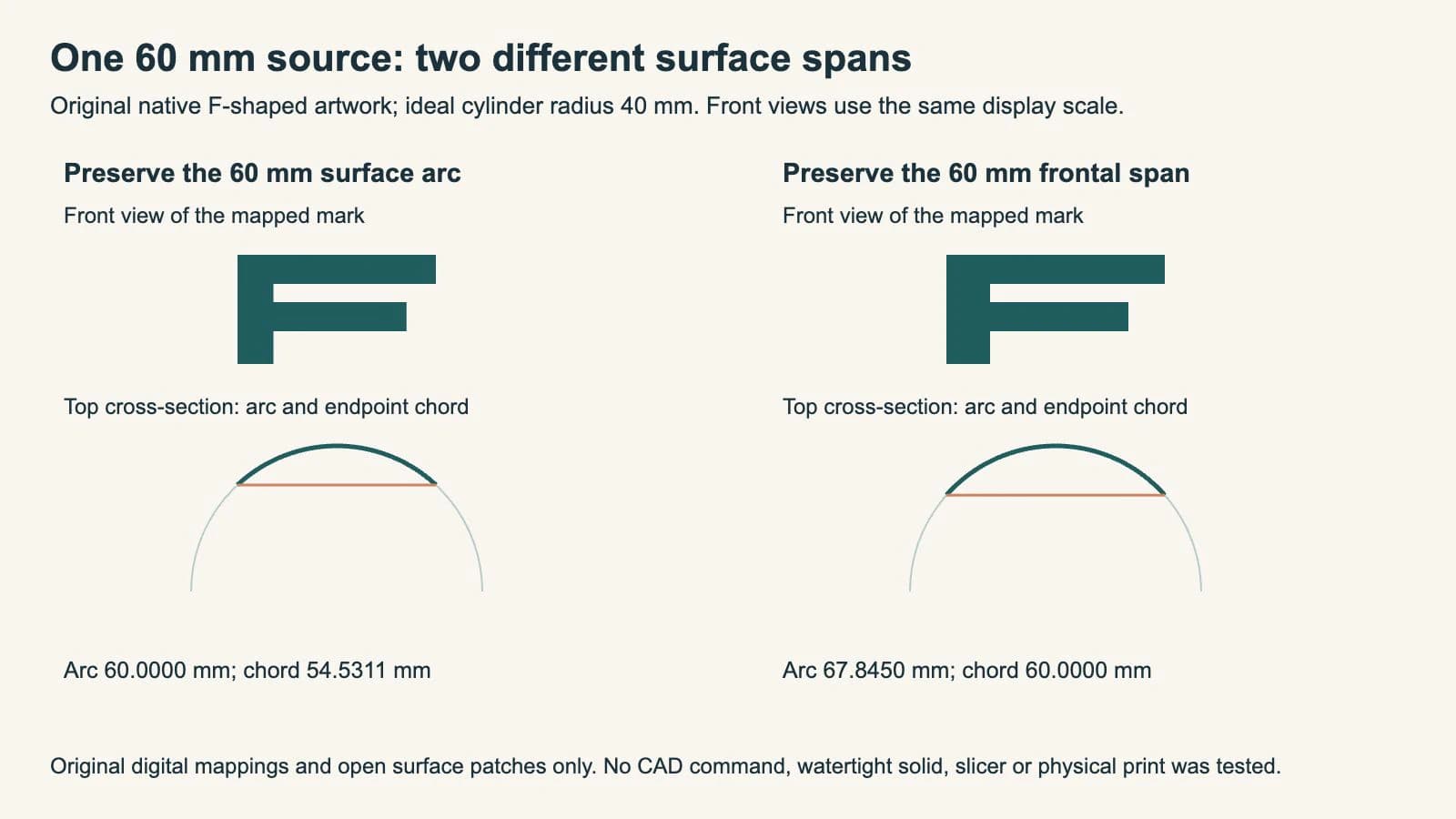
We saved native surface meshes for both cases and reopened their coordinates. Every checked vertex lies at the declared radius, their endpoint spans match the table, and the original SVG master remains separate.
The finite mesh edges approximate circular arcs with short straight segments. Their measured chain lengths were about 59.9996 and 67.8444 mm; the ideal analytic arcs are 60 and 67.8450 mm. We keep those measurements distinct rather than reporting the approximation as an exact curved length.
Keep these geometric rules within their scope
The examples use an ideal circular cylinder, a centered mark and an orthographic front view. The parallel-projection rule also requires the source coordinates to lie within the visible radius range. It cannot place a frontal point beyond the cylinder's silhouette using the same square-root expression.
A tapered cup, irregular mesh, curved fillet or photograph introduces other geometry. Moving a mark off-center can also change its apparent front width. The formulas here do not establish the behavior of every surface or every command labeled “wrap.”
No radial thickness, solid union, recess, overhang or print setting was tested. Our saved meshes are three rectangular strips representing the F's surface regions. Their purpose is inspecting the declared mapping, not supplying a manufacturing model.
Choose the destination operation by its result
An extrusion adds depth to a profile; its extent and direction matter. Autodesk's Extrude documentation describes profile, direction and extent choices. That is separate from deciding whether an artwork's horizontal measurement should follow a curved surface.
Autodesk's Emboss documentation describes applying selected profiles to body faces and setting an emboss or deboss depth. Prusa's SVG tool documentation describes a Use surface option for following an object surface.
Those documented controls do not prove that either application implements the exact mappings we defined. We did not execute the commands in this study. For the existing Prusa workflow, use the SVG emboss preparation guide, then inspect the actual placed geometry and sliced layers in your version.
Before committing to a placement, compare the source master with the destination result. Confirm which width is preserved, where the mark sits, and whether the required raised or recessed volume actually joins or cuts the model. A front screenshot alone cannot establish surface arc length or solid connectivity.
Where PerfectVector fits
If the flat logo exists only as a PNG or JPG and you need paths for a 3D workflow, prepare an SVG candidate with PerfectVector. Compare its silhouette, openings and letter proportions with the source before choosing the surface placement. Keep an existing native vector when available.
PerfectVector prepares two-dimensional artwork. It does not choose the cylinder mapping, create a watertight printable solid or verify slicing. Our F-shaped sample was authored directly as SVG. The image-to-SVG 3D guide covers the earlier artwork-preparation stage, and the SVG, STL and 3MF comparison separates the file roles.
FAQ
Why can a wrapped logo look narrower from the front? The surface arc and the frontal endpoint chord measure different distances. Our ideal radius-40 mm wrap keeps a 60 mm surface arc but has an approximately 54.5311 mm frontal endpoint span.
Does preserving the front width preserve the surface length? Not in this example. The parallel projection keeps a 60 mm frontal span while covering about 67.8450 mm along the ideal cylinder surface.
Does an Emboss or Use surface option guarantee these exact dimensions? The article defines two mathematical mappings and does not test those commands. Check the current destination documentation and measure its actual placed result.
Can I print the surface-study mesh as a finished logo? The saved examples are zero-thickness mathematical patches. They are not watertight printable solids; actual depth, connectivity, manufacturing details and slicing still require their own workflow.
Sources
- OpenStax — Angles and circular arc length — Radians and the relationship between radius, angle and arc length.
- Autodesk — Extrude a solid body — Profile, direction and extent choices for extrusion.
- Autodesk — Emboss a solid body — Applying profiles to selected body faces with an emboss or deboss depth.
- Prusa — SVG embossing tool — Documented SVG placement and surface-following controls.
Need paths from a raster logo? Prepare an SVG candidate with PerfectVector, inspect the source shapes, then compare surface length and front width in the actual 3D destination before building the printable model.
More from the blog

PNG to SVG for Bambu Studio: Clean Multicolor Imports
Convert a PNG to SVG for Bambu Studio, preserve useful color regions, check closed paths and holes, then verify size and extrusion before you slice the model.

Half-Drop vs Straight Repeat: Place the Same Motif
Compare straight, half-drop and half-brick layouts using one original motif. Check the translations, rectangular repeat cells and matching edge fragments.