
CairoSVG: Export SVG to PDF and PNG at the Right Size
Convert SVG artwork with CairoSVG, choose output width or scale, understand DPI and parent dimensions, and verify your PNG pixels and PDF page size before delivery.
On this page
Use cairosvg.svg2png() for a raster export and cairosvg.svg2pdf() for a PDF. For a specific PNG width, set output_width; for a proportional enlargement, use scale. parent_width supplies the container used to resolve percentage dimensions. dpi controls the relationship between pixels and physical units, so changing it can affect PNG and PDF sizes differently.
The example below starts with a small SVG emblem and checks the files produced by each setting. It suits designers automating logo exports and developers preparing artwork for documents. CairoSVG renders existing SVG content. It does not trace a PNG logo into editable paths.
Start with a self-contained SVG
We ran these examples with Python 3.12.11 and CairoSVG 2.9.1. Install the pinned converter in a project environment:
python -m pip install "CairoSVG==2.9.1"CairoSVG also needs the native Cairo library. If installation or importing fails, follow the operating-system notes in its installation documentation.
Save this original three-path emblem as emblem.svg. The square opening makes a missing fill rule easy to notice, and the narrow bar provides a small-detail checkpoint. This is hand-authored demonstration artwork, not a PerfectVector conversion.
<svg xmlns="http://www.w3.org/2000/svg"
     width="240" height="120" viewBox="0 0 240 120">
  <path fill="#176b63" fill-rule="evenodd"
        d="M20 100 V20 H100 V100 Z M40 40 V80 H80 V40 Z"/>
  <path fill="#e5a43a" d="M110 100 L160 20 L210 100 Z"/>
  <path fill="#24435d" d="M220 20 H230 V100 H220 Z"/>
</svg>
The root dimensions describe the output viewport. The viewBox describes the artwork's internal coordinate rectangle. Here both have the same 2:1 ratio. Keep that relationship deliberate when adapting the example to your logo.
Export one master at the required size
Save this as export_emblem.py beside the SVG, then run python export_emblem.py:
import cairosvg

cairosvg.svg2png(
    url="emblem.svg",
    write_to="emblem-480.png",
    output_width=480,
)
cairosvg.svg2pdf(
    url="emblem.svg",
    write_to="emblem.pdf",
)
Our PNG was 480 × 240 pixels. The PDF page was 180 × 90 points, equivalent to 2.5 × 1.25 inches. These are measurements from the supplied fixture, not dimensions to expect from every SVG.
The command-line equivalents are:
cairosvg emblem.svg --output-width 480 -o emblem-480.png
cairosvg emblem.svg -o emblem.pdf
CairoSVG's API and command-line reference documents input filenames through url, SVG bytes through bytestring, and file output through write_to. In the CLI, the output filename extension selects the format.
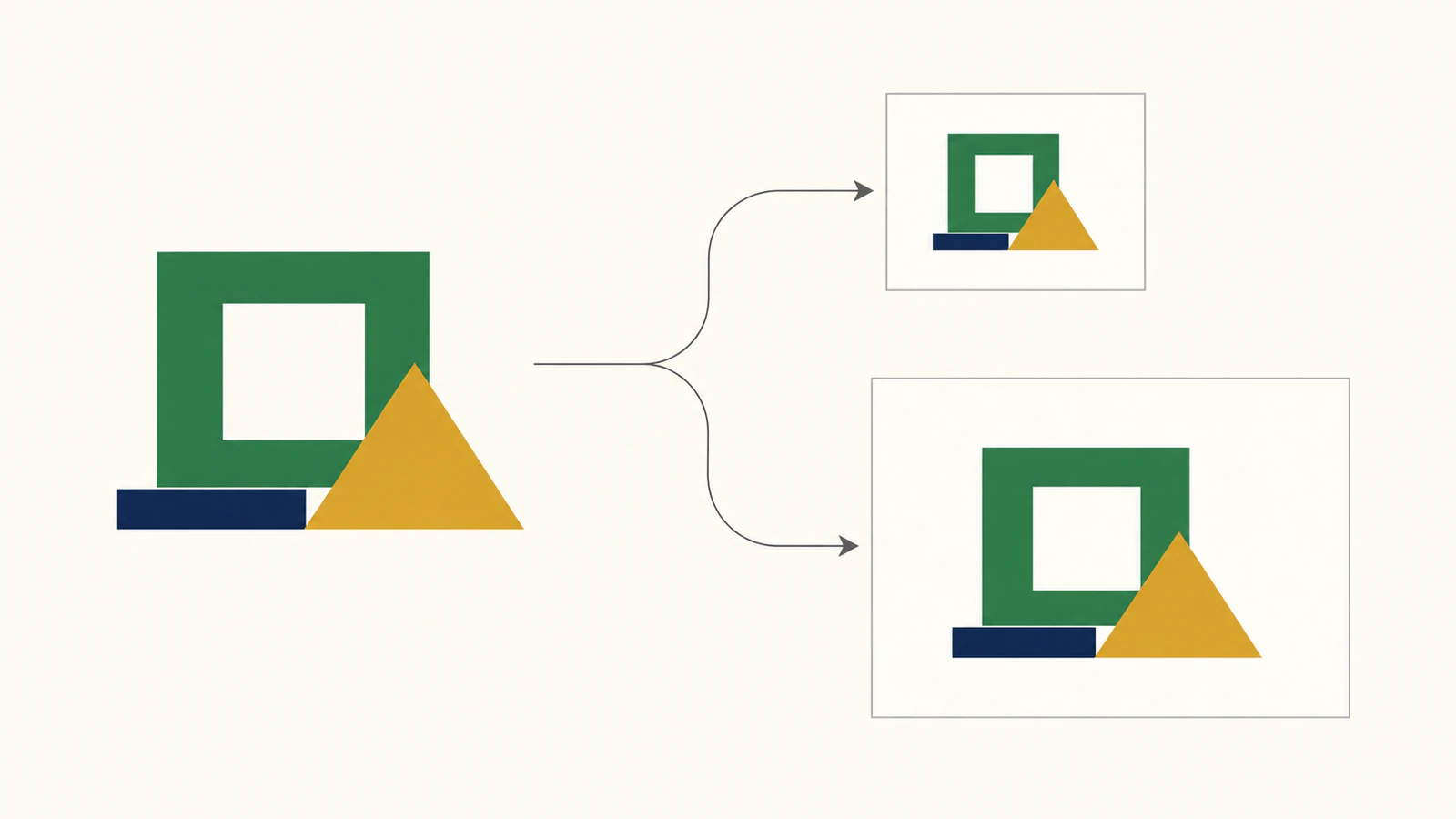
Choose the control that matches the problem
The similarly named options answer different questions. The CairoSVG sizing reference separates the parent container from the requested output dimensions.
| Your requirement | Python option | CLI option | What to check |
|---|---|---|---|
| Make a PNG exactly 480 pixels wide | output_width=480 | --output-width 480 | Height and artwork proportions |
| Double the resolved output dimensions | scale=2 | --scale 2 | Both dimensions doubled |
| Resolve root width or height expressed as a percentage | parent_width, parent_height | --width, --height | Percentage of the supplied container |
| Interpret physical units such as inches | dpi | --dpi | PNG pixel dimensions and PDF physical size separately |
For our pixel-sized source, we ran each option independently:
| Settings | PNG dimensions | PDF page dimensions |
|---|---|---|
| Defaults | 240 × 120 px | 180 × 90 pt |
output_width=480 | 480 × 240 px | 360 × 180 pt |
scale=2 | 480 × 240 px | 360 × 180 pt |
dpi=192 | 240 × 120 px | 90 × 45 pt |
The last row is the trap: doubling DPI did not give this pixel-sized SVG more PNG pixels. It made the same pixel dimensions occupy less physical space in the PDF. Use an output dimension when your delivery requirement is a pixel count.
Supplying both output dimensions sets the canvas rectangle; it does not guarantee a tightly filled logo box. The SVG's aspect-ratio rules and any empty area inside its viewBox still matter. Start with a single output dimension when you want the original proportions, then inspect the result.
Percentage dimensions need a parent
For a copy of the fixture whose root uses width="50%" height="50%", this call supplies a 960 × 480 pixel parent:
cairosvg.svg2png(
    url="emblem-percent.svg",
    parent_width=960,
    parent_height=480,
    write_to="emblem-percent.png",
)
Our output was 480 × 240 pixels: half the parent width and half its height. This explains why parent_width=480 is not interchangeable with output_width=480.
If CairoSVG reports that the SVG size is undefined, inspect the root dimensions first. Give the document positive dimensions appropriate to its use, or supply the parent dimensions when percentages depend on them. Do not infer the intended page size from how large a browser happens to display the artwork.
Physical dimensions behave differently
Change the original root to width="2.5in" height="1.25in", keeping its viewBox. In our test, dpi=96 produced a 240 × 120 PNG and dpi=192 produced a 480 × 240 PNG. Both PDFs remained 180 × 90 points.
Here the source defines a physical size, so more pixels per inch increases raster resolution while preserving the PDF's physical page size. The same principle lets a deliberately authored page use millimeters or inches. Check the exported PDF's page box instead of assuming that a large pixel count means an A4 or letter page.
If the logo needs to sit inside a report with text, margins, and several elements, use a document layout step. Our ReportLab SVG placement guide covers that separate task.
Verify the export, including what stayed vector
We read the PNG headers with Pillow and the PDF page boxes and content streams with pypdf 6.10.0. Each of the four pixel-source PDFs contained drawing-path operations and zero page images. That confirms vector geometry for this simple, image-free fixture. It does not establish full fidelity for an arbitrary SVG.
To check your own output dimensions, install pillow and pypdf in the same environment and run:
from PIL import Image
from pypdf import PdfReader

with Image.open("emblem-480.png") as image:
    print("PNG pixels:", image.size)

page = PdfReader("emblem.pdf").pages[0]
print("PDF points:", float(page.mediabox.width),
      float(page.mediabox.height))
print("Page images:", len(page.images))
The PageObject reference describes mediabox and images. Image count is a useful diagnostic, but it cannot prove that every shape, font, or effect survived correctly.
Before delivery:
- Open the PNG and PDF and compare the emblem against the SVG. Check its opening, triangle, bar, and margins.
- Verify the PNG's pixel dimensions and the PDF's physical dimensions independently.
- Inspect the artwork at its intended use size, including narrow gaps and small details.
- Keep the original SVG and rerun these checks after changing it or upgrading the converter.
CairoSVG's SVG support page says vector output is preserved where possible. Embedded raster images remain raster content. If your file contains a PNG in an SVG wrapper, the embedded-image diagnosis helps you identify it before export.
CairoSVG is a static renderer. Animation, scripting, advanced text layout, and many filters are outside its supported workflow. Its documentation lists only feOffset, feBlend, and feFlood as supported filters. For artwork that depends on other effects, compare the result carefully or export through an application that supports those features. A successful conversion call alone is insufficient.
Recover a vector master only when the source needs it
If your logo survives only as a PNG or JPG, PerfectVector can supply the upstream raster-to-SVG step before CairoSVG exports it. Check the recovered shapes, small openings, and brand lettering in an editor; then save a self-contained SVG master. Our logo vectorization workflow explains that inspection.
An existing editable SVG can go straight to the export stage. Converting it to PNG and tracing it again would discard useful source geometry. Photos can remain raster images when that is the intended content.
For a raster-only logo, try your own image in PerfectVector, inspect the SVG's contours and openings, and then verify both the pixel dimensions and physical page size of your CairoSVG exports.
FAQ
Why does changing DPI leave my PNG the same size? If the SVG root uses pixel dimensions, changing DPI does not necessarily change the PNG pixel count. In this example, a 240 by 120 pixel SVG stayed that size at 192 DPI. Use output_width or scale when you need more output pixels.
Is parent width the same as output width? No. parent_width supplies the container used to resolve percentage dimensions. output_width requests the final output width. A root width of 50% with a parent_width of 960 resolved to 480 pixels in the example.
Does CairoSVG always make an entirely vector PDF? No. CairoSVG preserves vector output where possible, but an SVG can include raster images and unsupported features. Inspect the PDF's content and appearance rather than treating the file extension as proof.
Sources
- CairoSVG documentation — Describes installation, conversion APIs, sizing controls, and rendering limitations.
- CairoSVG SVG 1.1 support — Explains vector preservation, embedded images, and unsupported features.
- pypdf PageObject reference — Documents the page-box and image interfaces used to inspect the PDF.
More from the blog

jsPDF SVG: Keep Logo Paths in a Browser-Made PDF
Use svg2pdf.js with jsPDF to place an SVG logo, preserve supported paths, set its PDF size, and check the saved file against a rasterized export of that artwork.

EasyEDA SVG Logo Import: PCB Images or Panel Paths?
Import a logo into EasyEDA Standard or Pro without mixing PCB image tools with panel SVG paths. Check the editor, layer, size, and artwork before export.