Can Sketchbook Vectorize an Image? Export First
Keep your layered Sketchbook master, export a clean PNG, then trace it to SVG. Check desktop and mobile options, transparent backgrounds and editable shapes.
On this page
- Save the layered master before exporting
- Export only the artwork you want traced
- Sketchbook Pro on Windows and macOS
- Sketchbook on iPad, iPhone and Android
- Check the background in the exported file
- Inspect the trace as shapes
- A PDF export is not evidence of vectorization
- Choose tracing only when it helps the drawing
- FAQ
- Sources
Sketchbook does not export a drawing as editable SVG paths. Its current export documentation lists image formats for Sketchbook Pro on desktop and Sketchbook on mobile, with PDF also available on mobile through the Premium Bundle. To turn the drawing into vector shapes, preserve the layered master, export a suitable image, and trace or redraw it in another tool.
The distinction matters when a clean ink line looks like a vector stroke. Its appearance does not tell you how the file stores it. A traced SVG may reproduce that line with filled shapes, without recovering the brush, pressure history or layers you used to draw it.
Save the layered master before exporting
Keep a version you can reopen and continue painting. Sketchbook's saving guide identifies TIFF as its native format. A Sketchbook TIFF retains layers in Sketchbook apps; another program opens it flattened. On desktop, TIFF and PSD are the formats that preserve layers.
| Your next job | File to keep or export | What it preserves |
|---|---|---|
| Continue drawing in Sketchbook | Sketchbook TIFF | Native layer data within Sketchbook |
| Move layers to another image editor | PSD | Layers and supported data, subject to compatibility limits |
| Send the visible picture for tracing | PNG | A flattened image, with transparency when exported correctly |
| Share several mobile canvases as pages | A document for viewing or sharing; inspect its contents separately |
PSD is a useful transfer format, but it is not an exact substitute for the native file. Sketchbook's Photoshop compatibility notes say PSD export rasterizes text layers, changes certain Sketchbook-specific blend and mask modes, and does not preserve a changed Background layer color. Keep the TIFF when those features matter.
For a drawing with lettering over a painted illustration, this means saving the layered master before making the trace input. You may later want to change the wording or hide the lettering without repainting the picture.
Export only the artwork you want traced
Use a duplicate or saved copy for preparation. Hide reference photos, rough sketches, alternative designs and any background you do not want in the vector. Keep complete contours inside the canvas; a line clipped at the edge gives the tracer no information about the missing portion.
If the words will need editing, consider exporting the illustration without them and adding live type in the destination vector editor. If separate parts must remain independently editable, export those parts separately while their original layers still exist. Tracing a flattened composite cannot reliably reconstruct which source layer each visible mark belonged to.
Sketchbook Pro on Windows and macOS
Save the master, then export a PNG copy. The desktop export guide identifies PNG as a flattened, lossless format.
Sketchbook on iPad, iPhone and Android
From the menu, choose Share/Export, select Export to Files, and choose PNG. The same mobile export guide distinguishes saving a file from sending it through the device's Share sheet. Save a file you can find and inspect before uploading it to a tracer.
Check the background in the exported file
Sketchbook's alpha-channel instructions say to hide the Background layer in the Layer Editor. The checked pattern indicates transparency. PNG, TIFF and PSD support that transparency; JPEG does not.
Open the exported PNG and check its corners and enclosed spaces. Hiding the Background layer does not remove white paint that already exists on an artwork layer. A white rectangle painted behind the drawing can still travel with the export.
On iOS, Sketchbook also warns that Photos can convert a PNG to JPEG and lose transparency. Saving the PNG to Files avoids that particular sharing problem. Do this check on the saved file, not only on the canvas you remember seeing.
Inspect the trace as shapes
The example below uses an owned raster owl fixture that was generated independently of Sketchbook and converted with PerfectVector. It was not drawn or exported in Sketchbook. The original conversion ran on September 3; this article adds a new inspection of the saved SVG.
The file contains 21 paths, two fill colors, no embedded image elements and no stroke attributes. Four paths form the selected eye: a black outer shape, a near-white inner shape, a black pupil and a near-white highlight. Their stacking produces the appearance of a thick outline.
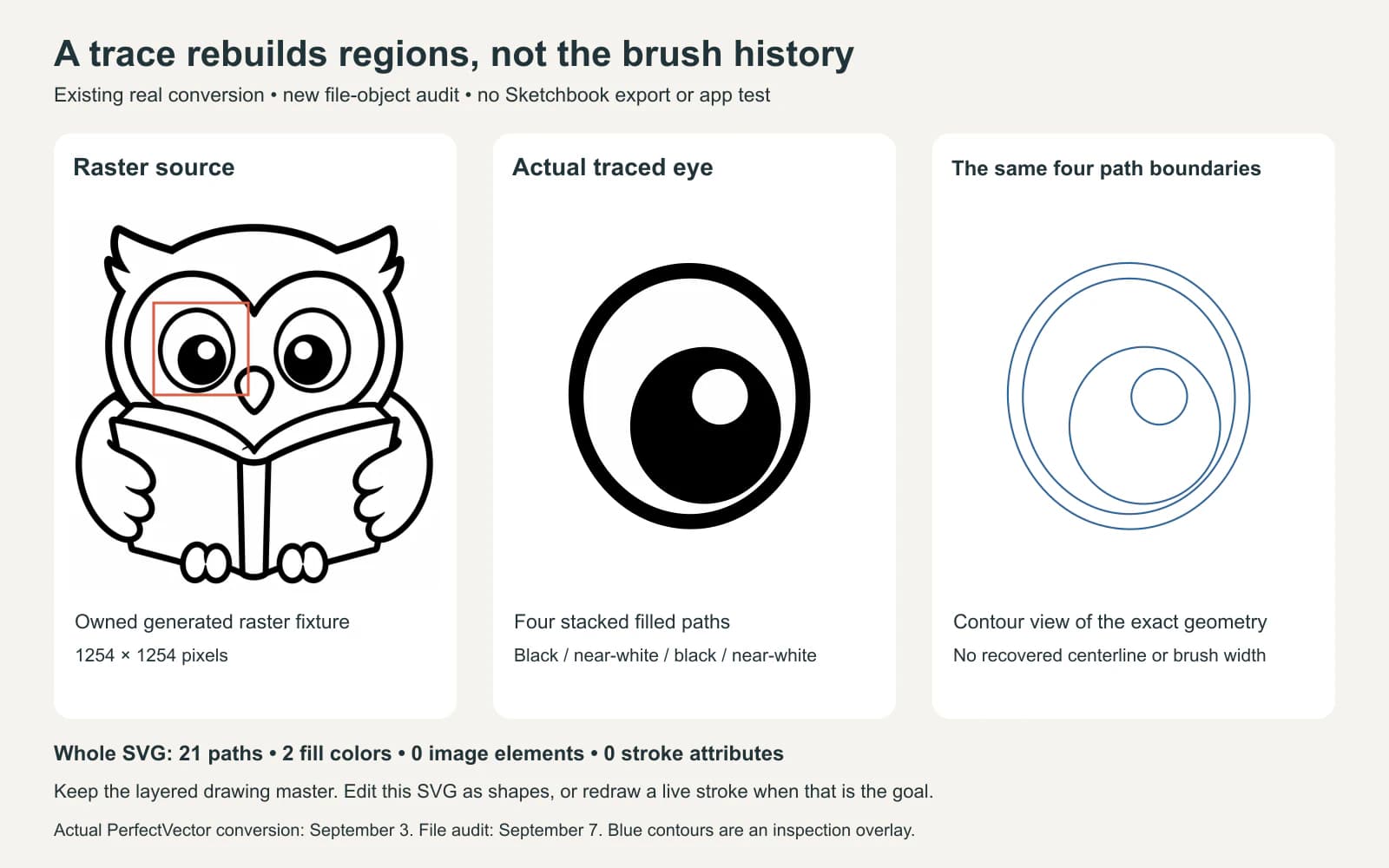
That eye has editable geometry, but no original brush-width control. To make its ring thinner, edit the relationship between the outer black boundary and the inner near-white boundary, or redraw it as an ellipse with a live stroke. Applying a stroke to an existing filled path adds another outline; it does not restore the original drawing action.
This is a file-specific observation, not a claim that every vectorizing method produces the same structure. Decide what kind of editing you need before accepting the result:
| Desired edit | What to inspect |
|---|---|
| Recolor an area | Can you select its filled shape without changing unrelated regions? |
| Thin a drawn-looking line | Is it a live stroke or an area between filled boundaries? |
| Change lettering | Is it live text or traced letter shapes? |
| Move a part | Is the visible part complete, or did another part cover some of it? |
| Reuse the original brush or layers | Return to the drawing master; a flattened trace is not that project |
If your SVG still contains a placed PNG, it may only be packaging the raster. Our embedded-image checks show how to distinguish that from actual paths.
A PDF export is not evidence of vectorization
Sketchbook's PDF export guide describes exporting one canvas, several canvases or an album as PDF pages through the mobile Premium Bundle. It offers quality and page-size settings. Those controls prepare a document; they do not document a tracing step that rebuilds brush marks as paths.
Use PDF when you need that document. If a recipient needs editable vectors, inspect whether the artwork itself is selectable path geometry in a vector editor. A .pdf filename or a sharp-looking preview is not enough to answer that question.
Choose tracing only when it helps the drawing
Flat icons, simple ink drawings and solid lettering can be useful candidates for an external trace. Keep soft shading, grain and painterly brushwork raster when preserving those qualities matters more than editing individual shapes. Vectorization may simplify those marks into a different-looking construction.
If your exported PNG needs editable vector shapes, PerfectVector's image-to-vector converter can prepare an SVG to inspect. Start with one representative detail, compare it with the PNG, and check filled regions, gaps and small features before converting the rest. Keep the Sketchbook master for brush, text and layer edits; the SVG serves a different editing job.
For similar app boundaries, see the Procreate-to-SVG workflow and Krita raster-to-vector options. More export and editing guides are in the PerfectVector blog.
FAQ
Can Sketchbook save an image as SVG? SVG is not in Sketchbook's current documented export formats. Export the intended artwork as an image, then trace or redraw it with a vector tool if you need paths.
Which file should I keep for my Sketchbook layers? Keep the native Sketchbook TIFF for continuing work in Sketchbook. PSD can transfer layers to another image editor, but some text, blend, mask and background features change.
Does Sketchbook PDF export turn the drawing into vectors? The documented PDF workflow places canvases into a document and provides quality and page-size options. Do not treat that export as proof of tracing; inspect the actual artwork objects if editable paths are required.
Will an SVG trace recover my brush strokes and layers? Do not expect a flattened image to recreate the source project. The demonstrated SVG uses filled paths rather than live strokes. Keep the layered master and inspect the trace according to the edits you need.
Sources
- Sketchbook: Exporting images — desktop and mobile format choices and export steps.
- Sketchbook: Saving files — native TIFF and layered master preservation.
- Sketchbook: Photoshop file compatibility — PSD layer support and specific limitations.
- Sketchbook: Creating an alpha channel — transparent backgrounds and the iOS Files workflow.
- Sketchbook: Exporting PDF files — mobile canvas-to-PDF options.
Need editable shapes from your Sketchbook drawing? Convert the exported image with PerfectVector, compare one important detail with the original PNG, and keep the layered master for changes the trace cannot reconstruct.
More from the blog

Can Concepts Vectorize an Image? Export Real Paths
Concepts draws editable strokes, but imported images need tracing. Choose native SVG export or an external conversion while preserving your original artwork.

Can Paint.NET Vectorize an Image? Check the Plugin
Paint.NET edits pixels, but one SVG plugin also traces images. Learn which operation you need, then check that the exported artwork contains editable shapes.